Websites built right, and read line by line
WordPress when it fits, a React or static build when it doesn’t, and AI in the loop to move faster. What never changes: I read the code, so I catch what isn’t right, and I check for the security holes before anyone else finds them.
How I think about the web
A website is the first thing most people meet you through, and a good one is the difference between a visitor who gets what they came for and one who quietly leaves. That part hasn’t changed. What has changed is how many good ways there are to build one.
For years the answer was almost always WordPress, and for plenty of projects it still is. It’s flexible, it’s friendly to edit, and the plugin ecosystem is enormous. But WordPress isn’t the only right answer anymore. Some projects are better as a fast React app, some as a lean static site with nothing to patch, and some as a headless setup that uses WordPress purely as the content engine behind a modern front end.
AI is part of how I work now too. It helps me move faster, but it doesn’t get the final say. The thread through all of it is simple: I understand the code, so I know when something isn’t right, and I know how to check the parts that quietly go wrong, like security.
How I build
The right tool depends on the project, and the three below run from “no platform at all” to “the full dashboard.” I’ll tell you honestly which one fits, even when the answer is “not WordPress.”
Static & edge
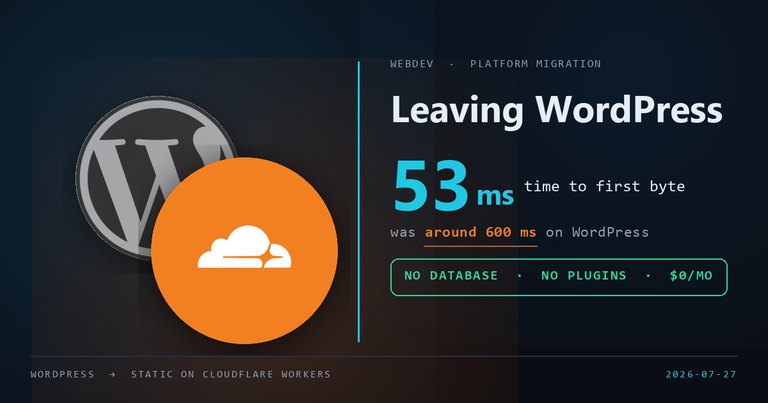
Finished pages served from a data center near your visitor, with nothing computed when they arrive. No database, no plugins, nothing to patch, and hosting that often costs nothing at all. This site runs that way: it rebuilds in about six seconds and answers in 53 milliseconds. Fastest and cheapest when the site is content rather than software.
Headless WordPress
The middle path. WordPress stays as the content backend your team already knows, with a fast React or Next.js front end on top. Editors keep the familiar dashboard, visitors get an app-quick experience, and the public site has a much smaller attack surface.
Managed WordPress
Still the right answer for a lot of sites, and I say that after ten years of building on it. Elementor and Advanced Custom Fields for a site you can edit yourself, Gravity Forms for anything that collects data, and managed hosting like WP Engine to keep it fast and secure. Best when several people publish, or you want to run the site day to day without touching code.
The part most people skip
Anyone can push a template live. The value is in knowing whether the code underneath is actually sound.
I read the code
Mine, a plugin’s, or something AI helped write, I actually read it. Years of doing this means I can tell when something is off, and I fix it before it ships instead of after a visitor trips over it.
Security is not an afterthought
I know the common flaws and the ways sites actually get attacked: injection, exposed endpoints, weak logins, out-of-date dependencies. I check for them on purpose, because I’ve seen what happens when nobody does.
Built to be handed off
Clean, organized, documented work you’re not locked into. If someone else ever needs to pick it up, they can, and you’re never held hostage by a black box that only one person understands.
Tools I build with
Two stacks, and years of day-to-day experience with each one rather than a passing familiarity. If you want to see the static side argued rather than listed, I wrote up why I moved this site off WordPress, numbers included.

Cloudflare
Workers, DNS and redirects at the edge. Where the static builds live, this site included.

WordPress
The foundation. Themes, custom code, and a CMS clients can run themselves.

Elementor
Pixel-level page building, extended with custom skins and widgets when the defaults run out.

Advanced Custom Fields
Structured, custom fields that turn WordPress into a real, tailored CMS.

Gravity Forms
Forms that do real work: logic, notifications, and clean data on the other end.
How I use AI, and where I draw the line
AI is a genuine accelerator. It is not a substitute for knowing what the code actually does.
What I use it for
- Scaffolding boilerplate and first-draft components, so my time goes to the hard parts.
- Explaining unfamiliar code and libraries quickly, and drafting tests.
- Speeding up the repetitive work: refactors, conversions, and tedious markup.
Where I draw the line
- I don’t ship code I haven’t read and fully understood.
- I don’t let AI make the security calls, or trust it blindly on logins, payments, or user data.
- Your live site isn’t where I find out whether the AI got it right.
The rule is simple: AI writes fast, I make sure it’s right. It helps me build, it never gets the final word.
Sites I’ve built
A sample of the businesses and organizations I’ve built and maintained sites for over the years.
And more. Most of these have been running and maintained for years, not built once and abandoned.
WebDev articles
Guides, comparisons, and deep dives on WordPress, Elementor, and building for the web, plus the occasional oddity like whether iframes work in email. New posts show up here automatically as they go live.
Thinking about a new site, or a rebuild?
Whether it’s a fresh WordPress build, a headless setup, or something built from scratch, I’m glad to talk through what actually fits. And I’ll tell you honestly if WordPress isn’t the right call.