
EPOMAKER HE108 review: the numbers on the box, actually measured
8000 Hz polling, 0.2 ms latency, actuation in steps of five thousandths of a millimeter, 32 hours lit and 500 hours dark. Nobody had measured any of it. So I did, and the answer splits cleanly down the middle: what EPOMAKER built keeps passing, and what EPOMAKER wrote keeps failing.

Plays via YouTube. Google may set cookies when the player loads. Privacy policy
The short version
The HE108 is a genuinely good full-size Hall effect keyboard for under a hundred dollars, and it is replacing the Razer that has been my daily driver for years. The 8000 Hz claim is real, wired and over the 2.4 GHz dongle, read straight off the USB descriptor. All 108 keys register at both extremes of the actuation range with no phantom presses. It is the quietest of the three boards on my desk in the range where a metallic ring lives, and a charge test settled the battery argument in EPOMAKER's favor. What fails is the writing: the keycaps are not shine-through, not double-shot and not PBT where it counts, the 500-hour runtime cannot exist in any configuration the software allows, and you cannot read the legends in the dark. If you look at your keyboard while you type, that last one decides it.
Buy it for the hardware, not the listingThis is the best looking keyboard I have ever owned. Ninety dollars, and it beats boards at twice the price. And in the dark, I cannot read a single letter on it.
Why a full-size Hall effect keyboard under a hundred dollars is worth measuring
Full-size Hall effect barely exists as a category. Until fairly recently your options were Wooting at a significantly higher price, or Keychron using proprietary switches that limit what you can actually swap in. A 108-key Hall effect board with a real numpad for under a hundred dollars is a genuinely thin part of the market, and that is most of the reason I said yes when EPOMAKER offered to send one.
The other reason is the box. There are three numbers on it, and as far as I can tell, nobody has actually measured any of them. Eight thousand hertz polling. Two tenths of a millisecond of latency. An actuation point you can move in steps of five thousandths of a millimeter. The board launched four months before I started testing and there was already a full wave of reviews out there, and not one of them had put a meter on those numbers. Every review I read described how it feels and how it sounds. Which is fine, and I do some of that below too. But feel is not a number, and this thing is being sold on numbers.
Quick thing on the company, because I got this wrong. My gut reaction to the first email was that this was another anonymous brand throwing a keyboard at a small channel. EPOMAKER have been around since 2019, they sell switches and keycaps and stabilizers as standalone parts, and their GK series is co-manufactured with a company called Skyloong. There is a decent chance you have already typed on their hardware without knowing whose it was.
And the disclosure, up front. They sent this one for free and I am not sending it back. They also put in writing that they would not interfere with the testing or the verdict, which is more than most companies bother to say out loud. I held them to it. Several of these numbers did not hold up, and they are all below.
Disclosure: EPOMAKER sent this keyboard free of charge, no return required, and confirmed in writing that they would not interfere with the testing or the verdict; they had no editorial control over this review. This post also contains affiliate links. As an Amazon Associate I earn from qualifying purchases, at no extra cost to you. Affiliate links like these and my YouTube channel are what keep the site running.
What is in the box, and what 1.28 kg of keyboard feels like
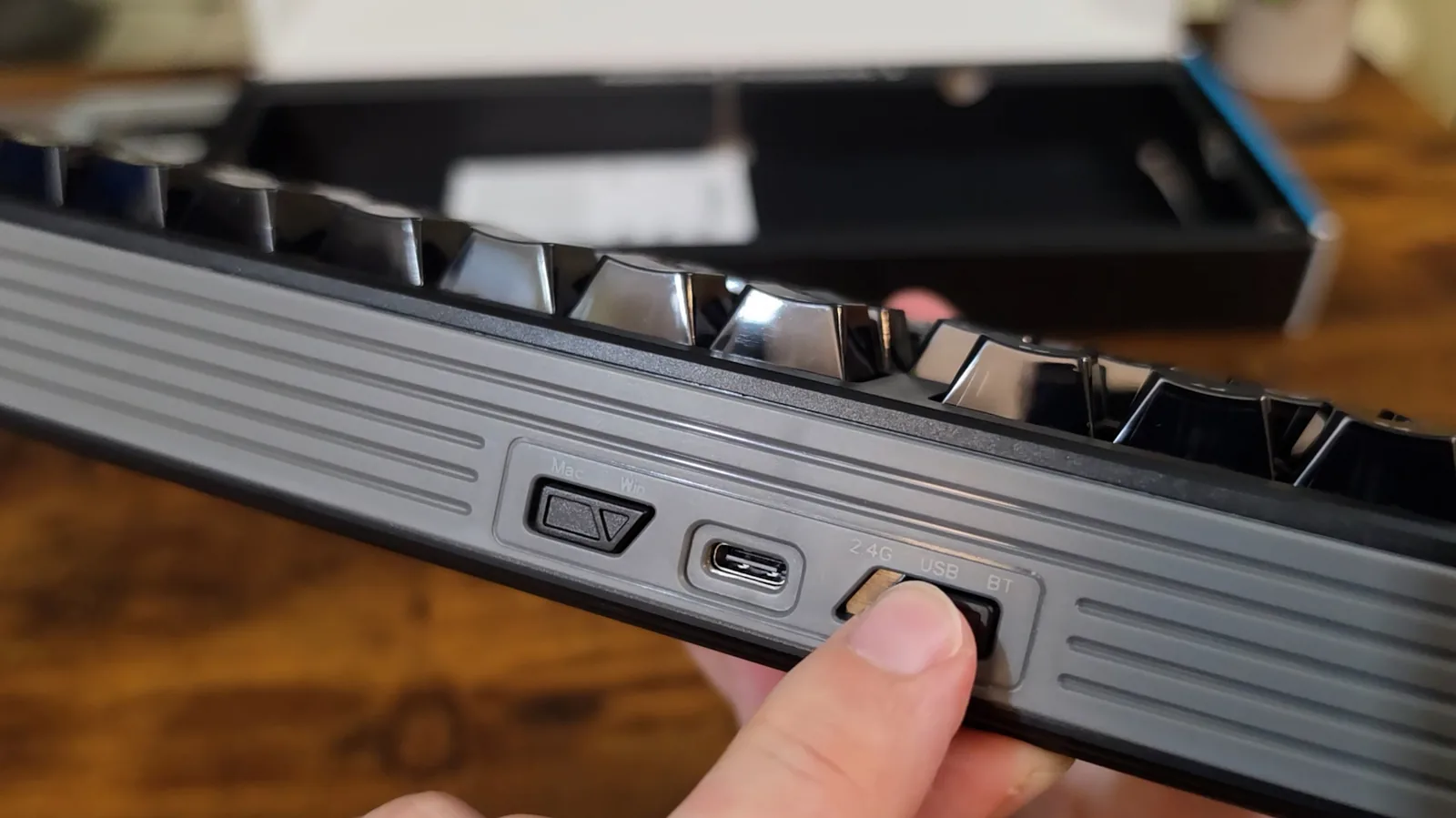
Per the listing: the board, a detachable USB A-to-C cable, a 2-in-1 switch and keycap puller, a multilingual manual, a product card, a 2.4 GHz receiver and one spare switch. Everything was there, and one item was over-delivered: two spare switches in the little bag where the listing promised one. Most boards at this price promise none.
The receiver deserves a second, because I went looking for it convinced it had not shipped. The box lists a 2.4 GHz dongle in the contents and does not say where it is. It is tucked inside the cavity of the left kickstand, underneath, which is a genuinely smart place to put it. For the record, EPOMAKER does document this. It is in the Amazon listing, in the item details, in brackets, at the end of a sentence about the cable. Which is a great place for that information if you happen to be reading Amazon while holding the keyboard.
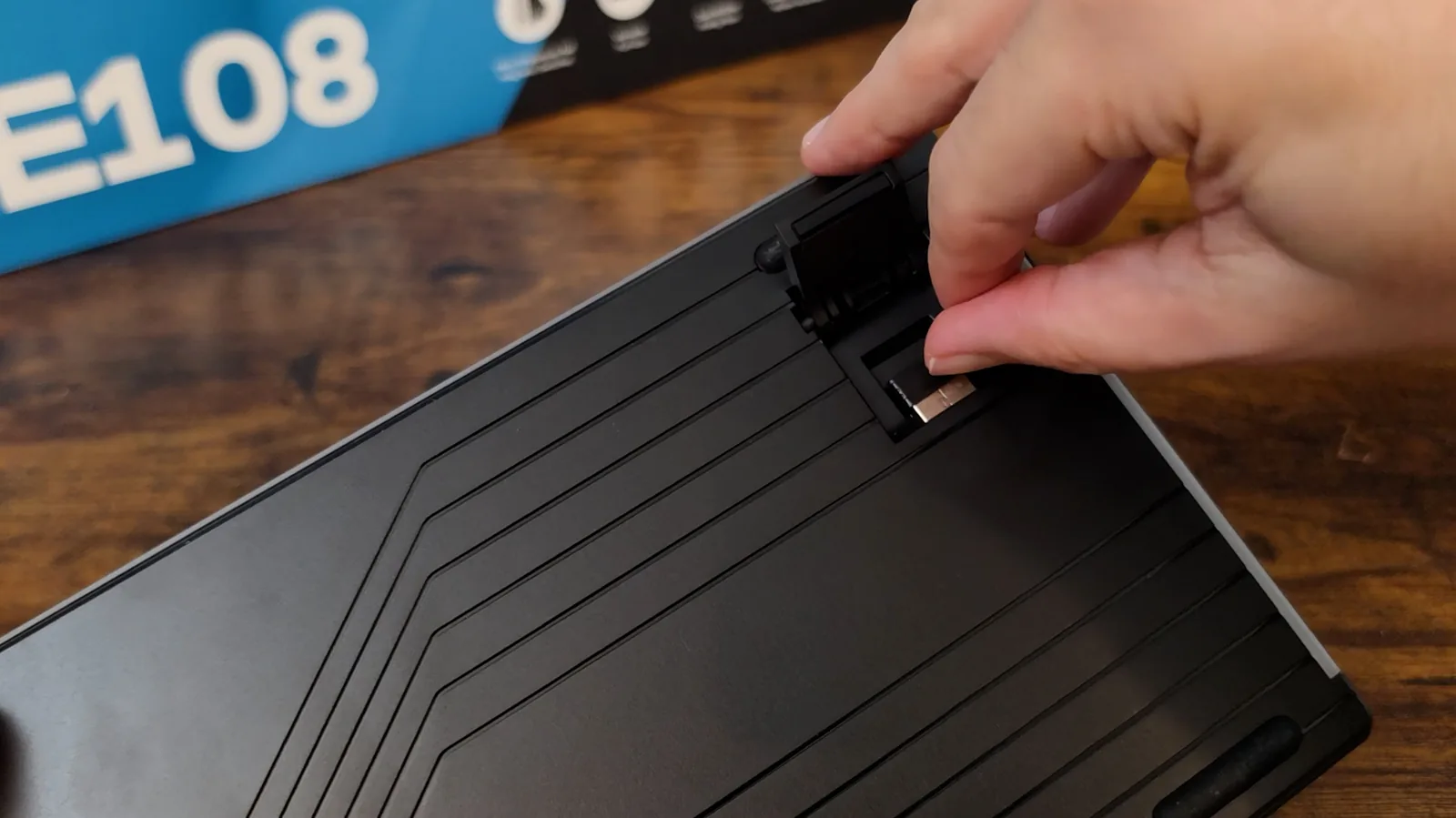
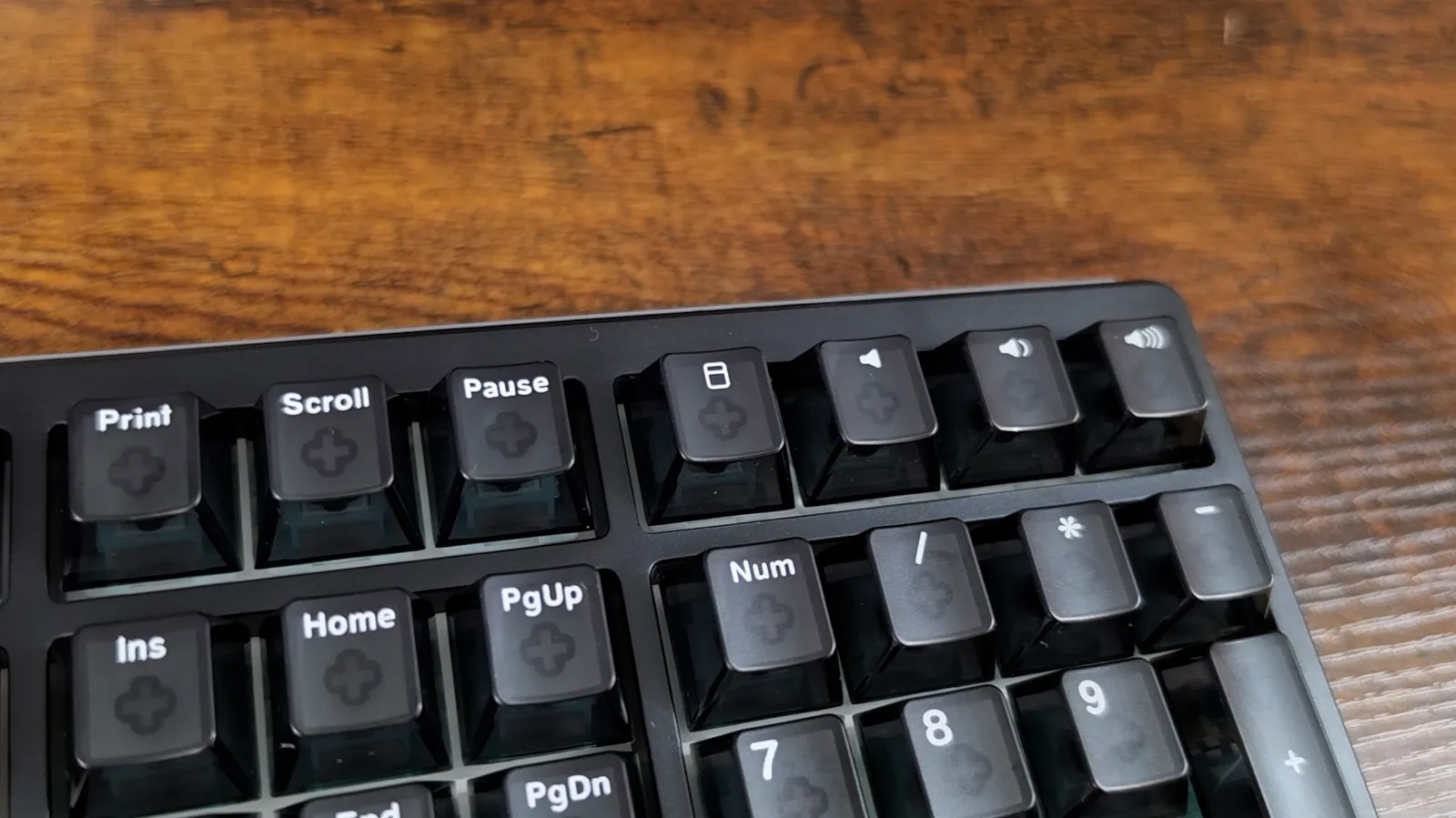
Full size means 108 keys here, and if you are wondering where 108 comes from when a normal full-size board is 104, it is the little row above the numpad. Four dedicated media keys. 104 plus 4. The Razer next to it has a volume knob instead, and two years ago I would have called the knob the better answer without thinking about it. But mine has started running the volume up on its own, with nobody touching it, which is a very specific kind of haunted. That is a rotary encoder wearing out, and wearing out is what rotary encoders eventually do. Four keys that cannot develop a mind of their own are not the downgrade I would once have called them.
On the scale, sealed box aside, the board weighs 2 lb 13.2 oz, which is 1.28 kg. EPOMAKER claim "over 1.2 kg" and that is accurate. It stays put on the desk.
Then there is the underside, which is where I got a little charmed. There is a panel back here with exposed screws that is laid out neatly for absolutely no reason, because you are never going to look at it. There is a little plaque in the middle. It is plastic. You are going to see it exactly once, right now, and then never again for as long as you own this keyboard. Somebody still bothered. Two-stage kickstands give you three typing angles including flat, and the back panel carries the connection switch and the OS switch.
Now the part that is not praise. The case is plastic. Thick plastic, feels genuinely good in the hand, but it is ABS and there is flex in the deck. Press the middle and it gives. That is what this money buys you. Just know what it is going in.
The other two boardsWhat it is being measured against
Two reference boards sat on the desk for every comparison in this review, and the choice of one of them matters a lot.
The Razer Yellow matters because it is the switch Razer markets as their silent option. So the acoustic test below is against a board built to be quiet, not a clacky old thing. If the HE108 still wins that one, the reason is almost certainly the case and the damping rather than the switches, and that is exactly the claim EPOMAKER make.
So the real question for this review is not whether the HE108 is a good keyboard, because I can already tell you it is. It is whether Hall effect, and eight thousand hertz, and an actuation point you can move, are worth double a fifty dollar board that already types beautifully.
Are the HE108 keycaps really double-shot PBT? Three words, three problems
The first thing anybody notices about this board is the caps. The top surface is lightly frosted, but the walls are completely clear. Not smoked, not tinted. Clear. From any kind of angle you are looking straight through the side of every key at the stem sitting underneath it. Nineties, everything-has-to-be-see-through, clear Game Boy vibe. I freaking love it. I also do not think it is for everybody.
But EPOMAKER's listing calls these "108 shine-through double-shot PBT keycaps", and PBT is not a transparent plastic. It is semi-crystalline, which is exactly why it comes out opaque. You should not be able to see through a PBT keycap at this thickness. So I asked them, and to their credit they came straight back with a real answer.
"For the keycap material, the inner part, including the stem, is PC, while the outer part around it is PBT." Agnes Du, EPOMAKER
Two plastics, then. Except the box says "PBT Legend", which assigns the PBT to the opposite shot from the one Agnes described, and the only reason anybody asks for PBT by name is shine resistance, which is a property of the surface your finger lands on. What I can observe is that the shell is transparent all the way through, and PBT does not come transparent at cap thickness. So whatever the wear surface is, it is not PBT, and the shine-resistance benefit people pay for does not hold.
Then it got bigger than a materials footnote. Run a fingertip across a key and you can feel the legend standing proud of the cap face. A double-shot legend cannot do that. Both shots are molded in the same tool, so the top face is one continuous plane; if anything, differential shrink leaves a molded legend slightly sunk, never raised. A legend you can feel above the surface was applied to a finished cap: pad print, screen print or UV. Three other things already agreed. The shell is clear and the stem is visible from the side with no legend-shaped plug of second material hanging inside it, which on a clear cap would be impossible to miss. The legends are fully opaque to the backlight, which is ink behaving like ink. And you cannot dye-sub a clear cap, so printing is what this construction leaves you.
The underside of a pulled numpad Enter settled it. Three cross mounts in a row, the walls unmistakably transparent, and the deciding detail: from the inside, the legend reads as sitting on the far surface, not as a plug of material passing through the cap. A double-shot legend has to pass through. This one does not.
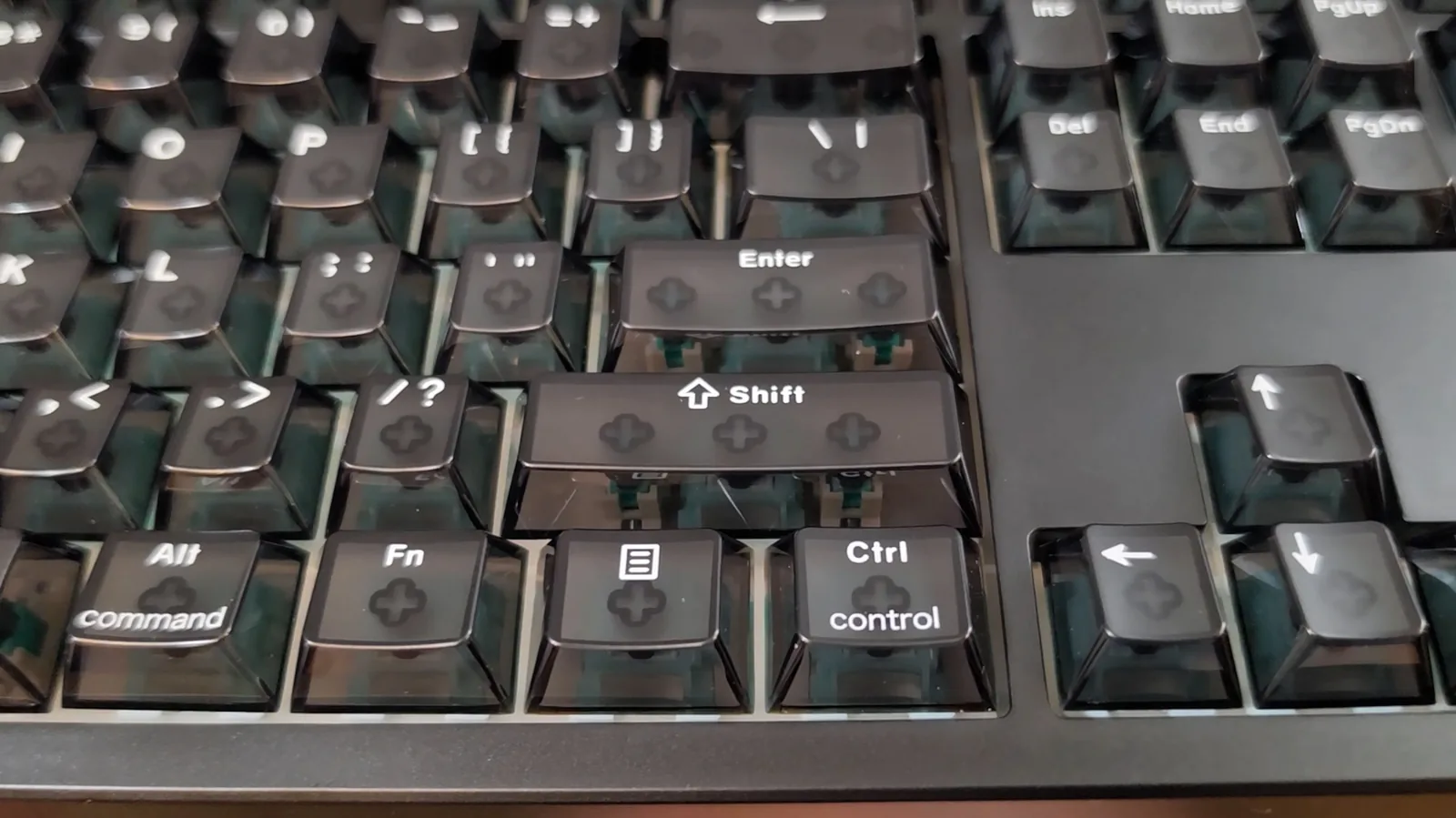
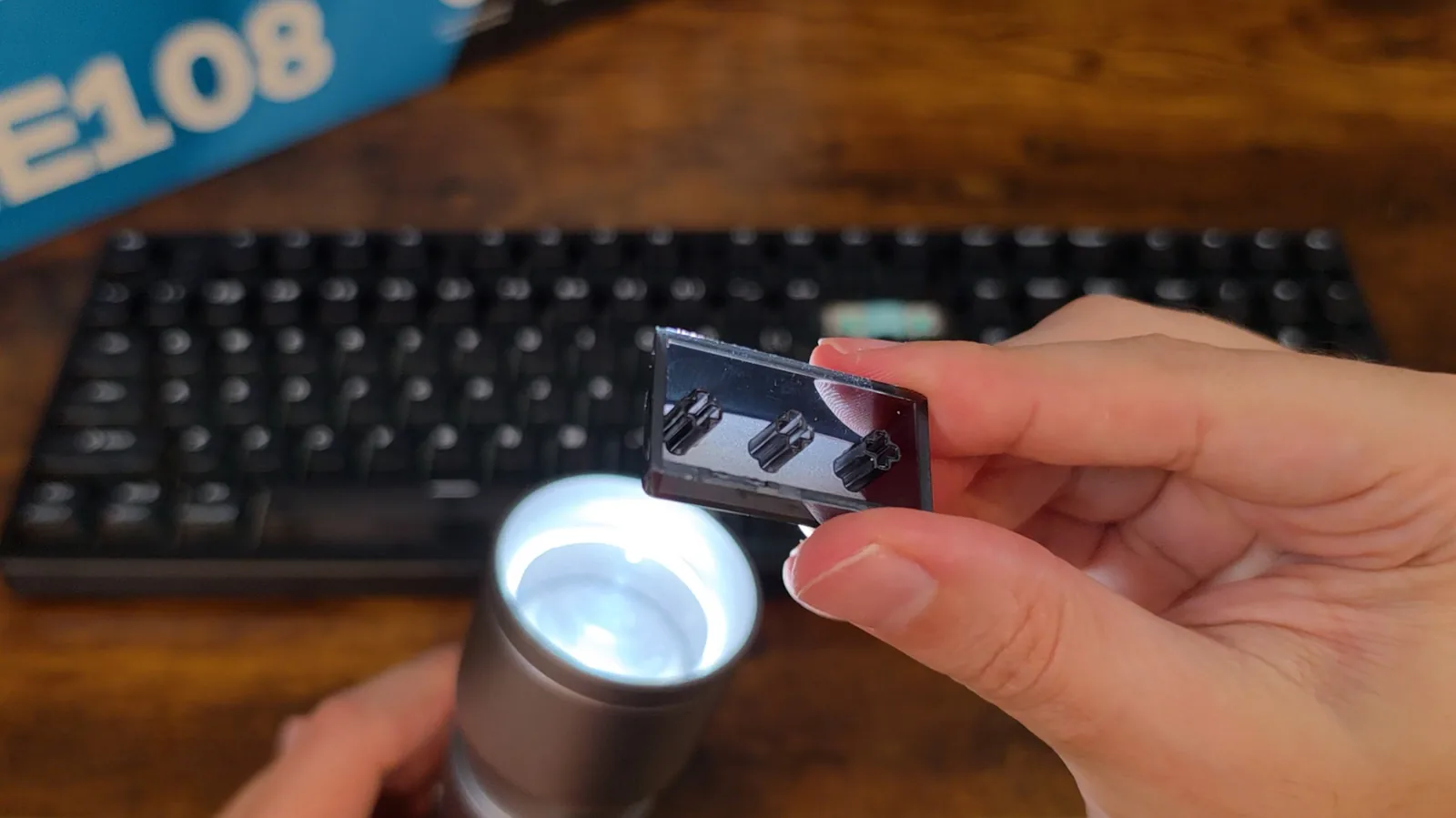
I want to be fair about what this means, because the construction choice is sound. You cannot mold a legend into a transparent cap without it showing as a blob from every angle, which would wreck the clear look. Printing is the only way to get legends onto a clear cap. The word in the listing is what is not.
There is a consequence nobody covers. Printed legends wear off the most-used keys. That is the entire reason enthusiasts pay for double-shot: a molded legend is the cap, and it can never rub away. I cannot measure wear in a review window and I will not pretend to, so take this as the mechanism, not a timeline. The escape route is the same one as for the darkness problem below: replacement caps fix it, and they cost you the clear caps.
Why can't you read the HE108's legends in the dark?
There is a cost to these clear caps that I did not see coming. You cannot read the legends in the dark. Not dimly. At all.
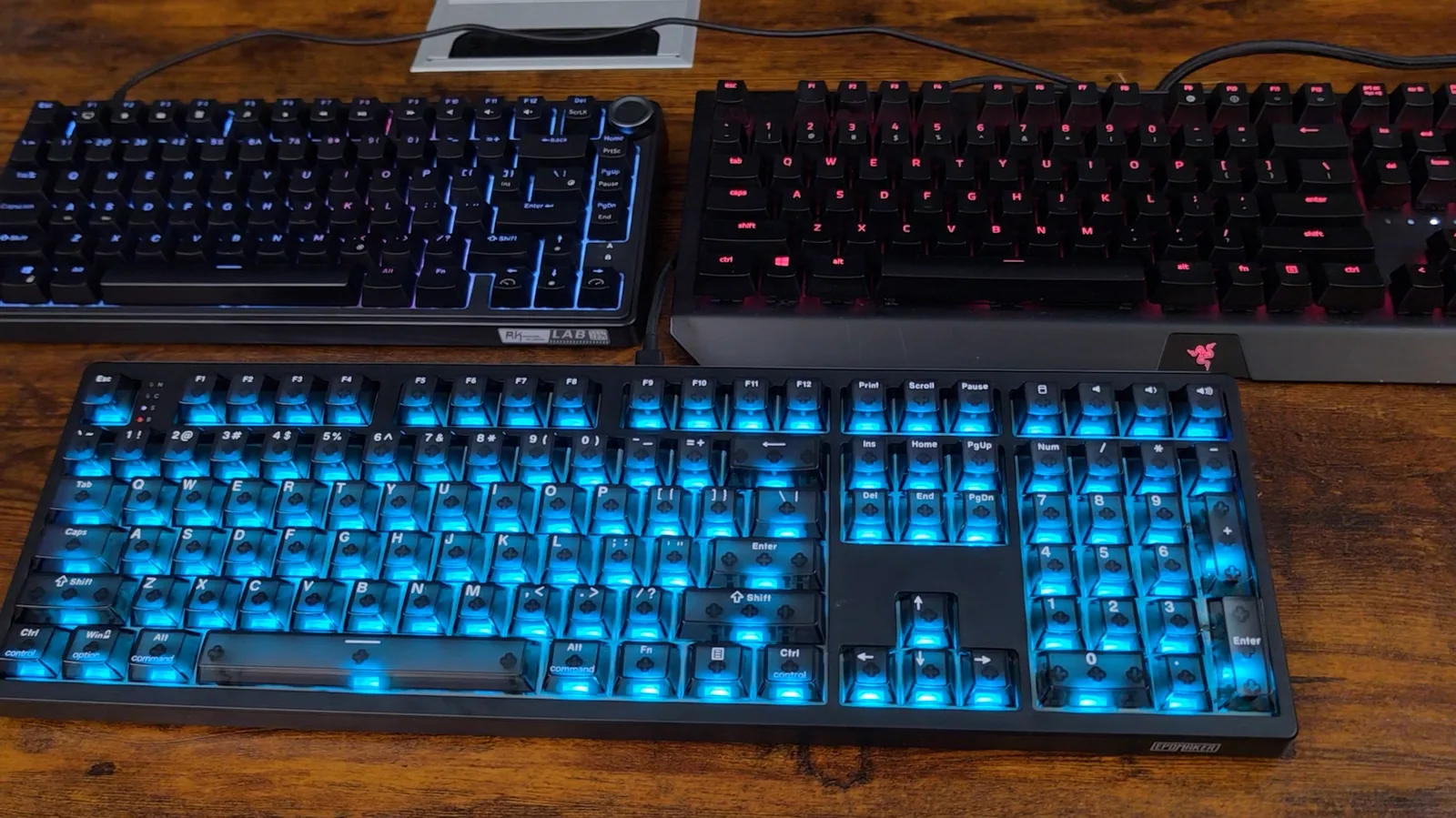
I shot all three boards in a dark room with the camera on a locked manual exposure, same night, same darkness. Here is the Razer: every letter crisp and bright, dark key, glowing legend. That is how backlighting is supposed to work. And here is the EPOMAKER: the keys glow and the letters are dark shapes sitting on top of them. Exactly backwards.
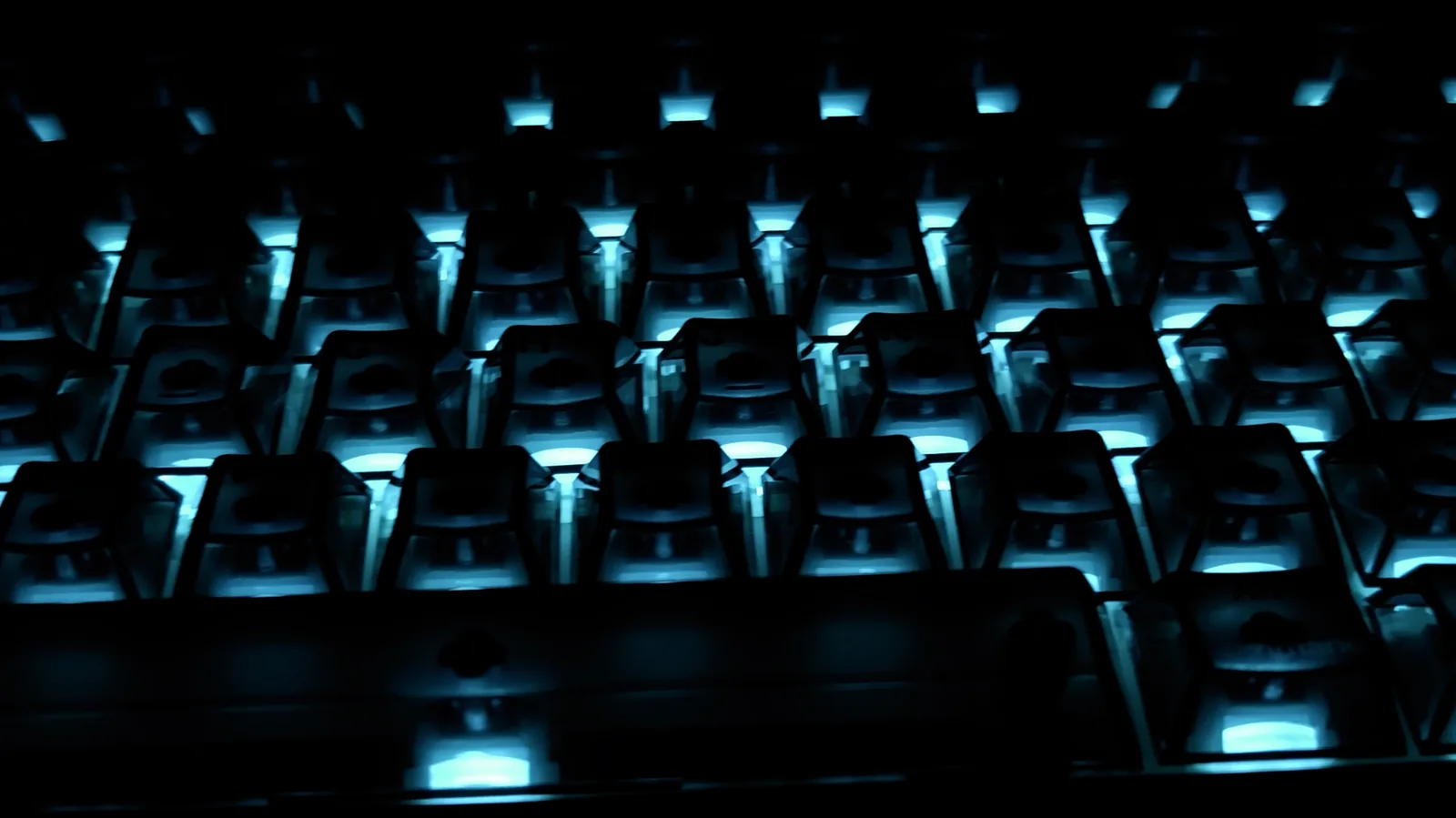
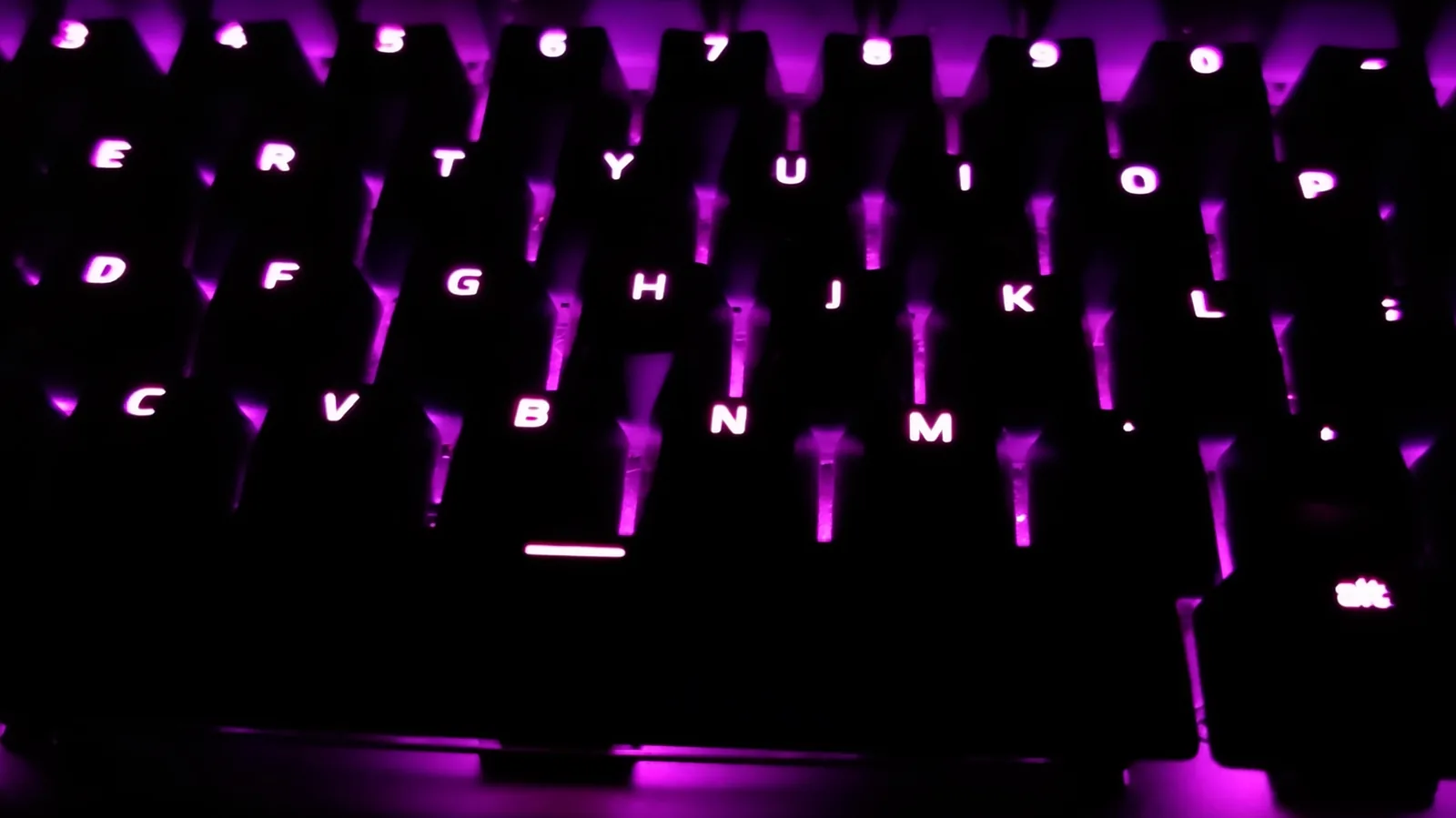
Two things are going wrong, and they stack. The light comes out of the bottom of the switch, so it pools in the bottom of a see-through keycap and never reaches the top where the letters are. And those letters are solid. They do not pass light at all, so instead of lighting up, they block it. That second half is why "shine-through keycaps" on the listing does not describe what these caps do; you can see it in the frames.
The LED position is worth being fair about, because it is not a mistake. These are south-facing, so the light sits at the bottom of the switch, nearest you. That is genuinely the right call with Cherry-profile caps, because a north-facing LED fights the taller back wall, and EPOMAKER list it as a feature. But the legends are printed up in the top corner of the cap, which is the furthest point on the key from the light. Two reasonable decisions, clear caps and south-facing LEDs, landing on top of each other.
I did try putting Razer caps on the arrow keys, thinking better legends would fix it. It did not, and now I know why. Fixing one of those two problems gets you nowhere while the other one is still there.
And I want to be precise, because it is narrower than it sounds. In a lit room these legends are fine. White on smoke, perfectly readable. The problem is only in the dark, with the backlight on. Which is the one situation a backlight is for. Nobody switches on per-key RGB to find their keys at midday. It does not bother me most of the time, because I do not look down. But sometimes I do, and now I am tilting my head to find an angle where I can read it. If you look at your keyboard properly, this will bother you every single day.
The first keyboard that shows you its own stabilizers
Here is something these clear caps let you do that you cannot do on a normal keyboard. Pull the cap off Backspace and look at what is actually under there. There is one switch, in the middle. Then either side of it there are two more stems sitting in little plastic housings, and those are not switches at all. They travel when the key travels, they are deliberately loose, and their entire job is to stop the key rocking when you catch it off center. Those are the stabilizers.
Every wide key on every mechanical keyboard is built this way. EPOMAKER did not invent anything here. The difference is that on this board you can see it happening without taking anything apart, because you look straight down through the cap and count three stems on Shift, on Enter, on Backspace, on the spacebar. I have been using mechanical keyboards for years and this is the first one that has ever just shown me its own mechanism.
You can also see exactly where they drew the line. Backspace gets stabilizers. The backslash key sitting right underneath it is only a little narrower and it gets a single switch and nothing else. Two units wide is the usual industry cutoff and this follows it. The one place I expected a corner to be cut was the numpad, and it holds: numpad plus, numpad Enter and numpad zero each show cream stabilizer housings with teal stems flanking a mint switch. Factory lube is visible on those housings as whitish deposits, which is what a "pre-lubed" claim looks like when it is true.
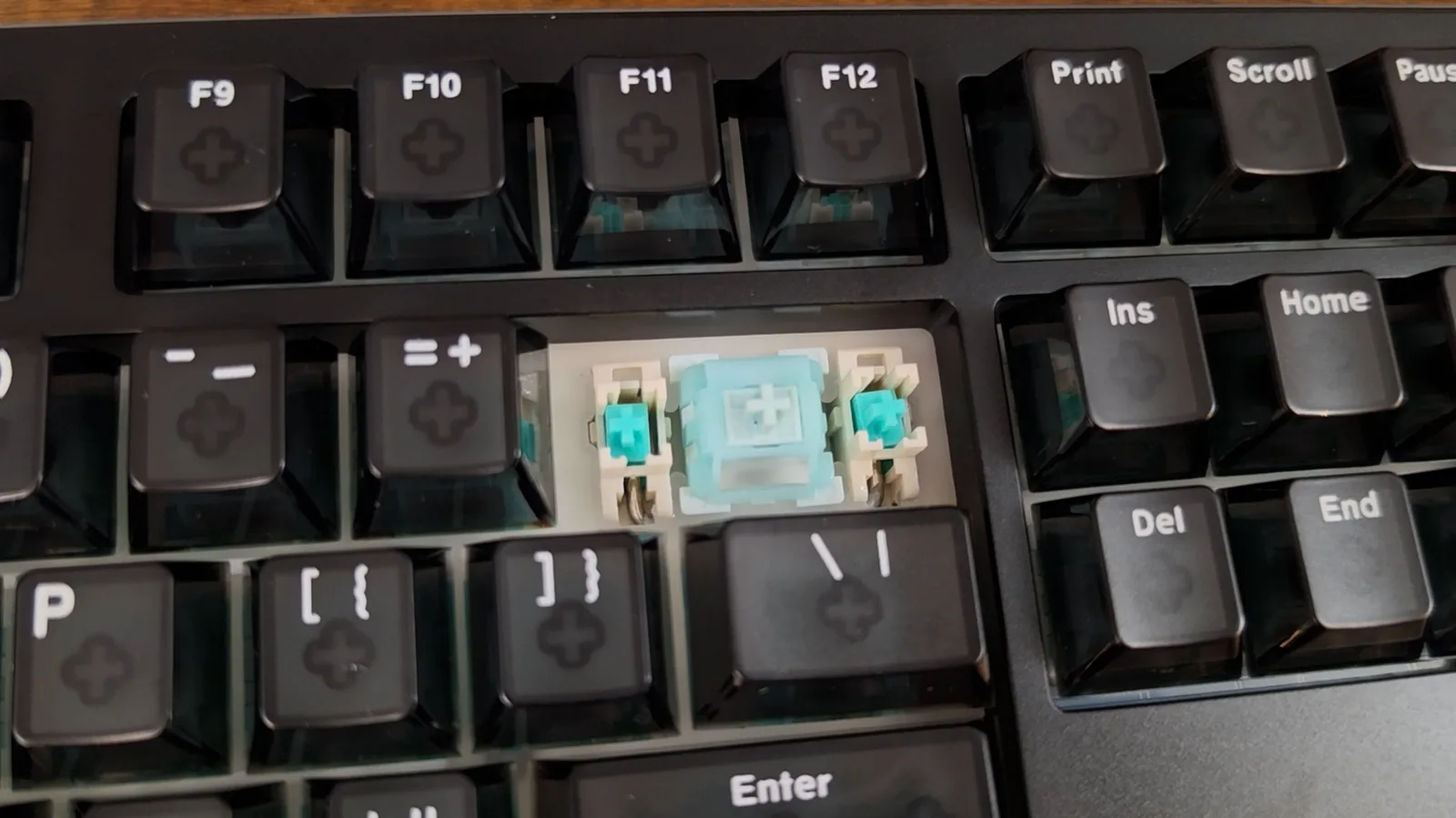
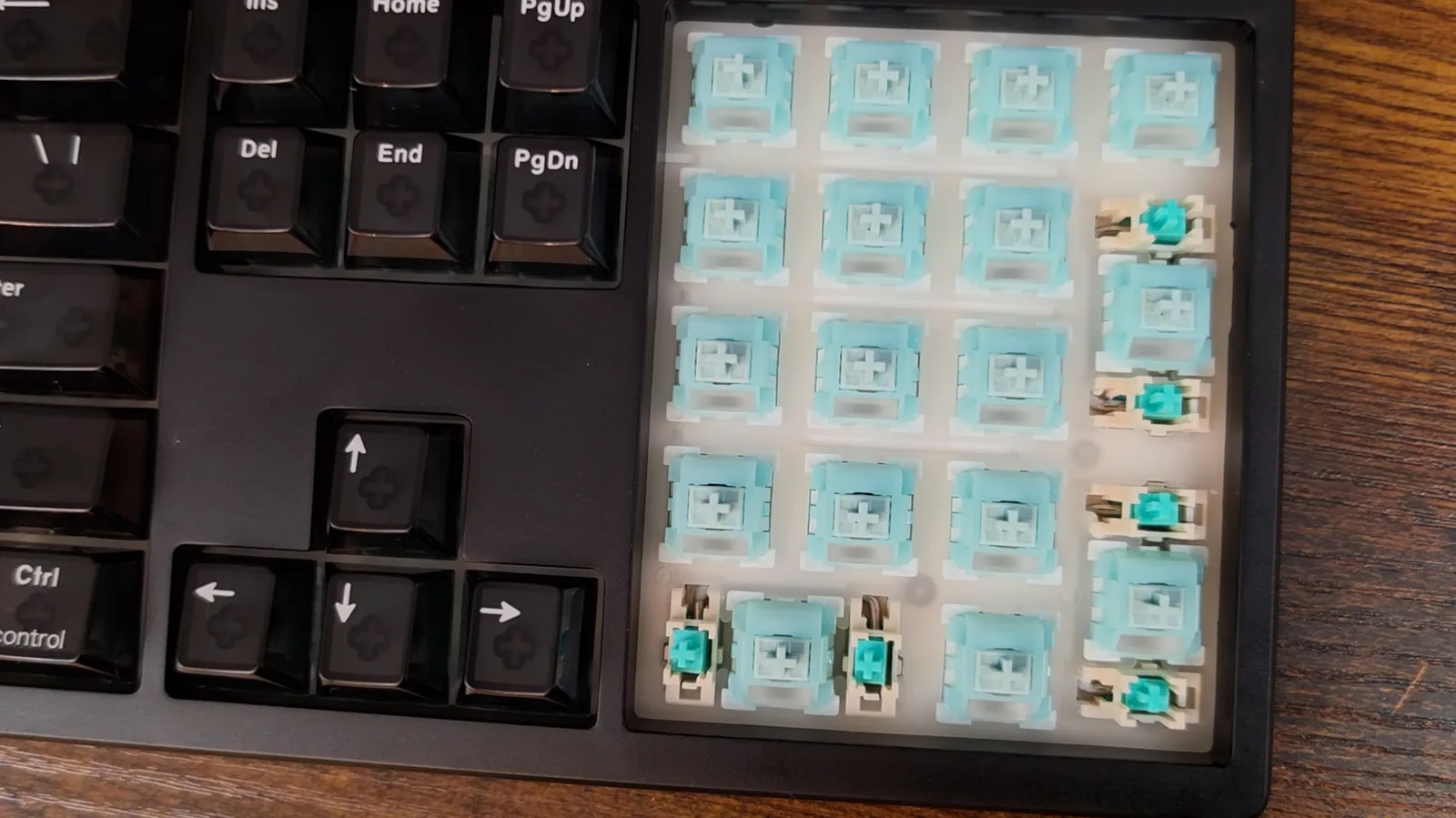
Two limitations come with what the plate shows. The stabilizers are plate-mounted, sitting in their own cutouts, so PCB-mount and screw-in stabilizers will not fit and the upgrade path is capped there. And those stabilizer cutouts are visibly larger openings than the switch cutouts, because the wire underneath needs clearance to swing. Anything that falls in there is behind the plate, and getting it out means full disassembly, not just pulling a switch. A real drawback, not a scare, and it belongs in the who-should-not-buy list below.
Does the EPOMAKER HE108 really poll at 8000 Hz? Read the descriptor
Start with the claim that is easiest to check and hardest to fake. Eight thousand hertz polling means the board reports its state eight thousand times a second, once every 125 microseconds. And here is the useful thing about USB: a device has to ask the computer for that rate when it plugs in, and that request gets written down somewhere anybody can go and read it. So I read it.
Two numbers in the descriptor matter. The first is what speed it connected at, and this one comes up as High Speed, 480 megabits. That matters more than it sounds, because the slower USB mode runs on one-millisecond frames, so a keyboard that connects that way is capped at a thousand hertz no matter what is printed on the box. This one is not capped. The second is a field called bInterval, and it asks for one microframe. One microframe is 125 microseconds. That is eight thousand hertz. And Windows gave it what it asked for: all three of the keyboard's interfaces run at that interval.
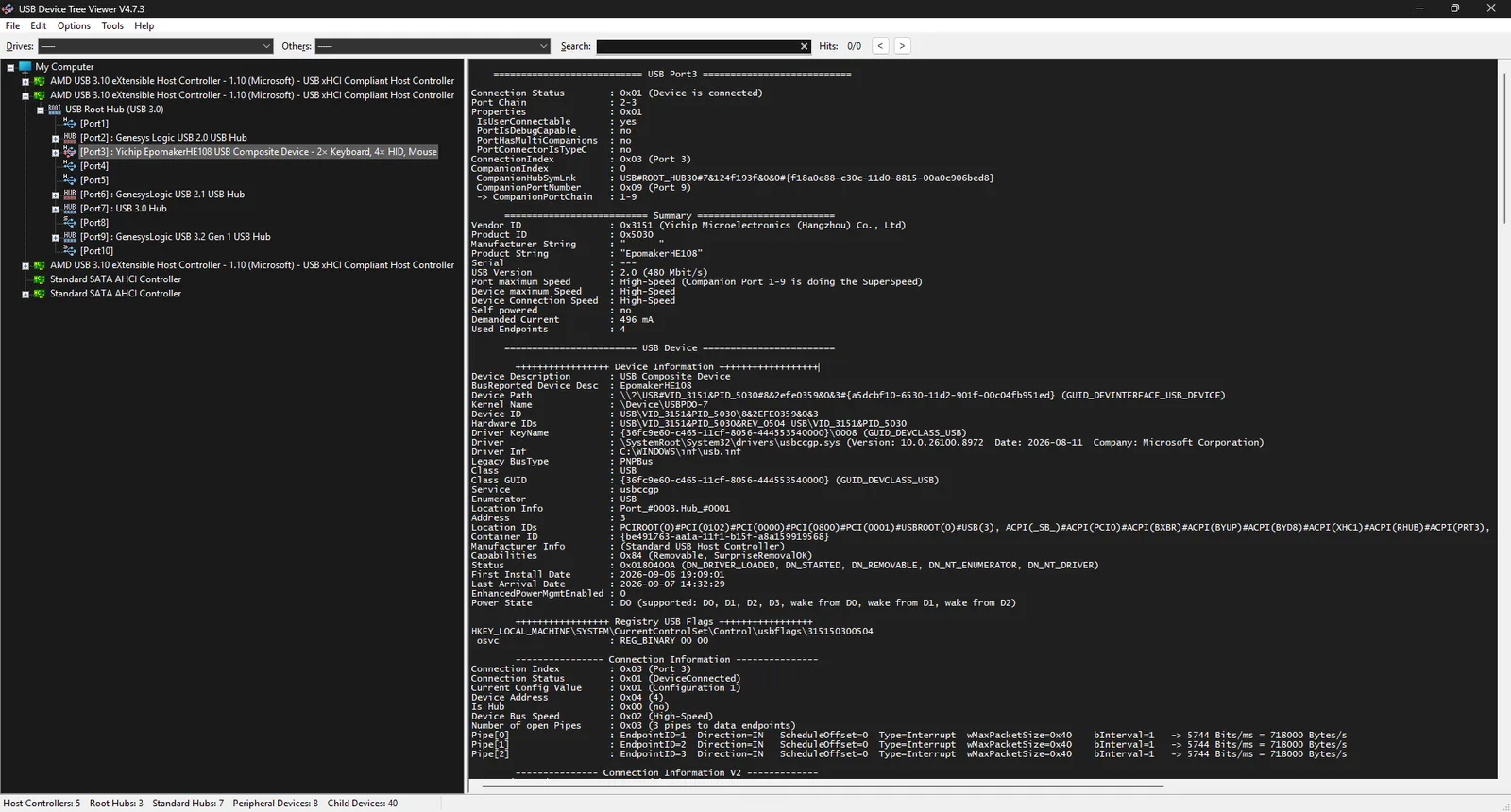
So the claim holds up. I came into this expecting to catch them out, and I did not. A couple of other things fell out of the same readout that I have not seen published anywhere. The chip running this keyboard is made by a company called Yichip. And the firmware version buried in the descriptor matches the one the software reports, which is a small thing, but it is the kind of internal consistency you like to see.
The wireless receiver is the same story. Plugged in on its own, it enumerates as High-Speed with a bInterval of one on all three of its interrupt endpoints, 125 microseconds, 8000 Hz, and its three HID interfaces mirror the keyboard's own structure, so the receiver is effectively a transparent bridge rather than reinterpreting anything. Worth checking separately, because plenty of receivers sold as 8K quietly turn up at the slower speed and cap you at a thousand no matter what the keyboard can do. This one does not. The dual 8000 Hz claim, wired and wireless both, holds.
Bluetooth drops to 125 Hz. That is not me catching them out, they publish it themselves, right next to the eight thousand. But it is worth saying plainly: pair this over Bluetooth and you have given up the single thing you bought it for, 64 times slower. On a laptop over Bluetooth it is just a keyboard.
Then the latency. The box claims two tenths of a millisecond, and I cannot measure that. It is far below what I have the equipment to resolve, and anybody telling you they measured 0.2 ms with a camera is guessing. What I can tell you is that it is consistent with what I just read. 125 microseconds of that is the polling interval, and it is real, because I read it off the descriptor. The rest is the board scanning the switch and making up its mind. The number is at least arithmetically honest, even though I am taking the last bit on trust. The 128 kHz scan rate on the box is in the same category: it lives inside the firmware and cannot be checked from outside.
How bad is the EPOMAKER driver, specifically?
Every review of this board says the same thing about the software, so let me try to be more useful than just telling you it is clunky. The version tested is EPOMAKER Driver 3.0, which reports itself as V3.2.22.
First, credit where it is genuinely due: you do not have to use it. The Fn layer does the lighting, the colors, the brightness, the effects, pairing, switching between devices, all of it from the keyboard itself. Every shortcut in the little booklet worked exactly the way it is printed. You can set this thing up once and uninstall the software, and plenty of boards cannot say that.
When you do install it, a few things bothered me. You download it from a bit.ly link. A shortened URL, for driver software, where you cannot see where you are actually going until you are already there. That is the precise thing everybody tells you never to click.
Then there is the Upgrade page. That is a firmware upgrade button, and there is no way to check whether newer firmware exists before you press it. The only way to find out is to start the upgrade. On a keyboard. Flashing firmware is not something you want to do speculatively, and I did not press it, because once it flashes, the firmware this unit shipped with is gone and nothing measured afterwards describes the board a buyer takes out of the box.
And this one fooled me for a while. The driver has a key test, and I could not get it to show more than three keys at once. I sat there thinking this board cannot handle more than three keys, which for a gaming keyboard would be a serious problem. It handles all of them. I mashed ten keys into Notepad and every single one landed. So the keyboard is fine, and it is their own test tool that cannot keep up with it, which is a strange piece of software to get wrong, because anybody checking that box is going to come away with the wrong idea about what they bought.
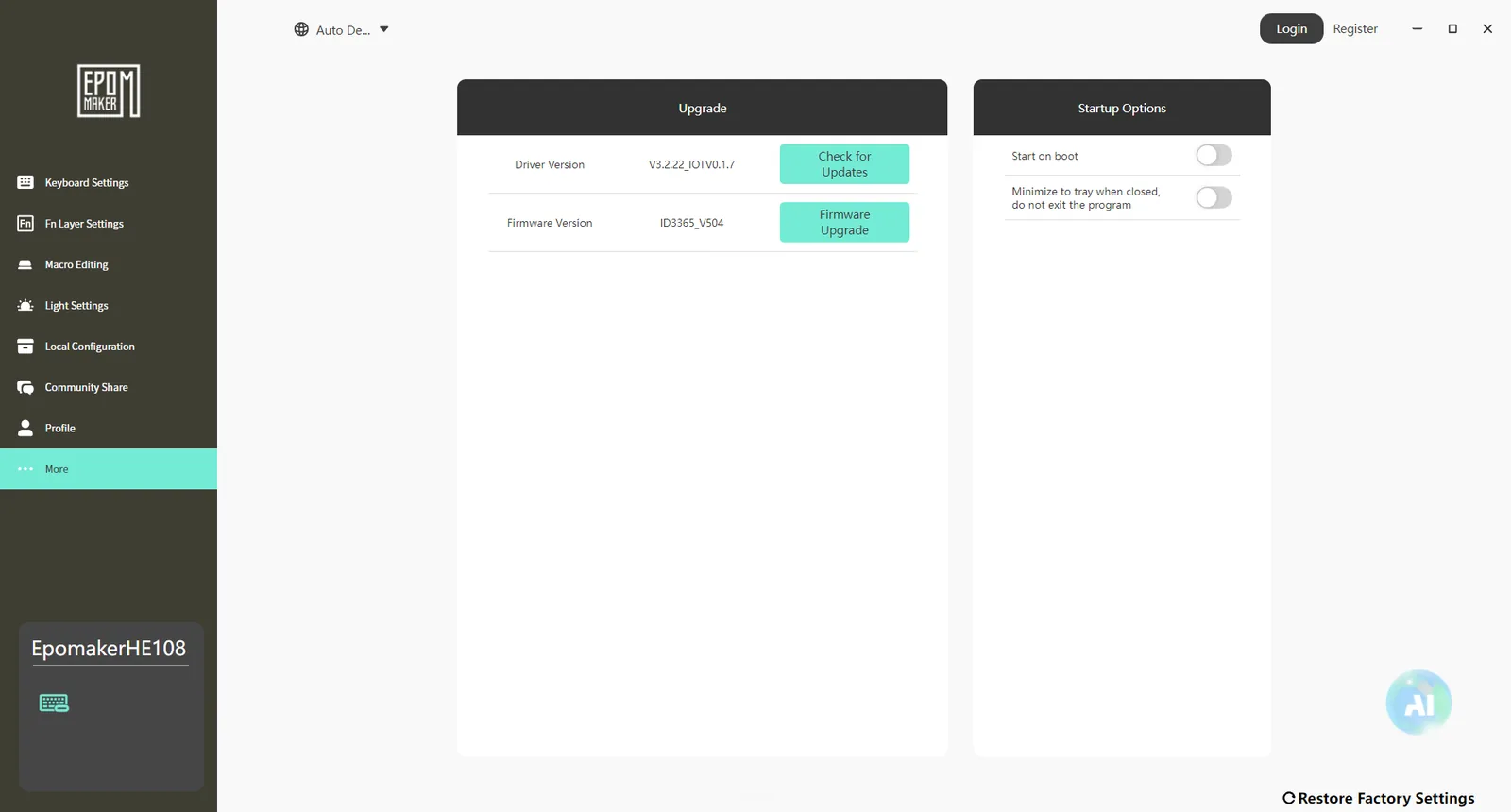
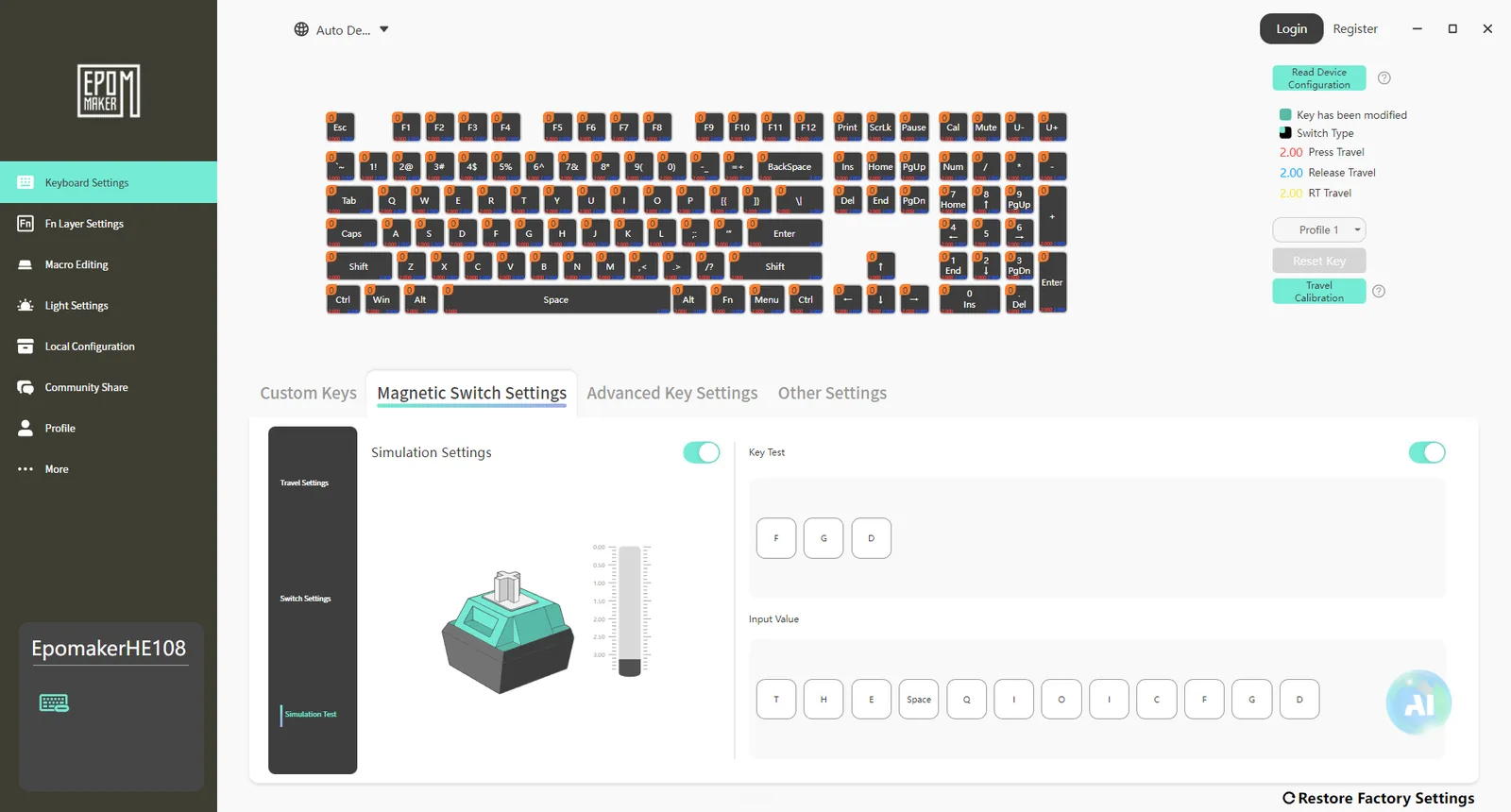
One more criticism belongs with the actuation testing below, because it explains the method. And for the enthusiast end: there is no VIA or QMK support. What you buy is what you keep.
What a Hall effect switch actually does differently
None of the actuation claims make sense until you look at the bottom of one of these switches next to a normal one. The normal switch has two little metal pins. Press the key, the pins close a circuit, the board knows a key went down. That is every mechanical keyboard ever made. This one has no pins at all. It has a magnet.
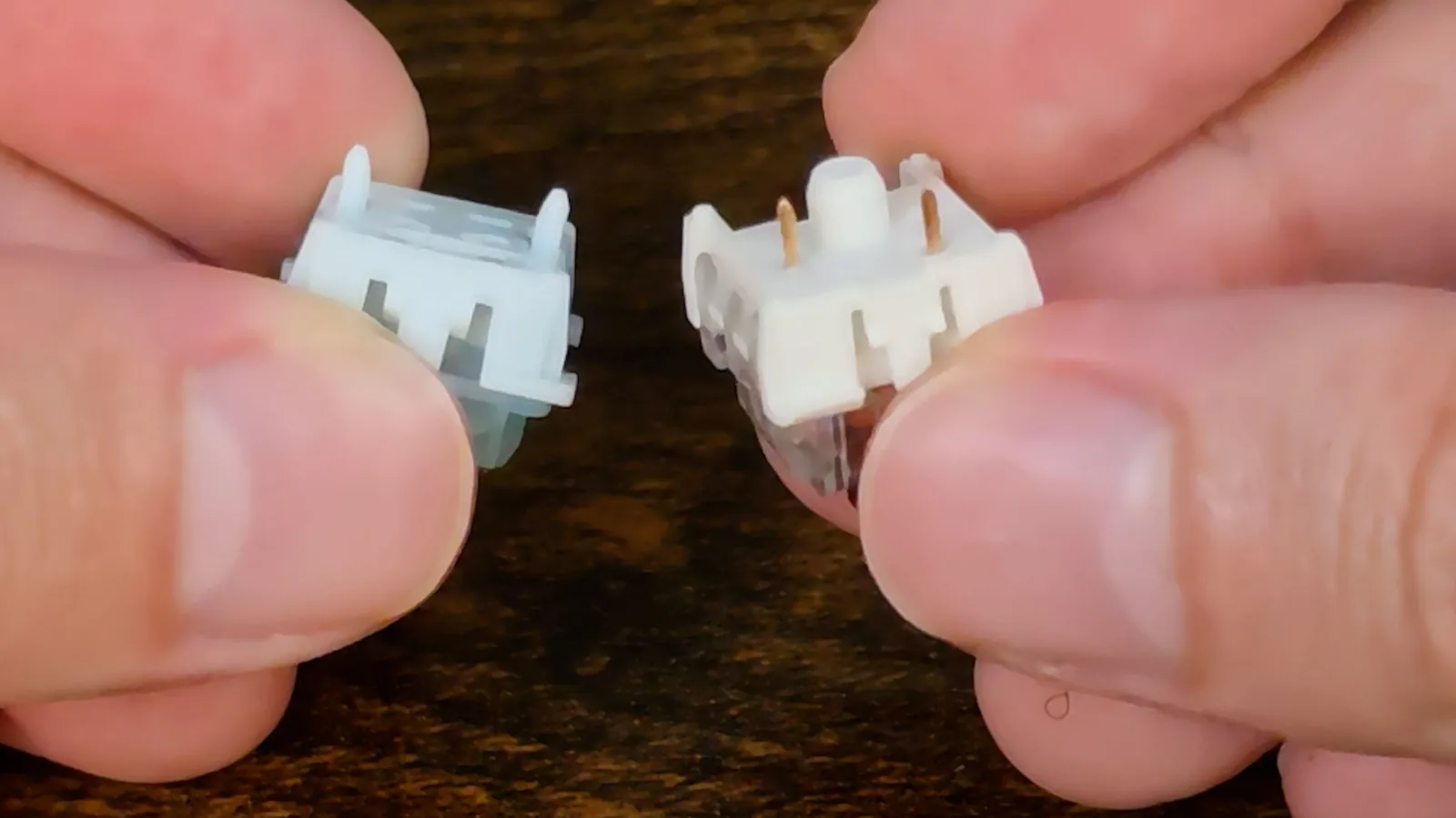
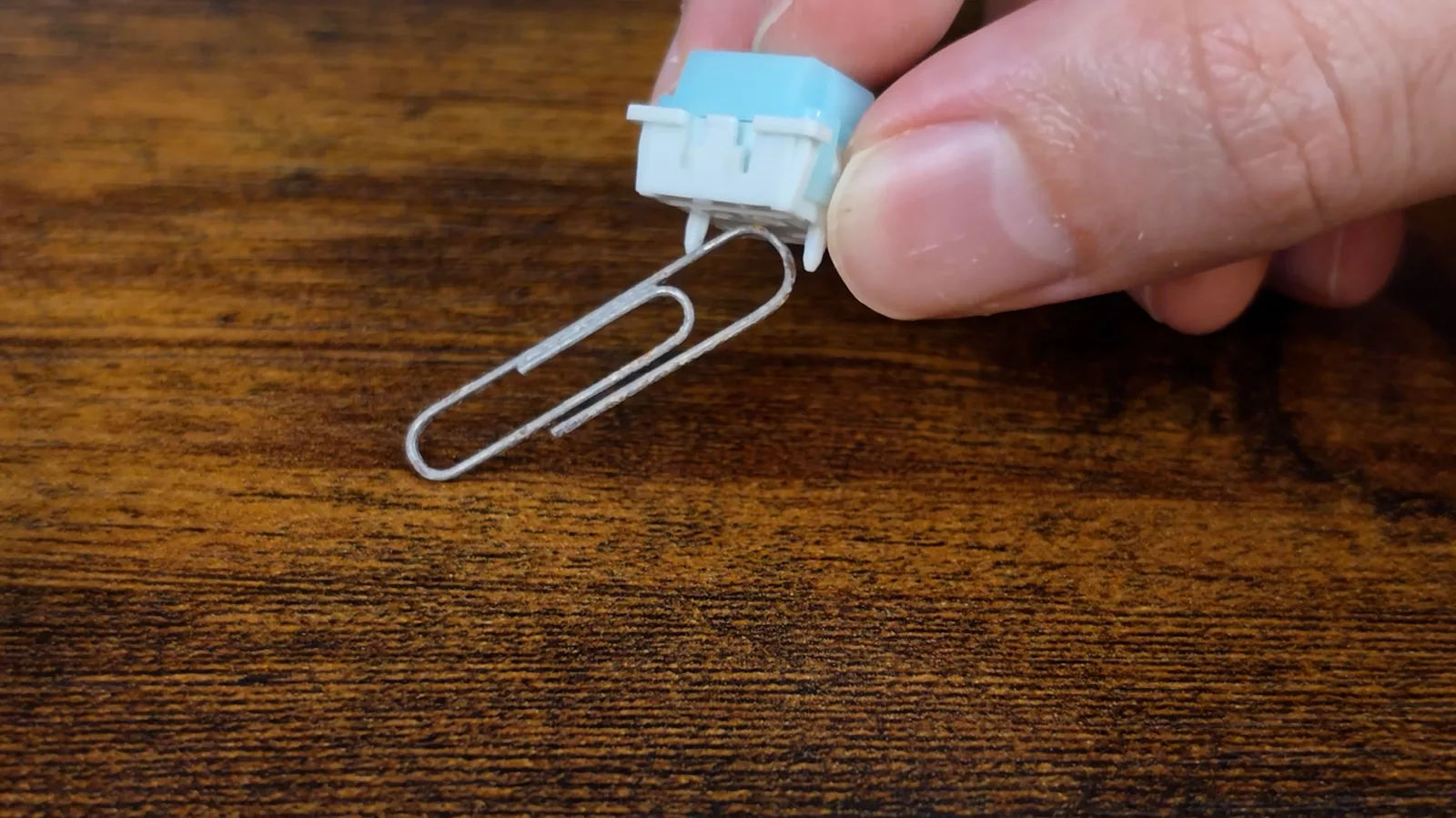
Hold the switch over a paper clip and it picks it up. Prop it a couple of millimeters above a sheet of glass with some staples underneath and press the stem, and the switch does not move but the staples jump. Nothing moved except the magnet getting closer. There is a sensor under every one of these keys reading how strong that magnet is, and strength tells it distance. So a mechanical switch knows pressed or not pressed, and this one knows how far.
Does a Hall effect switch last longer than a contact switch?
While the two of them are sitting side by side, it is worth asking what that does for how long they last. Both switches have the same moving parts: a stem, a spring, and a housing for the stem to slide in. The mechanical one adds two metal leaves that have to touch, and those leaves are the part that wears out. They carry current, they oxidize, they pit, the tension goes, and long before a key dies outright it starts registering twice for one press. That is chatter, and it is what a mechanical keyboard actually dies of.
The Hall effect switch does not have that part. The magnet and the sensor never touch, so there is nothing to oxidize and nothing to pit. The magnet is a permanent one, a small neodymium slug sitting in the bottom of the stem, and permanent means it: at room temperature a magnet like that gives up a fraction of a percent of its strength per decade. Heat would weaken it, and so would a hard knock, and neither is a thing that happens inside a keyboard. The sensor is a solid-state chip on the board with no moving parts at all. What is left to wear is the stem sliding in its housing and the spring, and those are the same plastic and steel you would find in any switch. It removes the part that fails first. It does not remove the parts that fail eventually.
The one new thing it introduces is drift. That magnet's field moves a hair with temperature, so a Hall effect board has to calibrate itself, and that is part of why the deadzones in the next section exist. It is a software problem rather than a wear problem, and the shape of it is a slightly moved actuation point on a cold morning, not a dead key. Nobody has had these long enough to know how they age in practice, and I will not pretend otherwise. But the mechanism a contact switch fails by is simply not in this one.
Can you really set actuation in 0.005 mm steps, and why do the deadzones stack?
EPOMAKER say you can move the actuation point in steps of five thousandths of a millimeter, and their software does offer exactly that. Three decimals, and the buttons step in 0.005 and nothing else. You cannot even type a value in; it is the slider or the buttons. Which is quietly a point in their favor, because if you were inventing that number you would give people a text box and round whatever they typed.
Now the honest part. I cannot tell you whether the hardware really resolves five thousandths of a millimeter, because proving that needs a dial indicator I do not have. Offering 0.005 mm steps in software and actually moving the trigger point by 0.005 mm are two different things, and I am not going to pretend I checked the second one. The live depth bar in the simulator moves smoothly rather than in visible chunks, which is a subjective observation and I am labeling it as one.
But there is something else in there I have not seen anybody mention. There is a second setting called the deadzone, two of them, top and bottom. They are dead regions at each end of the travel where the board ignores you, and they exist because a magnetic sensor is least trustworthy at the extremes: at rest the magnet is furthest away, the signal is weakest, and a bit of noise looks like movement. That is what gives you phantom keypresses. Sensible. But watch what happens when you use both settings together.
I set the actuation to half a millimeter. Then I set the top deadzone to one millimeter. I expected the key to fire at one of those two numbers. It fired at 1.5. They stack: the deadzone is measured from the top, and then your actuation point is measured from wherever the deadzone ends, so the depth you actually press to is always the two numbers added together. I checked it again with half and half and got exactly one millimeter.
Which matters, because the box sells you a 0.1 mm actuation point and a 0.1 to 3.3 mm range. 0.1 is only 0.1 if your deadzone is zero. Both sliders do go there: the actuation slider bottoms out at 0.1 mm and the top deadzone goes to zero, so the advertised floor is real, and the 3.3 mm ceiling is reachable too, but only with the bottom deadzone set to zero, which the software warns you against. I tested it in that state and it was clean. So the published range is reachable. It is not reachable at the defaults, and nothing on the box tells you that the deadzones silently qualify both ends of it. One more mismatch while we are here: the listing gives the deadzone range as 0 to 0.3 mm, and the software let me set 1.0, so one of those two is wrong as well.
And the reason I had to work all of that out by staring at a bar graph is that their own software would not just tell me. The simulation screen shows you which key you pressed. It does not show you the depth it triggered at. On a keyboard whose entire pitch is adjustable depth, that is the one number missing from the one screen built to show you what is going on.
Is every one of the 108 keys in calibration? Both extremes, no phantoms
Here is a test I do not think anybody runs on these, and it costs nothing. Every one of the 108 keys has its own magnet and its own sensor under it, which means every one has its own calibration, and a Hall effect board is only ever as good as its worst key. So I pushed it to both extremes to try and break it.
First, actuation at maximum, with the bottom deadzone at zero. Now every key has to be pressed nearly the whole way down before it registers anything. If any one sensor reads even slightly short, that key just stops working, and you do have to press them properly at that setting; there is no cheating it. All 108 registered.
Then the other end. Actuation at the 0.1 mm minimum, top deadzone at zero, where the lightest touch should set it off. I did not press anything. I glided my hand across the board. All 108 registered again, and nothing fired on its own, which is the other half of what I was looking for: at a setting that shallow, a sensor that drifts even a little gives you phantom keypresses out of nowhere.
I will be straight about what this does and does not show. I ran it through a browser key tester, and I tried several because they all have their own quirks. So this tells you every key registers. It does not tell you every key registers at exactly the same depth, and measuring that properly needs equipment I do not have. But the thing I was hunting for was one bad key in 108. There is not one. The reason the maximum pass probably survives is good engineering rather than luck: the bottom deadzone clamps anything past roughly 2.8 mm to "fully pressed", which is the mechanism that stops the edge case failing.
How does the HE108 sound next to a Razer and an R75? Measured, not described
Here is a test nobody runs on keyboards, which I think is a shame, because this whole category describes sound using adjectives. Thocky. Creamy. Clacky. None of those are measurements. So all three boards went under the same microphone, at the same height, at the same gain, and I did not touch a thing between them. About 250 presses each: 253, 249 and 263 for the Razer, the R75 and the HE108. The peak levels across all three files landed within 0.6 dB of each other, which is how you know the mic and the gain genuinely did not move. Then the recordings went through a script that measures two things: where the energy sits, and how long each press takes to die away.
Up front, this is relative and not absolute. I do not own a calibrated sound level meter, so these numbers compare these three boards against each other and mean nothing outside this room. Before I recorded anything I clapped once and measured how long my own room takes to go quiet, which was 36 milliseconds, and I recorded the room on its own for the noise floor.
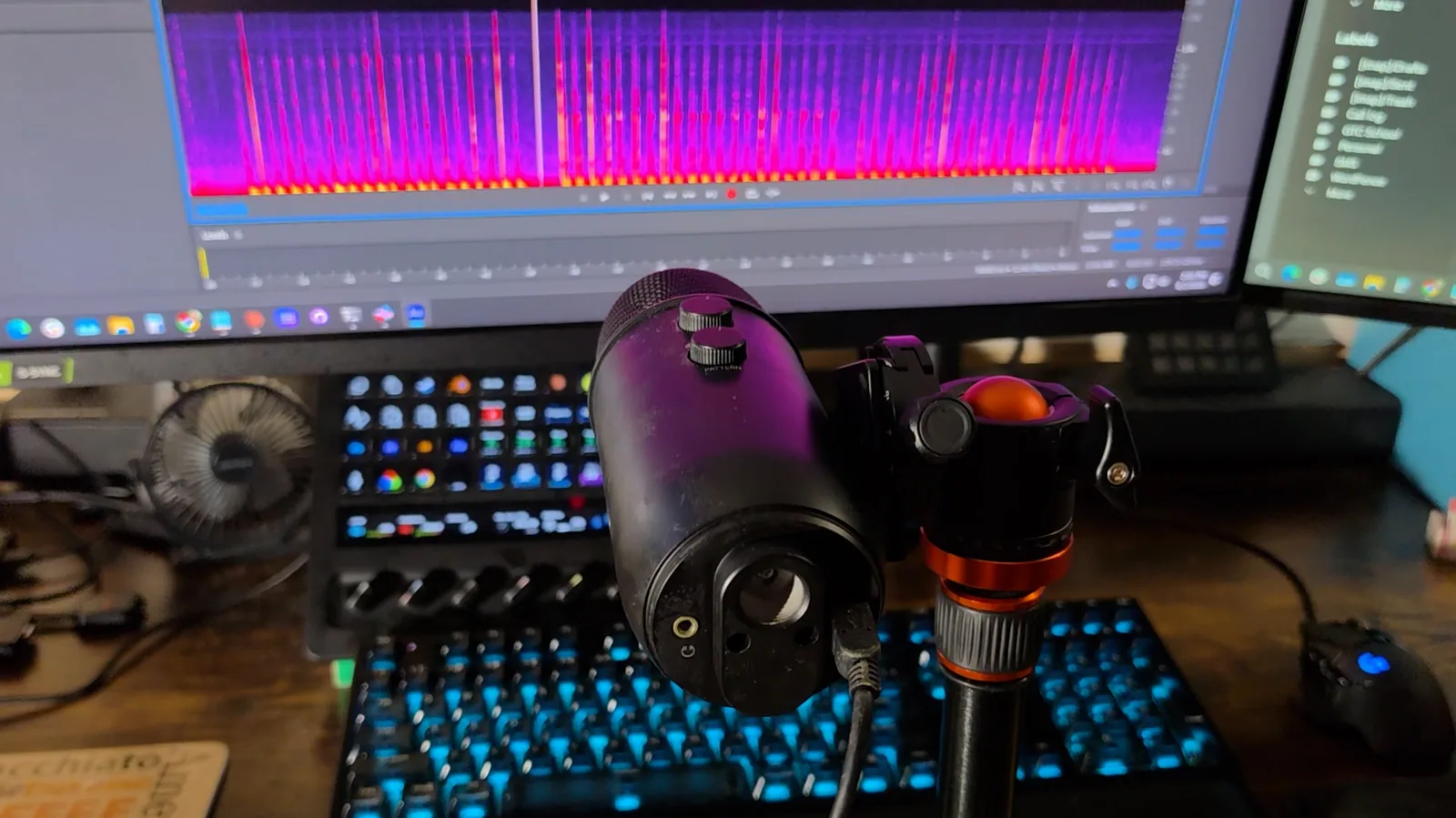
Listen for yourself first. These are twelve seconds of typing from each board, cut from those same recordings with one gain applied to all three, so the level you hear is the level the mic heard. Switch boards while a clip is playing and it swaps at the same moment.
Hear all three boards
Same mic, same distance, same gain, no normalizing. Press play on one board, then click another to switch mid-clip. Keys 1 2 3 switch, space pauses.
Recorded 2026-09-07, one mic overhead at 20 cm, matched gain, no processing. One shared gain was applied to all three clips so they are audible at web volume; the level differences between them are the ones the mic heard. Relative, not absolute: no sound level meter was used.
Now the measurement, and the honest part first. Measured across the whole spectrum, all three boards drop into the noise of my room inside about fifty milliseconds and I cannot separate them. The click is 20 dB down in 19, 20 and 20 milliseconds for the Razer, the R75 and the HE108, and into the room noise by 47, 50 and 52. No separation. My room's own low rumble sets that floor, and it buries all three at the same point.
But that noise is mostly low rumble. Up in the range where a metallic ting lives, two to eight kilohertz, the room is far quieter, so you can follow a ring a lot further down. So I re-measured in that band, as the median of every press, in decibels above that band's own room floor. Up there the EPOMAKER is done at about 69 milliseconds; the other two take 85. At 80 milliseconds after the click, the Razer is still 12.3 dB above the room, the R75 9.7, the HE108 6.1. The Razer is 6.2 dB above the HE108 at that moment, with a 95% confidence interval of 4.4 to 7.8, so it is not noise. And before the next key lands, 89% of the HE108's presses are back at the floor, against 68% for the R75 and 48% for the Razer. Half the Razer's presses never get back to quiet at all. That ting you can hear on the BlackWidow is real, and this board does not have it.
Loudness is the other half of "quieter", and it is smaller than the ring. The A-weighted peaks match almost exactly, minus 23.0 dBFS for the HE108 against minus 23.2 for the Razer, and the HE108 carries about 2 dB less energy per press. So "quieter" here is mostly "shorter up top", and a little "less". Tonally the ordering is solid even where the absolute numbers are not: the HE108 is the darkest of the three, the R75 in between, the Razer the brightest, which is what the ring measurement would predict.
Here is why that is interesting and not just a nice number. The Razer has Razer's silent switches in it, purpose built, with a dampener inside the housing, on an aluminum plate. The EPOMAKER's switches have no dampener at all; they are plain magnetic linears. So this board is not winning on switches. It is winning on the case and the five foam layers, which is exactly what EPOMAKER say they are for. I never opened the case to count the layers, and the effect is band-limited rather than the whole-spectrum win their marketing implies, so I am calling the damping claim a soft pass. The ring on the Razer is consistent with its aluminum plate, not proven to be it.
What this room could not measure. EPOMAKER's product page carries a four-band sound graphic, and the plan was to check it on their own terms. My room has too much low-frequency rumble for that: 27.8 dB in the 80 to 160 Hz band against 4.3 dB up at 2.5 to 5 kHz, which masks the LOW band on all three boards, and because the band shares are normalized a suppressed LOW inflates every other band. That is a limit of the room, not a finding about the keyboard. The spacebar rattle comparison from the build section is in the same bucket: every key went into one file per board, so there is no per-key split to prove or disprove "no play in the spacebar", and that stays a feel observation.
Does the HE108 really last 32 hours lit and 500 hours dark? And is it 10000 mAh?
This is the section I had to wait for, because the only way to check a capacity claim is to run the board flat and see what it takes to fill back up. Start with draw. I put a USB power meter inline on the cable. With the lighting on, the board draws 282 milliamps; turn the RGB off and it drops to 145. The meter reads at five volts and the pack inside is 3.7, so everything below is compared in watts: lights on, 1.41 W. Lights off, 0.725 W.
The box makes three runtime claims, not two. 32 hours with the RGB on, 500 with it off, and 1000 on standby. The pack, once the charge test below settled it, is 37 watt-hours.
32 hours lit. Out of a 37 Wh pack that is about 1.16 W, and I measured 1.41 W at the USB port, which on its own would give 26 hours. Then I just used it. Full brightness, three days of on-and-off typing from the morning of September 8 to midday on September 11, asleep whenever I walked away: 74 hours on the wall clock, 46.8 of them with the PC on according to the Windows event log, so the board was asleep for at least 27. Awake-and-lit time was therefore under 46.8 hours and realistically 25 to 40, which brackets 32. I cannot be tighter than that because it sleeps when I do. Consistent, and I expected it not to be. A soft pass, and I am saying it that way.
500 hours dark is a different story. 500 hours out of the same pack means the board averaging under a tenth of a watt, 0.074 W. Awake with the lights off it pulls 0.725. That is ten times over, and at the measured draw you get 51 hours; call it 69 if the board is a quarter leaner on battery than at the port. Fifty to seventy hours. Not five hundred, and that is granting them the full ten thousand.
Now, a keyboard spends most of its life asleep, and asleep it draws a lot less. Fair. But they already give you a number for that: the thousand hours on standby. Having a separate standby figure means the 500 has to describe the board awake and connected, just not lit. And the board cannot stay awake. Sixty minutes is the longest sleep timer the software will let you set, and after that it is asleep, which is the other number. So there is no configuration in which 500 hours of RGB-off use exists. The criticism is no longer that my measurement disagrees with theirs. It is that their own three figures do not form a coherent set, and the 60-minute cap is what proves it.
10000 mAh. That is the listing. The safety marking on the back of the box says 3.7 V, 5000 mAh, 18.5 Wh. Half. So I asked, and EPOMAKER said two cells, 5000 each, and the marking describes one of them. Plausible, and I could not disprove it from the outside, so I went and measured it: ran the board flat, then charged it through the meter from a wall brick with the lights confirmed off and no host attached, and read the total.
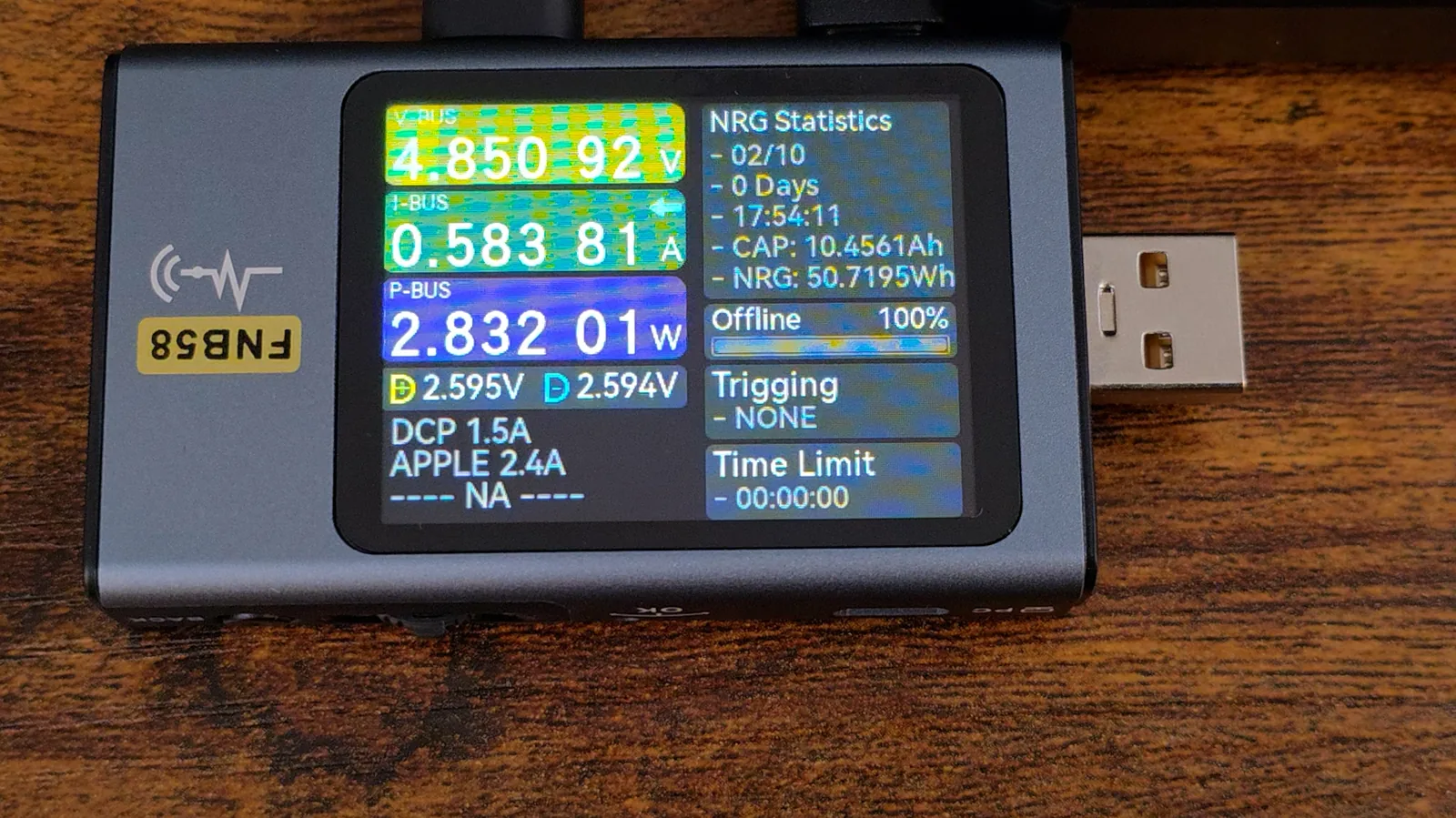
At 17 hours 54 minutes, 50.70 Wh and 10.45 Ah had gone in at 4.85 V, with the current dead flat at 0.584 A the whole way. Unplug, flip to wireless, Fn battery check: full. Allow for charging losses and the board's own draw during the charge and that is roughly a 37 Wh pack, two cells' worth. The worst case for the board's own consumption is the 145 mA awake-unlit figure for the whole 17.9 hours, which is 12.6 Wh, leaving at least 38 Wh into the charger, and a single 18.5 Wh cell cannot take 38 Wh at any efficiency. One cell would have stopped somewhere in the twenties. So the marking is true, the title is true, they just describe different things, and EPOMAKER's answer holds.
Two things nobody tells you, and I only know because I sat and watched it. This board charges at half an amp and no faster, so a full charge from flat is an overnight job, 18 hours or more. And the board shows no battery level while USB is connected, in any rocker position, including the Fn battery check, so there is no way to watch it charge from the board itself.
Snap Key, DKS, Rapid Trigger, five devices: the rest works as described
Quick run through the rest, because it all does what it says. Snap Key is EPOMAKER's name for SOCD: press A and D together and instead of your character stopping dead, the most recent key wins. Worth knowing that this is banned in a few competitive titles, so check before you rely on it. DKS and MT let one key do different things depending how far down you press it, four actions on one keystroke. It works, it is genuinely clever, and I suspect most people will set it up once and never touch it again. Rapid Trigger resets wherever you tell it to. Five devices pair and switch between them.
And it is hot-swappable, which needs one caveat. These sockets take magnetic switches. They will not take the mechanical switches out of your old keyboard, because there is nothing under them to read a magnet. Two different things wearing the same word. I did not have a third-party Hall effect switch on the bench, so swapping in somebody else's magnetic switch is untested here.
Seventeen claims from the box and the listing, checked one by one
Twelve pass, three fail, two could not be verified from outside. Asterisks are soft passes, and each one says why. Notice the pattern before you read the rows: everything that failed is something written, and everything measured on the hardware came back clean.
| Claim | Evidence | Verdict |
|---|---|---|
| 8000 Hz polling | Wired and 2.4 GHz both enumerate High-Speed with bInterval=1; pipes open at 125 µs. Dongle checked separately. | PASS |
| Five-layer damping | Least 2 to 8 kHz ring-out of the three boards, 6.2 dB below the Razer at 80 ms; whole-spectrum decay is buried by the room on all three. Layers never counted. | PASS * |
| 0.005 mm actuation steps | The software steps in exactly 0.005, no typed entry. Hardware side unverified, no dial indicator. | PASS * |
| 0.1 to 3.3 mm range | Both ends reachable: 0.1 with the top deadzone at 0, 3.3 with the bottom deadzone at 0, which the software warns against. Clean in that state. | PASS * |
| Over 1.2 kg | 1.28 kg (2 lb 13.2 oz) on the scale. | PASS |
| 32 h with RGB on | Needs 1.16 W from 37 Wh; measured 1.41 W at USB. Three-day run died between 25 and 40 h awake at full brightness. | PASS * |
| Pre-lubed switches | Lube visible on the stabilizer housings. | PASS |
| NKRO | Ten keys into Notepad, all registered. The three-key limit was their test box, not the board. | PASS |
| Numpad stabilization | All three 2u numpad keys stabilized, no corner cut. | PASS |
| 108-key consistency | No outliers at either extreme, nothing self-triggered at 0.1 mm. | PASS |
| Fn layer without the driver | Every shortcut in the booklet works as printed. | PASS |
| 10000 mAh capacity | Charge test: 50.70 Wh in at the port, at least 38 Wh into the charger. Two 18.5 Wh cells, 37 Wh. | PASS |
| 500 h with RGB off | Needs 0.074 W; measured 0.725 W awake-unlit, 50 to 70 h. And sleep caps at 60 minutes, so 500 h of use cannot exist. | FAIL |
| Shine-through keycaps | Legends are opaque; they block the backlight. Razer frame from the same night is the control. | FAIL |
| Double-shot legends | Legend is raised off the cap face and sits on the outer surface in the underside macro. Printed, not molded. | FAIL |
| 128 kHz scan rate | Inside the firmware. Not verifiable from outside. | NOT TESTABLE |
| 0.2 ms latency | Below what this bench resolves. Arithmetically consistent with the verified 125 µs polling. | NOT TESTABLE |
Two more rows do not fit a pass-fail column. The keycap material is open: EPOMAKER's own two sources assign the PBT to opposite shots, and what can be observed is that the wear surface is transparent and therefore not PBT. And the printed legends carry a durability consequence that cannot be measured in a review window, stated above as a mechanism rather than a timeline.
Who should buy the EPOMAKER HE108, and who should not
Who this keyboard is for
- YesYou want full-size Hall effect without paying Wooting moneyIt measures well on nearly everything that matters and it is built better than ninety dollars usually buys.
- YesYou want 8000 Hz that is real, wired or over the dongleRead off the descriptor on both. Not over Bluetooth, which is 125 Hz by their own spec.
- YesYou touch type and you like the clear-cap lookThe best thing about this board is the thing the fix for the legends would take away.
- NoYou look at your keyboard while you typeIn a dark room the backlight will not show you the legends, and a set of Razer caps did not fix it.
- NoYou want to move your old mechanical switches overThe sockets only read magnets. Magnetic switches only.
- NoYou plan to upgrade it laterPlate-mounted stabilizers, no VIA or QMK, and debris under the plate needs a full teardown. What you buy is what you keep.
There is a real fix for the legends, and I want to be fair about it. Keycaps built for south-facing lighting exist, with legends that pass light and sit down where the LED is, and EPOMAKER sell keycaps. So you could buy your way out of this. But any set that lights properly has to be opaque, because that is where the contrast comes from. The fix takes away the clear caps, and the clear caps are the best thing about this keyboard. You would be spending money to make it look like everything else.
Frequently Asked Questions
Is the EPOMAKER HE108 really 8000 Hz?
Yes, wired and over the 2.4 GHz receiver. Both enumerate on USB as High-Speed devices with a bInterval of one microframe, which is 125 microseconds, or 8000 Hz, on every interrupt endpoint. I read it off the USB descriptor with USB Device Tree Viewer rather than trusting the box. Over Bluetooth the board drops to 125 Hz, which EPOMAKER publish themselves.
Are the EPOMAKER HE108 keycaps double-shot PBT?
Not as sold. The shell is transparent, and PBT does not come transparent at keycap thickness, so the wear surface is not PBT. The legends are raised off the cap face and sit on the outer surface when you look at a pulled cap from underneath, which means they are printed on, not molded in, so they are not double-shot either. Printing is the only way to put a legend on a clear cap, so the construction is sound; the words in the listing are what do not hold.
Can you read the HE108 legends in the dark?
No. With the backlight on in a dark room the caps glow and the legends show as dark shapes on top of them, because the light enters at the bottom of a clear cap and the printed legends are opaque and block it. In a lit room the white-on-smoke legends are perfectly readable. A set of Razer caps on the arrow keys did not fix it, because both problems have to be solved at once.
How long does the EPOMAKER HE108 battery last?
At full brightness it died somewhere between 25 and 40 hours awake across a three-day run, which is consistent with the 32-hour claim. The 500-hour claim with the lighting off is not reachable: awake and unlit the board draws 0.725 W, which is 50 to 70 hours from the 37 Wh pack, and the software's longest sleep timer is 60 minutes, so the board cannot stay awake long enough for 500 hours of use to exist in any configuration. A full charge from flat takes about 18 hours because charging is capped at half an amp.
Is the HE108 battery really 10000 mAh?
Yes, as two 5000 mAh cells. The safety marking on the box says 3.7 V, 5000 mAh, 18.5 Wh, and the listing says 10000 mAh; EPOMAKER's explanation is that the marking describes one of two cells. A charge test from flat put 50.70 Wh in at the USB port, which after charging losses and the board's own draw is a pack of roughly 37 Wh. A single 18.5 Wh cell could not have taken that much.
Is the EPOMAKER HE108 quieter than a Razer BlackWidow?
In the range where a metallic ring lives, yes. Recorded under the same mic at the same gain, the HE108's 2 to 8 kHz ring is back at the room floor by about 69 milliseconds, while the Razer BlackWidow Elite is still 6 dB above it at 80 milliseconds and half its presses never return to quiet before the next key. Peak loudness is nearly identical between the two; the HE108 carries about 2 dB less energy per press. Across the whole spectrum all three boards vanish into the room noise inside about 50 milliseconds and cannot be separated.
Can you put normal mechanical switches in the EPOMAKER HE108?
No. The HE108 is hot-swappable, but its sockets read a magnet in the switch stem, and a conventional mechanical switch has metal pins and no magnet. Only magnetic Hall effect switches will work. Two spare Creamy Jade switches ship in the box.
Do you need the EPOMAKER software to use the HE108?
No. Lighting, colors, brightness, effects, pairing and device switching all work from the Fn layer on the keyboard itself, and every shortcut in the printed booklet worked as written. The driver is needed only for per-key actuation, deadzones, Rapid Trigger, Snap Key, DKS and MT.
The bottom line: a company that builds better than it writes
Under a hundred dollars, and I spent weeks trying to catch this thing out. Here is what I found. Eight thousand hertz polling, wired and wireless both, and it is real; I read it off the descriptor. Five layers of damping that do something you can measure: the metallic ring that is still there on the Razer at eighty milliseconds is gone on this one. Actuation you can move in five thousandths of a millimeter, and the software genuinely offers that, though I could not verify the hardware side without equipment I do not own. 108 keys and not one of them out of calibration at either extreme. Over 1.2 kilos, and it is. A ten-thousand-milliamp-hour battery that a charge test says is exactly that. The hardware keeps passing. Almost everything I pointed a meter at came back clean.
What does not hold up is what is written about it. The listing says shine-through, double-shot PBT keycaps, and all three words fail on inspection. It says 500 hours with the RGB off, and there is no way to configure this keyboard that gets you there, because it sleeps after sixty minutes and their own standby figure already covers that case. The box lists a dongle without saying it is in the kickstand. The outreach email called the switch by a different name from the listing. The deadzones silently qualify both ends of the published actuation range. None of that is a hardware problem.
The thing I keep coming back to is that their engineering and their paperwork are clearly two different departments. I sent them a hard question about the keycaps and got a straight technical answer back in a day. I asked about the battery and they answered again, and the charge test proved them right. They volunteered editorial independence in writing. That is not a company being sloppy on purpose. It is a company that builds better than it writes. Which is a strange thing to have to tell you about a keyboard, but it is the useful thing, and I only know it because I checked.
Am I replacing my Razer with it? Yes. Yes I am.
My rating: 4/5. The hardware would score higher on its own; the point off is the legends in the dark, which is the one thing a buyer would return it over, and a listing that describes a different keycap than the one on the board.