
What the Badges on Your SD Card Actually Mean
V30, U3, A2, a Roman numeral and a big number in the largest font on the box. Only one of those is a promise, and it is not the big one. Here is what each mark certifies, and what ten cards on my bench actually did with it.
Prefer to watch?
There is no video for this one, but every card mentioned here gets tested on camera over on the channel. Subscribe to catch the next teardown when it goes live.
The short version
Every speed badge on a memory card is a minimum, not a speed. Good cards sail past theirs: I measured one printed V30 that sustained 133 MB/s, and later another that reached 153.4 and an entry-tier card that reached 155.1, which is V90 performance from a V30 label. It cuts the other way too: one card averaged above the V60 floor all the way through and still only held V30, because its slowest ten seconds dipped under. Meanwhile almost nothing you own needs more than V30 in the first place, because even 8K 360° video works out to about 25 MB/s. And the badge only holds if your device can carry it. The same card, on my bench, on the same afternoon, delivered V60 in one reader and V90 in another.
Buy V30, then spend the difference on endurance or capacityDisclosure: Every card and reader named in this article was bought at retail with my own money; nobody sent me anything and nobody saw this article before it went up. This post contains affiliate links. As an Amazon Associate I earn from qualifying purchases, at no extra cost to you. Affiliate links like these and my YouTube channel are what keep the site running.
Three questions, and most bad purchases answer the wrong one
Pick up any microSD card and count the markings. There is a number in a C. A number in a U. A number in a V. Maybe an A1 or an A2. One or two Roman numerals. And a big "up to 170 MB/s" in the largest font on the package, which is the only one most people read and the only one that is not a promise.
Every one of those marks means something specific. Almost none of them mean what the packaging wants you to think. That gap is why people spend eighty dollars on a card for a dash cam that would have been perfectly happy with a twenty dollar one.
Here is the thing nobody explains, and it makes everything else fall into place. The badges are not one ranking system. They are three different systems answering three different questions, and they all got printed on the same piece of plastic.
| The question | The badges that answer it | Who is actually asking |
|---|---|---|
| How fast can it write, continuously, without stopping? | Speed Class (C), UHS Speed Grade (U), Video Speed Class (V) | Cameras. Dash cams. Anything recording a stream. |
| How fast can it handle thousands of tiny scattered operations? | Application Performance Class (A1, A2) | Phones. Raspberry Pi. Steam Deck. Anything running software off the card. |
| What wire is it talking over in the first place? | The Roman numeral: blank, I, II, III, or EX | Everybody. This one silently caps the other two. |
A dash cam buyer shopping the A-class is answering a question their dash cam never asked. A Raspberry Pi builder shopping the V-class is buying the wrong card entirely. And a Nintendo Switch 2 owner shopping either one comes home with a card that physically will not work in the console. What that console needs is a microSD Express card, and I have bench-tested one on two different readers to show what the format delivers and where it does not.
How fast can it write, forever?
Three badges answer this, which is two more than necessary. They accumulated over twenty years and nobody ever cleaned up.
Speed Class: the C badge
The original, from 2006. A number inside a C outline: C2, C4, C6, C10. The number is the guaranteed minimum sustained write in MB/s.
What it certifies: at least that many megabytes per second, continuously. What it does not: anything relevant to modern video. C10, ten megabytes a second, is the top of this ladder, and it sits below what a mid-range dash cam asks for. When to care: basically never on a new card. Everything ships C10, and C10 means "not the nineties."
UHS Speed Grade: the U badge
A number inside a U: U1 is 10 MB/s minimum, U3 is 30 MB/s minimum. Same kind of promise as the C badge, at a higher floor.
What it does not tell you is anything the V badge has not already said. U3 and V30 are the same promise printed twice. If a card shows both, and most do, that is one fact wearing two hats. It is not a scam, it is packaging inertia: the U badge came first, and dropping it looks like a downgrade. Printing one promise twice also leaves room to get one of them wrong: the Speederlash 128GB’s blister prints U1 beside V30, the card inside prints U3, and on my bench it held U3.
Video Speed Class: the V badge
The one that matters. V6, V10, V30, V60, V90. The number is the guaranteed minimum sustained sequential write in MB/s, and this is the only ladder that climbs high enough to describe modern video.
Here is the single most misread thing on the label. V30 does not mean "30 MB/s." It means "never less than 30." A V30 card can sustain 130 and still be honestly, accurately labeled V30. I own one that does exactly that, and we will get to it.
How fast can it handle a thousand tiny things at once?
The A1 and A2 badges are not about throughput at all. They are about IOPS, input/output operations per second, measured on small random 4K reads and writes. Completely different workload, completely different engineering problem.
- A1: minimum 1,500 random read IOPS and 500 random write IOPS.
- A2: minimum 4,000 random read IOPS and 2,000 random write IOPS, plus command queuing and host-side caching support.
That "plus" is doing enormous work, and it is the catch worth a whole section. A2's headline numbers require the host to participate. Command queuing is a two-sided conversation: the card has to support it and the device has to know how to use it. On a host without that path, an A2 card is an A1 card with a nicer sticker and a higher price.
The Raspberry Pi is the clearest illustration, because the Pi community actually measured it. With command queuing working on a Pi 5, A2 cards showed roughly 2.5x the random read and 4x the random write of the non-queued path. Real, large, worth paying for. But the Pi restricts command queuing to an allowlist of card implementations known to do it correctly, so an A2 stamp on the label does not guarantee you get the fast path on your particular board.
I have a small, carefully hedged data point here. Both VIOFO High Endurance cards carry an A2 badge, and when this was written neither reached even the lower A1 floor on my bench. On September 2026 re-runs both cleared it, and so did the line's 64GB on two readers, which is its own lesson: random-IOPS figures on a USB reader belong to the reader as much as to the card. That is not me calling the badge a lie: my readers connect over USB, which does not do command queuing, so the A2 procedure genuinely is not reproducible here and I do not score it. But it points the same way. Without the host path, the A2 badge does not turn into performance.
When to care: phones, tablets, Raspberry Pi, Steam Deck, anything where the card holds software rather than footage. When to ignore it completely: cameras. A camera writes one big sequential stream. It does not care about your random 4K IOPS, and paying extra for A2 in a dash cam buys you nothing.
What wire is it on?
Look at the pins. One row is UHS-I. A second row of pins means UHS-II, marked with a II. UHS-III exists and you will not meet it. A card with no numeral at all is on the older High-Speed bus.
This mark is the ceiling on everything else. A UHS-I card tops out around 104 MB/s by the standard, though several manufacturers ship a proprietary extension that goes further, and whether you get it depends entirely on your reader. A UHS-II card can go several times higher, but only in a UHS-II host. Put a UHS-II card in a UHS-I camera and nothing breaks, it just quietly becomes a UHS-I card with its second pin row unused.
I tested that question at length and gave it its own article: do you need a UHS-II SD card. The one-line answer is that in a UHS-I body a UHS-II card buys you nothing at all, and in a UHS-II body it buys you meaningfully more on writes and considerably more on getting the card empty again.
SD Express: the EX badge
The newest one, and the one about to matter to a lot of people who have never heard of it. SD Express puts PCIe and NVMe, actual SSD plumbing, behind the SD form factor, with another row of pins for it. Cards carry an EX mark.
The Nintendo Switch 2 requires it. Not "works better with," requires. That is Nintendo's own published compatibility rule, not my finding. Regular microSD cards, including whatever you used in your original Switch, cannot be used for games in a Switch 2 at all. If you buy by V-class for that console you will buy wrong, no matter how much you spend.
I own an Express card, a Samsung P9 Express 256GB claiming 800 MB/s read, and here is an honest limitation of my own lab: I cannot test it properly, and I do not own a Switch 2. My bench readers are UHS-I and UHS-II. Put an Express card in one and it falls back to UHS-I, around 100 MB/s. The 800 is not a lie, it is a number that lives on a bus I cannot reach yet. When I can, I will publish it.
What I can do is point at what other people measured, because it is consistent and it says something useful. Across published Switch 2 load-time tests, every microSD Express card lands within about a second of every other one: roughly 19 seconds against 16.6 from internal storage on the same game, with the old-style physical game card slowest at nearly 25. So on that console, once you have cleared the Express requirement, which Express card you buy barely moves the needle.
The badge that decides whether the card works matters enormously. The numbers that decide how fast it is rated matter far less than the packaging implies.
The marks that are not about speed at all
SDHC, SDXC and SDUC are the capacity family, not a performance rating. They tell you the addressing scheme and the filesystem the card is supposed to ship with: SDHC up to 32 GB on FAT32, SDXC from 64 GB to 2 TB on exFAT, SDUC above that.
Worth knowing because it can be wrong in the box. My VIOFO High Endurance 128GB, an SDXC card by capacity, arrived formatted FAT32, which is off-spec for SDXC and drags along a 4 GB maximum file size. That is not a benchmark curiosity, it is a real consumer-facing defect, and I only found it because I check the filesystem before testing rather than after.
The lock switch on full-size SD cards is an honor system. The card does not enforce it. The slot has a little sensor, the host reads it, and the host decides to behave. Most do. It is not write protection in any security sense.
Temperature, waterproof, shockproof and X-ray icons are manufacturer claims, not SD Association certifications, and the conditions behind them are usually in fine print somewhere else.
"High Endurance" is also not an SD Association badge. It is a manufacturer's claim about how many write cycles the flash will take, and for a dash cam it is the single most important spec on the package. There is a catch to it, which gets its own section below.
Four things the badges never tell you
This is the part a glossary cannot give you. Everything below came off my own bench.
1. The badges are floors, and good cards sail right past them
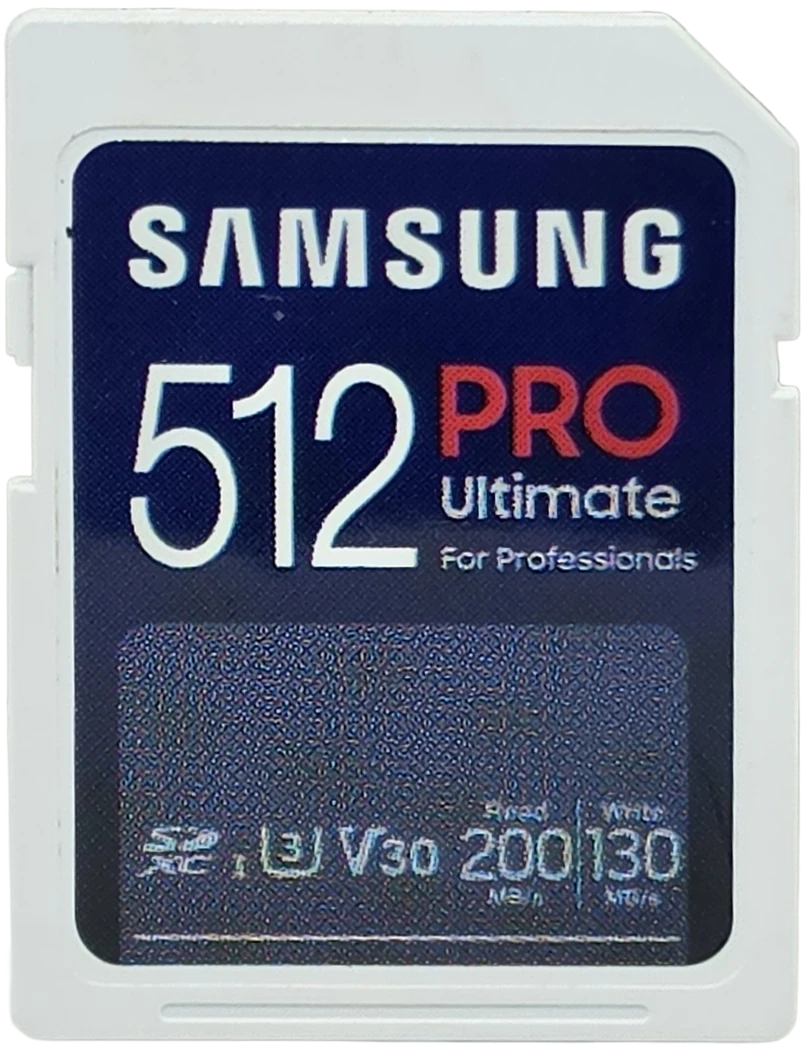
Here is every card I have run with a clean sustained-write result, printed V-class against what it actually delivered. The measured figure is worst-10-second sustained committed write: the slowest ten-second stretch of a long continuous write, which is precisely what the V badge is making a promise about.
| Card | Printed | Measured, worst 10s | Actually delivered |
|---|---|---|---|
| Samsung PRO Ultimate SD 512GB | V30 | 133.1 MB/s | V90, two grades up |
| Lexar Professional 1667x 128GB | V60 | 109.5 MB/s | V90 |
| ProGrade SDXC UHS-II V60 128GB | V60 | 102.8 MB/s | V90 |
| SanDisk High Endurance 128GB | V30 | 88.0 MB/s | V60 |
| Kioxia Exceria G2 128GB | V30 | 62.6 MB/s | V60 |
| VIOFO High Endurance 64GB | V30 | 59.5 MB/s | V30 |
| VIOFO High Endurance 128GB | V30 | 55.8 MB/s | V30 |
| Botslab 128GB | V30 | 53.9 MB/s | V30 |
| FitcamX 64GB | no V badge printed | 43.8 MB/s | V30 |
| VIOFO High Endurance 32GB | V30 | 34.3 MB/s | V30 |
| Gigastone High Endurance Pro 128GB | V30 | 31.0 MB/s once the card had been written end to end (59.6 fresh) | V30 |
Ten of those carry a printed V badge. All ten met or beat it, and five beat it by a full grade or more. One of them looked conditional for two months, and section 3 is about what that turned out to be. So the speed badges are broadly honest. Conservative to the point of being unhelpful, but honest.
2. The number in the big font is the one that misses
Same cards, but now it is the printed "up to X MB/s" write figure, the marketing number, against what I measured. This column is my three-pass average committed sequential write, which is the figure I use for claim comparisons in every card review, rather than the worst-ten-second number above. Different question, different metric.
| Card | Printed write claim | Measured | Delta |
|---|---|---|---|
| SanDisk High Endurance 128GB | 40 MB/s | 89.7 | 224% |
| VIOFO High Endurance 64GB | 40 MB/s | 61.2 | 153% |
| Kioxia Exceria G2 128GB | 50 MB/s | 65.3 | 131% |
| VIOFO High Endurance 32GB | 30 MB/s | 35.2 | 117% |
| Samsung PRO Ultimate SD 512GB | 130 MB/s | 137.3 | 106% |
| Lexar Professional 1667x 128GB | 120 MB/s | 119.3 | 99% |
| ProGrade SDXC V60 128GB | 130 MB/s | 108.4 | 83% |
| VIOFO High Endurance 128GB | 80 MB/s | 57.0 | 71% |
Look at what happened in the bottom two rows. The ProGrade came in 17% under its printed write claim and still delivered V90, two grades above its V60 badge. The VIOFO 128GB missed its claim by 29% and still held its V30 badge comfortably.
Not one card missed its V badge outright. Two missed their printed write number by double digits. Same cards, same runs, same bench. The difference is which number you read.
In fairness, and this matters: those are not measured the same way. My number is committed write, every byte actually flushed to the flash, the way a camera writes when the data has to survive the card being yanked. The "up to" number is a burst figure, measured into the card's small fast cache under ideal conditions. The Silicon Power Superior Pro 128GB makes the gap visible: it writes about 85 MB/s for its first 4.7 GB, beating the 80 its maker claims, then 39 for as long as you keep writing, and it is the 39 that has to clear its V30 badge. So the honest reading is not "they lied." The honest reading is better, and worse: the number in the big font describes a condition you will never record in, and the badge in the small font describes the condition you actually use the card in. The packaging leads with the one that does not apply to you.
3. A badge can look conditionally true. Then measure again.
Corrected 15 September 2026. When this article was first published, this section said the VIOFO High Endurance 32GB held V30 under pure video duty and fell to V10 after random 4K churn, and I called that the A badge and the V badge fighting each other. Two full re-runs in September, on two card readers, with the same random writes in front of the sustained test, held V30 from the first second: 34.3 and 34.2 MB/s through the worst ten seconds, not one of 600 samples under the floor. The slow run was the card's first-ever write, and a second card built on the same platform did the same thing on its first run and never again. The pair review carries the full correction.
What survives is a smaller lesson and a more useful one: a single run is one data point, and a conditional result is a hypothesis until it reproduces. The card that actually shows what the badges are worth is the line's 64GB, reviewed on its own: printed V30 and a 40 MB/s write, measured 59.5 MB/s through its worst ten seconds on both readers, twice the floor of the badge and half again the number in the big font.
The original framing, that optimizing a card for random IOPS and for uninterrupted sequential writes pull in different directions, is still a real tension in card design. It just is not what the 32GB was showing me. Which badge is telling you the truth depends on measuring it more than once, and no label can express that either.
If you take one thing from this article that you cannot get from a spec sheet, take this: the badge is a floor, and a floor is only proven by measuring it more than once. And a floor measured new is not always the one a card keeps: the SUNEAST Ultimate Pro 128GB held V30 sealed and V10 after one fill, and nothing I tried brought it back. And some cards never hold the floor they print: the Patriot EP 128GB prints V30, spells out a 30 MB/s minimum on its box, and held 22.5.
4. The same card gives different answers on different hosts
Samsung PRO Ultimate SD 512GB. One card, same test, same afternoon, two readers.
| Reader | Measured, worst 10s | Delivered |
|---|---|---|
| Transcend TS-RDF5, standard UHS-I | 88.7 MB/s | V60 |
| ProGrade PGM0.5, UHS-I with the DDR200 extension | 133.1 MB/s | V90 |
Two full grades apart, and the card is not the variable. The host is. The standard UHS-I bus caps out around 104 MB/s, the ProGrade reader speaks a manufacturer extension that goes past it, and this card speaks it back. That is why I name the reader on every number I publish, and why an unattributed speed figure from anybody, me included, is close to meaningless. There are four of those host tiers, and I measured what each one is worth.
And none of them say the capacity is real
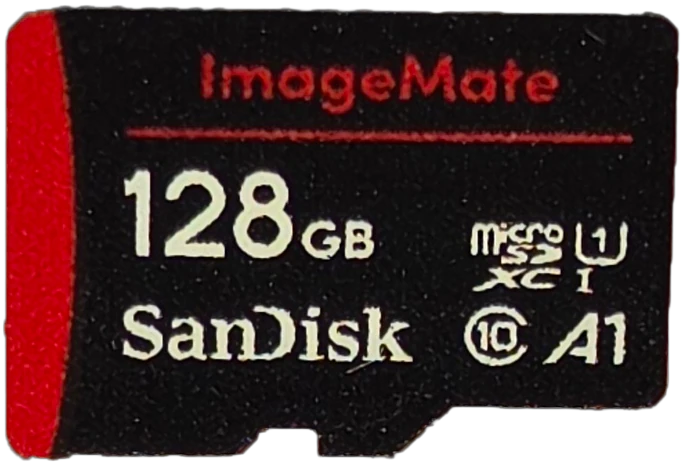
My counterfeit SanDisk ImageMate held V30 at 31.8 MB/s on the bench. Every speed measurement it produced was defensible. It was also a roughly 32 GB card wearing a 128 GB label, which means it writes your footage into an address that does not exist and then reports success.
No speed badge on earth tests whether the capacity is real. That is a different problem, and I wrote it up separately in the ImageMate teardown.
So what does your device actually need?
Camera specs are quoted in megabits per second. Card badges are in megabytes per second. That factor of eight is where everybody's intuition breaks, and it is why "8K" sounds terrifying and turns out not to be.
| Device | Its heaviest mode | Bitrate | That is | Badge that covers it |
|---|---|---|---|---|
| VIOFO A229 Plus, 2 channel | 2K front plus 2K rear | ~53 Mbps | 6.6 MB/s | V10 |
| VIOFO A229 Plus, 3 channel | plus 1080p cabin | ~68 Mbps | 8.5 MB/s | V10 |
| GoPro HERO13 Black | 5.3K60 high bitrate | 120 to 150 Mbps | 15 to 19 MB/s | V30 |
| Insta360 X3 | 5.7K360 at 30fps | 120 Mbps | 15 MB/s | V30 |
| DJI Osmo Action 5 Pro | 4K120 | 120 Mbps | 15 MB/s | V30 |
| DJI Osmo Pocket 3 | maximum | 130 Mbps | 16.3 MB/s | V30 |
| Insta360 X4 and X5 | 8K360 at 30fps | ~200 Mbps | 25 MB/s | V30 |
| Canon EOS R7 | 4K60 10-bit C-Log3 | ~340 Mbps | 42.5 MB/s | V60, UHS-II |
Read that column again. 8K 360° video, the most intimidating-sounding format on the consumer market, is 25 megabytes a second. Insta360's own recommendation for the X4 and X5 is a V30 card. The badge ladder goes to V90. Three quarters of it is headroom nobody in that table can use.
The one genuine climber is the mirrorless camera, and even there the demanding mode is 10-bit Log at 4K60. Shoot the R7 in normal 4K and you are back down with the action cameras.
The necessary caveat, because I do not want anyone buying a V10 card for a GoPro. Those bitrates are averages. Real recording is variable: a detailed, high-motion scene spikes well above the average, the filesystem takes a cut, and the card runs its own garbage collection mid-clip without asking you. The speed classes exist to guarantee the floor through all of that, which is why manufacturers spec roughly double the average bitrate. So V30 as the near-universal recommendation is correct. That is not the waste. The waste is everything above V30.
If you have this, buy this
Dash cams and always-on cameras
The V number is the least interesting thing about the card. Every dash cam on the market is asking for under 10 MB/s, and a V30 card clears that three times over. What actually kills dash cam cards is that they write continuously, forever, overwriting the same flash on a loop until it dies. That is an endurance problem, and endurance is not an SD Association badge, it is a manufacturer claim, and it is the spec worth paying for. Buy a high-endurance card, size it for how much footage you want to keep, and stop reading the speed numbers. I have a whole article on the sizing half: how long does your memory card record.
The one I keep going back to is the SanDisk High Endurance, and it is the card in the tables above with the widest margin over its own label: 89.7 MB/s committed against a printed 40, and a V60 delivery from a V30 badge. Full results here. If your dash cam is a VIOFO, their own High Endurance 128GB works and holds V30, but go in knowing it lands at 71% of its printed write claim, which is the whole story of that review.
360 and action cameras
V30, and stop. Insta360 asks for V30 with an exFAT filesystem and supports up to 1 TB. GoPro's requirement is V30. DJI publishes a compatibility list that is essentially all V30 U3 cards. If you are shooting an X4 or X5 in 8K, buy capacity rather than class: 25 MB/s is about 90 GB an hour, and space is what you will run out of.
The shape of card to look for is U3 with V30 and A2, which is what sits on DJI's and GoPro's own recommended lists. The two that turn up on nearly all of them are the SanDisk Extreme and the Samsung PRO Plus. The PRO Plus has since been through the bench and held V90 speeds on a V30 card. The SanDisk Extreme has since been through the bench as well, where it recorded the fastest read this bench has measured and held V90 against a printed V30 too.
Mirrorless and hybrid cameras
The one place the top of the ladder earns money, and mostly not for the reason people assume. For video, work out your heaviest codec and add margin: the R7's 4K60 10-bit Log at 42.5 MB/s wants V60. For stills, the number that matters is not sustained write at all, it is how fast the buffer clears after a burst. That is where a V90 UHS-II card visibly changes your day, and it is the only consumer scenario I would recommend one for without hesitating. Check your body has a UHS-II slot before spending UHS-II money. If it does not, that second pin row is decoration.
Both UHS-II cards I have run delivered V90 against a printed V60, so either is more card than its own label admits: the ProGrade SDXC V60 and the Lexar Professional 1667x, which I tested against each other in one combined review. If your body is UHS-I only, do not buy either of them. Buy the Samsung PRO Ultimate instead, the card at the top of the floors table: a UHS-I card that sustained 133 MB/s and never dropped below V90 the whole run.
Phones, tablets and Steam Deck
Now you are on the other axis. A2 matters, V-class barely does. You want U3, or V30, same thing, so that installing something large is not miserable, and A2 for the random reads that game loading and app launching are actually made of. The Steam Deck is a clean example of the bus rule biting: its reader is UHS-I, so it tops out around 100 MB/s in real transfers no matter what you feed it. A UHS-II card costs more and delivers nothing there. A Samsung PRO Plus, or any U3 A2 microSD from a brand you recognize, is the right shape of card for this job, and spending past that buys you nothing the handheld can use.
Raspberry Pi
A2 with command queuing, if your board and your card both cooperate. 2.5x random read and 4x random write is not a subtle difference. Just do not assume the A2 stamp guarantees you get it.
Nintendo Switch 2
None of the above. microSD Express, marked EX, and nothing else works. Look for the extra pin row. This is the one purchase in this entire article where getting the badge wrong means the card simply does not function.
A high-endurance card is not automatically the right card
"Just buy the SanDisk High Endurance for everything" is sensible-sounding advice that is mostly right and occasionally quite wrong, so it is worth its own heading.
High-endurance cards are tuned for sustained sequential writing. That tuning does not make them good at random I/O, and my own results show it plainly: the SanDisk High Endurance 128GB carries no A-class badge at all. Not a low one. None.
It is the best dash cam card I have tested, at 89.7 MB/s committed write against a 40 MB/s claim and a V60 delivery from a V30 label. It would be a poor choice for a Raspberry Pi. Right card, right question.
Reading a card in ten seconds
- Find the bus first. Roman numeral, or EX, or nothing. It caps everything else and it is the one that can make a card outright incompatible.
- Find the V number. Ignore the C and the U, they are the same promise in older language. V30 covers essentially every consumer camera. Go higher only for 10-bit Log video or burst stills.
- Check for an A badge only if the card is holding software, not footage.
- Ignore the big MB/s number. That is the cache talking.
- For anything recording continuously, stop reading badges and buy endurance instead.
- Buy from somewhere you trust, because none of the above detects a fake.
Frequently Asked Questions
What does V30 mean on an SD card?
V30 is a guaranteed minimum sustained sequential write speed of 30 MB/s. It is a floor, not a rating, so a V30 card can be much faster than 30 MB/s. I have measured one that sustained 133.
Is U3 the same as V30?
Effectively yes. Both certify a 30 MB/s minimum sustained write. The U badge is the older language, and most cards print both.
Do I need an A2 card for my camera?
No. A2 measures small random operations, which is what phones and single-board computers do. A camera writes one long sequential stream and gets nothing from it. On small cards, the tuning behind A2 can actively hurt sustained write performance.
What is the difference between A1 and A2?
A1 guarantees 1,500 random read and 500 random write IOPS. A2 raises that to 4,000 and 2,000, but only delivers it on a host that supports command queuing. Without host support, an A2 card performs like an A1 card.
Is a V90 card worth it?
For most people, no. Consumer video tops out around 25 MB/s and V30 covers it with margin. V90 earns its price for clearing the buffer after a stills burst and for high-bitrate 10-bit Log video, and only in a camera body with a UHS-II slot.
Why is my card slower than the number on the front?
Because that number is a burst measurement into the card's small fast cache under ideal conditions. Sustained writing, which is what a camera actually does, runs lower once the cache is full. That is normal, and the sustained figure is the one I publish.
What memory card does the Nintendo Switch 2 need?
A microSD Express card, marked EX. Standard microSD cards, including ones from the original Switch, cannot be used for games on a Switch 2.
Do I need a high-endurance card for a dash cam?
Yes, and it matters far more than the speed class. Dash cams overwrite the same flash continuously, so endurance is what determines how long the card survives.
Buy the floor you need, then stop
The badges are, on the whole, telling you the truth. Across every card I have run, the printed V-class was honest and usually conservative, and it was the big friendly number on the front of the package that came up short. That is the opposite of what most people assume, and it is worth adjusting for the next time you are standing in front of a wall of cards.
So work out which of the three questions your device is asking. Buy the floor that answers it, which for almost every camera made today is V30. Then put the money you did not spend climbing the ladder into the things the ladder does not measure: endurance if the card records all day, capacity if you shoot a lot, and a seller you trust, because no badge on that card can tell you whether the gigabytes behind it are real.