
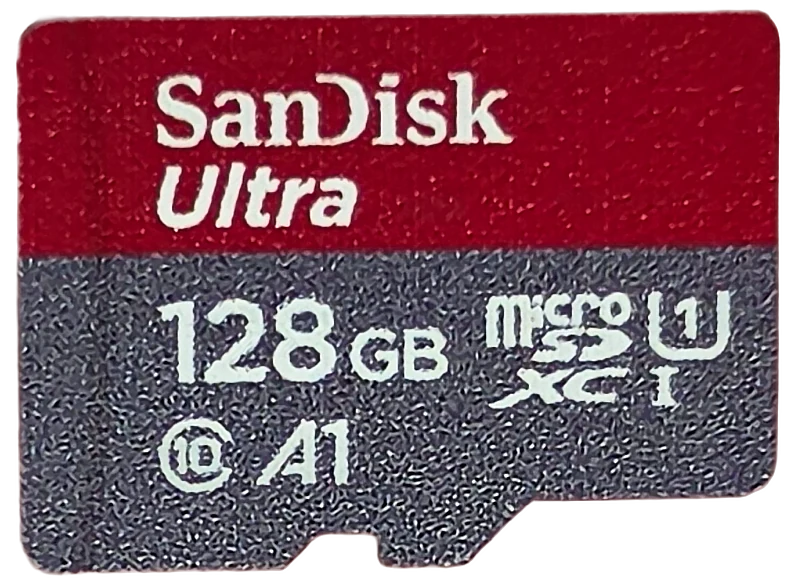
Two SanDisk Ultra 128GB cards, eight years apart: the new one writes half as fast
The SanDisk Ultra is the microSD card most people already own, and it commits to almost nothing: a 10 MB/s floor and no published write speed at all. So I benched two of them, a September 2018 card and the June 2026 version that replaces it on the shelf today. The new one reads more than twice as fast. It also writes at 40% of the speed, and nothing on either package would tell you that.
Prefer to watch a review?
No video for this lab run yet, but I cover dashcams, storage, and the gear around them on the channel. Subscribe to catch the next test the moment it goes live.
The short version
These are the same product name, the same U1 mark and the same aisle, eight years apart. The 2026 card is the better card on paper and it beats its printed 195 MB/s read, measuring 203.5. It also writes at 25 MB/s where the 2018 card writes at 61, which turns a 36 minute card fill into 87 minutes. Both cards verified every byte of their 128 GB with zero errors, and both meet every claim printed on them, because the only sustained-speed promise either one makes is a 10 MB/s floor. The old card simply cleared that floor by six times and the new one clears it by two and a half. My rating: 4.5/5 for the 2018 card and 4.0/5 for the 2026 one, scored against the CKBench rubric.
Verdict: 4.5/5 the old, 4.0/5 the new, and both keep their promisesWho these cards are for
- YesPhones, tablets, handhelds and 1080p dash cams, either generationBoth cards clear 1080p60 dash cam duty with enormous room: 19.9x on the 2018 card and 8.0x on the 2026 one. Both are A1 rated, so app data and photo libraries behave properly rather than crawling.
- No4K video or any high-bitrate recording, and the 2026 card especiallyThe 2018 card scraped through high-bitrate 4K at 1.7x. The 2026 card fails it at 0.7x and misses the V30 floor entirely. Neither prints an endurance rating either, so for a camera that records all day a high endurance card is the right tool.
- NoAnyone replacing an old Ultra and expecting an upgradeThis is the finding of the whole review. Same name, same U1 mark, and less than half the write speed. Read the sustained section before you swap a working card out.
At 1080p60 dash cam bitrates 128 GB holds roughly a day of continuous loop recording on either card. Work out your own numbers in the dash cam storage calculator.
Why test the same card twice, eight years apart?
Because the SanDisk Ultra is one of the best-selling microSD cards on earth, it is what sits in drawers and ships in bundles, and it is the default answer when somebody asks what card to buy. I had a 2018 one that had been in real use for years. When I went to link the version you can actually buy today, I realised it was a different part with a different model code, so I bought that too and ran it through the same suite on the same bench. The results are not what I expected. They join CKBench, the running index of every card on the bench, alongside the Kioxia Exceria G2 128GB that sets the "good" line here, the Samsung EVO Plus 128GB that is the other long-owned card in the corpus, and the SanDisk High Endurance 128GB that sets the top of it.
Why my write numbers read lower than other reviews. Every write here is committed to the card and confirmed before the clock stops, the way a dash cam actually writes, so my figures land below burst benchmarks like CrystalDiskMark that measure a few seconds of the card's RAM buffer. That rule, and the decimal MB/s and binary MiB conventions used throughout, are set out on the how we test and score page.
What the boxes claim, and what the cards did
Two cards, two spec sheets, eight years apart. Read them side by side, because the differences are smaller than you would expect and the one that matters is not printed at all.
The 2018 card (SDSQUAR generation)
| Claim | Printed | Measured | Verdict |
|---|---|---|---|
| Capacity | 128 GB | 127.84 GB written and read back, 99.88% of label | VERIFIED |
| Read speed | None on the card. 100 MB/s for this generation | 96.7 MB/s, on two different readers | AT THE BUS CEILING |
| Write speed | None published, for any Ultra | 60.7 MB/s committed, 61.1 sustained | NOT CLAIMED |
| Speed class | Class 10 (10 MB/s) | 59.7 MB/s worst ten seconds | HELD |
| UHS speed grade | U1 (10 MB/s) | 59.7 MB/s worst ten seconds, enough for U3 | HELD |
| Video speed class | None printed | 59.7 MB/s worst ten seconds, which is V30 | NOT CLAIMED |
| App performance class | A1 | 1713 read / 535 write IOPS | NOT TESTABLE |
| Endurance rating | None printed | n/a | NOT CLAIMED |
| Operating temperature | None printed on the card | n/a | NOT CLAIMED |
| Warranty term | 10-year limited, from the spec sheet | n/a | NOT A PERFORMANCE CLAIM |
The 2026 card (SDSQUJQ generation)
| Claim | Printed | Measured | Verdict |
|---|---|---|---|
| Capacity | 128 GB | 127.97 GB written and read back, 99.97% of label | VERIFIED |
| Read speed | Up to 195 MB/s | 203.5 MB/s on a reader that speaks the fast mode | BEATEN, 104% of claim |
| Write speed | None published, for any Ultra | 25.2 MB/s committed, 24.7 sustained | NOT CLAIMED |
| Speed class | Class 10 (10 MB/s) | 24.1 MB/s worst ten seconds | HELD |
| UHS speed grade | U1 (10 MB/s) | 24.1 MB/s worst ten seconds | HELD |
| Video speed class | V10 (10 MB/s) | 24.1 MB/s worst ten seconds, 2.4 times the floor | HELD |
| App performance class | A1 | 1641 read / 692 write IOPS | NOT TESTABLE |
| Endurance rating | None printed | n/a | NOT CLAIMED |
| Operating temperature | None printed | n/a | NOT CLAIMED |
| Warranty term | 10-year limited, printed on the box | n/a | NOT A PERFORMANCE CLAIM |
Three things jump out of those two tables.
The read claim more than doubled and the card delivers it. 100 MB/s became 195, and the new card measured 203.5. That is a genuine, large, delivered improvement and it deserves to be said first.
Neither card publishes a write speed. Not a vague one, not a footnoted one. SanDisk states only "write speeds lower" on both generations and stops there. That silence is the reason the change at the heart of this review is invisible to a buyer.
The sustained promise never moved. Both cards print U1, which is a 10 MB/s floor. The 2026 card adds a V10 mark, and V10 is also a 10 MB/s floor: the same promise printed a second way, not an upgrade. Both cards clear it. The 2018 one clears it by six times and the 2026 one by two and a half, and no mark on either package can show you that difference.
One row needs its caveat attached every time it appears. The A-class row cannot be settled on any USB card reader, mine included, because A1's floors are defined under a procedure that needs command queuing which USB readers do not implement. I have a measurement of how much that matters now: running the same card on two different readers moved its A1 read IOPS by 23%. A number that swings that far on the host cannot be held against a fixed spec floor, so both rows stay NOT TESTABLE, which never counts against a card.
Almost nothing promised, six times delivered
Which one actually writes faster, and by how much?
The 2018 card. By two and a half times. That is the whole review in one line, and everything below is me checking whether it could be anything else.
| Measurement | 2018 card | 2026 card | Change |
|---|---|---|---|
| Sequential read | 96.7 MB/s | 203.5 MB/s | +110% |
| Sequential write, committed | 60.7 MB/s | 25.2 MB/s | -58% |
| Sustained write, five minutes | 61.1 MB/s | 24.7 MB/s | -60% |
| Worst ten seconds | 59.7 MB/s | 24.1 MB/s | -60% |
| Time to fill the whole card | 35 min 39 s | 86 min 54 s | 2.4x longer |
| Video speed class held | V30 | V10 | two grades |
| Capacity delivered | 99.88% | 99.97% | slightly better |
Every write path agrees, which is what rules out a fluke. The 64 MiB warm-up probe, the one gigabyte preparation file, all three sequential passes, the five minute sustained test and the complete card fill all land in the same place. Preparing a single 1 GiB file took 18 seconds on the old card and 42 on the new one.
The two runs used different filesystems, FAT32 on the older one and exFAT on the newer, which is a real difference and worth ruling out rather than waving away. I have a control for it: a VIOFO card in this same collection was run on both filesystems, same card, same reader, same day. The gap between them was under one percent, and exFAT was the faster of the two. It cannot produce a sixty percent drop, and if anything it works against the newer card's low figure rather than causing it.
Both cards were also read on two different card readers, which matters for a different reason covered further down. Write speed barely moved between readers: under one percent on both cards. Read is the only measurement here that a reader changes.
How the old card missed V60 by a third of a megabyte per second
Here is the number that decides a card's video class: the worst ten seconds. Not the average, not the peak. Take every ten-second stretch of a five-minute continuous write, find the slowest one, and that is the figure a V-class has to clear. The rule exists because a camera dropping frames for ten seconds has already ruined the shot, no matter how good the average looked.
This card's slowest ten seconds ran at 59.66 MB/s. The V60 floor is 60.00. It misses by 0.34 MB/s, which is half a percent, and so it holds V30 instead. It has company just under that line: on the same reader the Metorage Industrial 64GB misses by 0.44 and the VIOFO High Endurance 64GB by 0.55, and those two are the same card under two labels.
What makes that interesting rather than trivial is that every other way of describing the same run says V60. The steady-state average is 61.06 MB/s. The mean across all 300 one-second samples is 61.07. The median is 61.13. Its first thirty seconds averaged 61.13. On any test that reports an average, this card is a V60 card and nobody would question it.
I checked whether one bad moment was to blame. The slowest single second of the run was 48.23 MB/s, and it lines up with a file-roll: the moment the test closes one file and opens the next, which carries the run's longest blocked write at 220 milliseconds. That is a tempting explanation and it does not survive. Swap that one second for the run's median and the worst window only climbs to 59.87, still under the line. Across the whole run, 12 of 291 ten-second windows fall below 60 MB/s, in three separate stretches. This card is not a V60 that got unlucky. Its natural writing rate simply sits one to two percent above the V60 floor, close enough that ordinary variation crosses it over and over.
None of which is a failure, because the card never claimed a V class in the first place. There is no V mark printed on it. What it claimed was U1, a 10 MB/s floor, and it cleared that by six times. If you want the full explanation of why these marks are floors rather than speeds, that is its own article.
The 2026 card is not close to any of this. Its worst ten seconds is 24.12 MB/s, and every single one of its 291 rolling windows sits below the V30 floor. There is no straddle to analyze and no argument to have: it is a V10 card, it prints V10, and it clears that mark by 2.4 times. The interesting comparison is not that it holds a lower class. It is that the older card held V30 while printing no video class at all, so a buyer who never looked past the packaging got two grades of performance nobody promised them, and now does not.
SanDisk Ultra 128GB
Why the new card needed a second reader to prove its speed
The first time I measured the 2026 card it read 180.7 MB/s, which looks like a 7% miss against the printed 195. It was not the card. 180.7 is my main reader's own ceiling for microSD. Nothing I have ever put in that slot has gone faster, and an unrelated card, a SanDisk Extreme, sits at 180.3, within a quarter of a percent of it.
So I moved the same card to a second reader the same day and it returned 203.5 MB/s, with three passes agreeing to within 0.03%. The claim is met and beaten. The packaging had said so in advance: it states the 195 figure is engineered with proprietary technology to go past the ordinary UHS-I limit and needs a device capable of reaching those speeds. It does, and most readers are not.
The 2018 card cannot do this at all. It reads 96.7 MB/s and it read 96.7 on both readers, because it never negotiates the faster mode. That is the honest generational read comparison: 96.7 against 203.5, or +110%, and it is a real and large improvement.
Two practical consequences. Emptying a full card takes about 22 minutes on the old one and 12 on the new one, which is the improvement you actually feel. And if you buy the new card and measure 96 or 180 rather than 203, nothing is wrong with it: you are measuring your reader. The reader question has its own article if you want the full picture.
Does either one slow down as it fills?
This one does not, and I have unusually strong evidence for that because the capacity test writes the entire card. Most cards have a small fast zone, a pseudo-SLC cache, that absorbs the first few gigabytes at high speed before dropping to the real rate underneath. The drop shows up as a knee in the write curve. This card has no knee anywhere. It starts at 61.13 MB/s, it ends at 61.06, and there is nothing in between that looks like a cliff, because there is no fast zone to fall out of. It writes at its native speed from the first second.
The five-minute test wrote 18.3 GB. The capacity test that followed wrote 127.8 GB, all of it, and averaged 61.65 MB/s over 35 minutes and 39 seconds. That is a one percent difference across a write seven times longer, covering every block on the device. It also sweeps evenly: 60.0, 60.4 and 59.7 MB/s across the first, middle and last tenth of the card, a spread of 1.1%. There is no slow region hiding at the far end, which is the first place wear tends to show.
Then it read all 127.8 GB back and compared every byte. Zero mismatched bytes. Zero read errors. Across 120 files and nearly eight years of service, there is no measurable damage anywhere on this card. That does not predict how much life is left in it, and I want to be clear that it cannot. What it does say is that the common belief that microSD cards quietly rot in a drawer did not happen to this one.
The 2026 card behaves identically in shape and completely differently in scale. It also has no knee, opening at 24.8 MB/s and closing at 24.6. It also wrote its entire capacity and read every byte back with zero mismatches and zero read errors, across the same 120 files. It also delivers its full label, and slightly more of it: 99.97% verified against the older card's 99.88%, and its own controller declares 100.000% of the 128 GB label.
The difference is time. The old card took 35 minutes 39 seconds to fill. The new one took 86 minutes 54 seconds. Same job, same bench, same 128 GB, and the newer card needs an extra fifty-one minutes to do it.
Every byte, written and read back
Run SanDisk-Ultra-128GB_2026-08-23_074430 · cardcheck v0.8.2 · ProGrade MSD PGM0.5
How hot do they get?
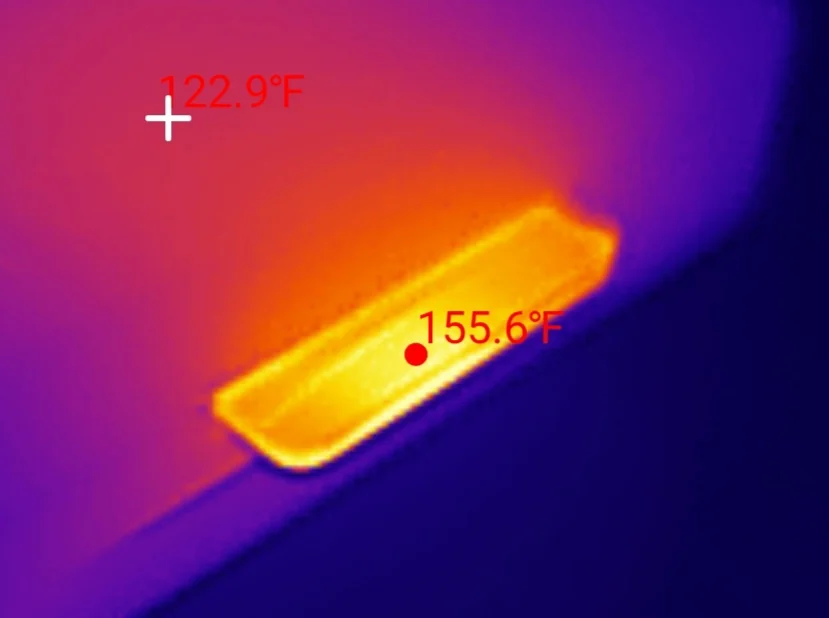
Hotter than it should for the work it is doing, yes, and it made no practical difference in this test. The card body reached 155.6°F in a 76°F room at the end of the five-minute write, a rise of 79°F over ambient. The rise is the number worth carrying, because that is what stacks on top of whatever the air around the card already is: the same card in a windscreen-mounted dash cam on a hot afternoon starts from a much higher baseline than a desk does.
Where it looks poor is efficiency. The Samsung EVO Plus rose 59°F in the same room while sustaining 30% more throughput. Measured as degrees of rise per MB/s delivered, this card sits sixth out of the eight comparable 128 GB cards on the bench. An older manufacturing process doing less work for more heat is exactly the shape you would expect from a 2018 part, and it is the only measurement here where the card's age visibly counts against it.
It cost nothing in this run. Nothing throttled, nothing stalled, the longest single pause in the whole five minutes was 220 milliseconds, and the card went straight on to write another 127.8 GB at the same rate afterwards.
The 2026 card is worse on both counts. It reached 165 °F in the same 76 °F room, a rise of 89 degrees, which is the highest of any 128 GB microSD card I have tested. And it did that while sustaining 24.7 MB/s rather than 61. Expressed as degrees of rise per megabyte per second delivered, that is 3.61 against the older card's 1.32, making it comfortably the least heat-efficient card in this collection.
Neither card throttled and neither stalled, so in a card reader on a desk this is a curiosity rather than a problem. It is worth knowing for a sealed dash cam housing on a summer afternoon, where the rise stacks on top of an ambient that is already high, and where the newer card is producing more heat to move less data.
It gets hot and it does not care
How old are they, and which versions?
The card face prints no speed and no model number, and that is a real problem for reviewing it, because SanDisk has sold the Ultra 128GB at 80, 100, 120, 140 and 150 MB/s across the years, several of those behind the same face design. Reviewing it against the wrong number would either flatter it or fail it for a promise it never made.
So I asked the chip. Every SD card carries a CID register, a small block of read-only data with the manufacturer, a product code, a serial number and a manufacture date. Read on a Raspberry Pi with the card in a native SD slot, this one reports September 2018, which makes it seven years and eleven months old and the oldest card on the bench. That date settles the version: SanDisk's spec sheet for the generation shipping then rates 64GB to 512GB at 100 MB/s, and the 120 MB/s version arrived on a later sheet that also requires a proprietary mode faster than UHS-I normally allows. This card never negotiates that mode on a reader I know can deliver it, which is the physical confirmation that it is the older, slower part. If you want to read your own card's register, there is a decoder for that.
The 2026 card answers the same question instantly: June 2026, product code
SK128, revision 8.6, against the older card's SC128 at revision 8.0.
Two months old at test. Its box also prints its part number, SDSQUJQ, which the older card's
face never did.
The registers confirm the printed faces on both, including the one visible difference between them. The SD Status register reports no video speed class at all on the 2018 card and V10 on the 2026 one, exactly matching what is stamped on each. Both report Class 10 and UHS speed grade 1. The marks tell the truth. They just cannot tell you which card writes faster. What the registers can tell you, on this pair and on two more, is the subject of its own article.
Two scores, one recommendation
Scored separately, because they are different products that happen to share a name. The gap between them is not in the scores. It is in the one row neither package fills in.
SanDisk Ultra 128GB, September 2018 (SDSQUAR)
Scored against the CKBench rubric. Five dimensions, each out of 5.
Final score: 4.5 out of 5. An honest, predictable card that beats every promise it makes, held back by a sustained rate that lands just under the class its averages suggest and by running warm for the work it does. The rows were restated on the September 2026 scoring tables on 19 September 2026: endurance moved to 4.5 on the recovery-time deduction; the mean stays 4.5.
SanDisk Ultra 128GB, June 2026 (SDSQUJQ)
Scored against the CKBench rubric. Five dimensions, each out of 5.
Final score: 4.0 out of 5. It keeps every promise on the package and its read speed is genuinely excellent. It loses half a grade on the two things the packaging cannot tell you: it is the slowest real 128 GB card here, and it runs the hottest for the work it does. The rows were restated on the September 2026 scoring tables on 19 September 2026: sustained moved to 2.5 on the absolute ladder, endurance to 5 on fade and recovery, thermal to 3.5 on headroom; they average 4.2, still 4.
Frequently Asked Questions
Is the SanDisk Ultra 128GB good for a dash cam?
For 1080p yes, for 4K no, and the 2026 version is the weaker of the two. The older card holds 59.7 MB/s through its worst ten seconds and the newer one 24.1, against the 3 MB/s a 1080p60 dash cam needs and the 6 MB/s a 4K30 one needs. Both have room at Full HD. At high-bitrate 4K the older card scrapes through at 1.7 times and the newer one fails at 0.7. Neither prints an endurance rating, and a dash cam overwrites its card constantly, so a purpose-built high endurance card is the better tool for either resolution.
How fast is the SanDisk Ultra 128GB really?
It depends which one you have. The 2018 version reads 96.7 MB/s and writes 60.7. The 2026 version reads 203.5 MB/s and writes 25.2. Those write figures are measured with every byte committed to the card, the way a camera actually records, so they read lower than burst benchmarks. The read figures need a capable reader: the newer card returns 180.7 or even 96 on ordinary readers, and that is the reader being measured rather than the card.
Why does my 128GB card only show about 119 GB?
Because Windows and the card maker are counting differently, and neither is lying. Manufacturers use decimal gigabytes, where 128 GB means 128,000,000,000 bytes. Windows reports in binary units but labels them "GB", and 128,000,000,000 bytes divided by 1,073,741,824 comes to about 119. This card handed over 127.84 decimal GB of usable space, which is 99.88% of its label, so nothing is missing. A card that is genuinely faking its capacity fails very differently, and you can see what that looks like in the counterfeit I tested.
Is the newer SanDisk Ultra an upgrade over an older one?
Only if you care about reading. The 2026 card reads more than twice as fast, which halves the time to empty a full card. It also writes at 40% of the speed of the 2018 card, drops from V30 to V10 on measured sustained write, and takes 51 minutes longer to fill. If your card is being written to continuously, by a camera or a dash cam, the older one is the better card and swapping it out is a downgrade. Neither package prints a write speed, so there is no way to see this without measuring it.
Is the SanDisk Ultra A1 rating worth anything?
Probably, and I cannot prove it on this bench. A1 promises a minimum number of small random operations per second, which is what makes apps and photo libraries feel responsive rather than sluggish. The official test for it needs command queuing, a feature USB card readers do not implement, so any figure I measure is not comparable to the threshold in either direction. My numbers came out above the A1 floors, which is encouraging, but I am reporting it as untestable rather than claiming a pass.
Should you buy the SanDisk Ultra 128GB?
Buy it for a phone, a tablet or a handheld, and buy the current one, because it is the only one you can buy. For that job it is a good card. It reads faster than anything else in its price class, it delivers every gigabyte on the label, it is A1 rated so apps and photo libraries behave, and it clears the video class it prints by two and a half times. Nothing in this review says do not buy it.
What this review says is do not assume it is an upgrade. If you have a working Ultra from a few years ago in a camera or a dash cam and you are about to replace it with a fresh one, you are about to lose 60% of your write speed and two video speed grades. The card will still record 1080p comfortably. It will no longer keep up with high-bitrate 4K, where the old one just about did. Same product name, same U1 mark on the front, and no write figure printed on either package to make any of that visible. It is not a SanDisk habit either: Lexar leaves the write figure off its Blue tier while publishing one for the tier above, and PNY's Premier-X prints a footnote that says the write speed is lower and stops there. Measured, the unstated write on this bench has run from an eighth of the read claim to nearly all of it.
For anything that writes continuously all day, neither of these is really the right card. Neither prints an endurance rating, and constant overwriting is what the High Endurance line exists for. The Ultra is a phone card that happens to be good at Full HD, and it has been that on both sides of an eight-year gap. What changed is how much free headroom you got on top.
One honest caveat. Each of these is a single card, one used and one new, so nothing here generalizes to every unit on every shelf. What two cards eight years apart can tell you is which direction this product line moved, and on the number nobody prints, it moved backwards.
Device identity: what these cards report about themselvesSanDisk, 09/2018 and 06/2026
| Field | 2018 card · 2026 card |
| Manufacturer ID (MID) | 0x03, SanDisk / Western Digital · identical |
| OEM / application ID (OID) | 0x5344, "SD" · identical |
| Product name (PNM) | SC128 · SK128 |
| Product revision (PRV) | 8.0 · 8.6 |
| Manufacture date (MDT) | September 2018 · June 2026 |
| Serial number (PSN) | 0xb818… · 0x2d3a… |
| Declared capacity (from CSD) | 127,865,454,592 bytes, 99.9% of label · 127,999,672,320 bytes, 100.0% of label |
| SD Status: speed class | Class 10 · Class 10 |
| SD Status: UHS speed grade | U1 · U1 |
| SD Status: video speed class | none · V10 |
| Captured on | Raspberry Pi 4 native SD host, no USB bridge in the path · 2026-08-04 and 2026-08-24 |
Manufacturer, product name, revision and manufacture date are model-level facts and will match any other card from the same production run. Serial numbers are unique to each physical card, which is why they are partly hidden here. The manufacture dates did the real work in this review: with no speed printed on the 2018 card and five different ratings sold under that face over the years, the date is what identified which version it actually was. The video speed class row is the one visible difference the registers report, and it matches what is stamped on each card.
Disclosure: The 2018 card is a personal one I bought at retail years ago and have used since. The 2026 card I bought new specifically to run this comparison. Nobody supplied either, and nobody was told they were being tested. The card linked below is the 2026 one, which is one of the two reviewed here. This post contains affiliate links. As an Amazon Associate I earn from qualifying purchases, at no extra cost to you. Affiliate links like these and my YouTube channel are what keep the site running.