
The fake that passes every speed test: a 32 GB card in a 128 GB coat
This card says SanDisk. It says ImageMate. It says 128 GB. The flash inside it verifies at 34.3 gigabytes, which is 26.8% of the number on its face, and its own hardware registers back the lie: they declare 128 GB and a forged SanDisk identity to any computer that asks. And then it does something we did not expect: it passes every speed test we threw at it. That combination is what makes it dangerous, and it is why a benchmark will never catch a card like this.
Prefer to watch?
The counterfeit teardown is heading to the channel. Subscribe to catch it and the next card that hits the bench.
The short version
Do not buy this card, and if you own one, get your files off it. Its real, verified flash is 34.3 GB where the label says 128, so 93.7 GB of what you paid for does not exist, and since our July 31 register capture we know its own controller claims the fake 128 GB too. Everything else about it is oddly competent: it commits sequential writes at 33.2 MB/s, holds a V30 sustained floor, and meets the A1 app-performance floors it prints on its face. That is the whole point of this article. The speed is real, the capacity is not, and no speed test ever written would have told you.
Verdict: counterfeit, do not buyUpdated 31 July 2026. Our new register-reading rig pulled this card's hardware identity, and two findings changed this article. Its registers declare 127.9 GB, so the controller is in on the fraud after all and our original claim that the silicon was honest was wrong. And its electronic identity is a coherent SanDisk forgery that an ID-checker app would wave through. The corrected passages are rewritten below, the new section has the full story, and the raw registers are published in the appendix at the end of the page.
What this card actually is
- NoA 128 GB cardVerified flash: 34.3 GB, 26.8% of the label. Its registers claim all 128.
- NoA genuine microSDXCThe real flash is SDHC-sized at 31.98 GiB. Only the forged registers say SDXC.
- YesA working 32 GB cardEvery byte it claims was written and read back clean.
- YesGenuinely quickV30 held, A1 met, 33 MB/s committed writes.
If this had been sold honestly as a 32 GB card, it would be a perfectly decent one. It was not. The label is the product, and the label is a lie.
Why a fake card is worth an hour on the bench
Counterfeit memory cards are usually described the same way: cheap junk, slow as treacle, dies in a month. Cheap does not mean fake either, and the Newegg TeamGroup 128GB is the counterexample on this bench: about half the going rate for its class, and every byte of its capacity verified real. That description is comfortable because it suggests you could spot one by using it. This card is the reason that advice fails. It is fast. It is consistent. It survived a full write and read of every byte it claims to hold without a single error. If you bought it, formatted it, copied a few files across and ran any benchmark on the internet, you would conclude you had a good card.
You would be wrong by 93.7 gigabytes, and you would find out the day your camera wrapped around and started overwriting footage you thought was still there.
So we ran it through the full CKBench suite the same way we run every card: every test byte committed to the card and confirmed, every byte read back and checked against what we wrote. This is the third card on CKBench, after a SanDisk High Endurance that beat its own label and a Kioxia Exceria G2 that quietly kept four gigabytes for itself. This one is a different category of problem.
Why our write numbers read lower than other reviews. Every write here is committed to the card and confirmed before the clock stops, the way a camera actually records, so our figures land below burst benchmarks like CrystalDiskMark that measure a few seconds of the card's RAM buffer. That rule, and the decimal MB/s and binary MiB conventions used throughout, are set out on the how we test and score page.
How much of the label is real?
We originally wrote that no test was needed for this part: the volume our bench tested reported 34,338,734,080 bytes, and we took that as the controller being honest while only the label lied. The July 31 register capture corrected us. Asked directly at the hardware level, this card claims 127,865,454,592 bytes, and it gives that same answer on two independent buses. The honest number lives only in the flash itself, and it takes a full write-and-verify to find it. The dishonest number is everywhere else: printed on the front in the largest text on the card, and stored in the silicon that answers for it.
What the label promises against what the card hands over
Decimal gigabytes, the same units the label uses. Measured on our bench, all three cards on the same reader.
The Kioxia's shortfall is a design decision you can argue with. This one is not a shortfall, it is a different card wearing the wrong number. The real flash is a 32 GB part: 31.98 GiB in the units your computer uses, which is exactly the ceiling of the SDHC standard, one tier below the microSDXC mark printed on its face. The registers, meanwhile, declare SDXC-range geometry to match the costume rather than the flash.
Worth being precise about the size of the lie, because two numbers get muddled. Measured in bytes, the label overstates the card by 3.7 times. Measured the way cards are sold, it is a 32 GB card sold as a 128 GB card, which is four tiers of the product line in one step. Both are true. The one that matters to you is the 93.7 GB you paid for and cannot use.
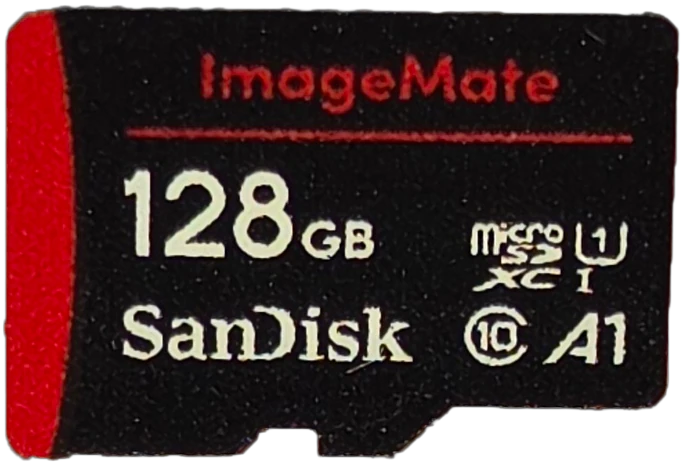
What the card claims, and what it did
This is the table that surprised us. Six checkable marks are printed on the face. We expected a clean sweep of failures. We got two.
| Printed on the card | Measured | Verdict |
|---|---|---|
| 128 GB | registers claim 127.9 GB; 34.3 GB of real flash written and read back clean | FAILS, 26.8% of label |
| microSDXC | registers claim SDXC-range geometry, but the real flash is 31.98 GiB, SDHC territory | WRONG FAMILY MARK |
| Class 10 | worst ten seconds 31.8 MB/s against a 10 MB/s floor | MET, 3.2 times over |
| U1 | 31.8 MB/s against a 10 MB/s floor, and it holds U3 | MET, one grade higher |
| A1 | 1611 read and 595 write IOPS against 1500 and 500 floors | MET, both floors |
| UHS-I | 145.5 MB/s read on a reader that supports the faster mode | MET |
| (no video class printed) | holds a V30 sustained floor unprinted | V30, unprinted |
| (no read or write speed printed) | 33.2 MB/s committed sequential write; 96.1 MB/s read on a standard UHS-I reader, 145.5 on one that speaks the faster mode | NOT CLAIMED |
| (no endurance rating printed) | nothing to check, and nothing a forged label would be bound by in any case | NOT CLAIMED |
| (no operating temperature range printed) | hot spot reached 150.1 F (65.6 C) at the end of the timed write, at a third of the SanDisk's write rate | NOT CLAIMED |
| (no warranty printed, no packaging retained) | a genuine SanDisk retail card carries a limited warranty; a forged label carries nothing | NOT A PERFORMANCE CLAIM |
Read that table again with the fraud in mind. A counterfeiter who wanted to maximize margin would have soldered the cheapest flash they could find behind a fake label and shipped it. Whoever built this card did the opposite: they used flash good enough to clear Class 10, U3, A1 and V30, then lied about the only specification that sets the price. It is a more sophisticated fraud than the usual one, and it defeats every consumer-grade check except the right one.
The fake is genuinely fast
Five minutes of continuous committed writing with the cooling fan off, which is the test that separates cards that can record video from cards that cannot. It burst at 32.8 MB/s, settled at 32.6, and its worst ten-second window in the whole run was 31.8 MB/s. There is no knee in the trace: the cache analysis returned NO_KNEE_STABLE, meaning the card never ran out of fast storage and fell off a cliff, because it never had a fast tier to run out of in the first place. It writes at one speed from the first byte to the last.
The consistency is the striking part. We sample write throughput at three positions across the card, at the start, the middle and the end of its address range, which is where a tiered fake shows its seams. It returned 32.75, 32.74 and 32.78 MB/s. That is a spread of 0.12%, tighter than either genuine card in the corpus. Across 9,332 individual one-megabyte blocks the slowest single write took 199 milliseconds, on a file roll, and nothing crossed half a second.
For the record, that is enough for 4K30 dash cam recording with five times the margin it needs, and enough for 4K60 on a consumer camera. If the number on the front said 32 GB, this would be a recommendable budget card. It says 128.
Why this fake reads faster than a real SanDisk
Sequential read came back at 145.5 MB/s, which stopped us, because on the same reader the genuine SanDisk High Endurance reads 96.8 and the genuine Kioxia reads 96.8. A counterfeit outrunning both by half again is not what anyone expects.
It is real, and the explanation is the reader. We ran the card through a second reader, a standard UHS-I unit, and it returned 96.1 MB/s, landing on the same figure as the two genuine cards. Roughly 96 to 97 MB/s is the ceiling of standard UHS-I signalling. Our main reader supports a faster non-standard read mode on top of that, and this card's controller happens to support it too, while the two retail cards do not. So the counterfeit is not faster flash. It is a controller that speaks a protocol extension the genuine cards skip.
The practical version: expect about 96 MB/s from this card on a normal reader. The 145 figure only appears on hardware that supports the faster mode, and we publish both because a number you cannot reproduce is not much use to you.
The only test that catches a card like this
Every test above is a speed test, and every one of them passed. Speed tests read and write a small region, usually a gigabyte or less, and a fake card has no trouble at all being fast inside a region it genuinely owns. To catch a capacity lie you have to fill the card and read every byte back, and you have to write data the card cannot guess so it cannot fabricate the answer.
That is the capacity test. It wrote 34,338,668,544 bytes of seeded, verifiable data across 32 files until the card was full, then read all of it back and compared every byte against what it should have been. The fill ran at 33.3 MB/s and took 19 minutes 5 seconds. The read back took 4 minutes 2 seconds.
| Capacity test | Result |
|---|---|
| Bytes written | 34,338,668,544 (34.3 GB) |
| Bytes read back and verified | 34,338,668,544, all of them |
| Mismatched bytes | 0 |
| Read errors | 0 |
| Verdict | PASS at its real size |
This is the finding that decides how to describe the card. There are two common kinds of fake. The first is a capacity-fraud card: the controller is reprogrammed to report a size it does not have, it accepts writes forever, and it silently wraps around and destroys your earlier files. Our tool is built to decode that, and it will measure the real flash size from the wrap pattern when it finds one.
When we first published, we called this card the second kind. The volume on our bench reported 34.3 GB, it verified clean at 34.3 GB, and we wrote that the fraud lived only on the label, not in the silicon. That was wrong, and the July 31 register capture is what caught it. Asked at the hardware level, this controller claims 127.9 GB, on a native SD bus and through a USB reader alike. The right-sized 34.3 GB volume our suite tested was partitioning, not honesty, and we can no longer establish whether that partition arrived on the card or was left behind by our own earlier diagnostic session. What we can establish is the part that matters to a buyer: a controller that declares 127.9 GB over 34.3 GB of real flash is the first kind of fake after all. Store more than 34 GB on it while trusting the claimed size, and the wrap-around failure described above stops being hypothetical. One grace note stands: within its real capacity, every byte we wrote came back intact.
The card's ID papers are forged too
Five days after this review went up, our register-reading rig came online: a Raspberry Pi with a native SD slot, built because USB card readers hide a card's identity registers behind their bridge chips. Every SD card carries a burned-in identity called the CID: a manufacturer code, an OEM tag, a product name, a revision, a serial number, a manufacture date. We put this counterfeit in the slot expecting the usual lazy-fake tells, a wrong manufacturer code or an all-zero serial.
It gave us none. This card presents a complete, coherent SanDisk identity: manufacturer ID 0x03 with OEM tag SD, which is the genuine SanDisk signature, a plausible product name, a plausible revision, a normal-looking serial, a manufacture date of December 2024. Field for field, its paperwork is indistinguishable from that of the genuine SanDisk we scored 5/5. Whoever programmed this controller copied the whole costume, not just the label.
That has an uncomfortable consequence for the standard advice. The usual second check for a suspect card, after eyeballing its capacity, is an ID-reader app that shows the manufacturer code. This card passes that check. A forged identity register costs the counterfeiter nothing, because the same firmware that lies about capacity will happily lie about provenance. An identity check can damn a card that fails it, but it can clear nothing, and this unit is the proof.
The same capture is what exposed the capacity claim covered above: the registers declare 127.9 GB of a card that physically holds 34.3. Two lies, one chip, both told with a straight face. The complete register dump, raw hex and all, is published in the identity appendix at the bottom of this page, so you can compare a suspect card of your own against a known forgery.
How hot does the fake get?
The sustained leg runs with the bench fan off so the card heats the way it would inside a sealed camera body, and the thermal frame is captured the instant the write stops, because a card sheds heat in seconds.
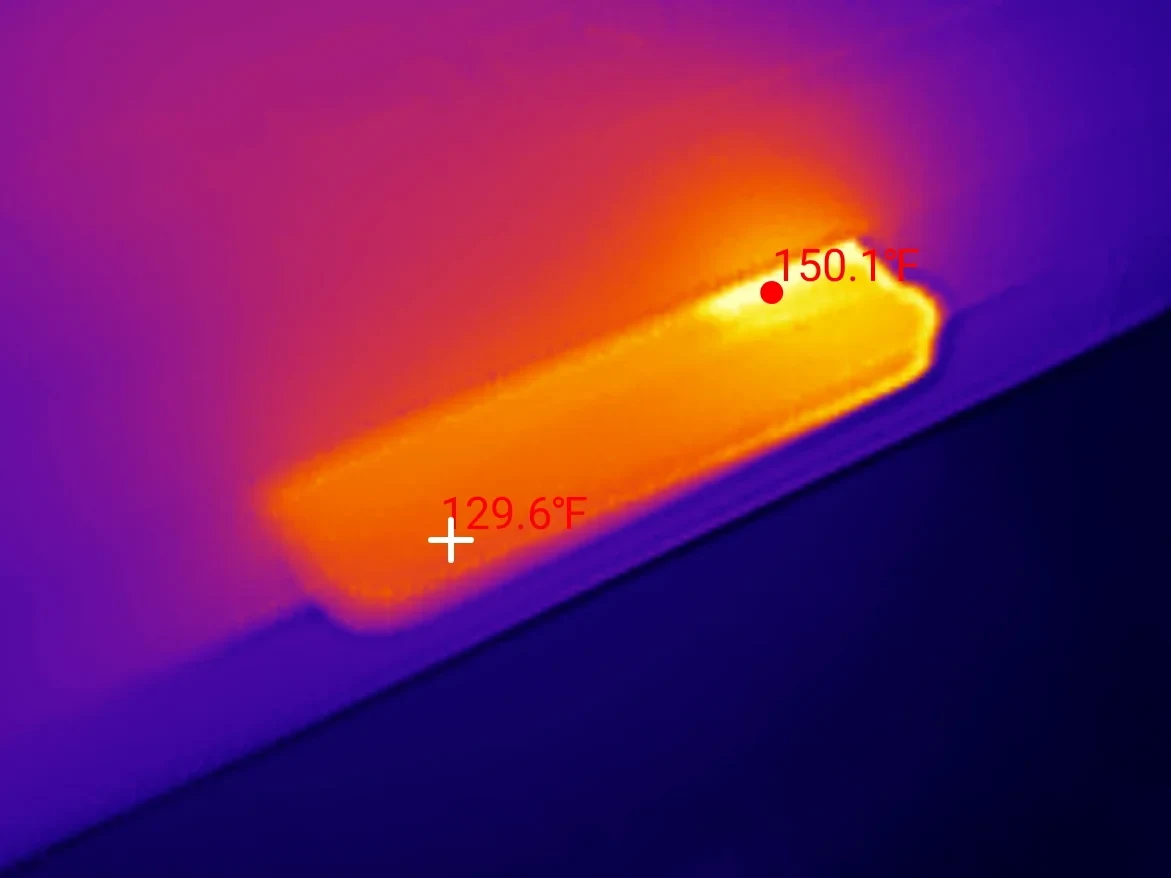
That is a rise of 74 F over the room, and it is the one result where this card looks genuinely worse than the real ones. The SanDisk High Endurance peaked at 151.4 F while writing 88 MB/s. The Kioxia peaked at 143.3 F at 63 MB/s. This card reached 150.1 F while writing 32.6 MB/s, which is roughly a third of the SanDisk's workload for the same heat. Whatever is inside it is working much harder for much less output.
It never slowed down, so this is not throttling. It is simply an inefficient part. In a dash cam mounted against black plastic in summer sun, that is the difference worth knowing about, and it is one more reason not to trust the card with anything you care about.
The hour this card spent running at 6 MB/s
We tested this card once before, on 2026-07-17, and got a completely different set of numbers. Sequential write 5.9 MB/s. Sequential read 6.1 MB/s. Sustained 5.9. Every single throughput measurement in that session, reads and writes, canary and sequential and sustained and fill, landed between 5.69 and 6.11 MB/s. It held no speed class at all and missed the A1 floors by half.
Flash does not behave that way. Reads are always substantially faster than writes on a memory card, usually by three to twenty times. A device whose reads and writes are identical to within four percent is not showing you its flash, it is showing you a bottleneck somewhere in the link. So we went looking for one.
The obvious suspect was the card reader, since that run used a different one. We tested it: the same reader moved 89.3 MB/s write and 96.1 MB/s read for the genuine SanDisk High Endurance, within one percent of what our main reader gives that card. The reader is fine. We then put this counterfeit back into that same reader nine days after the first run, and it returned 36.3 MB/s write and 96.1 MB/s read. The slow session does not reproduce.
Our best explanation is that the card failed to negotiate a high-speed bus mode that day and spent the whole hour in a legacy fallback, which produces exactly the symmetric ceiling we recorded. What argues for it is that the slow run was otherwise clean: no errors, no retries, no stalls, just a flat rate for over an hour. A loose contact gives you noise and failures, not a stable ceiling. We cannot fully exclude a badly seated adapter, and with one occurrence and no reproduction we are not going to pretend to certainty.
We are including it because if it is a real intermittent fault, it matters more than anything else on this page. A card that occasionally drops to 6 MB/s in a 4K dash cam would silently stop keeping up, and you would find out when you needed the footage. One event, not reproduced in two later sessions, recorded here rather than tidied away.
How this card scores, and why the number is a 1
Every CKBench review is scored on the same five dimensions, judged against what the card is for rather than against an SSD. Here is this card's breakdown, which is more interesting than the final number.
SanDisk ImageMate 128GB
Scored against the CKBench rubric. Five dimensions, each out of 5.
Final score: 1 out of 5. The dimensions average 2.4, and we are not publishing 2.4. The rubric carries one disqualifier: a card that materially misrepresents its capacity is capped at 1 regardless of everything else, because every other measurement is irrelevant when the space is not there. This card is the reason that rule exists.
Bench conditions, and what we did not test
The bench. Card read through a ProGrade MSD PGM0.5 over USB on a Windows 11 host, tested on the card's FAT32 filesystem as it sat on the bench that day (after the July 31 register capture we can no longer establish that volume was factory state; see the update), 512-byte sectors with every operation issued 4096-byte aligned. All test I/O uses unbuffered write-through handles and the write timer stops only after the flush returns. That is what "committed" means throughout this article. Cross-checks on the second reader used a Transcend TS-RDF5.
Power loss is not tested. Sudden power removal mid-write is one of the most common ways a card fails in a camera, and nothing in this suite touches it. It needs switchable power hardware and a protocol that deliberately risks the card, so it is a separate project. Treat every result here as describing a card that was never interrupted.
One card, one unit. This is a single counterfeit, and counterfeits are not a product line with quality control. Another card with the same printed face could contain completely different flash, a different controller and a different real capacity. Nothing here should be read as a description of "this model", because there is no model. There is only this unit.
How do I check my own memory card?
The check is the same one that caught this card, and you do not need our tool to run it. The principle: fill the card completely with data the card cannot predict, then read all of it back and confirm it matches. Anything less than the full card will miss a capacity lie, and anything predictable, like copying the same file repeatedly, can be faked by a controller that recognizes repeated data.
Three practical routes, in the order most people should try them:
- Check the reported size first, but do not trust a pass. The laziest fakes are caught in seconds this way. Right-click the drive, look at the capacity, and remember your computer counts in binary: a genuine 128 GB card shows about 119 GB, and a genuine 32 GB card shows about 29.8 GB. If a card sold as 128 GB shows anything near 30, you already have your answer. Just know that the reverse proves nothing: this card's own registers claim the full 128 GB, so a correct-looking size on screen is exactly what a competent fake shows you.
- Run a free full-card verifier. H2testw and F3 are the long-standing free tools for this, and both do the same essential thing: write verifiable data to every free byte and read it back. Budget several hours for a large card, because the card's own write speed sets the pace.
- Buy from somewhere that will take it back. The most reliable protection is not a test, it is a refund. Counterfeits concentrate in marketplace listings from unfamiliar sellers, and the price is usually the tell.
If a card fails, stop using it and claim a refund. A card that lies about its size will eventually overwrite something you wanted, and no amount of speed makes up for that.
Disclosure: I bought this card at retail with my own money. SanDisk had no involvement in this test and no editorial input, and this card is not a SanDisk product regardless of what is printed on it. This post contains affiliate links. As an Amazon Associate I earn from qualifying purchases, at no extra cost to you. Affiliate links like these and my YouTube channel are what keep the site running.
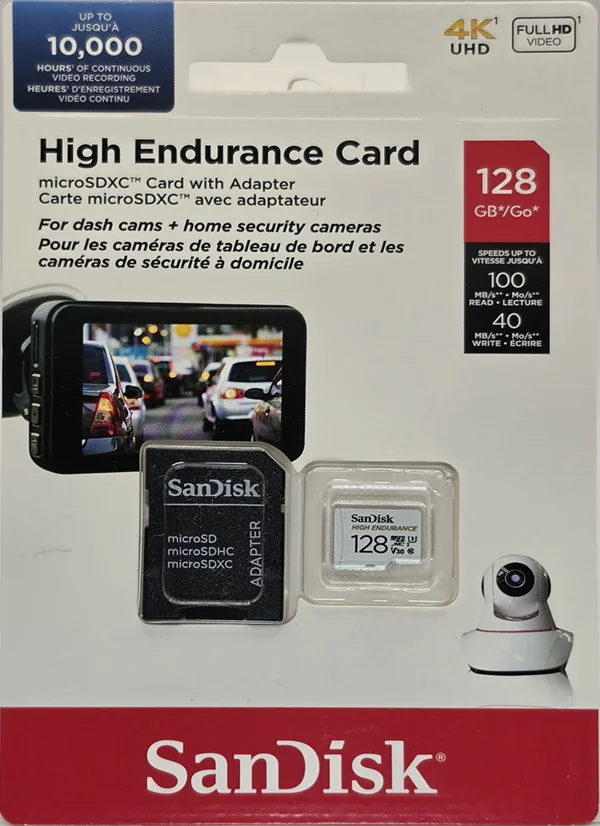
Buy this instead
SanDisk High Endurance 128GB
The card we benched end to end that delivered all 128.0 GB with zero mismatched bytes, beat its own write spec by 2.24 times, and scored 5/5.
Frequently Asked Questions
How do I know if a SanDisk microSD card is fake?
Check the reported capacity first, because the cheapest fakes are caught in seconds without writing anything. Your computer counts in binary, so a genuine 128 GB card displays as about 119 GB and a genuine 32 GB card as about 29.8 GB. If a card sold as 128 GB reports anything near 30, it is not a 128 GB card. But a correct reported size clears nothing, and neither does an ID-checker app: the counterfeit in this review declares a full 128 GB and a forged SanDisk identity in its own hardware registers. The only test that settles it is to fill the entire card with verifiable data and read every byte back, using a free tool like H2testw or F3. Speed tests cannot detect a fake: the card in this review passes Class 10, U3, A1 and V30.
Is a fake memory card dangerous to my files?
It depends which kind you have, and this review is a caution against assuming the safer kind. The worst kind reports a size it does not have, accepts writes forever and silently wraps around to overwrite your earlier files, so data you believe is stored has already been destroyed. We initially took the card in this review for the harmless kind, because the volume we tested reported its real 34.3 GB and verified with zero mismatches. Its hardware registers later showed the controller claims 127.9 GB, which puts it in the dangerous category after all: fill it past its real flash while trusting the claimed size and earlier files get destroyed. Within its real 34.3 GB, every byte we wrote did come back intact.
Why does my 128GB card only show 119 GB?
That one is normal and is not a fake. Windows counts in binary units, so a genuine 128 GB card, meaning 128,000,000,000 bytes, displays as about 119 GB. The same bytes are simply divided by 1,073,741,824 instead of 1,000,000,000. Nothing has been taken from you. A real shortfall looks different: the counterfeit in this review physically holds 34.3 GB against a 128 GB label, a quarter of what was advertised rather than a units difference. And the trap runs the other way too: that same counterfeit declares a full 128 GB in its registers, so a right-looking number on screen does not prove a card is genuine.
Can a fake memory card be fast?
Yes, and this one is. It committed sequential writes at 33.2 MB/s, held a V30 sustained floor with a worst ten-second window of 31.8 MB/s, and met both A1 app-performance floors at 1611 read and 595 write IOPS. It even read faster than two genuine retail cards on the same reader. Speed and authenticity are unrelated properties, which is exactly why benchmarking a suspicious card tells you nothing useful about whether its capacity is real.
What should I do if I bought a fake SD card?
Stop using it for anything you care about, copy off whatever is currently on it, and claim a refund through the marketplace you bought it from. Counterfeit listings are a policy violation on every major platform and capacity fraud is straightforward to evidence: a screenshot of the reported size next to the advertised size is usually enough. Do not reformat it before you claim, because the reported capacity is your evidence.
Bottom line: competent flash, fraudulent label
Bottom line: this is a 32 GB card sold as a 128 GB card, and it is the most interesting fake we have tested precisely because it is not junk. It writes at 33 MB/s, holds V30, meets A1, keeps one speed from the first byte to the last, and passed a full write and verify of every byte it claims without a single error. Sold honestly at its real size it would be a decent budget card. It was not sold honestly, and 93.7 GB of what you paid for does not exist. Since publication, its own registers have joined the indictment: a forged SanDisk identity and a claimed 127.9 GB, so the silicon tells the same lie the label does.
The lesson is bigger than one card. The usual advice for spotting a counterfeit is to benchmark it or check its identity with an app, and this card passes every benchmark you could reasonably run and the identity check besides. The only thing that exposed it was filling all of it and reading all of it back. That is the test worth knowing about, it is free to run, and it is the one nobody does. My rating: 1/5, scored against the CKBench rubric.
Device identity: what this counterfeit reports about itselfReference data from the July 31 register capture, collapsed because most people do not need it. Open it to compare a suspect card against a known forgery, or to see how completely an electronic identity can be faked.
| Raw CID register | 0353445344313238857dd2873d018c00 |
| Manufacturer ID (MID) | 0x03 (SanDisk / Western Digital) · forged |
| OEM / application ID (OID) | 0x5344, ASCII "SD" · the genuine SanDisk signature, forged |
| Product name (PNM) | SD128 |
| Product revision (PRV) | 8.5 |
| Serial number (PSN) | 0x7dd2873d · published in full, deliberately |
| Manufacture date (MDT) | December 2024, as claimed |
| Declared capacity (from CSD) | 249,737,216 sectors of 512 bytes = 127,865,454,592 bytes |
| Verified real capacity | 34,338,668,544 bytes written, read back and matched |
| Raw CSD register | 400e00325b590003b8ab7f800a404000 |
| Raw SCR register | 0245804300000000 |
| Raw SD status (SSR) | 00000000080000000400900000001900000000000001000001000000000000000000000000000000000000000000000000000000000000000000000000000000 |
| Captured on | Raspberry Pi 4 native SD host, no USB bridge in the path · 2026-07-31 |
On the genuine Ultra Fit's page we truncate the serial number, because publishing a verified-genuine serial mostly helps whoever wants to clone it onto a counterfeit. This is the opposite case. Every field in this table is a forgery, so we publish all of it: if your SanDisk-branded card reports this CID, or this serial under a different claimed capacity, you are holding a relative of this card.
The larger point of this table is what it cannot prove. Every row here is authored by the card's own controller, and this controller demonstrably lies. Register data can damn a card when it contradicts the label; it can never clear one. It is also worth saying what a suspicious register is not: a VIOFO card we tested reports a manufacturer ID that appears in no public registry, and it is a perfectly genuine card that delivers every byte it claims. Unlisted is not the same as forged. Treat identity fields as testimony from a witness with every incentive to deceive, and treat a full write-and-verify of every byte as the only physical evidence.
More from CKBench
Every card we test gets the same treatment: every byte committed, every byte verified, and the numbers published whether they flatter the card or not.
See every card we have tested