
SanDisk Ultra Fit 32GB: what "up to 130 MB/s" does not tell you
I pointed a thermal camera at the SanDisk Ultra Fit 32GB, my own Raspberry Pi boot drive, expecting to catch it throttling on heat. The camera cleared the heat completely, and the real culprit was hiding somewhere else.
No video on this one
This was a bench session rather than a shoot, so there is no video to embed. I do put the memory card teardowns and speed tests on the channel. Subscribe if you want the next one.
The short version
The SanDisk Ultra Fit 32GB prints exactly one performance number on its packaging, "speeds up to 130 MB/s read", and it genuinely beats it: I measured 148.8 MB/s. It is also the least useful true thing anyone could print about this drive. The number it does not print is the write speed, which settles at 8.7 MB/s after the first gigabyte, and for 448 seconds out of a 58 minute fill it wrote nothing at all. Capacity came back perfect: 30.8 GB written and read back with zero bad bytes.
Genuine drive, honest claim, misleading spec sheetWho this drive is for
- YesLiving permanently in a portIt is barely larger than the connector. That is the entire product.
- YesFiles you write once and read oftenDocuments, installers, media. Reading is where this drive is genuinely good.
- YesBoot media for a Pi or a PCWriting the image is slow. Once installed, a root filesystem is mostly reads.
- NoBackups or large transfers8.7 MB/s sustained means roughly an hour per 30 GB.
- NoRunning applications or databases0.68 MB/s random write. Anything that writes constantly will crawl.
- NoCamera, dashcam or video recordingThis is not a memory card and carries no video speed class at all.
Rough transfer math: at the 8.7 MB/s this drive sustains once its cache is gone, filling all 30.8 GB takes about 58 minutes. That is the number to plan around, not the 130 on the front of the box.
I tested this drive because I was about to depend on it
Nobody sent me this drive. There is no review unit, no embargo and no launch. I bought it at retail months ago and it was about to become the boot device for a Raspberry Pi rig I am building to read card identity registers. That rig is going to spend its life telling me whether other people's memory cards are genuine, so it seemed worth knowing whether its own boot drive was genuine first.
That is the whole reason this post exists. A bench that only measures the things it is sent is not a bench, it is a press channel. So the equipment I rely on gets the same treatment as anything on the CKBench test bench, and when it produces something surprising I publish that too.
One thing to set straight before the numbers start: this is a USB flash drive, not a memory card. It gets a score at the end, but it is scored as a flash drive on its own terms. The rubric I use for scoring memory cards leans on things like sustained video write class and app performance class, and a thumb drive carries none of those certifications, so grading it against them would be a category error. It also means this drive never lands in a memory card comparison table, because it is not competing with them.
It produced something surprising. Three times I formed a confident explanation for what I was seeing, and three times the measurement killed it.
There is exactly one number on the box
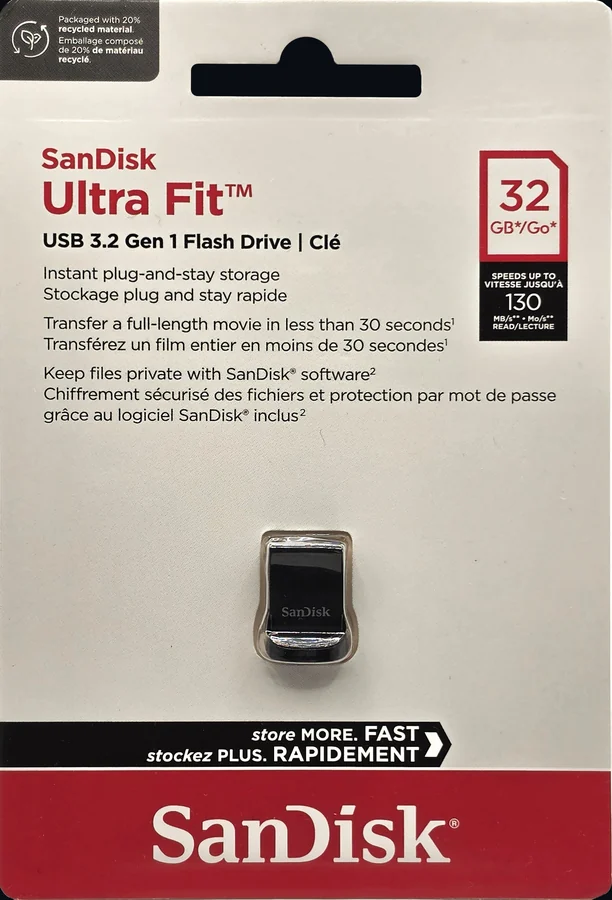
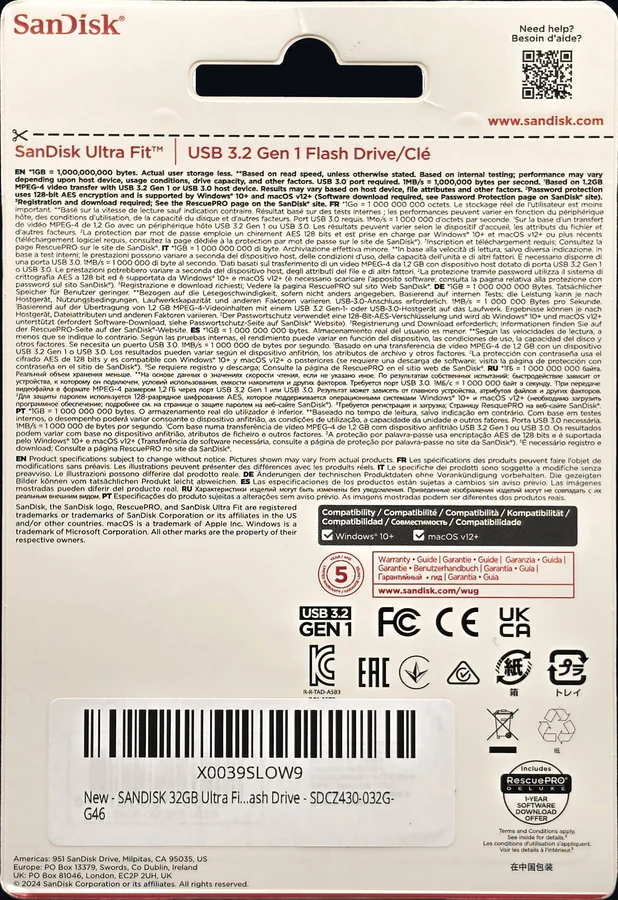
Read the packaging carefully and something stands out. In the red panel on the front: "speeds up to 130 MB/s read". On the back, a footnote clarifies that the figure is "based on read speed, unless otherwise stated". Nothing else is otherwise stated. There is no write speed anywhere on the packaging, no endurance rating, and no sustained figure.
That absence is not an oversight. It is a decision. Ultra Fit is a well known slow writer, and declining to print a write number is a manufacturer choosing not to make a promise it would rather not keep. It is not confined to this drive either: SanDisk publishes no write figure for the entirely separate Ultra microSD card line either. Everything that follows should be read with that in mind: when I report a write speed below, it is not failing to hit a target. There is no target.
Disclosure: I bought this drive at retail with my own money; SanDisk had no involvement in this test and no editorial input. This post contains affiliate links. As an Amazon Associate I earn from qualifying purchases, at no extra cost to you. Affiliate links like these and my YouTube channel are what keep the site running.
The drive tested
SanDisk Ultra Fit 32GB (SDCZ430-032G-G46)
A thumbnail-sized USB-A drive built to live permanently in a port. Bought at retail, tested before it became a Raspberry Pi boot device.
The SanDisk Ultra Fit 32GB beats its read claim by 14 percent
Reading a 1 GiB file three times, unbuffered so nothing is served out of system memory, the drive averaged 148.8 MB/s. Against a claim of 130 that is 114 percent, and the claim is already hedged with "up to". Credit where it is due: SanDisk under-promised on the one number they chose to print.
It also plugs straight into the host, so there is no card reader in the path to blame or credit. On USB 3.2 Gen 1 there is roughly 450 MB/s of usable bandwidth available, which means 148.8 is the drive's own ceiling and not the bus running out of room.
Then I changed one thing, and the number fell apart.
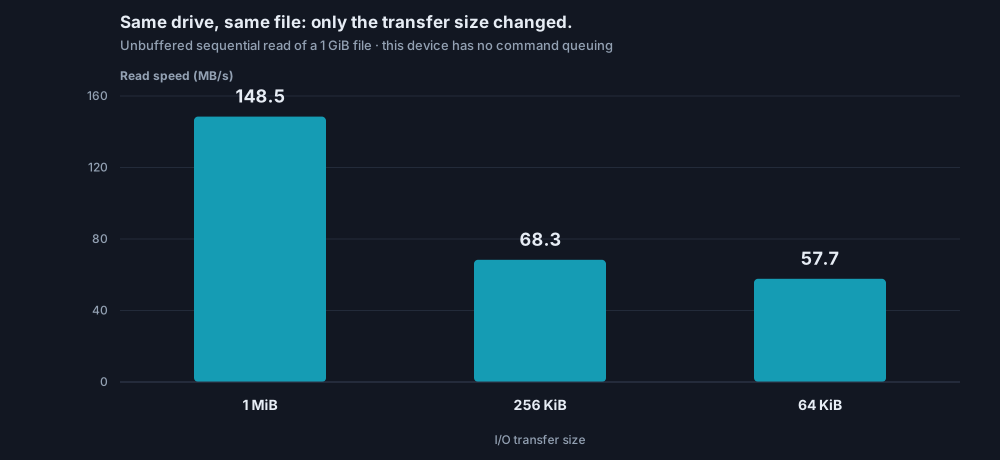
Reading the identical file in smaller chunks cost more than half the speed. The reason is in the drive's own USB descriptors: it speaks Bulk-Only Transport, the older mass storage protocol with no command queuing. Every transfer is one command, issued and completed before the next begins, so per-command overhead has nothing to hide behind. Bigger transfers amortise it. Smaller ones do not.
In practice that is the difference between copying one large video file and copying a folder of a few thousand small ones. Same drive, same data, and something close to a 2.5x spread in how long you wait.
The number SanDisk did not print
Write speed on this drive is not one number, it is a decay curve. The first burst runs at 22.8 MB/s. Fifty-two seconds later it falls off a cliff to 8.6, and it never comes back. Over a five minute sustained test the worst ten second stretch managed 8.1 MB/s.
The full capacity fill is where it gets bleak. Writing 30.8 GB took 57 minutes and 45 seconds at an average of 8.9 MB/s. Of the 3,457 seconds that fill was running, 448 of them wrote zero bytes. Not "slowly", zero. The worst single stall lasted 1.40 seconds, and 98 blocks took longer than a full second to commit.
Reading all of it back afterwards took 7 minutes 43 seconds at a steady 66 MB/s. Data comes off this drive about seven and a half times faster than it goes on. Hold on to that 66, though: it is less than half of the 148.8 this same drive posted a few sections ago, on test day I could not explain the difference, and the answer turned out to be the best finding in this post. The update near the end tells that story.
So I pointed a thermal camera at it
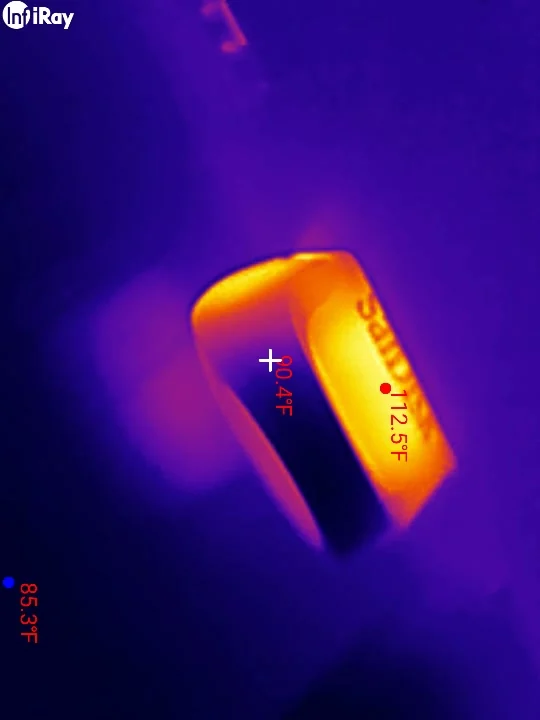
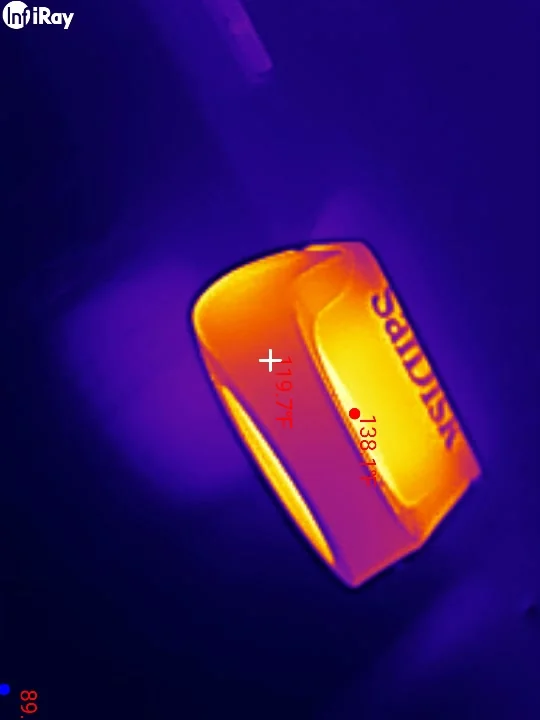
A compact, unventilated drive in a metal shell, slowing down under sustained load, is a thermal throttling story so obvious it barely needs testing. The Ultra Fit gets genuinely hot: it entered the sustained test at 112.9°F, already warm from the earlier benchmarks, and peaked at 138.6°F against a 76°F room. That is 62°F above ambient, hot enough to be unpleasant to unplug.
Every temperature in this section, and in both charts below, was measured on the drive's top face. Two days after publishing I found out that is not where the heat is, and the real number is a lot worse. The second update at the end of this post has the corrected figure, and it does not change a single conclusion drawn here.
Then I lined the temperature curve up against the throughput curve, second for second, and the theory fell apart.
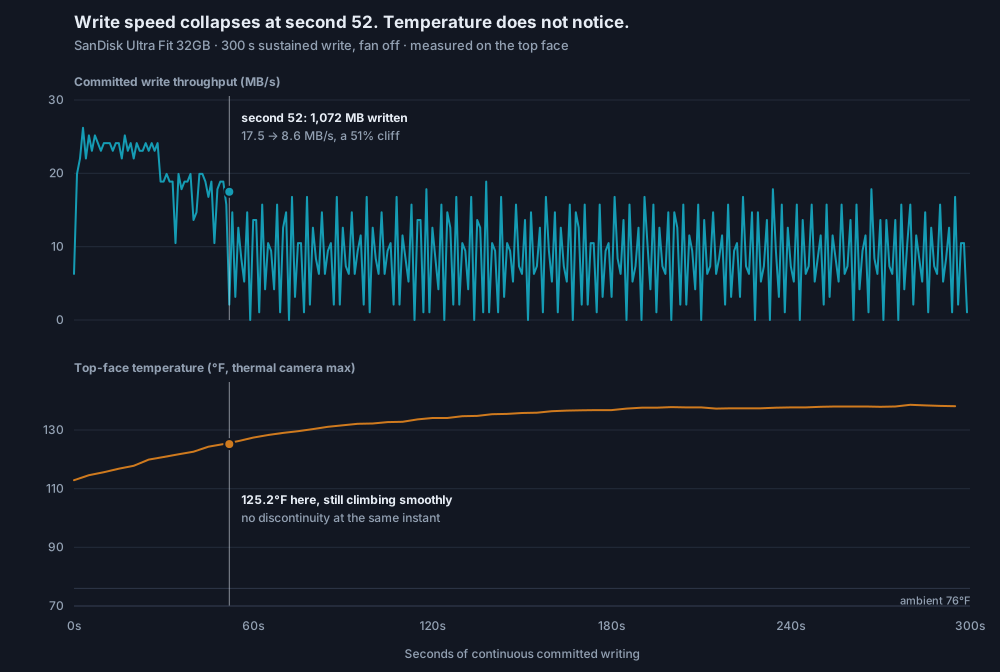
The relationship is backwards. Temperature climbed fastest during the first fifty seconds, which is exactly when throughput was highest. By the time the drive had thermally saturated near second 200, throughput had been sitting on its floor for two and a half minutes. Heat is the consequence of writing quickly here, not the cause of writing slowly.
The actual cause is arithmetic. By second 52 the drive had accepted 1,072 MB, and the cache analysis independently estimated the fast write cache at about 1,100 MB. The drive was not overheating at second 52. It was running out of SLC cache, and after that every write has to go straight into slower storage.
Two effects that look identical on a throughput graph, separated only because a second instrument was watching.
Heat does not touch the read speed either
Ruling heat out of the write cliff still left a second suspicion. Some of my read measurements had come in around 66 MB/s instead of 148, and every one of those happened after the drive had been run hot. So I tested it directly: heat the drive with the fan off, then read the same 1 GiB file the instant writing stops, and keep reading it every 45 seconds while it sits there.
The drive reached 141.3°F at the first read and drifted up to 147.1°F over the next several minutes, which is hotter than the peak of the original test. Ten reads, a 21.5°F spread, and the read speed did not move.
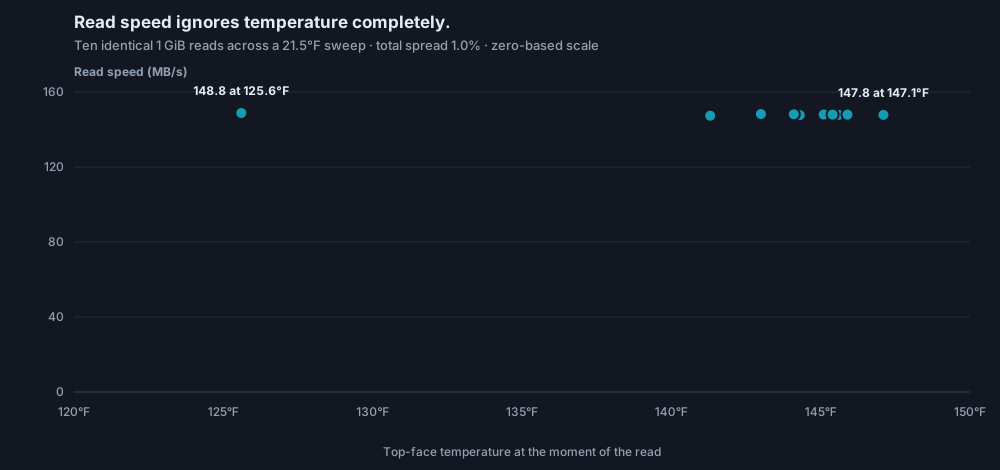
For completeness I also killed the other obvious explanation. Data written directly into the slow storage, with no fast cache involved, read back at 148.3 MB/s. The data's final resting place makes no difference to how fast it comes off.
So the thermal theory is dead, and so is the placement theory. When this post first went up, that is where the trail ended: the capacity test's reads sat at a consistent 66 MB/s, I could not reproduce the number or explain it, and I flagged it rather than invent a cause. A day of staring at the data later, it gave up the answer.
Why the same drive reads at 148 and at 66
This section was added the day after publication. The text above is unchanged: it said I had one measurement I could not explain and would not invent a cause for. This is the cause, found by re-reading the session's own data.
The pattern I missed was embarrassingly simple: the fast tests and the slow tests were never reading the same bytes. Every slow reading in this whole session, the 65.2 MB/s calibration read and the 66.5 MB/s full-drive read-back, was a read of data written during the capacity fill, while the cache was saturated and stalling. Every fast reading, all of them, was of data written calmly: the short bursts the cache absorbed early on, and the slow, steady writes of my later experiments. I had compared the drive against itself without noticing the data on it had two different histories.
Here is the mechanism. When this drive's cache is overwhelmed, the controller stalls, shuffles data out of the cache under pressure, and scatters logically neighboring data across the flash. Of the fill's 3,457 seconds, 448 wrote nothing at all; that is the controller digging itself out, and the data written around those stalls landed physically scattered. Reading scattered data back means the drive does a pile of small internal reads to serve each large request, and it caps at about 66 MB/s. Data written without that pressure lands contiguous and reads at 148. The read speed was decided at the moment each byte was written.
The bench's own records back this up. The other two full capacity tests I have run, on the Kioxia and on the counterfeit ImageMate, both filled smoothly with zero stalls, and both read their fills back at 95 to 98 percent of their sequential speed. This drive filled in a sawtooth and read back at 45 percent. Same test code all three times, which also clears the tool: the path that measured 66 here measured 142 on the counterfeit.
Two honest caveats. First, this is the explanation that fits every measurement, not one I have proven with a controlled experiment, because the test files were deleted before the pattern emerged and this drive can no longer recreate the conditions. Second, that leads to a finding of its own: the full fill permanently changed this drive. SSDs have a command called TRIM that tells the controller which deleted data is really gone; this drive's USB protocol has no such thing, so after writing every byte once, its controller believes it is full forever. The 40 MB/s write bursts from the start of this review are gone, and every write since the fill has run at a flat 12 MB/s. The next thumb drive through the bench gets a test designed to catch the scattering in the act, and if it does not show the same behavior, this explanation dies the same way the thermal one did.
One practical takeaway survives all of it: the 66 MB/s figure is the honest number for the way most people empty a full drive, because a full drive is exactly this kind of data. And if you have ever felt a flash drive get slower as it aged, this is one of the reasons why: not wear, just history.
I was measuring the wrong side of the drive
A correction, not an addition. Every temperature earlier in this post is a top-face reading, and the top face is not where this drive's heat is. The real peak is 26 degrees higher than the number I published.
Two days after this went up I put the drive into the Raspberry Pi it was bought for, pointed the camera at it again, and happened to catch the underside. It read 165.0°F, or 73.9°C, with the room at 81.7°F. The thermal camera's tracker only ever reports the hottest point it can actually see, and through the whole bench session it could only see the top. The hot side was facing the desk the entire time.
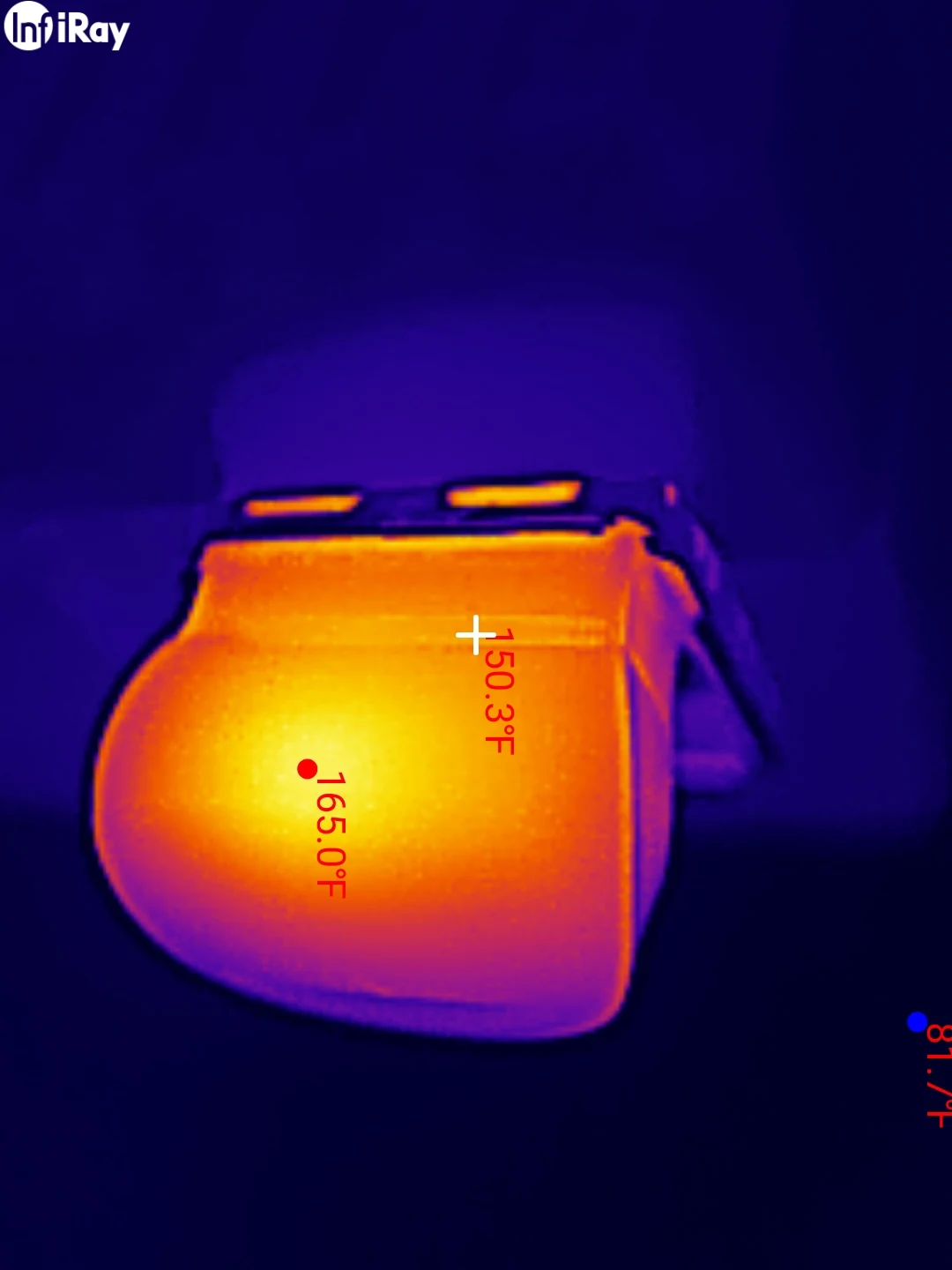
That last part is what makes the number worth publishing. This is the hottest reading this bench has ever recorded, and it beats the previous record by 14°F. The old record holder was the SanDisk High Endurance card at 151.4°F, set while it was writing at 88 MB/s with a fan deliberately switched off. The Ultra Fit reached 165°F sitting in a Pi with an operating system idling on it. Every card I have tested was hotter under torture than at rest; this drive is hotter at rest than any of them managed under torture.
Here is what does not change. Every conclusion in this post about heat is unaffected, and one of them gets stronger. The read-speed sweep held flat while the top face climbed from 125.6 to 147.1°F, so if the underside was running 26 degrees hotter throughout, the real span was wider than the chart shows and the read speed still refused to move. The cache knee at second 52 is still cache, not heat: what matters there is that the temperature curve has no feature at the moment throughput falls off a cliff, and shifting that whole curve up by a constant changes nothing about its shape. The numbers were low. The reasoning was not resting on them.
What does change is a row in the claims table. The packaging prints no operating temperature range at all, which read as a small curiosity when I wrote it and reads differently now that I can put a real number in the empty column. I cannot tell you this drive is running out of spec, because SanDisk publishes no spec for it to run out of. That is precisely the problem.
The lesson for the bench is duller and more useful: a thermal camera reports the hottest thing it can see, which is not the same as the hottest thing there is. Every device gets shot from more than one side from now on.
My first instinct was that this put an asterisk on every card I had already measured, so rather than leave that hanging I went and checked. I ran the Kioxia Exceria G2 twice under identical five minute writes, photographing a different face each time, and the two runs did the same work to within two tenths of a percent: 63.62 against 63.68 MB/s, same room, same duration. The faces read 142°F and 141°F. A single degree is smaller than the uncertainty in pointing an infrared camera at something the size of a fingernail, so the honest conclusion is that there is no difference between them.
That makes sense once you look at what the two devices actually are. A microSD card is a sealed slab about a millimetre thick, so both of its faces are the same piece of plastic over the same chip. The Ultra Fit is a circuit board inside a shell roughly ten millimetres deep, with the chip against one side and air behind the other. My mistake was never about thermal cameras in general. It was about assuming a device with an inside behaves like a device without one. The card figures in the earlier reviews stand exactly as published, and the multi-angle rule now applies where it genuinely matters: anything with a case and a cavity.
One more thing fell out of that check for free. The Kioxia read 142°F this week against 143.3°F six days earlier in a completely separate session, which is the first time I have repeated a thermal measurement on this bench to see whether it reproduces at all. It does, to within about a degree.
Your 32 GB drive holds 30.8 GB, and that is fine
Filling every available byte and reading all of it back is the test that catches fraudulent drives, and this one passed cleanly: 30,768,971,776 bytes written, all of it verified, zero mismatches and zero read errors across 29 files.
The usable figure comes to 30.8 GB against a 32.0 GB label, or 96.2 percent. That gap is not fraud and it is not the binary versus decimal confusion people usually reach for. It is controller reserve, a bad block pool and translation metadata, all of which live on the flash and none of which you get to use. A counterfeit fails this test very differently, by wrapping around and corrupting what you already wrote. If you want to see what that actually looks like, I caught one doing it: a "SanDisk" 128GB card that turned out to be a 32GB fake and passed every speed test on the way.
Worth noting for anyone tracking these numbers across brands: the SanDisk microSD cards I have measured deliver 100.0 percent of their decimal label, while the Kioxia Exceria G2 came in at 96.7 and the two VIOFO High Endurance cards landed at 99.1 and 97.4. This USB drive lands at 96.2, closer to the Kioxia convention than to SanDisk's own cards, which suggests the 100 percent behavior is a microSD line trait rather than a company policy. The full capacity story is its own post.
Every claim on the package, checked
This is the whole point of the exercise. Note how much of the table is empty on the left: most of the questions a buyer would ask are not answered on the packaging at all, and an unanswered question cannot be a broken promise.
| Printed on the package | Measured | Verdict |
|---|---|---|
| 32 GB | 30.8 GB written and read back, 0 mismatches, 0 read errors | MET (96.2% of the decimal label) |
| Speeds up to 130 MB/s read | 148.8 MB/s committed sequential, in 1 MiB transfers | BEATEN 1.14× |
| USB 3.2 Gen 1 | enumerated as a SuperSpeed device, 5 Gbps link | MET |
| (no write speed printed) | 40.5 MB/s peak burst, 8.7 MB/s sustained once the cache is gone | NOT CLAIMED |
| (no endurance rating printed) | not measurable in one bench session | NOT CLAIMED |
| (no operating temperature range printed) | 165.0 F (73.9 C) on the underside, sitting in a Raspberry Pi under a light OS. The bench's flat-out write test read 138.6 F, but only on the top face | NOT CLAIMED |
| 5-year limited warranty | printed on the back of the package | NOT A PERFORMANCE CLAIM |
One deliberate omission from that table: SD speed classes. A USB flash drive carries no C10, U3, V30 or A-class certification and cannot, because those are SD Association marks. If you see those grades quoted for a thumb drive, they were invented by whoever wrote the listing.
SanDisk Ultra Fit 32GB
Scored as a standalone USB flash drive, not against the CKBench card rubric. Five dimensions, each out of 5.
Final score: 4 out of 5. The five dimensions average exactly 4.0. It is an honest, genuine, quick-reading little drive that you should not ask to write much. Sustained write is the only dimension where it is genuinely poor, and it is poor there because of what it is, not because it broke a promise.
Avoid what this drive is bad at
- Sustained writing of anything large. 8.7 MB/s means a 30 GB transfer takes about an hour.
- Thousands of small files. Small transfers cost more than half the read speed.
- Random access. 4K random write measured 0.68 MB/s, so running software from it will crawl.
- Anything where a 1.4 second write stall matters.
Good what this drive is fine at
- Reading large files, where it genuinely exceeds its printed claim.
- Living permanently in a port. It is tiny, and that is the entire point of the product.
- Boot media and read heavy jobs, where write speed barely matters.
- Carrying documents, installers and media you write once and read often.
Frequently Asked Questions
Is the SanDisk Ultra Fit really 130 MB/s?
Yes, and it is faster than that. Reading a 1 GiB file in large transfers I measured 148.8 MB/s, about 14 percent above the printed claim. That only holds for large sequential reads, though. Reading in 64 KiB chunks dropped it to 57.7 MB/s.
Why is the SanDisk Ultra Fit so slow to write?
It has roughly 1.1 GB of fast cache. Once that fills, which took 52 seconds of continuous writing, throughput drops to about 8.7 MB/s and stays there. SanDisk does not print a write speed on the packaging, so there is no advertised figure it is failing to meet.
Does the SanDisk Ultra Fit get hot?
Very. Its underside reached 165°F (73.9°C) just sitting in a Raspberry Pi under a light operating system, which is the hottest reading this bench has recorded from any storage device, including memory cards writing flat out. The heat is not what makes it slow: read speed varied by 1.0 percent across a 21.5°F sweep. Note that most of the heat is on the underside, so a reading taken from the top face will understate it by around 26°F.
Why does a 32GB flash drive only show 30.8 GB?
The controller reserves flash for spare blocks, bad block replacement and its translation tables, and none of that is available to you. This drive delivers 96.2 percent of its decimal label, which is normal. A fake drive fails differently: it corrupts or overwrites data once you pass its real capacity.
Is the SanDisk Ultra Fit good as a Raspberry Pi boot drive?
For booting, yes. A root filesystem is mostly reads and small writes, and slow sustained write speed barely matters once the operating system is installed. Expect the initial image write to be slow, and do not use it for a workload that writes constantly.
Why do small files copy so much slower than one big file?
This drive uses Bulk-Only Transport, a USB storage protocol with no command queuing, so every transfer waits for the previous one to finish. Large transfers spread that fixed overhead over more data. On my measurements 1 MiB transfers ran at 148.5 MB/s while 64 KiB transfers managed 57.7.
Why does data read slower from a full or heavily used flash drive?
Because read speed follows how the data was written. When a drive's cache is saturated and stalling, incoming data gets physically scattered across the flash, and reading it back later runs at a fraction of the drive's clean sequential speed. On this drive, calmly written data read at 148 MB/s while data written during the stalling full-drive fill read back at 66.
An honest claim can still tell you nothing
The SanDisk Ultra Fit 32GB is a genuine drive. It delivers its full capacity, it returns every byte you give it, and it exceeds the one performance number on its packaging. If you want a thumb drive that disappears into a port and holds files you mostly read, it does that job at a price that makes arguing about it silly.
What it does not do is behave anything like its spec sheet implies. That single printed number describes a state, cold and sequential and reading a large file, that almost nobody stays in for long. Everything a buyer would actually want to know, how fast it writes, what happens after the first gigabyte, how it handles a folder of small files, is absent from the packaging and not technically wrong to omit.
My rating: 4/5, scored as a standalone flash drive rather than against the CKBench card rubric. It loses a point on read for falling apart on small transfers, and it loses most of the rest on sustained write. Everything it actually promises, it delivers.
One more thing this session turned up, and it is on me rather than SanDisk. My own bench software judged this drive against SD card speed classes it cannot carry and warned about a card reader that was not in the circuit, because it applies memory card logic to anything you point it at. That is now on the fix list. Testing your own gear means finding your own bugs.
Device identity: what this drive reports about itselfReference data, collapsed because most people do not need it. Open it if you want to check your own drive against mine, or if you are curious what a genuine unit looks like from the inside.
| USB vendor ID | 0x0781 (SanDisk / Western Digital) |
| USB product ID | 0x5583 |
| Device revision | 1.00 |
| USB class / subclass / protocol | 08 / 06 / 50 (Mass Storage, SCSI transparent, Bulk-Only Transport) |
| Negotiated link | SuperSpeed, 5 Gbps (USB 3.2 Gen 1) |
| SCSI inquiry vendor | USB |
| SCSI inquiry product | SanDisk 3.2Gen1 |
| SCSI inquiry revision | 1.00 |
| Model code (from the package) | SDCZ430-032G-G46 |
| Raw device size | 30,784,094,208 bytes (60,125,184 sectors of 512 bytes) |
| As shipped | MBR partition table, single FAT32 volume |
| Unit serial number | 010119B3…CD95 (truncated) |
Everything above except the last row is identical on every Ultra Fit of this model, which is what makes it useful: you can check your own drive against it. The serial is the one field unique to my physical unit, so I show only its first eight and last four characters. Publishing a verified-genuine serial in full would mostly be a favor to whoever wants to clone it onto a counterfeit.
Two fields deliberately left out. The FAT32 volume serial changes every time the drive is formatted, so it identifies a filesystem rather than a device. The Windows container GUID is generated by the host, not reported by the drive. Including either would make this table look authoritative about something it is not.
What is missing: this is USB descriptor level only. The flash controller and NAND part numbers, which are the fields that really tell you what silicon you bought, need a vendor-specific interrogation tool I did not run here. When I have that data for a drive, it belongs in this table too.