
The card that came with your dash cam: better than you think
Every dash cam ships with a memory card, and the internet's standard advice is to throw it away and buy a real one. So we put one on the bench: a Kioxia Exceria G2 128GB, run through the full CKBench suite. It beat its own published write spec by 31%, held a speed grade two steps above its label, and did not flinch under the workload that destroys cheap cards, a trick an entry-tier Lexar has since repeated with room to spare. It also hands you four gigabytes less than the number on the front.
Prefer to watch?
This card came out of the Mangoal OEM dash cam, which now has its own full review. Subscribe to catch the next card that hits the bench.
The short version
Keep it. The bundled Kioxia is a legitimately good card: it committed sequential writes at 65.3 MB/s against a published claim of 50, meaning every byte was confirmed onto the card rather than parked in a buffer, and it held a V60 sustained floor against the V30 printed on its face. Under the scattered-write churn that collapsed our reference card by 71%, it did not fade at all. The one real complaint is capacity: the label says 128 GB and you get 123.7 of them. My rating: 4.5/5, scored against the CKBench rubric.
Verdict: do not replace this cardWho this card is for
- YesDash camNearly 17x the bitrate of a dual-channel 4K setup.
- YesHome security cameraFlat under continuous loop recording, no fade.
- YesAction or consumer 4K cameraClears 4K120 and high-bitrate work.
- NoRaspberry Pi, app storage, OS driveOrdinary random performance, and no A-class printed.
Rough capacity math: at the 6 MB/s a 4K30 dash cam writes, 123.7 GB holds a little under 6 hours before it starts looping over the oldest clips. Your camera's bitrate is the variable that matters, so work out your own numbers in the dash cam storage calculator.
Why test the card that came in the box?
The standard advice about bundled memory cards is to bin them. It is repeated confidently and almost never tested, which is exactly the kind of claim this lab exists to check. Mangoal have since shipped a second camera with a different card in the box, and that one beat every card I have ever bought. Bundled cards are also the single most-used cards in dash cams, because most people never change the one the camera came with. If that card is quietly bad, a lot of footage is at risk. If it is quietly good, a lot of people are being told to spend money they do not need to spend. Two more bundled cards have been through the bench since this one, and the 64GB card that ships inside the FitcamX came out better than its unlicensed label suggests.
So we ran one. This card came out of the Mangoal dash cam I later reviewed, it has no retail packaging, and everything we could claim about it up front came off the card face itself: Kioxia, Exceria G2, 128 GB, microSDXC, C10, U3, V30, UHS-I. The SanDisk Ultra I tested later had the same problem, and there the card face printed no speed at all. That already makes it more interesting than the no-name the advice assumes, because Kioxia is the former Toshiba memory business, one of the handful of companies that actually manufactures NAND rather than buying and relabeling it.
Every figure below comes from one run on 2026-07-25, stored in a single results file, and quoted here exactly as recorded. Where a number needs a caveat, the caveat is next to it.
This is the second card on CKBench, the running index of every card we have put on the bench. It follows a retail SanDisk High Endurance that beat its own printed write claim by 2.24 times, and it is followed by a counterfeit SanDisk that passed every speed test we ran while holding barely a quarter of the capacity on its label. All three are scored the same way, against the same published rubric.
Why our write numbers read lower than other reviews. Every write here is committed to the card and confirmed before the clock stops, the way a dash cam actually records, so our figures land below burst benchmarks like CrystalDiskMark that measure a few seconds of the card's RAM buffer. That rule, and the decimal MB/s and binary MiB conventions used throughout, are set out on the how we test and score page.
What Kioxia promises, and what the card did
There is no box, so the claims come from two places and we keep them separate. The card face prints its capacity and its class marks. The speed figures come from Kioxia's own published spec for the Exceria G2 128GB, which states 100 MB/s read and 50 MB/s write. Watch the write bar in particular: it does not stop at the dashed line where its own claim sits.
The spec sheet vs the bench
The full scorecard. Class floors are judged against the worst ten seconds of sustained writing, not the average, because a class rating is a promise the card has to keep for the whole recording.
| Claimed | Measured | Verdict |
|---|---|---|
| 128 GB (card face) | 123.7 GB exposed, every byte of it verified | 96.7% of label |
| Up to 100 MB/s read (Kioxia spec) | 96.8 MB/s committed sequential | MET (97%, at the bus ceiling) |
| Up to 50 MB/s write (Kioxia spec) | 65.3 MB/s committed sequential | BEATEN 1.31× |
| C10 (card face) | floor 62.6 MB/s vs 10 MB/s | BEATEN 6.3× |
| U3 (card face) | floor 62.6 MB/s vs 30 MB/s | BEATEN 2.1× |
| V30 (card face) | floor 62.6 MB/s → holds V60 | BEATEN by one grade |
| (no A-class printed) | 1996 / 781 IOPS (small operations per second) vs A1's 1500 / 500 floors | A1 met, unprinted |
| (no endurance rating claimed) | no hours figure on the card face, and none in Kioxia's spec for this line | NOT CLAIMED |
| -25 to 85 C operating temperature (Kioxia spec) | hottest point on the card reached 61.8 C under five minutes of flat-out writing | WITHIN RANGE |
| 5-year limited warranty (Kioxia spec) | Kioxia's published term for the retail line; a bundled card arrives with no receipt to claim against | NOT A PERFORMANCE CLAIM |
Two of those rows deserve a note. The read figure looks like a miss at 97% of claim, but 96.8 MB/s is where the UHS-I bus itself runs out of road: in its fastest mode UHS-I tops out around 104 MB/s of raw bandwidth, and real ceilings land in the mid-to-high 90s once protocol overhead is paid. The card is as fast as the interface allows, and Kioxia's "up to 100" is effectively a statement about UHS-I rather than about the flash.
The A1 row is deliberately marked unprinted rather than met-as-claimed. Kioxia's retail spec for this model does list A1, but this card face does not print one, and a bundled unit may be an OEM version rather than the retail SKU. It clears both A1 floors in our test, so it earns the row. It just should not be scored against a promise this particular card may never have carried.
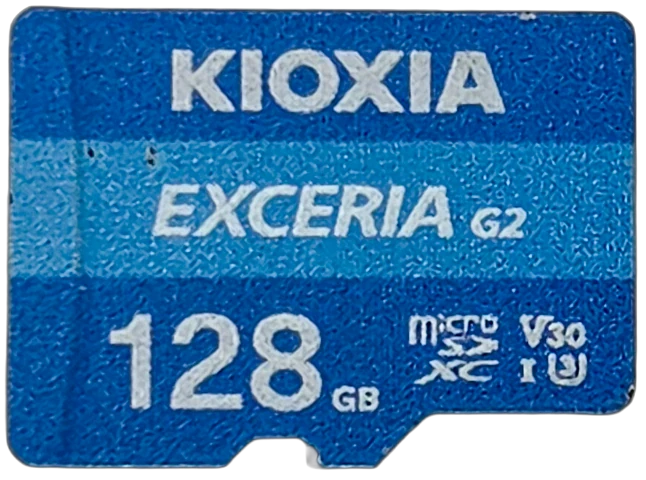
Why would Kioxia under-rate its own card?
A 50 MB/s write claim on a card that commits at 65.3 is not modesty. The printed number has to hold for every unit of every production revision for the life of the model, across NAND suppliers and controller respins, on the slowest host the card might ever meet. So the claim is a floor the manufacturer will defend, not a description of the card in your hand.
Kioxia say this themselves, more plainly than most. Their spec footnote reads: the figures are "the best values obtained in a specific test environment" and they "warrant neither read nor write speeds in individual devices." That is a manufacturer stating outright that the number on the sheet is a ceiling measured under favorable conditions, not a promise about your card. Ours happened to land above it, which is the same pattern the SanDisk High Endurance showed when it beat its own printed write claim by 2.24 times. Two cards, two brands, both quietly better than their labels.
The same logic explains V30 on a card that holds V60. V30 is what the dash cam and 4K camera market asks for, so it is the promise worth making, and headroom above it is margin the manufacturer keeps in reserve rather than in marketing. Which is why you cannot rank cards by their labels: two cards both printed V30 can differ by a factor of three in the number that decides whether your camera drops frames.
The printed number is a floor the manufacturer will defend, not a description of the card in your hand.
Why a 128 GB card only gives you 124 GB
Put this card in a computer and it reports 123.7 GB. The label says 128. That is 4.26 GB you paid for and cannot use, and it is the one genuine complaint this card earns.
The first thing to rule out is the boring explanation. It is not the dash cam's formatting: the physical disk reports 123.77 GB and the partition fills essentially all of it, so there is no hidden unallocated space to reclaim. It is also not the usual decimal-versus-binary confusion that makes every drive look smaller in Windows. This is the card telling the host, honestly, that 123.7 GB is all it has. It is not inevitable at this capacity either: a seven-year-old Samsung EVO Plus 128GB measured on the same bench handed back 100.02 percent of its label.
Same label, different delivery
Both cards say 128 GB. Both were measured on the same bench, in the same reader, formatted the same way.
4.26 GB is roughly 19 minutes of footage at the bitrate a dual-channel 4K dash cam writes. Same number on the front of both cards.
Kioxia do disclose it. Their spec page lists an approximate usable capacity of 115.2 GB for this model and explains that "capacity is based on installed flash memory and not user available memory as part of the memory is used for management functions." That figure is in binary units, which works out to 123.7 GB in the decimal units the label uses, and our card matched it to within 0.04%. So the card delivers exactly what its maker says it delivers, in a document approximately nobody reads before buying a dash cam. For context on how much this varies, the two VIOFO High Endurance cards hand over 99.1% and 97.4% of their labels, from the same brand at two capacities, and the card bundled with a Botslab dash cam gives back 97.4% as well.
Credit where it is due: publishing the number at all puts Kioxia ahead of manufacturers who do not. But disclosure is not the same as the label being accurate, and it is worth being clear about what the fine print does and does not settle.
Where does the missing space actually go? Flash needs spare capacity to function. It writes in small pages but can only erase in much larger blocks, so a controller needs a pool of already-erased blocks to write into, plus replacements for blocks that fail over the card's life, plus room for the map that tracks where everything physically lives. That reserve is not idle insurance for old age. It is in use from the first write, and a card with a thin free-block pool has to stop and clear space before it can accept new data, which costs both speed and lifespan.
Is the reserve a fair excuse?
Partly, and the honest version of the argument is more interesting than either "they lied" or "it's fine, they disclosed it."
Every card reserves space. The question is where the reserve comes from. A card sold as 128 GB is built from 128 GiB of raw flash, which is 137.4 GB in the decimal units the label uses, so roughly 7% is already invisible before anything is advertised. The SanDisk takes its entire reserve out of that raw headroom and still hands you the full 128 GB. This Kioxia takes about 10% of raw, which means part of its reserve comes out of the number printed on the front.
Both cards reserve. Only one of them makes the buyer pay for it. That is the fair criticism, and it does not require accusing anyone of lying: a competitor solved the same engineering problem without spending the customer's capacity.
It also raises a question with no good answer. Nothing sets a floor on how much a manufacturer may hold back from the advertised figure. If 4 GB is acceptable because a spec sheet mentions it, so is 20. The only thing standing between a buyer and that is convention, competitive embarrassment, and somebody actually measuring. Which is most of the reason this lab exists.
Where it is not a scandal: this card is nothing like the counterfeit we tested, which claimed 128 GB and exposed 34.3 GB, or 26.8% of its label. The Kioxia delivers 96.7% and every byte of it is real. The Newegg TeamGroup 128GB lands on the same 96.7% and is equally real, for what it is worth: a low share of the label is a design choice about spare area, not a sign of anything wrong. Those two facts belong on the same scale, and they land nowhere near each other.
Five minutes flat out: the write curve
Consumer cards frequently write fast into a small cache and collapse when it fills. That is the failure mode that ambushes long recordings: fine for the first few gigabytes, then a cliff. So the sustained test writes flat out for five minutes with the cooling fan off, logging every second, while a class ladder keeps score of which speed ratings the card is still holding.
The test also starts honest. Before the clock runs, a settle pre-pass writes untimed until throughput stabilizes, so the measurement begins on a controller that has finished reacting to the random-write test before it. Without that, the verdict number would partly be measuring recovery rather than the card's real rate. Hover the line for the exact sample under your cursor.
Kioxia Exceria G2 128GB
Burst 63.5, steady state 63.4, worst ten seconds 62.6. The worst ten-second window sits 1.3% below the steady state, and there is no knee anywhere in the trace: the cache analysis returned NO_KNEE_STABLE, meaning the card never found a cliff to fall off. Every one of the 300 samples landed between 56.6 and 67.1 MB/s, a spread of about 15.6% peak to trough.
That spread deserves a word, because we published the same figure for the SanDisk High Endurance and it was about 8%, roughly half this one. Second to second, this card is the twitchier of the two. It does not change either verdict, and here is why: a class rating is set by the worst sustained window, not by the jitter around the mean, and 62.6 MB/s clears the V60 floor with room. A camera writes into a buffer that swallows a single slow second whole. What the wider spread does tell you is that the Kioxia's controller works harder to hold its line, which is worth knowing and is not worth worrying about.
That worst window sits at 1:00, the earliest moment a complete ten-second window exists to score, and it is 1.3% below the steady state. So it marks where measurement opens rather than a card digging out of a hole, which is why the endurance section can say this card needed no recovery without contradicting the chart.
Averages hide the thing that actually ruins footage, though. A card can post a fine mean and still freeze for two seconds, and two seconds is a hole in your recording no average will show. So the suite times every individual block it writes and keeps the tail. Across 18,141 blocks the slowest single write took 106.7 milliseconds, at second 287, on a file roll: the moment the test closes one file and opens the next. Nothing crossed 500 ms, nothing crossed a second. For a 4K30 dash cam writing roughly 6 MB/s into a buffer, a 107 ms hiccup is invisible.
Is the space real? Every byte, verified
A counterfeit card lies about its size. A controller reprogrammed to report more than it has will accept writes forever, silently wrapping new data over old once the real flash runs out. The only test that cannot be fooled is the brute-force one: fill every free byte with seeded pseudorandom data, then read all of it back and compare against what the seed says each byte must be. Every block carries a unique stamp, so a controller cannot fake capacity by recognizing repeated data.
This matters more than usual for a bundled card, because a camera that ships with a counterfeit is exactly the scenario nobody checks. It came back clean.
Every byte, written and read back
Run Kioxia-Exceria-G2-128GB_2026-07-25_165608 · cardcheck v0.7.1 · ProGrade MSD PGM0.5
123.7 GB written across 116 files, 123.7 GB verified, zero mismatched bytes, zero read errors. The card holds exactly what it says it holds. The complaint from two sections ago stands separately: what it says it holds is 4.26 GB less than what the label advertises. Those are different claims and both are true.
The verify pass doubles as a measurement no manufacturer advertises and every user eventually cares about: how long it takes to get footage off. Reading the whole card back took 22 minutes 23 seconds at 92.2 MB/s wall-clock. Fill this card and budget that.
One number in the fill deserves the same treatment. It is quoted at 65.9 MB/s, which is the rate across 1,878 seconds of actual I/O, but the wall clock on that phase was 32 minutes 42 seconds, or 63.1 MB/s end to end. The 84-second difference is time spent between write operations rather than inside a slow one: file opens, allocation, the flush at each close. Worth stating because a speed quoted beside a duration should reconcile with it, and on our SanDisk run an unexplained pause made that gap more than twice as large.
The whole-card fill also settles the cache question at full scale. The same knee analysis that ran over the five-minute test ran over all 123.7 GB, and found nothing: it opened at 63.8 MB/s and closed at 63.9. A card written from the first byte to the last at one unbroken rate has nowhere left to hide a slow tier.
What loop recording actually does to a card
Here is the most revealing number in the run, and it is not a speed. Random 4K writes are what loop recording looks like to a card: event-file saves, filesystem updates, and above all the constant overwrite churn of a camera that never stops. A dash cam card lives in that workload permanently. So the bench runs three consecutive 20-second random-write passes specifically to see whether a card degrades as its flash translation layer gets churned. That layer is the firmware deciding where your data physically lands, and it is the part that gets tired first.
We put the lab's reference card through the identical test, though on the Transcend reader this bench used before the ProGrade became the standard. Be clear about what that card is: an unbranded Class 4 32 GB card that writes sequentially at 11.4 MB/s, the slowest tier still sold and a bus generation behind this one. It is a floor, not a fair fight. Each bar is that card's percentage of its own best pass, so the shape of the collapse is comparable even though their absolute speeds differ by four times, and no reader can change how far a card falls against itself.
One minute of loop-recording abuse
This card: run Kioxia-Exceria-G2-128GB_2026-07-25_165608 · reference card: lab baseline, same bench, same test
The reference card went 183, 76, 53 IOPS: a 71% collapse in sixty seconds of scattered writes, after which it needed nearly two minutes of continuous writing to climb back to normal. The Kioxia went 777, 782, 785. It did not fade at all.
Say that carefully, because the honest version is slightly narrower than the exciting one. A 1% rise across three passes is inside measurement noise, so the finding is no measurable fade, not it got faster. And treat it as indicative rather than proven: three 20-second passes measure how the controller behaves under churn, which is a good directional read on whether a card is built for loop recording, but it is not an endurance test and cannot tell you the card is still working in year three.
What it does say is narrow and useful. Under the workload that cost a floor-tier card 71% of its random-write speed, this one gave up nothing and needed no recovery. Its settle pre-pass reached a stable rate in 60 seconds or less, the earliest our analyzer can declare stability, immediately after the same abuse.
For comparison, the SanDisk High Endurance faded 2.1% in the same test. That card is explicitly sold on endurance and costs accordingly. The bundled Kioxia matched it on stability. It is slower in absolute terms, at 781 write IOPS against the SanDisk's 1030, so this is not a claim that the two cards are equals. What matches is the thing that decides whether a card degrades in a dash cam, and that is a genuinely surprising result for a card most people are told to throw away.
Two caveats stay in the open. In absolute terms the random figures are ordinary microSD numbers, 8.17 MB/s read and 3.20 MB/s write, which is why this is not a card to run an operating system from. And while it clears both A1 floors at 1996 and 781 IOPS, that is recorded as indicative rather than certified: the SD Association's A-class procedure differs from ours, and A2 is not testable on a USB reader at all because its floors assume command queuing that USB readers do not perform.
How hot does it get?
The sustained leg runs with the bench fan off, so the card heats the way it would inside a sealed camera body, and the thermal frame is captured the instant the write stops, because a card sheds heat in seconds. The question is not just the peak. It is whether the card slowed down on the way there.
It got warm. It did not slow down.
A 4K30 dash cam writes about 6 MB/s, roughly a tenth of this workload · Run Kioxia-Exceria-G2-128GB_2026-07-25_165608
Here is the frame itself, captured as the timed write ended. The spot marker reads 143.3 F, or 61.8 C, at the hottest point on the card.
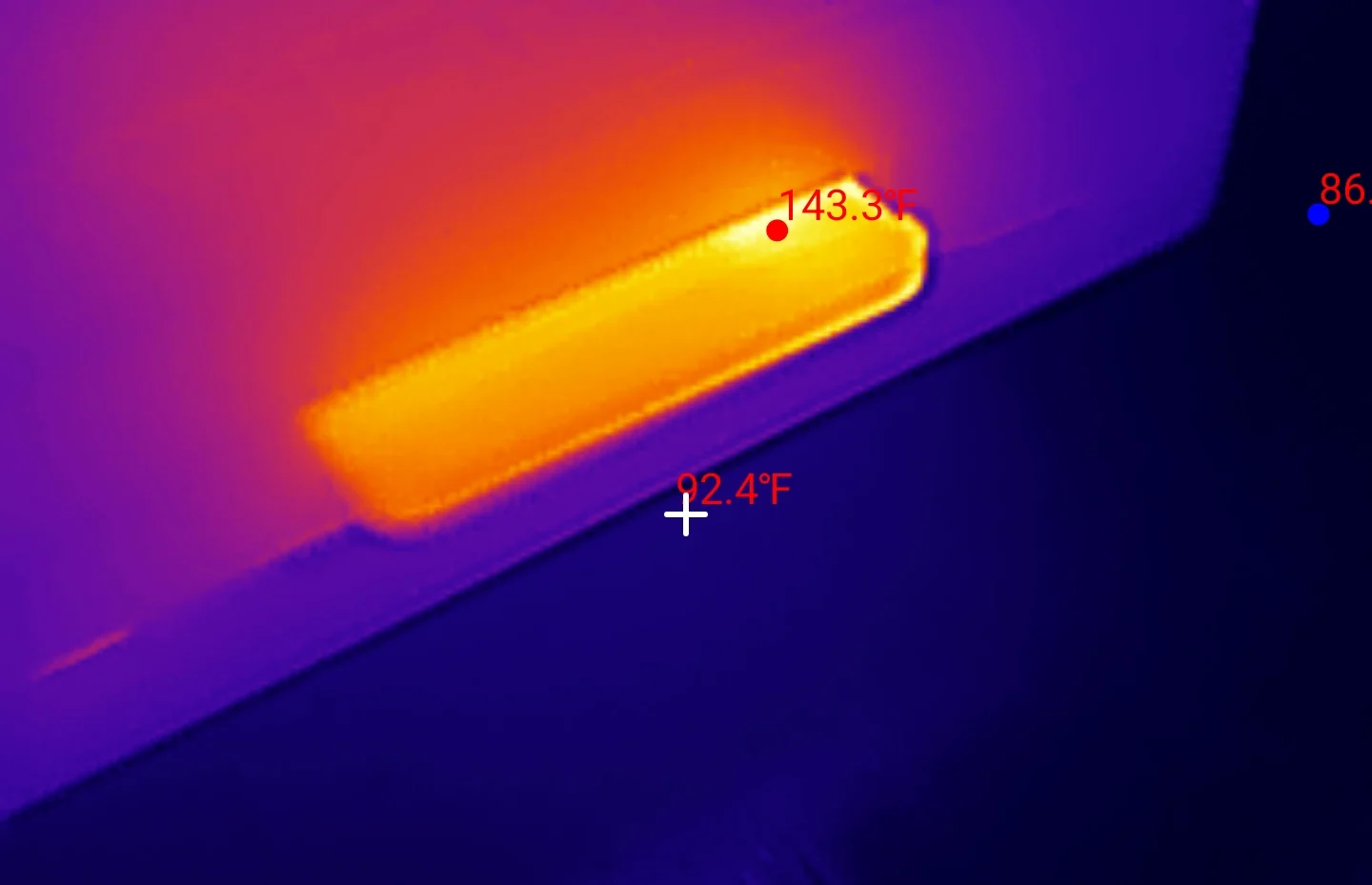
That is a rise of 67 F, or 37.4 C, over the room, and the speed trace above it never moved: the card was writing at the same rate at peak temperature as it was cold. It also ran cooler than the SanDisk High Endurance, which peaked at 151.4 F in the same test. That is not a virtue so much as arithmetic, since the SanDisk was writing 88 MB/s to this card's 63, and controller heat scales with how hard the controller is working.
Now the dash cam arithmetic, done honestly in both directions. Taken at face value the rise looks alarming: a car parked in summer sun reaches 140 F in the cabin, and stacking a 37 C writing rise on that lands past the 85 C these cards are rated for. That is where a lazier review would stop, and it would be wrong. Our rise came from writing 63 MB/s continuously. A 4K30 dash cam writes about 6 MB/s, roughly a tenth of the data rate, so the bench is deliberately generating a thermal load no camera will impose.
The honest reading: this card's worst-case self-heating is real, a dash cam will not come near invoking it, and 61.8 C leaves comfortable headroom under the typical 85 C rating even at full abuse. What the number does tell you is that thermal headroom is not unlimited, so mount choice matters. A camera baking against black dash plastic in direct sun starts from a far worse ambient than a bench at 76 F.
What can the Kioxia Exceria G2 128GB record?
Every row is judged against the worst ten seconds of the run, 62.6 MB/s, not the average. Averages do not appear here on purpose: your camera does not record over the average, it records over the worst moment.
| Workload | Needs (MB/s) | Margin | Verdict |
|---|---|---|---|
| 1080p30 dash cam | 1.5 | 41.7× | PASS |
| 1080p60 dash cam | 3.0 | 20.9× | PASS |
| Dual-channel 4K front + rear | 3.7 | 16.9× | PASS |
| 4K30 dash cam | 6.0 | 10.4× | PASS |
| 4K60 consumer camera | 12.0 | 5.2× | PASS |
| 4K120 / high-bitrate video | 35.0 | 1.8× | PASS |
| V30 class floor | 30.0 | 2.1× | PASS |
| V60 class floor | 60.0 | 1.04× | PASS |
| V90 class floor | 90.0 | 0.70× | N/A (not claimed) |
The V60 pass is genuinely close, clearing the 60 MB/s floor by 4%. That is still a pass, and it is two full grades above the V30 printed on the card, but it is worth being precise: a card that holds V60 by 1.04 times has less margin against that floor than the SanDisk's 1.47 times. V90 is marked not applicable rather than failed, because the card never claimed it: it prints V30, and at 63.4 MB/s sustained it is not close to the 90 MB/s floor in any case. For a look at cards that do clear it, see the two UHS-II V60 cards that both sustain V90.
One cross-check ties the run together. The cache-leak canary probe wrote at 63.6 MB/s. The calibration pass wrote 66.4. The sequential test averaged 65.3. The settle pre-pass stabilized at 63.3. The five-minute sustained test held 63.4. The whole-card fill wrote 123.7 GB at 65.9. Six independent measurements, three different engines, spanning 64 MB to 123.7 GB of data, all landing inside a 5% band. That agreement is the strongest evidence that the methodology is measuring the card rather than the tool.
Kioxia Exceria G2 128GB
Scored against the CKBench rubric. Five dimensions, each out of 5.
Final score: 4.5 out of 5. The five dimensions average 4.6, rounded to the nearest half point. Both marks against it are the same fact counted where it belongs: the label says 128 GB and the card hands over 123.7. Everything it does with the capacity it has, it does very well.
Bench conditions, and what we did not test
The bench. Card read through a ProGrade MSD PGM0.5 over USB on a Windows 11 host, tested on the card's own exFAT filesystem as it shipped, 512-byte sectors with every operation issued 4096-byte aligned. All test I/O uses unbuffered write-through handles and the write timer stops only after the flush returns. That is what "committed" means throughout this article. We publish the filesystem because it matters: random 4K results move with the filesystem and the allocation unit, so a number measured on exFAT is not directly comparable to one measured on FAT32.
Read speed depends on your reader, and we can show where the limit is. The 96.8 MB/s above is what this card returns on a standard UHS-I reader, and it is the number you should expect. It is not our hardware running out of road: a different card on this same ProGrade has since read at 145 MB/s, well past anything the Kioxia does. What pins the figure down is that the SanDisk High Endurance lands on the same 96.8 on this reader and 96.1 on a second one, so roughly 96 to 97 MB/s is the ceiling of standard UHS-I signalling rather than a quirk of either card. This Kioxia has been run on one reader only, and we will say so until it has been run on two.
Power loss is not tested, and it is the honest gap. For a dash cam, sudden power removal mid-write is arguably the most common way a card actually fails in the field, and nothing in this suite touches it. Testing it properly needs switchable power hardware and a protocol that deliberately risks the card and its filesystem, so it is a separate project rather than a line item. Until we build it, treat every result here as describing a card that was never interrupted.
One card, one session. This is a single unit, pulled from a dash cam, with one run on most phases and three passes within each speed test. That is enough to characterize this card and to give us a fingerprint to diff future cards against, but it cannot see unit-to-unit variation across a production run. A second sample could land a few percent either side of these figures.
Disclosure: This card came bundled with a dash cam I bought myself. Nobody supplied it, nobody was told it was being tested, and nobody saw this before publication. The link below is an affiliate link. As an Amazon Associate I earn from qualifying purchases, at no extra cost to you. Affiliate links like these and my YouTube channel are what keep the site running.
Read this before you click. We tested the 128GB, and it was unavailable when this went up, so the link below goes to a 64GB Kioxia instead. Two things to know about it. It is a smaller card, and smaller cards have fewer flash chips for the controller to write across in parallel, so they are commonly slower: the numbers on this page are the 128GB's, not that card's. It is also a different part number, KLMEB064G, sold as an import rather than the LMEX2L retail Exceria G2 we benched, though it carries the same U3, V30 and Class 10 marks and the same 100 MB/s read spec. Stock across this line is thin generally. Everything on this page describes the 128GB in our hand, and if that capacity returns, it is the one this review is actually about. If you want a card we have measured end to end and can buy today, that is the SanDisk High Endurance.
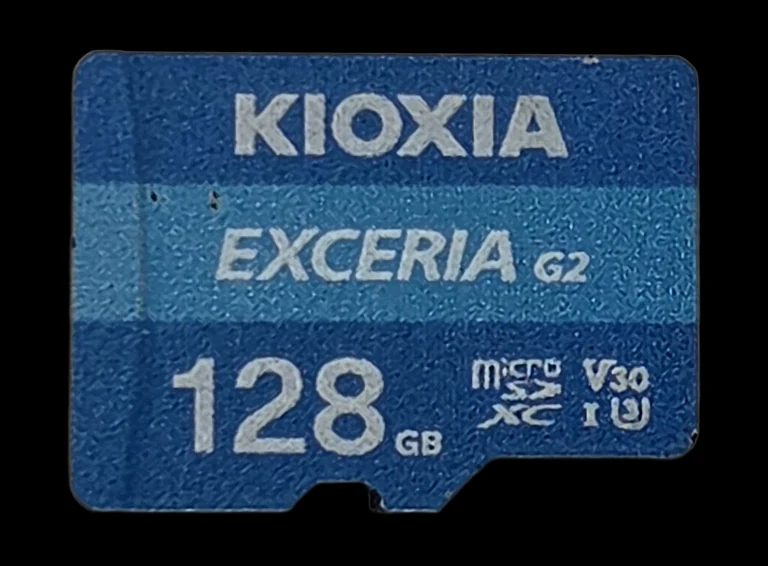
The card tested
Kioxia Exceria G2
The 128GB we benched. What the button reaches depends on what is in stock, for the reasons in the note above.
Frequently Asked Questions
Should I replace the memory card that came with my dash cam?
Not if it is this one. The bundled Kioxia Exceria G2 128GB beat its own published write spec by 31%, held a V60 sustained floor against the V30 printed on it, and showed no measurable fade under the scattered-write churn that cost our reference card 71% of its speed. Replace a bundled card if it is unbranded or fails a capacity check, not on principle.
Why does my 128GB microSD card only show 119 GB?
Two different things cause that, and only one of them is a real shortfall. The common one is not: Windows counts in binary units, so a genuine 128 GB card, 128,000,000,000 bytes, displays as about 119 GB. Nothing has been taken from you; the same bytes are simply divided by 1,073,741,824 instead of 1,000,000,000. If your card reads 119 GB, it is behaving exactly as it should. The second cause is real, and it is what we measured here. This Kioxia hands over 123.7 GB where the SanDisk High Endurance we tested on the same bench handed over the full 128.0, so on screen this card shows about 115 GB against the SanDisk's 119. That difference is flash Kioxia reserved for card management: replacements for blocks that wear out, room for the controller to erase and reclaim space, and the map tracking where your data physically sits. Kioxia publish an approximate usable capacity of 115.2 GB for this model, and that published figure is the binary one, so it is precisely what your computer will report. Our card matched it to within 0.04%.
Is the Kioxia Exceria G2 good for a dash cam?
Yes. Its worst ten seconds of sustained writing was 62.6 MB/s, which is nearly 17 times what a dual-channel 4K front-and-rear setup needs, and 10 times what a single 4K30 camera needs. It also did not degrade under loop-recording churn, which is the property that decides whether a card survives dash cam duty.
Is Kioxia a real brand?
Yes. Kioxia is the former Toshiba Memory business, one of the few companies that actually manufactures NAND flash rather than buying and relabeling it. A bundled card carrying their name is a different proposition from the unbranded cards the throw-it-away advice is really about.
How do I know if a memory card is fake?
The only test a counterfeit cannot pass is a full fill and verify: write every free byte with data that cannot be predicted, then read all of it back. A card lying about its capacity fails loudly at its real size. This card verified all 123.7 GB it exposes with zero mismatched bytes and zero read errors.
Bottom line: the advice was wrong about this one
Keep it. On the numbers that decide whether a dash cam card survives, the bundled Kioxia behaves like a card you would have chosen on purpose: 65.3 MB/s committed against a 50 MB/s spec, a V60 floor against a printed V30, 62.6 MB/s at its worst moment in five minutes flat out, no cache cliff anywhere across 123.7 GB, no stall longer than 107 milliseconds, and no measurable fade under the churn that collapsed a floor-tier card by 71%.
The one real deduction is capacity. You paid for 128 GB and the card hands you 123.7, and while Kioxia disclose that in a spec sheet, the number on the card face is still 128. A SanDisk with the same label gave us the full amount, so the shortfall is a choice rather than a law of physics. It is worth about 19 minutes of footage.
The broader point is the one worth keeping. Two cards have now come through this bench and both beat their own printed write claims, one by 2.24 times and one by 1.31. Manufacturers publish floors they can defend for years across every production revision, not descriptions of the card in your hand. Which means a spec sheet cannot rank cards, and the only way to know what you have is to measure it.
This run is now the reference fingerprint for this card on CKBench. If a future Exceria G2 shows a cache knee, a random-write fade, or a different delivered capacity, the parts changed, and this page is what it gets compared against.
Device identity: what this card reports about itselfReference data from the July 31 register capture, collapsed because most people do not need it. Open it to check a card of your own against a verified-genuine unit, or for the register-level version of this review's capacity story.
| Raw CID register | 02544d534531323889…019800 (serial digits elided) |
| Manufacturer ID (MID) | 0x02 (Toshiba / Kioxia) |
| OEM / application ID (OID) | 0x544d, ASCII "TM": Toshiba Memory, the company's pre-2019 name |
| Product name (PNM) | SE128 |
| Product revision (PRV) | 8.9 |
| Serial number (PSN) | 0x05…b3 (truncated) |
| Manufacture date (MDT) | August 2025 |
| Model code | not determinable: bundled unit with no packaging; the retail part numbers for this capacity are LMEX2L128GG2 and LMEX2L128GG4 |
| Declared capacity (from CSD) | 241,745,920 sectors of 512 bytes = 123,773,911,040 bytes, 96.7% of the label |
| Raw CSD register | 400e00325b5900039a2f7f800a400000 |
| Raw SCR register | 0285848374032d0a |
| Raw SD status (SSR) | 00000000080000000400a00020073a1e000800000001000000000000000000000000000000000000000000000000000000000000000000000000000000000000 |
| Captured on | Raspberry Pi 4 native SD host, no USB bridge in the path · 2026-07-31 |
The declared-capacity row is the register-level confirmation of this review's headline finding: the controller itself declares 123.77 GB before any filesystem exists, so the 4.2 GB shortfall is provisioned into the silicon, not lost to formatting. And the OEM tag is a small history lesson: TM is Toshiba Memory, which became Kioxia in 2019, and the same maker signature appears on Toshiba cards a decade older.
Everything above except the serial and the date is model-level: another genuine unit of this card should match it. The serial is unique to our unit, so it appears truncated here and its digits are elided from the raw CID hex; publishing a verified-genuine serial in full would mostly be a favor to whoever wants to clone it onto a counterfeit. The manufacture date publishes in full because it is batch-level and diagnostic. And a caution that identity can damn but cannot clear: the counterfeit we autopsied forged a complete, coherent identity, so matching a table like this is necessary for a genuine card, never sufficient.