
The free card that outwrote every card I paid for
The Lexar Silver Plus came in the box with a dash cam. It sustains 153.4 MB/s at its worst, beats 512 GB cards that cost real money, and almost none of that is something you will ever feel.
Prefer to watch a review?
No video for this lab run yet, but I cover dashcams, storage, and the gear around them on the channel. Subscribe to catch the next test the moment it goes live.
Updated 18 September 2026: the 205 MB/s read claim is settled, and it is met. This card was re-run on a SanDisk QuickFlow reader, which drives a bus mode the ProGrade used for the original review does not. On the QuickFlow it read 206.1 MB/s, wrote 182.7 MB/s committed, and sustained 187.3 MB/s through its worst ten seconds, against 168.4, 157.0 and 153.4 in the review below. Nothing about the card changed. The earlier write figures were the ProGrade’s ceiling rather than the card’s, and the review now says so wherever they appear. The score does not move: its five rows have been restated on the September 2026 scoring tables and still average to 4.5. One superlative does go: the Amazon Basics 128GB, the same Longsys silicon at the same firmware revision, ties this card on sustained write and leads on committed sequential write by about 3%.
Updated 4 September 2026: this card is no longer the fastest sustained writer on the bench. It published as the quickest UHS-I card I had measured, and on committed sequential write it still was, at 157.0 MB/s, until the 18 September update above. On the sustained figure that decides a video class, the worst ten seconds of a five-minute write, it has been beaten by Lexar’s own entry tier: the Lexar Blue 128GB floors at 155.1 MB/s against this card’s 153.4, and the two read within 0.02% of each other despite the Blue advertising 160 MB/s where this one advertises 205. Nothing measured here changed and no score moves. What changed is that a cheaper card arrived and took one of the two crowns, so the superlatives in this review now name which figure they mean.
The short version
This card arrived free in a dash cam box and then outwrote every card in my corpus at the time, including 512 GB cards from Samsung and SanDisk that cost real money. It sustains 153.4 MB/s through its worst ten seconds on the ProGrade reader this review was run on, and 187.3 MB/s on a SanDisk QuickFlow (see the 18 September update), holds V90 on a card whose face is printed V30, and has no cache cliff anywhere across its entire capacity. It is also, in the camera it shipped with, almost entirely wasted: a dash cam writes single-digit megabytes per second, and the V30 mark it already carries promises five times more than this card will ever be asked for. The speed is real. Whether you can reach it depends on a reader specification most people have never checked. My rating: 4.5/5, scored against the CKBench rubric.
Verdict: 4.5/5, tied for the fastest UHS-I sustained write I have measured, in the one place it cannot matterWho this card is for
- YesAnyone recording genuinely high-bitrate video4K120 and high-bitrate formats need 35 MB/s and this card floors at 153.4, more than four times over. It is one of the few cards in this class that never wavers.
- YesAnyone who fills a card and then dumps itNo cache cliff exists anywhere in 126.4 GB, so the last file copies as fast as the first. A full card offloaded in 13 minutes 43 seconds.
- NoAnyone buying it to make their dash cam betterYour camera writes single-digit MB/s. It cannot use 153.4, it could not use the 62.6 of the card this one replaced, and it will not record one extra minute.
- NoAnyone expecting 205 MB/s from whatever reader they already ownThat figure needs DDR200 at the clock a SanDisk QuickFlow drives: 206.1 MB/s there, 168.4 on a ProGrade PGM0.5, and near 96 MB/s on any reader without DDR200, same as a plain card.
The label says 128 GB and 126.4 GB reaches you, which is 98.75%. At 4K30 dash cam bitrates that is roughly 58 hours before the loop starts overwriting. Work out your own numbers in the dash cam storage calculator.
Why test a card nobody chose to buy?
Because somebody did choose it. A bundled card is a decision a camera manufacturer made on your behalf, usually invisibly and usually to a price, and it is the card that will be in the mount on the day you need the footage. This one came in the box with a Mangoal dash cam, and it is the second Mangoal card on this bench: the first camera shipped a Kioxia Exceria G2 that turned out to be genuinely competent. Two bundled cards from one brand, both good, is not a pattern I have seen from anyone else. It joins CKBench, the running index of every card on the bench, alongside the SanDisk Extreme 512GB and the Samsung PRO Plus 512GB, both of which it beats at sustained writing.
Why my write numbers read lower than other reviews. Every write here is committed to the card and confirmed before the clock stops, the way a dash cam actually writes, so my figures land below burst benchmarks like CrystalDiskMark that measure a few seconds of the card's RAM buffer. That rule, and the decimal MB/s and binary MiB conventions used throughout, are set out on the how we test and score page.
What the card claims, and what the card did
| Claim | Printed | Measured | Verdict |
|---|---|---|---|
| Capacity | 128GB | 126.4 GB, 98.75% of label, every byte verified | VERIFIED |
| Read speed | 205 MB/s (product page, not on the card) | 206.1 MB/s (SanDisk QuickFlow SDDR-B751, 17 September 2026); 168.4 MB/s (ProGrade MSD PGM0.5) | MET |
| Write speed | 150 MB/s (product page, not on the card) | 157.0 MB/s committed (ProGrade); 182.7 MB/s (QuickFlow) | MET |
| Speed class | Not printed, declared C10 in the card's register | 153.4 MB/s worst ten seconds (ProGrade); 187.3 (QuickFlow) | HELD |
| UHS speed grade | U3 | 153.4 MB/s worst ten seconds (ProGrade); 187.3 (QuickFlow) | HELD |
| Video speed class | V30 | 153.4 MB/s worst ten seconds (ProGrade); 187.3 (QuickFlow); holds V90 on both | HELD |
| App performance class | A2 | 2229 read / 2139 write IOPS at QD1 | NOT TESTABLE |
| Endurance rating | None printed | n/a | NOT CLAIMED |
| Operating temperature | None printed, none published for this line | n/a | NOT CLAIMED |
| Warranty term | Limited lifetime (product page) | n/a | NOT A PERFORMANCE CLAIM |
Two rows need their reasoning attached. A2 is not testable on any USB card reader, mine included: its floors assume a command queuing mode that USB card readers do not perform, so the card is neither credited nor penalised for it. That is a limit of every bench like this one, not a mark against the card, and I explain it on the speed classes page.
The 205 MB/s read was the one number I could not settle when this published. It was settled, and met, on a second reader on 17 September 2026. The section below is kept as written, with the result added at the top.
Why 205 MB/s is not a number you should expect
Update, 18 September 2026: re-run on a SanDisk QuickFlow, this card read 206.1 MB/s, so it does reach its claim. The argument below still stands, because the QuickFlow drives DDR200 at a clock the ProGrade PGM0.5 does not, and on a reader without DDR200 at all this card still stops near 96 MB/s. What follows is the original analysis, unchanged.
Standard UHS-I signalling tops out around 104 MB/s. That is the wire, not the card, and it is why so many perfectly good cards in my corpus all read within a hair of 96 MB/s and stop. A claim of 205 is roughly double what that wire carries, and the only way any card gets there is DDR200, a manufacturer extension that is not part of the UHS-I specification and that the card and the reader both have to speak.
This card clearly speaks it. Reading 168.4 MB/s and writing 157.0 MB/s are both far above the standard ceiling, and that alone puts it in a small group. But I still could not reach 205, and I am not going to blame my reader for all of it: the same reader has read 180.3 MB/s from a SanDisk Extreme in the same slot, so it is not capped at 170 and the shortfall is more likely the card than the chain. What is true is that 205 is beyond anything this bench has ever produced, which is why the row above says NOT TESTABLE rather than FAILS. A reader rated well past 205 is on its way here, and when it arrives this card gets re-run and the claim gets a real answer.
The practical version is shorter. On an ordinary card reader without DDR200, this card and a cheap one will both stop near 96 MB/s. The speed is genuinely in the card. Whether it is in your hands depends on a specification almost nobody checks before buying, which is the same argument I made about whether you need UHS-II.
What happens when you write to it for five minutes straight
This is the test that decides a video speed class, and it is the one most cards fail interestingly. Five minutes of continuous committed writing, cooling fan off, sampled every second. The verdict number is the worst ten second window, never the average, because your camera does not get to record over the average.
The card opened at 154.6 MB/s and closed at 155.3. Across all 300 samples it ranged from 148.9 to 158.3, a band of about six percent, with no step, no sag and no periodic cycle. The worst ten seconds landed at 153.4 MB/s, which clears the V90 floor of 90 by a margin wider than most cards' entire result. On a card whose face is printed V30, that is two full classes of headroom.
More important than the speed is what is missing. There is no cache cliff. Many fast cards write quickly into a small pseudo-SLC buffer and then collapse when it fills, which is exactly the failure that ruins a long recording. The five minute test found no knee across 46.5 GB, and then the capacity test wrote the entire 126.4 GB card and stayed flat end to end, opening at 147.5 MB/s and closing at 146.2. A cliff shows itself long before 126 GB. This card either has no meaningful cache layer or one large enough that filling the whole card never exhausts it, and for your purposes those are the same thing: the speed you see in the first ten seconds is the speed you get for the whole card.
I ran the sustained test a second time, four minutes later, on a card whose every block had just been written and with no warm-up pass. It gave 147.8 MB/s at its worst, 3.6% lower, and still held V90. I do not have an explanation for the 3.6% that I can prove. The temperature was identical, so it is not heat. It is a small unexplained difference and I would rather record it than invent a cause for it.
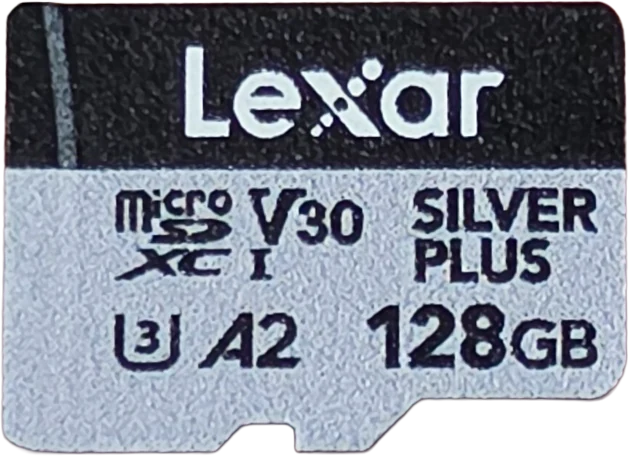
Lexar Silver Plus 128GB
How hot does it get, and does it slow down?
The frame below was taken the instant the five minute write stopped, because a card sheds heat in seconds. Ambient was held at 76 °F.
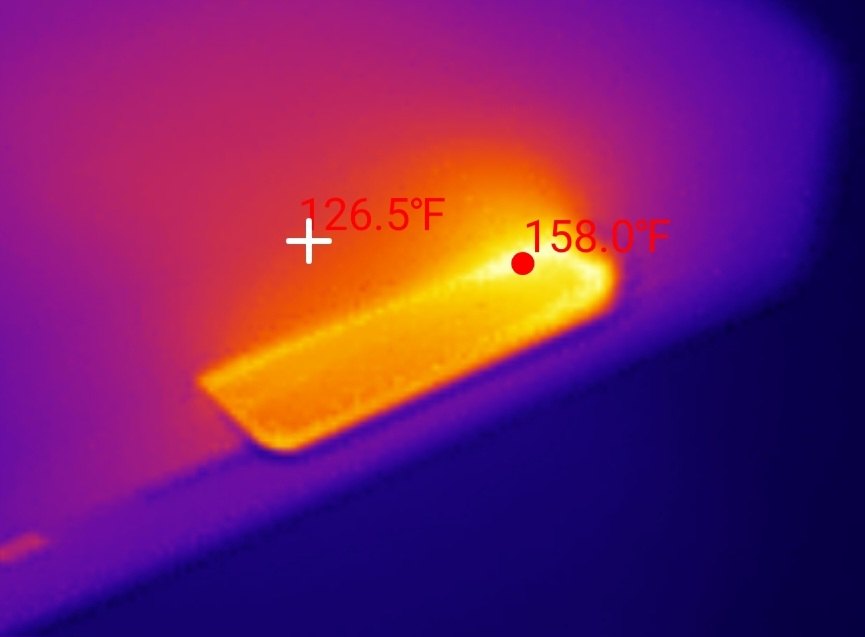
158 °F is a rise of 82 °F over ambient, and the card never slowed down reaching it. The write curve finishes higher than it starts, which is the opposite of throttling. Heat that costs no speed is a fact rather than a fault.
Context in both directions. It runs cooler than the cards nearest to it on speed: the SanDisk Extreme 512GB hits 172 °F and the Samsung PRO Plus units sit between 163 and 169 °F. Measured as heat produced per unit of work, it is the most efficient microSD card in my corpus. But it also runs 15 °F hotter than the Kioxia it replaced, which peaked at 143 °F. That is the price of writing 2.4 times as fast, and in a windshield mount in summer it stacks on top of a cabin that is already well above outside air. Lexar publish no operating temperature range for this line, so there is no manufacturer figure to check that against. I am not calling it a fault. I am saying a card sold into camera duty with no published thermal range is worth noticing.
It got hot, stayed cooler than its rivals, and never slowed down.
A 4K30 dash cam writes about 6 MB/s, roughly a twenty-sixth of this workload · Run Lexar-Silver-Plus-128GB_2026-08-20_175822
Is the 128 GB real?
Yes, and this is the only test that can prove it. Every free byte was filled with unpredictable verifiable data and then read back and compared: 126.4 GB across 118 files, zero mismatched bytes, zero read errors. Nothing is missing, nothing repeats, nothing quietly wraps around. Filling it took 14 minutes 34 seconds and reading all of it back took 13 minutes 43 seconds.
What you actually receive is 98.75% of the printed 128 GB, a shortfall of 1.6 GB. That is not a defect: every card reserves flash for bad blocks, garbage collection and its translation layer. The point is that no standard says how much of that reserve comes out of the advertised number instead of out of raw flash, and the spread across otherwise comparable 128 GB cards on my bench is real. A SanDisk High Endurance delivers 100.0% of its label. The Kioxia that came with the previous Mangoal camera delivers 96.7%. This card sits between them, and it is the only card I have measured that lands in that gap. Against that Kioxia it hands you 2.66 GB more usable space on the same printed capacity.
Every byte, written and read back
Run Lexar-Silver-Plus-128GB_2026-08-20_175822 · cardcheck v0.8.2 · ProGrade PGM0.5 microSD slot
Does it get worse the harder you hammer it?
Loop recording is not one long tidy write. It is scattered small writes landing on top of blocks the card has to erase first, over and over, for years. I cannot test lifespan in an afternoon and I will not pretend otherwise, but I can measure the behavior that predicts it: three back-to-back passes of random 4K writes, watching whether the card degrades as the churn continues.
This card gave 8.77, 8.77 and 8.76 MB/s across the three passes. That is a fade of 0.1%, which is another way of saying no measurable fade at all, and 2139 write IOPS is the highest of any card I have measured on this reader. For contrast, the unbranded reference card in the panel below loses 71% of its random write speed by its third pass and needs about two minutes to recover afterwards. That is the difference between a card built for this duty and a card that merely survives it.
One minute of loop-recording abuse
This card: run Lexar-Silver-Plus-128GB_2026-08-20_175822 · reference card: lab baseline, same bench, same test
How it scores, and why it is not a 5
Lexar Professional Silver Plus microSDXC 128GB
Scored against the CKBench rubric. Five dimensions, each out of 5.
Final score: 4.5 out of 5. The five rows were restated on the September 2026 scoring tables on 18 September 2026: claim accuracy rose to 5 once the read claim was settled, capacity moved to 4.5 on the declared-capacity table, and thermal moved to 4 on the headroom table. They average 4.7, rounded to the nearest half point.
Worth saying plainly, because it looks strange: this card still scores exactly what the Kioxia it replaced scored, 4.5, on a card that writes roughly three times as fast on the right reader. That is not the rubric saying they are equal. It is the rubric running out of room: this card sits at the top of the dimensions where it dominates, so its advantage has nowhere left to go. The number cannot separate them. The rest of this review can.
Frequently Asked Questions
Is the Lexar Silver Plus 128GB a good card?
Yes. It sustains 187.3 MB/s through its worst ten seconds on a SanDisk QuickFlow reader and 153.4 MB/s on a ProGrade PGM0.5, holds V90 against a printed V30, has no SLC cache cliff anywhere across its full capacity, and delivered every one of its 126.4 GB with zero errors. It scores 4.5 out of 5.
Will this card make my dash cam record better video?
No. A dash cam writes at its bitrate, which for this class of camera is single digit megabytes per second, and any card carrying a V30 mark already promises 30 MB/s. This card delivers five times that and your camera cannot use the difference. It will not add recording time, improve image quality, or reduce dropped clips compared with any other genuine V30 card.
Does the card reach its 205 MB/s read speed?
Yes, on the right reader. 205 MB/s is about double what standard UHS-I signalling carries, and reaching it requires DDR200, a non-standard mode that both the card and the reader must support, at a clock the reader has to drive. On a ProGrade PGM0.5 the card read 168.4 MB/s, which I published as not testable because no reader on my bench had exceeded 180.3 MB/s at the time. Re-run on a SanDisk QuickFlow on 17 September 2026 it read 206.1 MB/s, so the claim is met, and the same reader lifted committed write from 157.0 to 182.7 MB/s.
How much usable space does a 128GB Lexar Silver Plus actually have?
126.4 GB, which is 98.75% of the printed 128 GB, verified by writing and reading back every byte. Your computer will display it as about 118 GiB because it counts in binary. The 1.6 GB difference is flash reserved for bad blocks, garbage collection and the card's translation layer.
Is a bundled memory card worth keeping?
This one is, and that is unusual. Bundled cards are typically the weakest cards I test, but both cards Mangoal has shipped with its cameras have been genuinely competent, and this one outperforms every card I have bought. Test the card you were given before replacing it, because replacing a good bundled card with a worse retail one is a real and common mistake.
The bottom line on the Lexar Silver Plus 128GB
This is the best bundled card I have measured and it is not close. It writes 157.0 MB/s committed, floors at 153.4, carries no cache cliff across its entire capacity, barely fades under scattered-write churn, and runs cooler for the work it does than any other microSD card on my bench. Among every UHS-I card I have tested, bought or otherwise, nothing writes faster.
And the honest reason to care is none of that. In the camera it came with, this card is enormously over-provisioned, and the Kioxia it replaced was already more card than that camera needed. Pulling it out to copy footage is where the speed lives, and even there an ordinary reader without DDR200 will close most of the gap between this card and a cheap one. What survives every one of those caveats is quieter and more useful: the space is real, there is no cliff waiting at the end of a long recording, and it does not degrade when you hammer it. Those are the things that matter at 2am on the side of a road, and they are the reason this card earns its score.
If you own the camera this came in, keep the card. If you are shopping for a card to fix a dash cam problem, this is not the fix, and the speed classes page explains why almost nothing you own needs more than V30.
Device identity: what this card reports about itselfFor anyone verifying they have the same card
| Raw CID register | ad4c534c58313238 21 xxxxxxxx a19b00 (serial digits elided) |
| Manufacturer ID (MID) | 0xAD, Longsys, which owns the Lexar brand |
| OEM / application ID (OID) | 0x4C53, "LS" |
| Product name (PNM) | LX128 |
| Product revision (PRV) | 2.1 |
| Serial number (PSN) | 0x3771… (elided) |
| Manufacture date (MDT) | November 2025 |
| Declared capacity (from CSD) | 246,947,840 sectors of 512 bytes = 126,437,294,080 bytes, 98.8% of the label |
| Captured on | Raspberry Pi 4 native SD host, no USB bridge in the path · 2026-08-20 |
Everything above except the serial number is model level, so a genuine card of this model should report the same manufacturer, product name and revision. One oddity is worth knowing if you use these registers to identify cards: this card reports the same product name, LX128, as Lexar's full size Professional 1667x SD card, which is a completely different product on a different bus. The register cannot tell them apart. You can decode your own card's registers with the SD card CID decoder.
Disclosure: This card was not supplied by Lexar. It arrived bundled with a dash cam I bought myself, and Lexar had no involvement in or knowledge of this review. This post contains affiliate links. As an Amazon Associate I earn from qualifying purchases, at no extra cost to you. Affiliate links like these and my YouTube channel are what keep the site running.