
Lexar Blue 128GB: faster than its box says
Lexar's entry tier beats the only speed number printed on its box, sustains 155 MB/s of committed writing, and, on my primary reader, quietly outran the more expensive Silver Plus sitting one rung above it. On a faster reader that changed; see the 18 September update.
Prefer to watch a review?
No video for this lab run yet, but I cover dashcams, storage, and the gear around them on the channel. Subscribe to catch the next test the moment it goes live.
Updated 18 September 2026: this card is no longer the fastest sustained writer on the bench, and the reader is the reason. Every figure in this review was measured on a ProGrade PGM0.5, and on that reader the numbers stand: the Blue was re-run on a SanDisk QuickFlow on 17 September and read 168.7 MB/s, wrote 153.4 committed and sustained 155.0, the same card it was in September. Two other cards did not stand still. The Lexar Silver Plus, re-run on the QuickFlow the same evening, went from 153.4 to 187.3 MB/s sustained, and the Amazon Basics 128GB, the same Longsys platform as both Lexars, sustained 188.1 there. The ProGrade’s microSD slot turns out to have a write ceiling near 157 MB/s for cards of this family, so the tie between the two Lexars in the table below was two cards at one reader’s limit, and the Blue is the one that cannot go past it: it reports firmware revision 2.0 where the other two report 2.1. Nothing measured here changed and the score does not move (its rows have been restated on the September 2026 scoring tables, still 4.5). The superlatives below now say when they were true. The title changed on 18 September as well: this review published as “The Cheap One Is the Fast One”, which was true on the ProGrade and is not true on the QuickFlow; the address did not change.
The short version
Lexar prints one speed number on the Blue's packaging, 160 MB/s read, and no write figure at all. The card read 168.4 MB/s and then held 155.1 MB/s through the worst ten seconds of a five-minute committed write, which is five times the floor its V30 badge promises and, when this published, the fastest sustained write of any UHS-I card I had tested. It fills and verifies every byte it claims, it never hits a cache cliff, and it does not fade under churn. Two things stop it short of a clean sweep: it hands back 125.6 GB of a 128 GB label, the biggest shortfall of any name-brand card here, and it runs hot enough that a summer dash cam is a fair question. My rating: 4.5/5, scored against the CKBench rubric.
Verdict: 4.5/5, an entry-tier card with flagship sustained writeWho this card is for
- YesDash cams, action cameras and drones that write hard and never stop155.1 MB/s through its worst ten seconds clears the most demanding format I test, 4K at high bitrate, by more than four times. Nothing you can record will outrun it.
- YesCamera B-roll and card-to-computer offloadingIt reads at 168.4 MB/s on a reader that can keep up, and it read back the entire full card at the same speed, so a full-card offload took 13 minutes 32 seconds, against about 22 minutes for the same data on a reader capped at the standard UHS-I ceiling.
- NoRunning apps or a game library off the cardRandom 4K write is 1402 IOPS, and the Silver Plus one tier up does 2139 for that job. The A2 mark on the box cannot be verified on any USB card reader, so treat it as unproven rather than as a promise.
- NoAnyone who needs a device to see the speed rather than just receive itThe card declares V30 in its own registers, not V90. A camera that unlocks a recording mode based on the class a card reports will read 30 and stop there, no matter how fast the card actually is.
125.6 GB reaches you, which is about 5 hours 50 minutes of 4K dash cam footage at 6 MB/s before the loop starts overwriting. Work out your own numbers in the dash cam storage calculator.
Why an entry-tier card got the full protocol
Lexar sells the Blue as its cheap line. It is the card you get when you sort by price and stop reading, and the packaging is written to match: one speed figure, a row of badges, and a footnote admitting that write speeds are lower without ever saying lower than what.
I bought it for a comparison rather than for itself. Lexar's Professional Silver Plus 128GB is the same form factor, the same bus and the same class marks one tier up, and it advertises 205 MB/s read and 150 MB/s write against the Blue's 160 and nothing. Two cards from one brand, one rung apart, is the cleanest way to find out what a tier name actually buys. The answer turned out to be almost nothing, and the cheaper card won the measurement that matters most.
It joins CKBench, the running index of every card on the bench, alongside the Lexar Silver Plus 128GB, the Kioxia Exceria G2 128GB that anchors the low end of my reference band, and the SanDisk High Endurance 128GB that anchors the high end.
Why my write numbers read lower than other reviews. Every write here is committed to the card and confirmed before the clock stops, the way a dash cam actually writes, so my figures land below burst benchmarks like CrystalDiskMark that measure a few seconds of the card's RAM buffer. That rule, and the decimal MB/s and binary MiB conventions used throughout, are set out on the how we test and score page.
What the box claims, and what the card did
| Claim | Printed | Measured | Verdict |
|---|---|---|---|
| Capacity | 128GB (packaging and card face) | 125.6 GB, 98.2% of label, every byte written and read back | VERIFIED |
| Read speed | Up to 160 MB/s (packaging) | 168.4 MB/s (ProGrade MSD PGM0.5), 168.5 MB/s (SanDisk SDDR-B751) | BEATEN, 105% |
| Write speed | No figure printed anywhere | 152.6 MB/s sequential, 155.1 MB/s worst ten seconds committed | NOT CLAIMED |
| Speed class | C10 (packaging and card face) | 155.1 MB/s worst ten seconds against a 10 MB/s floor | HELD |
| UHS speed grade | U3 (packaging and card face) | 155.1 MB/s worst ten seconds against a 30 MB/s floor | HELD |
| Video speed class | V30 (packaging and card face) | 155.1 MB/s worst ten seconds, which is V90 territory | HELD, BEATEN BY THREE GRADES |
| App performance class | A2 (packaging and card face) | 2118 read / 1402 write IOPS at queue depth 1 | NOT TESTABLE |
| Endurance rating | None printed, none published for this line | n/a | NOT CLAIMED |
| Operating temperature | None printed. Heat and cold resistance are ticked as icons with no range given | n/a | NOT CLAIMED |
| Warranty term | 10-year limited on the card, 1-year limited on the bundled adapter (packaging) | n/a | NOT A PERFORMANCE CLAIM |
Two rows there are unusual enough to be worth stopping on. The write row is blank on Lexar's side because the package states no write speed at all, a habit it shares with SanDisk's Ultra line and with the PNY Premier-X, whose blister says only that the write speed is lower, and the video class row is the only time a card in this corpus has cleared its printed class by three full grades.
Does the Lexar Blue really read at 160 MB/s?
Yes, and it goes past it. The card averaged 168.4 MB/s across three read passes, or 105% of the printed figure.
That sentence is harder to earn than it looks. 160 MB/s is above what standard UHS-I signalling can carry, which tops out near 104 MB/s, so hitting it needs a faster non-standard mode that the card and the reader both have to support. Plug this card into an ordinary reader and you will measure about 96 MB/s, and the number you are looking at will be the reader's limit rather than the card's. It is the single most common way a card review gets a speed figure wrong.
My own tool flagged the risk automatically on this run:
"INTERFACE CEILING: sequential read (168.4 MB/s) is within 5% of UHS-I DDR200 (~170 MB/s), the reader may be the limiter, not the card."
So I ran the whole thing again on a second reader. The SanDisk SDDR-B751 has already been measured pushing a different card to 203.5 MB/s, so it has room to spare here. The Blue read 168.5 MB/s on it, within 0.06% of the first answer, with 17% of that reader's proven capability left unused.
Two readers, one of them with 35 MB/s of headroom it never needed, returning the same number. 168.4 MB/s is the card, not the bench. This is the first card here whose above-standard read claim I have been able to settle outright rather than mark unresolved, and the reason is slightly deflating: Lexar set the claim low enough to clear.
Lexar Blue 128GB · the flat line
300 one-second samples · worst 10 s at 1:22 · knee scan outcome NO_KNEE_STABLE · Run Lexar-Blue-128GB_2026-09-04_102023
What 155 MB/s of sustained writing actually buys you
The number that decides whether a card can record video is not its headline speed. It is the worst ten-second window of a long continuous write, because a camera does not get to record over the average. One bad stretch is a corrupted clip.
Across five minutes of committed writing the Blue's worst ten seconds came to 155.1 MB/s. Its V30 badge promises 30. It cleared that floor by a factor of five, and it cleared V90, the top of the video class ladder, by 1.7 times.
The curve above is the least dramatic in this entire corpus and that is exactly what you want. The lowest single second of the run was 150.99 MB/s, the highest 159.38, and the first thirty seconds averaged within 0.1 MB/s of the following four and a half minutes. There is no knee, which is the moment a card exhausts a fast SLC write cache and drops to the slower speed of its underlying flash. Plenty of cheap cards look excellent for twenty seconds and then fall off a cliff.
Five minutes only proves five minutes, so the real evidence is the full-card fill further down: 14 minutes and 15 seconds of continuous writing across all 125.6 GB, starting at 148.3 MB/s and ending at 147.8. Its worst ten seconds over the whole card was 144.0 MB/s. There is no cache to run out of.
One caveat belongs with the chart above. Both anchors in my reference band stay on standard UHS-I signalling while this card uses the faster mode, so part of that gap is bus tier rather than card quality. The band is a comparison, never a score.
The good-to-great band
Read this one with its caveat attached: both anchors stay on standard UHS-I signalling, and this card uses the faster non-standard mode. The band separates bus tiers as much as it separates card quality, it is a comparison rather than a score, and read speed is deliberately absent from it.
Is the more expensive Lexar worth it?
This is the comparison the card was bought for. Same brand, same form factor, same bus, same C10 / U3 / V30 / A2 marks, one tier apart, both measured on the same reader in the same room. On paper the Silver Plus promises 28% more read speed and publishes a write figure the Blue withholds.
| Measured on the ProGrade PGM0.5 | Blue 128GB | Silver Plus 128GB | Difference |
|---|---|---|---|
| Sequential read | 168.4 MB/s | 168.5 MB/s | 0.02%, a tie |
| Worst ten seconds, committed write | 155.1 MB/s | 153.4 MB/s | Blue wins by 1.1% |
| Steady state write | 155.8 MB/s | 154.9 MB/s | Blue wins by 0.6% |
| Sequential write | 152.6 MB/s | 157.0 MB/s | Silver Plus by 2.9% |
| Random 4K write | 1402 IOPS | 2139 IOPS | Silver Plus by 52.6% |
| Random 4K read | 2118 IOPS | 2229 IOPS | Silver Plus by 5.2% |
| Usable capacity | 98.2% of label | 98.8% of label | Silver Plus by 0.6 points |
| Peak temperature | 162.3 °F / 72.4 °C | 158 °F / 70.0 °C | Silver Plus runs 4 °F cooler |
| Rated read on the box | 160 MB/s | 205 MB/s | Silver Plus by 28%, on paper |
Update, 18 September 2026: this table is the ProGrade PGM0.5, and on the ProGrade it stands. On a SanDisk QuickFlow, which drives the DDR200 mode at a higher clock, the Silver Plus went to 206.1 MB/s read, 182.7 committed write and 187.3 sustained, while the Blue, re-run the same evening, stayed at 168.7, 153.4 and 155.0. The two are the same Longsys platform one firmware revision apart, and the revision is the difference. On the reader most people own the cheaper card is level with the dearer one; on a reader that can drive the Silver Plus, the Silver Plus is about 20% ahead.
The two cards read at the same speed. Not similar speeds, the same speed, 0.02% apart, which is closer than two runs of the same card usually land. The Blue promises 160 and delivers 168.4. The Silver Plus promises 205 and delivers 168.5. One card beats its claim by 5% and the other misses its by 18%, and they are doing identical work.
What the extra tier does buy is random 4K write, where the Silver Plus is 52.6% quicker. That is the small scattered-file workload behind the A2 badge, and it matters if you are running apps off the card in a phone or a Raspberry Pi. It buys a slightly better sequential write, half a percentage point more of your capacity, and a card that runs about 4 °F cooler. It does not buy read speed, and it does not buy sustained write, where the cheaper card is marginally ahead.
There is a wider implication I want to flag carefully. When I reviewed the Silver Plus I could not settle its 205 MB/s claim, because no reader on this bench had been proven past that figure and blaming the card for the instrument would have been dishonest. This card now shows the same platform stopping at 168.5 on a reader with 35 MB/s to spare. That is indirect evidence and it does not settle anything, since a claim can only be tested on the card that makes it. It does mean a re-run of the Silver Plus is worth doing, and I have a fair idea what it will say.
Every byte, written and read back
Run Lexar-Blue-128GB_2026-09-04_102023 · cardcheck v0.8.3 · ProGrade MSD PGM0.5
Why does a 128GB card show up as 117 GB?
Two different things are going on, and only one of them is the card's doing.
The first is arithmetic and it is not a fault. Card makers count a gigabyte as 1,000,000,000 bytes, which is what the SD specification and the speed class floors use. Windows counts in binary, where a gigabyte is 1,073,741,824 bytes. The same untouched card is therefore labelled 128 GB and displayed as about 117 GiB. Nothing is missing. Two counting systems are being shown with the same three letters, and every honest card on the market does this.
The second is real, and this card gives back more than most. I filled all 125.6 GB with seeded, unrepeatable data across 118 files and read every byte back: zero mismatched bytes and zero read errors. The space is genuine. But 125.6 GB of a 128.0 GB label is 98.2%, leaving 2.36 GB unaccounted for, and that is before Windows does its binary conversion.
For context, most name-brand cards I have tested land between 99.9% and 100.1%. The Silver Plus one tier up delivers 98.8%. At 98.2% the Blue hands back less of its label than any other name-brand card in the corpus, and only the bundled and bargain-bin cards do worse. Lexar does disclose the possibility on the package, in the standard line about actual usable capacity varying, but it publishes no figure to hold them to.
Speed was also even across the whole card, which is the other thing a full fill exposes. Writing to the first, middle and last tenth of the card gave 147.4, 147.3 and 147.7 MB/s, a spread of 0.26%. There are no slow zones near the end.
If a card ever fails this test badly, that is a different story entirely and a far more serious one. The counterfeit ImageMate I tested exposed 128 GB and delivered 26.8% of it, destroying everything written past the real capacity.
It ran hot. It never slowed down.
Lexar prints no operating temperature range for this card, so the reference point is the 85 °C these parts are typically rated for, leaving roughly 12.6 °C of headroom · Run Lexar-Blue-128GB_2026-09-04_102023
Does the Lexar Blue get too hot?
It gets hot. It does not get slow, and those are separate questions.
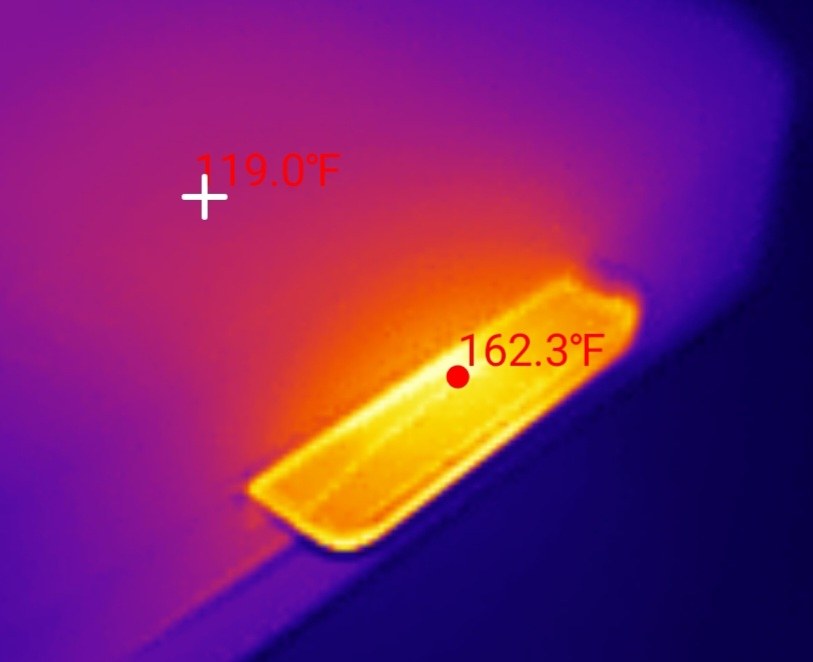
At the end of five minutes of flat-out committed writing, with no fan and a room at 76 °F / 24.4 °C, the card reached 162.3 °F / 72.4 °C. That is a rise of 86 °F / 48 °C over ambient, and it makes this the hottest 128GB card on my bench bar one.
Nothing slowed down. Not in the five-minute test, where throughput varied by 0.91% end to end and the longest single stall was 32 milliseconds, and not in the 14-minute whole-card fill either, which is a far longer thermal soak. Heat that throttles is a fault. Heat that costs no speed is just a fact about the card.
The fair way to judge it is heat produced per unit of work, and on that measure the Blue is third best of every card I have run, at about 0.56 °F of rise for each MB/s it sustains. It is hot because it is working hard, not because it is inefficient.
The caveat is headroom. Lexar prints no operating temperature range for this card at all, only heat and cold resistance icons with no numbers attached, so the reference point has to be the 85 °C these flash parts are typically rated for. At 72.4 °C on a desk in a 76 °F room, that leaves roughly 12.6 °C of margin. A closed car in summer eats margin like that quickly. I would still put this card in a dash cam, but if your car bakes, the cooler-running SanDisk High Endurance is the more conservative choice even though it writes at little more than half the speed.
One minute of loop-recording abuse
Random 4K write, queue depth 1 · ProGrade MSD PGM0.5 · the reference card ran on the retired Transcend reader under protocol v1.0 · Run Lexar-Blue-128GB_2026-09-04_102023
What happens when you make it churn
Loop recording is not one long clean write. It is a delete and a rewrite in the same place, over and over, and that scattered pattern is what exposes a weak controller. The test is three back-to-back passes of random 4K writes, watching whether the card degrades as its flash translation layer fills with garbage.
The Blue recorded 1402, 1402 and 1403 IOPS across the three passes. That is not a small decline, it is no decline at all, a change of one tenth of one percent in the card's favour. Random reads behaved the same way, moving 0.3% across three passes. The cheap unbranded reference card in the same chart loses 71% by its third pass and needs about two minutes to recover.
Recovery was equally uneventful. After the earlier tests had thoroughly churned the card, it was back at its full media rate within 60 seconds, which is the earliest my analyzer is able to declare stability. It may well be faster than that.
Two honest limits on this. Three passes is a directional indicator, not an endurance test: no bench session can tell you whether a card will still be working in year three. And absolute random 4K figures move by as much as 24% on reader alone, which I confirmed on this very card by running it on both readers, so treat the shape here as the finding and the raw IOPS as approximate.
This card does not report itself as a Lexar
Every SD card carries a small read-only register called the CID, written at the factory, holding a manufacturer code, a product name, a revision and a date. It is the closest thing a card has to a birth certificate, and it is where a counterfeit usually gives itself away.
I knew what this one should say before I read it. The Blue's own packaging names Longsys, the company that owns the Lexar brand, in its legal small print. Longsys is manufacturer ID 0xAD. Both of the other Lexar cards on my bench report exactly that, along with the OEM code "LS" and the product name "LX128".
The Blue reports manufacturer ID 0xC9, an OEM code that decodes to nothing readable, and the product name MSSD0. Across all 30 register dumps I have collected, 0xC9 appears exactly once, and this is it.
I want to be careful about what that does and does not mean. It is not a sign of a fake. The capacity is real and fully verified, the speeds are excellent, the packaging is genuine retail with a proper Amazon barcode, and a counterfeit does not usually outperform the brand it is imitating. What it means is that whoever assembled this card did not program it with the identity its own box would lead you to expect.
There is a stranger detail on top. The Blue and the Silver Plus report different manufacturers, yet their SD Status registers, 64 bytes describing allocation sizes, erase timings and declared classes, are byte for byte identical. That is the only such match across my whole archive, and every other identical pair sits inside a single manufacturer. Combined with two cards reading at the same speed to two decimal places, it points at a shared controller and firmware wearing two different badges. I checked three other tempting similarities first and threw all three out, because they turned out to be shared with Samsung and SanDisk cards too and therefore prove nothing. This is an observation, not a conclusion. Confirming it would need a teardown I have not done.
The practical consequence for you is simple: a card with an unfamiliar controller identity is one worth re-checking if you buy another later. Parts get swapped inside a product that keeps the same name and the same box, which is exactly what my two SanDisk Ultra units bought eight years apart turned out to demonstrate. If you own one of these, the CID decoder will read your own card's registers back to you.
How the Lexar Blue scores
Lexar Blue microSDXC 128GB
Scored against the CKBench rubric. Five dimensions, each out of 5.
Final score: 4.5 out of 5. The five rows were restated on the September 2026 scoring tables on 18 September 2026: claim accuracy rose to 5 because a capacity shortfall is no longer counted twice, capacity moved to 4.5 on the declared-capacity table, and thermal moved to 3.5 on the headroom table. They average 4.6, rounded to the nearest half point. It still scores exactly what the Silver Plus above it scores, and the comparison table above now says which reader that was true on.
Frequently Asked Questions
Is the Lexar Blue 128GB a good microSD card?
Yes, and it is considerably better than its entry-tier positioning suggests. It beat its printed 160 MB/s read claim at 168.4 MB/s, held 155.1 MB/s through the worst ten seconds of a five-minute committed write, and verified every byte of its capacity with zero errors. Its two weaknesses are that it returns 98.2% of its label, the least of any name-brand card I have tested, and that it runs hot at 72.4 degrees Celsius, though it never once slowed down because of it.
Is the Lexar Blue or the Lexar Silver Plus faster?
It depends on the reader. On a ProGrade PGM0.5 they are level: 168.4 against 168.5 MB/s read, and the Blue slightly ahead on sustained write at 155.1 against 153.4. On a SanDisk QuickFlow, which drives a faster DDR200 mode, the Silver Plus reads 206.1 and sustains 187.3 while the Blue stays at 168.7 and 155.0, so on that reader the Silver Plus is about 20% faster. The Silver Plus is also 52.6% quicker at random 4K writes on the ProGrade, which matters for running apps rather than for recording video.
Why does my 128GB Lexar Blue only show 117 GB?
Most of that gap is a units difference rather than missing storage. Card makers count a gigabyte as 1,000,000,000 bytes while Windows counts 1,073,741,824, so a genuine 128 GB card displays as roughly 117 GiB. There is also a real shortfall on this particular card: it exposes 125.6 GB rather than 128, which is 98.2% of the label and about 2.36 GB short before Windows does its conversion. Every byte it does expose is genuine, verified by writing and reading back the entire card.
Is the Lexar Blue fast enough for a 4K dash cam?
Comfortably, with more headroom than any dash cam can use. A 4K dash cam typically needs about 6 MB/s and the most demanding format I test needs 35 MB/s, against this card's measured worst case of 155.1 MB/s. It also showed no performance fade across three passes of the scattered rewriting that loop recording produces. The one thing to weigh is heat: it reached 72.4 degrees Celsius under load, so a car that bakes in summer is a fair reason to choose a cooler-running high endurance card instead.
Why is the Lexar Blue rated V30 when it writes at 155 MB/s?
V30 is a floor, not a speed. It guarantees the card will never drop below 30 MB/s during sustained recording, and any card that comfortably exceeds that still qualifies. This card measured at V90 levels, three grades above its badge. The catch is that it also declares V30 in its own internal registers, so a camera that unlocks a recording mode based on the class a card reports will see 30 rather than 90 no matter how fast the card really is.
Does the Lexar Blue have an A2 rating that works?
A2 is printed on the card, but I cannot verify it and neither can most reviewers. The A2 specification requires command queuing that USB card readers do not implement, so no USB-based test can confirm or deny it. What I can report is that the card managed 2118 random read and 1402 random write IOPS at queue depth one, which clears the older A1 floors. Treat A2 on this card as unproven rather than as either passed or failed.
The bottom line on the Lexar Blue 128GB
Buy it. When this published, the Lexar Blue was the fastest UHS-I card I had put on this bench for the workload that actually matters, sustained committed writing, and it costs less than the Lexar sitting above it that it matched on my primary reader. On a reader that can drive the Silver Plus faster, the Silver Plus pulls about 20% ahead; on the reader most people own, the two are level. It exceeds the one speed claim printed on its box, it holds a flat 155 MB/s from the first second of a full card to the last, it does not degrade under churn, and every byte it advertises is really there.
Two caveats travel with that recommendation, and neither is a dealbreaker. It gives back 2.4 GB against its label, more than any other name-brand card here, so if you are sizing a card to the edge of your needs, size up. And it runs hot: 72.4 °C with roughly 12.6 °C of margin left, which never cost it a single MB/s on my desk but is worth thinking about in a car that sits in the sun.
The wider lesson is the one I did not expect to write. A tier name is marketing, not a specification. Lexar's cheap card and Lexar's better card read at the same speed, share an identical firmware configuration, and the cheap one writes faster for longer. The only place the extra money bought measurable performance was random 4K, which is the workload most buyers of either card will never touch. Test the card, not the badge.
One unit, purchased retail from Amazon, tested 4 September 2026 on protocol v1.14. Three passes are an indicator, never an endurance test.
Device identity: what this card reports about itselfFor anyone verifying they have the same card
| Raw CID register | c94d604d53534430 20 xxxxxxxx a19c00 (serial digits elided) |
| Manufacturer ID (MID) | 0xC9, unassigned in the registered list and unique across all 30 cards on this bench |
| OEM / application ID (OID) | 0x4D60, which decodes to no readable text |
| Product name (PNM) | MSSD0 |
| Product revision (PRV) | 2.0 |
| Serial number (PSN) | 0x3536… (elided) |
| Manufacture date (MDT) | December 2025 |
| Declared capacity (from CSD) | 245,452,800 sectors of 512 bytes = 125,671,833,600 bytes, 98.2% of the label |
| Captured on | Raspberry Pi 4 native SD host, no USB bridge in the path · 2026-09-04 |
Everything above except the serial number is model level, so a genuine card of this model should report the same manufacturer, product name and revision. The manufacturer ID is the interesting field here and it is discussed in full in the body of the review rather than buried in this table, because a card that does not identify itself as the brand on its box is the story rather than an appendix. You can decode your own card's registers with the SD card CID decoder.
Disclosure: I bought this card myself at retail from Amazon and Lexar had no involvement in the testing or this review. This post contains affiliate links. As an Amazon Associate I earn from qualifying purchases, at no extra cost to you. Affiliate links like these and my YouTube channel are what keep the site running.