
Samsung PRO Plus 512GB review: a V30 card that holds V90
It beats the write speed printed on its own box by 9 percent, sustains that speed across all 512 GB without a single cache cliff, and holds a video class three tiers above the one it advertises.
Prefer to watch a review?
No video for this lab run yet, but I cover dashcams, storage, and the gear around them on the channel. Subscribe to catch the next test the moment it goes live.
The short version
The box promises 130 MB/s write. The card delivered 142.15 MB/s, and then held 141.56 MB/s through its worst ten seconds of a five minute flat-out write, which is V90 territory on a card whose face is stamped V30. It wrote and read back every one of its 512.6 GB with zero mismatched bytes, and it never hit a cache cliff, not in the five minute test and not across the entire card. The catch is heat: 169.6 °F at the card surface, the hottest conventional card on this bench, though it never once slowed down because of it. The 180 MB/s read claim I cannot settle, and I will explain exactly why rather than pretend otherwise. My rating: 4.5/5, scored against the CKBench rubric.
Verdict: 4.5/5, beats its own label almost everywhere it can be measuredWho this card is for
- Yes4K and high bitrate video captureAction cameras, drones and mirrorless bodies that write big files fast. Worst case measured here is 141.56 MB/s, which clears the V90 floor of 90 MB/s with room to spare and clears 4K60 by about twelve times.
- YesPhone and handheld console expansion2,372 random read IOPS and 1,895 random write IOPS at queue depth one. Both clear the A1 floors, read by 1.6 times and write by 3.8 times, and neither faded across three passes.
- NoA dash cam or a 24/7 security cameraNot because it is slow. It has no printed endurance rating at all, where cards built for loop recording publish one, and this card is designed to be fast rather than to be overwritten forever. A high endurance card is the right tool and usually the cheaper one.
- NoAnyone who needs 180 MB/s reads specificallyI could not confirm that number on this bench, and if the read speed is the reason you are buying, see the section below before you commit.
At 512 GB this card holds roughly 20 hours of dual channel 2K dash cam footage, though see above for why I would not put it in a dash cam. Work out your own numbers in the dash cam storage calculator.
Why test a card that already has good reviews?
Because almost nobody tests the number that actually matters. Burst benchmarks measure a few seconds of a card's RAM buffer and report a headline figure; a camera writing 4K for twenty minutes finds out what the flash underneath can really do. This card went through the full CKBench suite: sequential, random 4K, a five minute sustained write with the cooling fan off, and a complete fill and verify of all 512 GB. It joins CKBench, the running index of every card on the bench, alongside the Samsung PRO Ultimate SD 512GB, the Samsung P9 Express 256GB and the SanDisk High Endurance 128GB.
One unit, bought at retail, plus a second unit from the same production batch as a cross check. Three passes of a test are an indicator, not an endurance rating, and I will say so again where it matters.
Why my write numbers read lower than other reviews. Every write here is committed to the card and confirmed before the clock stops, the way a dash cam actually writes, so my figures land below burst benchmarks like CrystalDiskMark that measure a few seconds of the card's RAM buffer. That rule, and the decimal MB/s and binary MiB conventions used throughout, are set out on the how we test and score page.
What the box claims, and what the card did
| Claim | Printed | Measured | Verdict |
|---|---|---|---|
| Capacity | 512 GB (packaging) | 512.6 GB usable, 100.13% of label | VERIFIED |
| Read speed | 180 MB/s (packaging) | 169.30 MB/s (ProGrade PGM0.5, microSD slot) | NOT SETTLED |
| Write speed | 130 MB/s (packaging) | 142.15 MB/s sequential, 142.93 MB/s sustained | BEATEN BY 9.3% |
| Speed class | C10 (card face) | 141.56 MB/s worst ten seconds | HELD |
| UHS speed grade | U3 (card face) | 141.56 MB/s worst ten seconds | HELD |
| Video speed class | V30 (card face) | V90 held, 141.56 MB/s worst ten seconds against a 90 MB/s floor | BEATEN BY THREE TIERS |
| App performance class | A2 (card face) | 2,372 read and 1,895 write IOPS at queue depth one | NOT TESTABLE |
| Endurance rating | none printed | n/a | NOT CLAIMED |
| Operating temperature | none printed | n/a | NOT CLAIMED |
| Warranty term | 10-year limited (packaging) | n/a | NOT A PERFORMANCE CLAIM |
Two rows need explaining rather than a bare verdict. A2 is not testable on this bench, and that is a property of my equipment rather than of the card: the A2 floors are defined with command queuing, which USB card readers do not implement. What I can report is the queue depth one result above, which clears the A1 floors of 1,500 read and 500 write IOPS by 1.6 and 3.8 times. The read claim gets its own section, immediately below, because "not settled" is a real answer and it deserves a real explanation.
Disclosure: I bought this card at retail with my own money and Samsung had no involvement in this review. This post contains affiliate links. As an Amazon Associate I earn from qualifying purchases, at no extra cost to you. Affiliate links like these and my YouTube channel are what keep the site running.
Samsung PRO Plus 512GB
What the box actually says
Both faces, because the claims this review checks are split across them. The front carries the speed figures and the class marks; the back carries the model code, the warranty term, and the byte definition that decides what "512 GB" means.
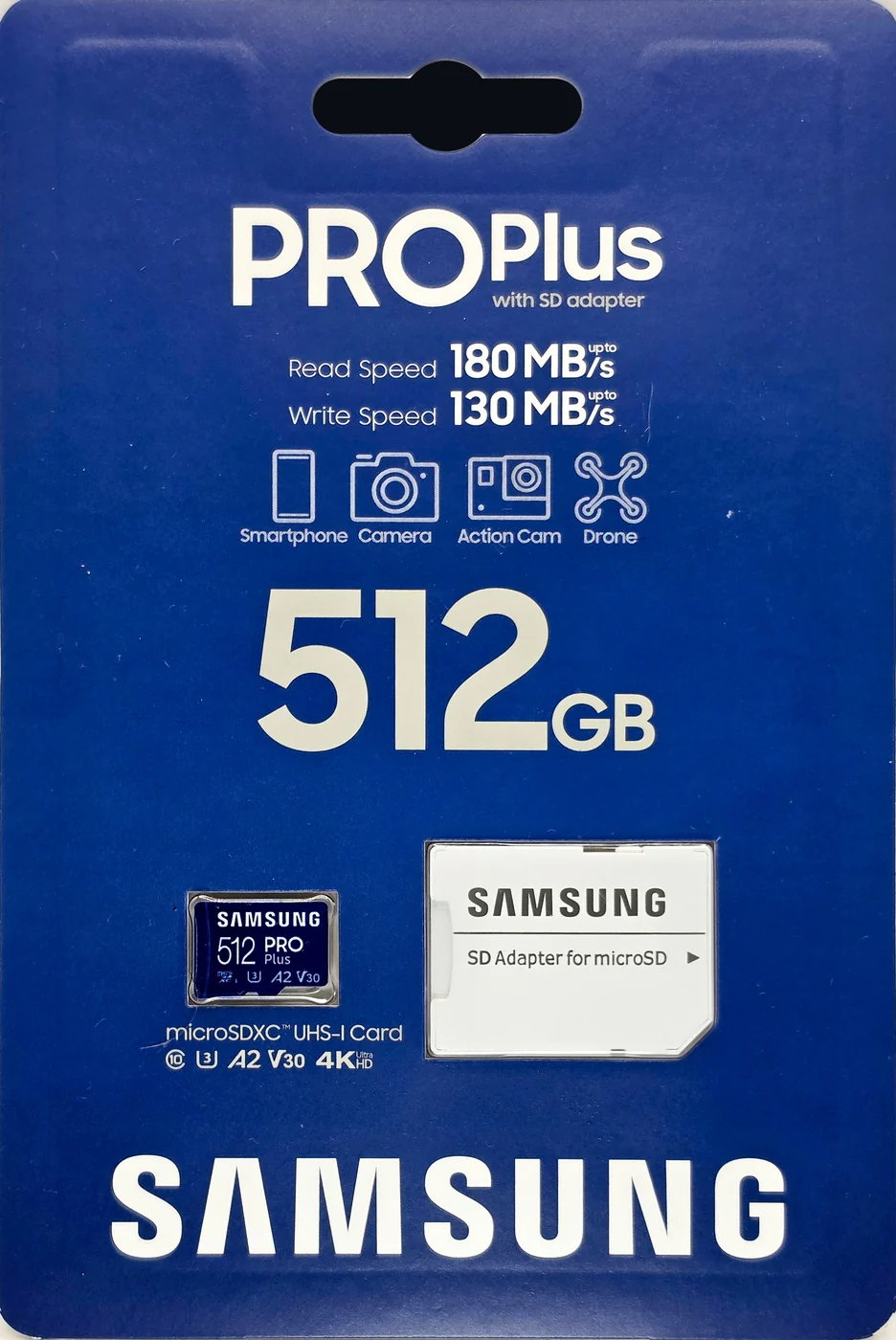
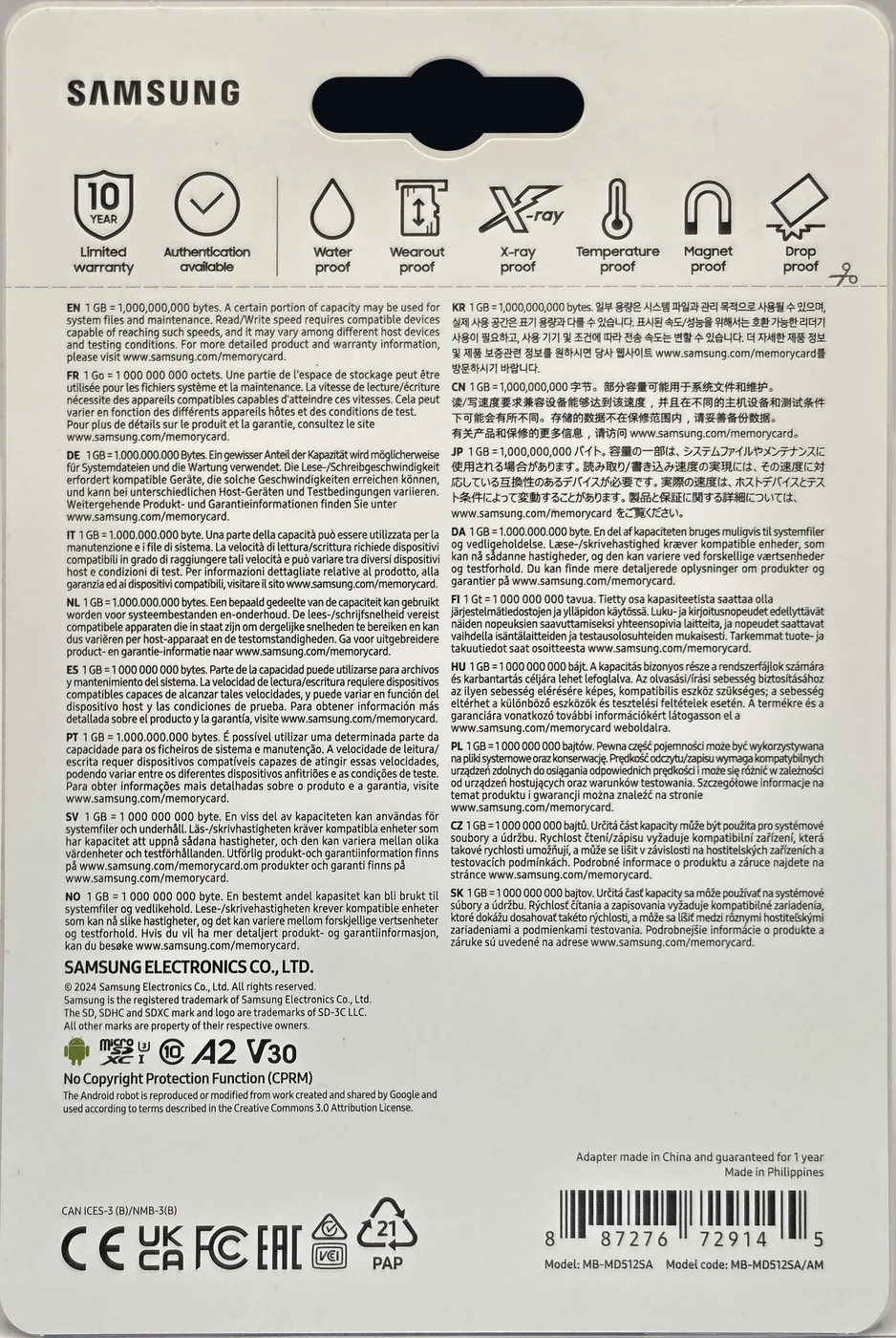
How fast is the Samsung PRO Plus 512GB, really?
The interesting thing about this card is not any single number. It is that all the numbers are the same number.
| Measurement | MB/s |
|---|---|
| Sequential write, average of three 2 GiB passes | 142.15 |
| Sustained write, opening 30 second burst | 143.17 |
| Sustained write, steady state over 270 samples | 142.93 |
| Sustained write, worst ten seconds | 141.56 |
| Writing the entire 512 GB card | 144.01 |
Every one of those sits inside a 2 percent band, and the worst ten seconds of a five minute flat-out write came in only 1.1 percent below the opening burst. Split the five minutes into quarters and they read 143.11, 142.76, 143.02 and 142.93, a spread of a third of a megabyte per second. Write to the first tenth of the card, the middle tenth and the last tenth and you get 135.15, 136.75 and 135.80.
That flatness is the whole product. Plenty of cards post a big opening number and then fall off a cliff when their fast write buffer fills, which is the moment a long 4K take starts dropping frames. This one does not have that moment. The number on the box is what you get, everywhere on the card, for as long as you keep writing.
For scale, the worst ten seconds here is 141.56 MB/s. The V90 badge requires a floor of 90. A 4K60 camera needs roughly 12. A 4K30 dash cam needs about 6.
Does the Samsung PRO Plus really read at 180 MB/s?
I do not know, and I am not going to guess. Here is the honest position.
Measured read speed was 169.30 MB/s across three passes, and 170.31 MB/s reading back the entire card. That is 94 percent of the printed figure. It would be easy to write that up as a near miss, and it would be wrong.
The reason is that 180 MB/s is above the UHS-I standard entirely. UHS-I tops out at 104 MB/s, and every card that goes faster does it through a proprietary extension that both the card and the reader have to speak. My reader speaks it: the fastest read this bench has ever recorded through that slot is 174.94 MB/s, on a different card. But 174.94 is itself below 180. A measuring path that has never once exceeded 175 cannot tell you whether a card can do 180. It cannot confirm the claim and it cannot refute it.
So the row says NOT SETTLED, and it will stay that way until I have a reader that has demonstrably gone past 180 with something. The other half of the picture, which I will state just as plainly: 169.30 is about 3 percent below what that same slot has already delivered, so the reader is not simply capping this card. It genuinely reads a little slower than the quickest card I have put through it.
If you are buying this card for its write performance, none of this matters and the measured numbers are excellent. If you are buying it because the box says 180, buy from somewhere with a returns policy and test it in your own hardware.
Every byte, written and read back
Run Samsung-PRO-Plus-512GB_2026-08-11_134554 · cardcheck v0.8.2 · ProGrade PGM0.5, microSD slot
Is the Samsung PRO Plus 512GB really 512 GB?
Yes, and then a little more. The card presents 512,644,612,096 bytes, which is 100.13 percent of its 512 GB label. I filled every free byte of it with seeded, unique data, read all of it back, and compared: 478 files, zero mismatched bytes, zero read errors.
The seeding matters. A fake card can pass a naive capacity test by recognizing repeated data and lying about having stored it. Every block written here carries a stamp derived from its own position, so there is nothing to recognize.
While that fill was running it produced a second useful result. The five minute sustained test writes about 43 GB, which is a fair chunk but not the whole card, so a cache cliff could in principle hide beyond it. It does not. The knee scan came back NO_KNEE_STABLE on the five minute run and again across the entire 512.6 GB fill, which finished slightly faster than it started. 512 GB cannot be hidden in a buffer, so that is the card itself and not a measurement artifact.
And if your 512 GB card shows up as 477 GB in Windows, nothing is wrong. Card makers count a gigabyte as 1,000,000,000 bytes and Windows counts it as 1,073,741,824. Same card, same bytes, two different definitions of the word. That is why this review reports both a byte count and a percentage of label rather than a round number.
One minute of loop-recording abuse
This card: run Samsung-PRO-Plus-512GB_2026-08-11_134554 · reference card: lab baseline, same bench, same test
Does it slow down when you hammer it?
Random 4K is the awkward workload: thousands of tiny scattered writes rather than one long stream. It is what a phone does with app data, and what any camera does around the edges of recording. Many cards post a good first pass and then sag as the controller falls behind on housekeeping.
Three consecutive twenty second passes here went 1,893, 1,889 and then 1,901 write IOPS. The third pass was the fastest of the three. Read passes were 2,374, 2,370 and 2,372. There is no fade to measure.
For context, the reference card in the panel above is an unbranded Class 4 that loses 71 percent of its speed over the same three passes. That is what falling behind looks like.
Three passes is an indicator, not an endurance test. It tells you the controller keeps up over a minute of churn. It tells you nothing about how the card behaves after two years in a dash cam, which is a different question and one I have been measuring separately.
It got hot. It did not slow down.
A 4K30 dash cam writes about 6 MB/s, roughly a twenty-fourth of this workload · Run Samsung-PRO-Plus-512GB_2026-08-11_134554
Does the Samsung PRO Plus get hot?
Yes. This is the one place the card gives something back.
At the moment the five minute write ended, with the cooling fan off as the protocol requires, the card surface read 169.6 °F, which is 76.4 °C. Ambient in the room was 76 °F, or 24.4 °C, so that is a rise of 93.6 °F, or 52 °C, over the air around it. The reader housing in the same frame read 128.9 °F, which confirms the heat is coming from the card and not from the reader around it.
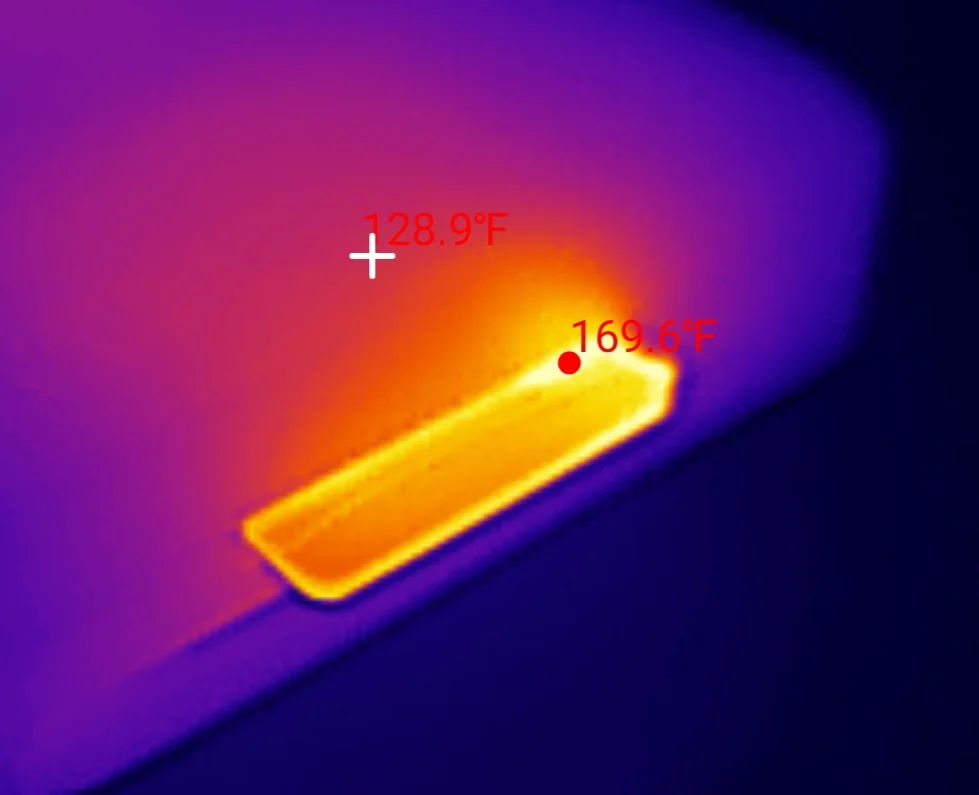
That makes it the hottest conventional card I have measured, warmer than every dash cam card on the bench. The important part is what it did at that temperature: nothing changed. The write curve is flat through all four quarters of the run and the worst ten second window lands at 1:15, early, rather than late where a throttling card would put it. It ran hot and it kept its speed.
Worth knowing anyway. My bench points a fan at the reader until the sustained test begins, and 76.4 °C is below the 85 °C rating most consumer flash carries, but not by a wide margin. A card sealed inside a phone or an action camera on a summer day has no fan and less airflow than a card reader on a desk.
Was this one lucky? I tested a second one
Reviews of a single unit have an obvious weakness, so I ran a second Samsung PRO Plus 512GB from the same production batch through the same suite. Both report the same internal product code and the same May 2025 manufacture date, with different serial numbers, and the identity explainer sets their registers beside those of the older unit that had been living in my dash cam.
| Measure | Unit A | Unit B, same batch |
|---|---|---|
| Sequential write | 142.15 MB/s | 141.29 MB/s |
| Sequential read | 169.30 MB/s | 169.33 MB/s |
| Random 4K write | 1,895 IOPS | 1,907 IOPS |
| Sustained, worst ten seconds | 141.56 MB/s | 142.71 MB/s |
| Video speed class held | V90 | V90 |
| Capacity delivered | 100.13% of label | 100.13% of label |
Every figure lands within 1.4 percent, and the second unit is marginally ahead on four of them. Two cards from one batch is not a sample size that proves consistency across a production run, but it does rule out the most obvious way a single unit review goes wrong.
The thing that can make a fast card slow, and it is not the card's fault
While testing this line I put an older Samsung PRO Plus 512GB on the bench, one that had spent a month in a dash cam, been filled completely, and then been quick formatted. Windows reported an empty, healthy card.
It wrote at 13.22 MB/s. That is a tenth of what you have been reading about above, and it failed the V30 class printed on its own face by two full tiers, while showing no sign of a problem anywhere in the operating system.
It was not worn out and it was not damaged. Every byte on it verified perfectly. It was not even about being full: I measured a card at 40 percent capacity performing exactly like a brand new one, and filling a card completely costs only about 2.5 percent. The cause was churn on a card that has no way to be told which blocks are dead, and the fix turned out to be measurable and permanent. That is a longer story than this review, and it is the subject of its own piece, because it applies to far more cards than this one.
How the Samsung PRO Plus 512GB scores
Samsung PRO Plus 512GB
Scored against the CKBench rubric. Five dimensions, each out of 5.
Final score: 4.5 out of 5. It beats its own label almost everywhere the bench can reach, and the two marks it drops are an unverifiable read claim and a genuinely hot card that never actually slowed down because of it.
Frequently Asked Questions
Is the Samsung PRO Plus 512GB good for 4K video?
Yes, comfortably. Its worst ten seconds of a five minute continuous write measured 141.56 MB/s, which clears the roughly 12 MB/s a 4K60 camera needs by about twelve times, and it holds that speed across the entire card rather than falling off once a buffer fills.
Does the Samsung PRO Plus really reach 180 MB/s read speed?
I could not confirm it. The card measured 169.30 MB/s, but the fastest read my test bench has ever recorded through that reader is 174.94 MB/s, which is itself below 180. A measuring path that has never exceeded 175 cannot confirm or refute a 180 claim, so the verdict stays unsettled rather than pass or fail.
Why does my 512GB card only show 477GB?
Nothing is wrong. Card manufacturers count a gigabyte as 1,000,000,000 bytes while Windows counts it as 1,073,741,824, so the same card reads differently depending on who is doing the arithmetic. This card actually delivered 512,644,612,096 bytes, which is 100.13 percent of its label.
Is the Samsung PRO Plus good for a dash cam?
It is fast enough, but it is not the right tool. The PRO Plus prints no endurance rating at all, where cards designed for loop recording publish one, and a high endurance card is usually cheaper as well as better suited to being overwritten continuously for years.
Does the Samsung PRO Plus 512GB slow down when it gets hot?
No. It reached 169.6 degrees Fahrenheit, or 76.4 Celsius, at the end of a five minute write with no cooling, which is the hottest conventional card on this bench, and its write speed stayed flat throughout. The worst ten second window occurred early in the run rather than late, which is the opposite of what thermal throttling looks like.
Does the Samsung PRO Plus have a cache cliff?
No. The knee scan returned NO_KNEE_STABLE both on the five minute sustained test and again across a complete fill of all 512.6 GB, which finished slightly faster than it started. Since 512 GB cannot be held in a write buffer, that is a property of the card rather than a limitation of the test.
Should you buy the Samsung PRO Plus 512GB?
If you write a lot of video, yes. This is the fastest sustained writer on my bench that is not sitting on a PCIe bus, and it beat several UHS-II cards that cost considerably more. It exceeded its own printed write speed, delivered every byte it promised and a fraction more, showed no cache cliff anywhere in half a terabyte, and did not fade under random 4K churn. The V30 badge on its face undersells it by three whole tiers.
Two things keep it off a perfect score. The 180 MB/s read claim sits above what my equipment can adjudicate, so I have marked it unsettled rather than guessed, and you should know that going in if reads are why you are buying. And it runs genuinely hot: 76.4 °C at the surface after five minutes flat out, the warmest conventional card I have tested, even though it never once slowed down as a result.
It is also the wrong card for a dash cam, not because it cannot keep up but because it publishes no endurance rating and a high endurance card is the tool built for that job. For a camera, a drone, a handheld console or a phone, this is an easy recommendation.
Device identity: what this card reports about itselfFor readers checking their own unit
| Raw CID register | 1b534d4646345937 30 -------- a19500 (serial digits elided) |
| Manufacturer ID (MID) | 0x1b, Samsung |
| OEM / application ID (OID) | 0x534d, "SM" |
| Product name (PNM) | FF4Y7 |
| Product revision (PRV) | 3.0 |
| Serial number (PSN) | 0x69ad… (truncated) |
| Manufacture date (MDT) | May 2025 |
| Declared capacity (from CSD) | 1,001,390,080 sectors of 512 bytes = 512,711,720,960 bytes, 100.14% of the label |
| Captured on | Raspberry Pi 4 native SD host, no USB bridge in the path · 2026-08-11 |
The manufacturer ID, OEM ID, product name and product revision are model level: every Samsung PRO Plus 512GB of this revision reports the same four values, which is what makes them useful for checking a card you already own against this one. The serial number is unique to this individual card and is truncated here on purpose, and its digits are elided from the raw register above for the same reason. The manufacture date is batch level and publishes in full because it is diagnostic. Note that these registers do not reach the flash controller or the NAND part numbers, which need a vendor tool, so this table is an identity record rather than a complete bill of materials.