
V90 in a reader, V60 in a camera
The Samsung PRO Ultimate 512GB is a UHS-I card printed V30 that never dropped below V60 anywhere, and reached V90 on the right reader. Both figures are real. Only one of them is the one your camera will see.
Prefer to watch a review?
No video for this lab run yet, but I cover dashcams, storage, and the gear around them on the channel. Subscribe to catch the next test the moment it goes live.
The short version
This is the strongest UHS-I card I have measured. It beat the 130 MB/s write speed printed on its own face, at 137.3, it handed over every byte of 512 GB and a little more, and it never once paused long enough to matter across nearly 40,000 write blocks. The catch is the headline: the sustained speed that earns it a V90 badge only exists on a reader that speaks Samsung's fast mode. Give it the plain UHS-I bus a camera gives it and it settles at V60, which is still double the V30 printed on the label. My rating: 4.5/5, scored against the CKBench rubric.
Verdict: 4.5/5, honest, fast, and faster still on the right hardwareWho this card is for
- YesPhotographers and video shooters who want capacity without paying UHS-II pricesIt holds 134.6 MB/s indefinitely on a fast reader and 89.0 on a plain one, and at 512 GB it is four times the card most UHS-II shoppers are looking at for similar money. Offloading a full card runs at 154.4 MB/s.
- NoDash cams, security cameras, and anything that records around the clockNot because it is slow, but because Samsung says so: the PRO Ultimate warranty specifically excludes write-intensive uses like dashcam, CCTV and surveillance recording. A card sold for that duty, with an endurance rating attached, is the right tool there.
512 GB is roughly 11 hours of 100 Mbps video, or about 12,000 raw frames at 42 MB apiece. Work out your own numbers in the dash cam storage calculator.
Why a 512 GB UHS-I card was worth a full afternoon
Every other card on this bench so far has been 128 GB or smaller, which makes a complete capacity fill a coffee break. This one took an hour and five minutes to fill and another fifty five to read back, and it was worth it, because it is the first card here whose printed speed cannot be reached over the standard interface at all. Samsung prints 200 MB/s read on the face. The UHS-I bus tops out near 104. Something has to give, and working out exactly what turned into the most interesting result of the day. It joins CKBench, the running index of every card on the bench, alongside the ProGrade and Lexar UHS-II V60 pair and the Kioxia Exceria G2 128GB. Samsung's microSD flagship lands in the same place: the PRO Plus 512GB beats its own write claim and holds V90, but its 180 MB/s read sits above what this bench can settle either.
One unit, bought at retail, tested on 2026-08-04. Every figure below comes from a run whose file name is printed under the chart it produced.
Why my write numbers read lower than other reviews. Every write here is committed to the card and confirmed before the clock stops, the way a camera actually writes, so my figures land below burst benchmarks like CrystalDiskMark that measure a few seconds of the card's RAM buffer. That rule, and the decimal MB/s and binary MiB conventions used throughout, are set out on the how we test and score page.
What the card claims, and what it did
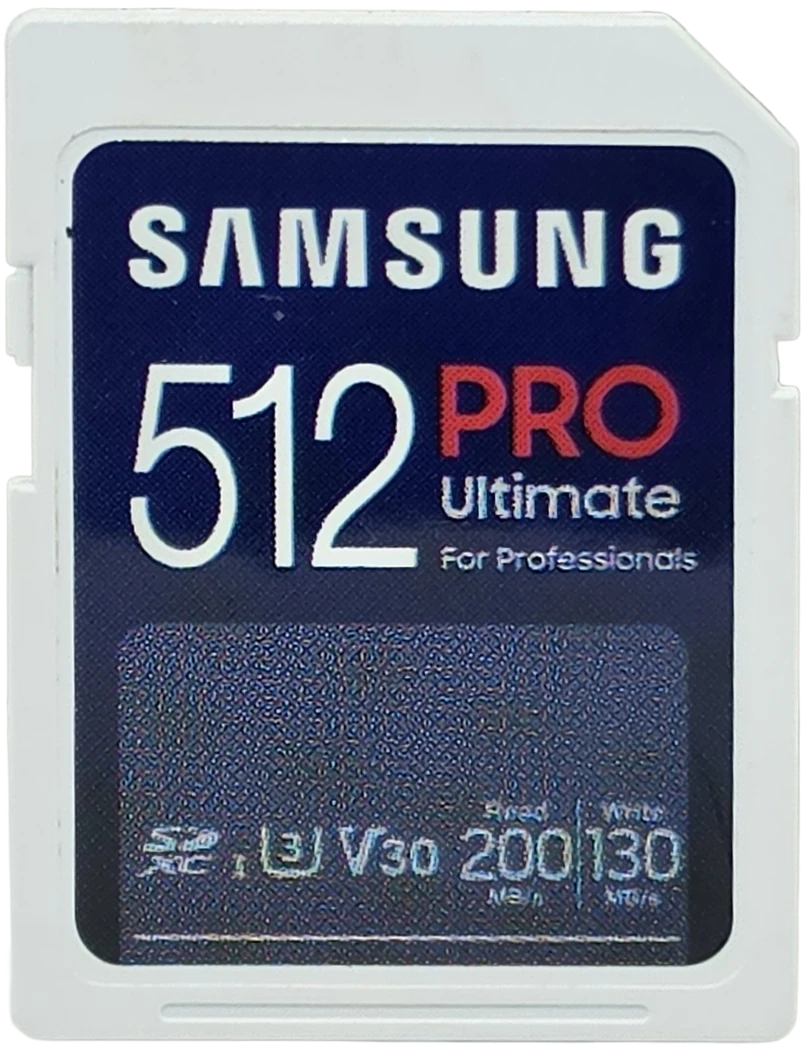
This card face is unusually complete. Most cards print one speed and leave you to guess its direction; this one prints both, each labelled, along with SDXC, U3, V30 and the UHS-I mark. Everything below is sourced per row, because a number stamped on the card and a number on a web page are two different levels of evidence.
| Claim | Printed | Measured | Verdict |
|---|---|---|---|
| Capacity | 512 GB, card face | 512.64 GB written and verified, 100.13% of label | VERIFIED |
| Read speed | 200 MB/s, card face, conditioned by Samsung on its own USB readers | 169.8 MB/s (ProGrade PGM0.5), 96.3 MB/s (Transcend TS-RDF5) | NOT SETTLED ON THIS HARDWARE |
| Write speed | 130 MB/s, card face, same condition | 137.3 MB/s (ProGrade PGM0.5), 89.2 MB/s (Transcend TS-RDF5) | BEATEN, 106% |
| Speed class | none printed, no circled 10 on the face | 133.1 MB/s worst ten seconds, which clears C10 many times over | NOT CLAIMED |
| UHS speed grade | U3, card face | 133.1 MB/s worst ten seconds (ProGrade), 88.7 (Transcend) | HELD ON BOTH HOSTS |
| Video speed class | V30, card face | 133.1 worst ten seconds is a V90 result, 88.7 is a V60 result | BEATEN ON BOTH HOSTS |
| App performance class | none printed, no A mark on the face | 2,466 read and 1,822 write IOPS (ProGrade PGM0.5) | NOT TESTABLE |
| Endurance rating | none printed | n/a | NOT CLAIMED |
| Operating temperature | none printed, and Samsung's published range covers the microSD version of this line, not this SKU | n/a | NOT CLAIMED |
| Warranty term | 10 year limited, from Samsung's product page | n/a | NOT A PERFORMANCE CLAIM |
That warranty carries a condition worth reading before you buy. Samsung excludes write-intensive use, naming dashcam, CCTV and surveillance recording, from the PRO Ultimate warranty. It is a warranty term rather than a measurement, and this bench cannot test it either way, but it tells you what the card was built for.
The card face vs the bench
The video speed class changes with what you plug it into
A video speed class is a floor, not an average. V30 promises that the worst ten seconds of a sustained write will never drop below 30 MB/s. That is the number a camera cares about, because one dip under the floor is a dropped frame or a stopped clip.
I ran the same five minute sustained write on this one card through two readers, back to back on the same evening. Through the ProGrade PGM0.5, which speaks the fast mode this card supports, the worst ten second window was 133.1 MB/s. That is a V90 result. Through a plain UHS-I reader, the worst ten second window was 88.7 MB/s. That is a V60 result, and it misses V90 by 1.29 MB/s. On a microSD Express card the same split decides an A1 rating rather than a video class, with the card failing the mark printed on its own face in one reader and clearing it 3.7 times over in another.
Both numbers came from the same card, an hour apart, running the same test. Neither is wrong. But a camera does not have a ProGrade reader inside it: a camera gives the card a plain UHS-I bus, so 88.7 is the figure that predicts what happens while you are shooting, and 133.1 is the figure that predicts what happens while you are offloading. Quoting the 133.1 without naming the reader would tell a camera buyer something false, and you will see that number quoted.
The honest headline is the boring one: whichever host it gets, this card sustains at least double the V30 it is sold as. On the camera bus it is a V60 card wearing a V30 badge. On a fast reader it is a V90 card wearing a V30 badge.
One card, two hosts, two video classes
What Samsung actually promised, and why 200 MB/s is not a simple number
Samsung's own product page qualifies the headline figures: up to 200 and 130 MB/s when using Samsung USB readers. I do not own one, so I could not put the claim in the conditions it was made under, and this review does not pretend otherwise.
There is a deeper reason the read figure resists a simple pass or fail. The UHS-I interface, in its fastest standard mode, tops out around 104 MB/s. A 200 MB/s read is therefore not something UHS-I can do at all. It requires a proprietary extension, generally called DDR200, that runs the bus faster than the specification allows, and the reader has to speak the same extension or none of it happens. That is not fine print. It is the architecture.
So when this card reads 169.8 MB/s on my reader, there are three genuinely different explanations and they must not be collapsed into one: the card cannot do 200, or my reader cannot go faster, or my reader speaks a different extension than Samsung's. My own analyzer picked the second one without being asked, flagging 169.8 as within 5 percent of the DDR200 ceiling of roughly 170 MB/s. That makes 169.8 a floor for the card and a ceiling for the reader, and it is why the claim row in the table above says not settled on this hardware rather than passed or failed.
What the two readers do settle is how much of this card's speed belongs to the extension rather than the card. Same card, same evening: the fast reader is worth 76 percent more read speed and 54 percent more write speed than the plain one. That is the largest host effect I have measured on any single card, and I went into what the reader alone does in the ProGrade PGM0.5 reader review.
The write claim needs none of this. Samsung says 130 MB/s. On non-Samsung hardware, with every byte committed and confirmed, the card averaged 137.3 across three passes and never dipped below 137.2. It beat a claim it made about someone else's reader while running on mine.
Five minutes flat out, then 512 GB without a knee
Plenty of cards open fast and collapse once a small quick buffer fills. That collapse, the knee, is the most common way a card that benchmarks well fails in a camera, and it only appears if you keep writing.
This one has no knee anywhere. The five minute sustained write started at 134.4 MB/s and finished at 134.3, and the analyzer classed the whole curve as stable with no cache cliff to find. Then the capacity test wrote to the card until it was full, an hour and five minutes of continuous writing, and speed measured at the first, middle and last tenth of the card came out at 130.2, 131.5 and 130.2 MB/s. That is a spread of 1.0 percent across 512 GB. Reading back, the same three positions gave 153.0, 154.8 and 153.9, a spread of 1.17 percent.
Nor did it ever pause. Across 38,490 individual one megabyte writes on the fast reader, not a single one took longer than half a second, and the longest of all took 38 milliseconds. On the plain UHS-I reader, 25,457 blocks, longest 41 milliseconds, again nothing over half a second. For recording, that steadiness is worth more than any peak number on a box.
One caveat on recovery. The card returned to full speed within 60 seconds of being handed a churned workload, but 60 seconds is the earliest my analyzer is allowed to declare stability, so the honest form of that result is 60 seconds or less, not 60 seconds. A dedicated follow-up run would pin it down.
Is it really 512 GB? Every byte, written and read back
The capacity test fills the card with uniquely seeded data so a controller cannot fake it by recognizing a repeated pattern, then reads every byte back and compares. It is slow, and it is the only test that catches a fake.
478 test files, 512.64 GB written, 512.64 GB verified, zero mismatched bytes, zero read errors. Against a 512 GB label that is 100.13 percent, which ties the SanDisk High Endurance for the highest figure on this bench. For contrast, the same test has returned 96.7 percent on a legitimate card and 26.8 percent on a counterfeit I took apart earlier this year.
If your computer shows about 477 GB rather than 512, nothing is missing. Card capacity is counted in decimal, where a gigabyte is a billion bytes, and Windows displays binary, where a gigabyte is 1,073,741,824 bytes. The same storage, two different rulers.
Two honest footnotes. The card was not blank when the fill started, so verification covered its free space: two pre-existing files totalling 88 bytes were left alone. And the read-back is where this card quietly does its best work for a photographer. Reading 512.64 GB back took 55 minutes 20 seconds, an average of 154.4 MB/s across the whole card. That is the number you feel offloading a full card, and it is a different measurement from the 169.8 MB/s short-file figure further up. Both are real. I am not going to invent a mechanism to reconcile them.
Every byte, written and read back
Run Samsung-PRO-Ultimate-SD-512GB_2026-08-04_170004 · cardcheck v0.8.1 · ProGrade PGM0.5
How it behaves under scattered writes
Sequential writing is the easy case. The hard case is random 4K: thousands of tiny writes landing all over the card, which is what filesystem updates, event saves and overwrites actually look like. Cards that are going to misbehave tend to misbehave here first, and the tell is that each pass comes out slower than the last as the card's internal bookkeeping falls behind.
Three 20 second passes, back to back, no rest: 1,826, 1,819 and 1,821 write IOPS. IOPS is just operations per second, so that is a card doing the same amount of work in pass three as in pass one. The drop from first to last is 0.25 percent, which is the steadiest result of any card on this bench, ahead of the 0.50 percent from the ProGrade V60 and a long way ahead of the 5.23 percent from the Lexar.
Three passes is an indicator, not an endurance test, and I want to be clear that it is not one. Nobody publishes an endurance rating for this card, Samsung included, and I have no way to measure one. What three passes can tell you is whether a card falls over the moment it is asked to work untidily, and this one does not notice.
One minute of scattered-write abuse
This card: run Samsung-PRO-Ultimate-SD-512GB_2026-08-04_170004 · reference card: lab baseline, same bench, same test
How hot it gets, and which number I trust
Ejected the moment a sustained write ended, with the room at 76 °F, the card body measured 144.4 °F. That places it fourth of six cards measured this way, between the ProGrade V60 at 145.1 °F and the Kioxia at 143.3 °F, and a long way under the VIOFO High Endurance at 160.8 °F.
Getting a card temperature honestly is harder than it sounds, and this card is the reason I now write the method down beside the number. A full-size SD card disappears almost entirely into the fast reader, so with the card in place the only hot spot a thermal camera can see is through the slot opening, and that read 130.0 °F. It is a real reading of a real thing, and it is not the card: it is the hottest surface visible through a gap, and it runs 10 to 14 °F low. A third reading, taken with the card sitting proud of a shallower reader, came in at 150.0 °F while the card was doing a third less work. Three numbers, one card, all correct, none of them interchangeable. Only the ejected card-body reading goes on the chart below.
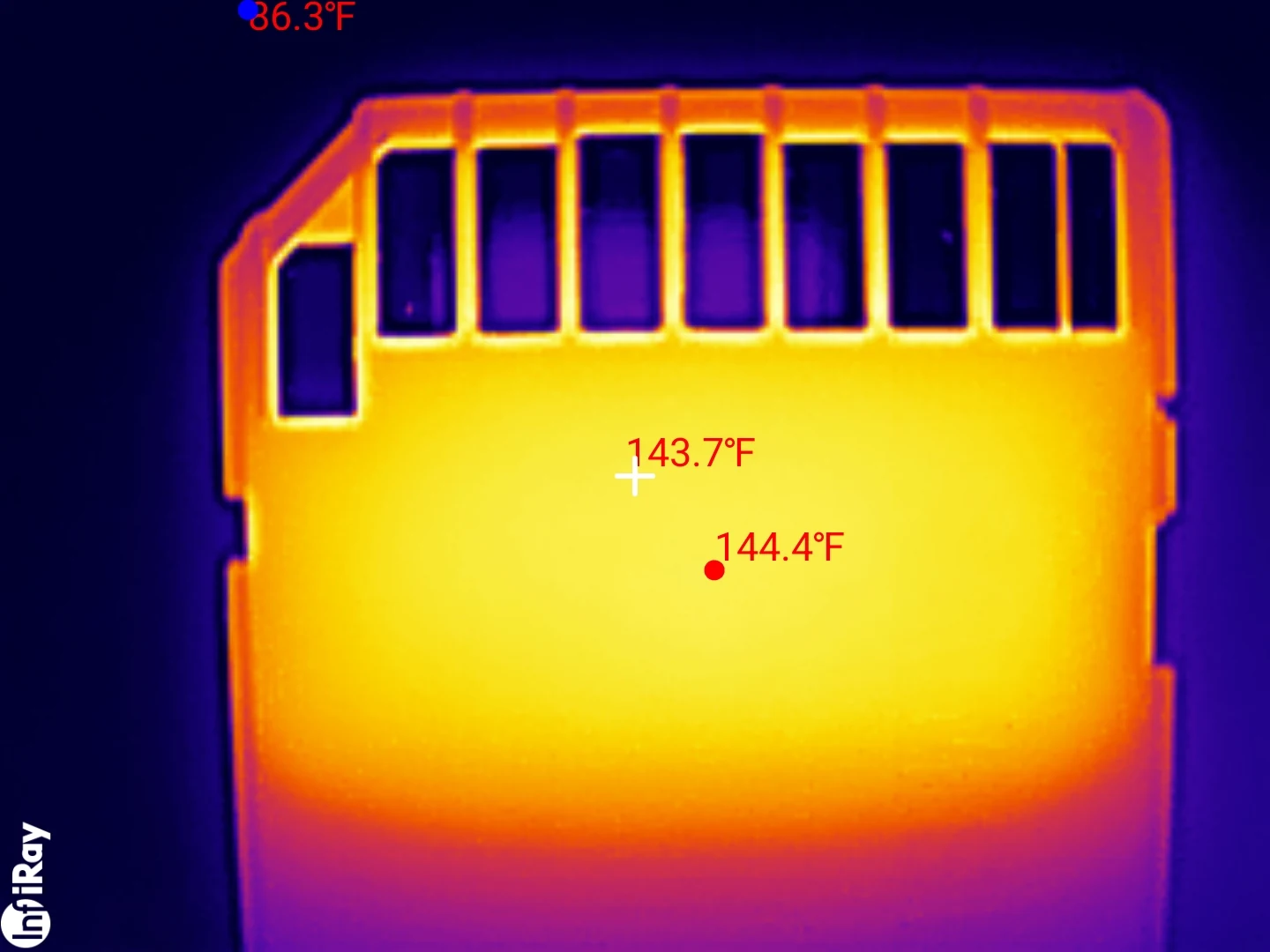
What matters more than any of them is that the heat cost nothing. Through the five minute fan-off run the card started at 134.4 MB/s and ended at 134.3, and its worst ten second window, which landed at second 286 near the very end of the run, was 133.1. A card that was throttling would show that window collapsing as it heated. This one gave up one percent, and one percent is not throttling.
Peak temperature, every card on the bench
How it scores on the five dimensions
Samsung PRO Ultimate SD 512GB
Scored against the CKBench rubric. Five dimensions, each out of 5.
Final score: 4.5 out of 5. The only thing standing between this card and full marks is a headline number that needs Samsung's own reader to mean anything.
Frequently Asked Questions
Does the Samsung PRO Ultimate really read 200 MB/s?
Not on my hardware, and Samsung never promised it would. The claim is conditioned on Samsung's own USB readers, and 200 MB/s is faster than the UHS-I standard allows, so it needs a proprietary fast mode the reader has to support as well. On a fast third-party reader I measured 169.8 MB/s, which my analyzer placed within 5 percent of that fast mode's ceiling. On a plain UHS-I reader the same card reads 96.3.
Is the PRO Ultimate 512GB fast enough for 4K video?
Yes, with room to spare. In a camera it sustains 88.7 MB/s in its worst ten second window, which is 710 Mbps and clears V60. Consumer 4K, including high-bitrate 4K, sits well below that. The card is printed V30, so it is delivering roughly double what its badge promises.
Why does the same card test faster in one card reader than another?
Because some UHS-I cards support a proprietary fast mode that runs the bus above the standard's limit, and it only works if the reader supports it too. This card read 169.8 MB/s and wrote 137.3 through a reader that speaks it, and 96.3 read and 89.2 write through one that does not. Same card, same evening: the reader was worth 76 percent more read speed and 54 percent more write speed.
Can I use the Samsung PRO Ultimate in a dash cam?
You can, but I would not. Samsung's warranty for this line specifically excludes write-intensive uses including dashcam, CCTV and surveillance recording, so a failure in that duty is a warranty argument you would probably lose. A high endurance card carries an endurance rating for exactly this reason.
Why does my 512 GB card show as 477 GB?
Because the card is counted in decimal and your computer displays binary. 512 billion bytes is about 477 binary GB. This card actually delivered 512.64 billion bytes, slightly more than its label, with every byte written and read back and zero mismatches.
Is the PRO Ultimate better than a UHS-II card?
In a UHS-II camera, no. A UHS-II V60 card I tested the same day sustained V90 at 102.8 MB/s where this one manages V60 at 88.7, and that is a whole video class. In a UHS-I camera, which is most of them, the two are effectively the same card, and this one is four times the capacity.
The bottom line on the PRO Ultimate 512GB
Strip away the headline and this is simply a very good card. It beat the write speed on its own face, it delivered slightly more capacity than it promised across half a terabyte, it never developed a cache cliff, it never stalled, and under scattered writes it is the steadiest thing I have measured. Five hundred and twelve gigabytes that behave identically from the first block to the last is not a small achievement.
The headline is where it gets complicated, and the complication is not really the card's fault. Samsung printed 200 MB/s on a card whose interface cannot do 200 MB/s, then footnoted that the number needs Samsung's own reader. Both halves of that are true, and together they produce a specification that most buyers will never see met and cannot easily find out why. What I can tell you is that the card was never the bottleneck in any test I ran.
My advice is to ignore the 200 entirely and buy this for the two numbers that survive contact with real hardware: it writes faster than it says it does, and it holds a video class at least double its badge no matter what you plug it into. If you shoot on a UHS-I body, this is a great deal more card than the badge suggests. If you shoot on a UHS-II body, a real UHS-II card will beat it by a full video class, and that gap is the only reason to spend the extra money. I put that decision side by side in do you need a UHS-II SD card, using this card as the UHS-I control.
The limits of this test. One unit, bought at retail, tested on 2026-08-04. The exact part number on my bench, MB-SY512S, has since been discontinued, so the card linked below is the current same-line 512GB PRO Ultimate rather than the unit I measured; it is sold bundled with a reader. Samsung's read and write claims are conditioned on Samsung's own USB readers, which I do not own, so the 200 MB/s figure is unresolved here rather than passed or failed. Capacity verification covered the card's free space, since two pre-existing files of 88 bytes were on it. Recovery time hit my analyzer's 60 second measurement floor, so it is 60 seconds or less rather than exactly 60. And three random-write passes describe behavior under churn, not endurance: nobody publishes an endurance rating for this card, and I did not measure one.
Device identity: what this card reports about itselfFor anyone checking a card against a counterfeit
| Raw CID register | 1b534d394638534430…a17900 (serial digits elided) |
| Manufacturer ID (MID) | 0x1B (Samsung) |
| OEM / application ID (OID) | 0x534D, ASCII "SM" |
| Product name (PNM) | 9F8SD |
| Product revision (PRV) | 3.0 |
| Serial number (PSN) | unique to this unit, deliberately not published |
| Manufacture date (MDT) | 09/2023 |
| Declared capacity (from CSD) | 1,001,390,080 sectors of 512 bytes = 512.71 GB, 100.14% of the label |
| Captured on | Raspberry Pi 4 native SD host, no USB bridge in the path · 2026-08-04 |
Manufacturer ID, OEM code, product name, revision and manufacture date are model-level values, identical on every card of the same production run, so they publish in full and you can check your own card against them. The serial number is unique to this individual unit and is left out. What makes this one unremarkable in the best way is that it is coherent: a card sold as Samsung reporting Samsung's own manufacturer ID, with an OEM code and a capacity register that agree with the label. A counterfeit usually reports the brand it is imitating rather than its real manufacturer, which is what gave away the fake I pulled apart earlier this year.
Disclosure: I bought this card myself, at retail, and Samsung had no involvement in the testing and did not see this review before it published. This post contains affiliate links. As an Amazon Associate I earn from qualifying purchases, at no extra cost to you. Affiliate links like these and my YouTube channel are what keep the site running.