
Samsung P9 Express 256GB review: the reader decides what this card is
One card, two readers, two completely different verdicts. It fails the A1 mark printed on its own face in one of them and beats that mark by 3.7 times in the other. Here is what a microSD Express card actually does, measured both ways.
Prefer to watch a review?
No video for this lab run yet, but I cover dashcams, storage, and the gear around them on the channel. Subscribe to catch the next test the moment it goes live.
The short version
The Samsung P9 Express is a genuinely excellent card wearing a claim it does not reach. Its capacity is real and fully verified, it holds V90 against a printed V30, and it wrote all 256 GB without a single cache cliff, which almost nothing else on this bench can say. But the biggest number on the package, 800 MB/s, never appeared: the best single read pass I measured was 618.3 MB/s, and across the whole card it settled at 453.7 MB/s. It also runs hotter than any card I have tested, by a wide margin. Buy it for a Switch 2 or another SD Express host and it is superb. Put it in a camera, a dash cam, or a phone and you have paid Express money for a card that reads slower than a budget UHS-I one. My rating: 4/5, scored against the CKBench rubric.
Verdict: 4/5, brilliant on the right host, ordinary on the wrong oneWho this card is for
- YesA Nintendo Switch 2 or another SD Express hostThis is what the card is built for. On an Express connection it read 453.7 MB/s across the entire card and held V90, five times the read speed it manages anywhere else.
- YesAnyone who fills a card to the brim in one sittingIt wrote all 256 GB at a steady 190.6 MB/s with no cache cliff anywhere. Most cards collapse partway through a fill.
- NoCameras, dash cams, phones, drones, or anything without an Express slotIn an ordinary reader it fell back to 89.7 MB/s read, which is slower than every UHS-I card in this corpus, and it missed its own A1 mark.
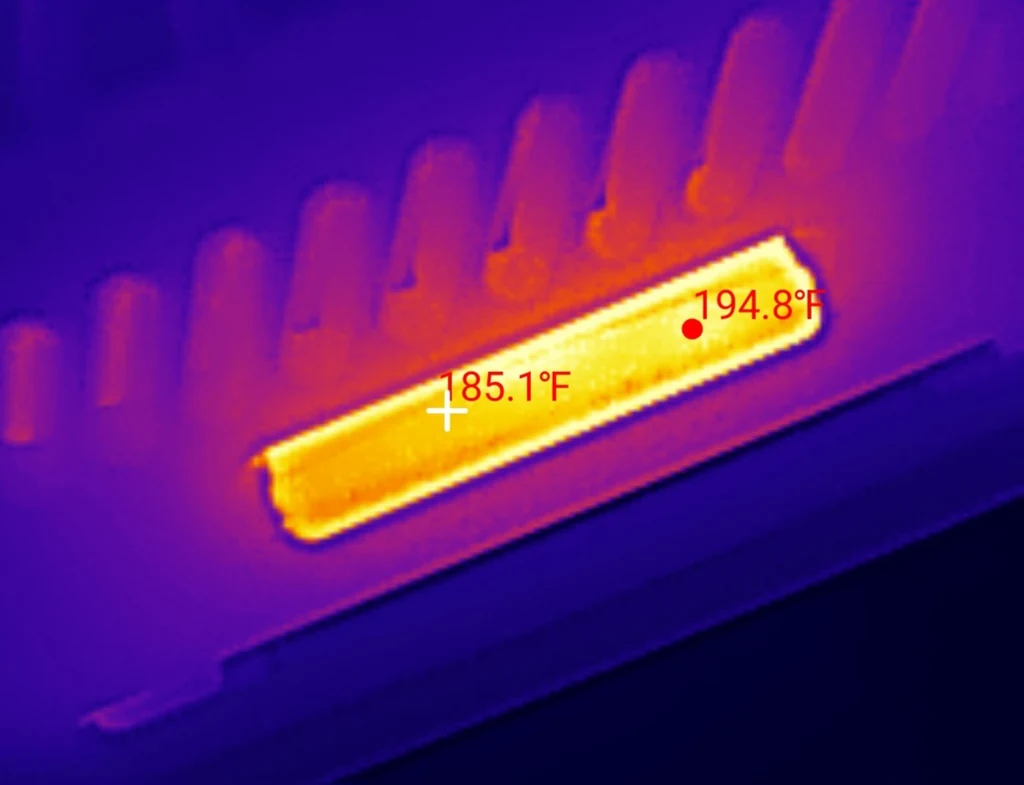
- NoAnywhere heat is a problem and airflow is notIt reached 194.8F (90.4C) under a sustained write with the fan off, measured with the InfiRay P2 Pro. That is the hottest card on this bench by 34F (19C).
256 GB of real, verified space is roughly 21 hours of 4K30 dash cam footage at 60 Mbps, or about 85 hours at 1080p60. Work out your own numbers in the dash cam storage calculator.
Why a card with two rows of pins needed testing twice
Turn a Samsung P9 Express over and there is a second row of contacts behind the usual eight. That row is not a faster SD bus. It is a PCIe lane, and behind it sits an NVMe controller, which makes this card a very small solid state drive in a microSD shell. It also means the card has two personalities, because the first row still speaks ordinary SD for everything that cannot use the second one. Testing it once would have told you half the truth, so I ran the full suite twice on the same card on the same day, once through each interface. It joins CKBench, the running index of every card on the bench, alongside the Samsung PRO Ultimate 512GB, which first showed me that a card's class verdict can depend on the reader, and the SanDisk High Endurance 128GB and Kioxia Exceria G2 128GB, the two cards I use as permanent controls. For a conventional card at the same capacity tier, the Samsung PRO Plus 512GB holds V90 on an ordinary UHS-I reader with no Express hardware needed.
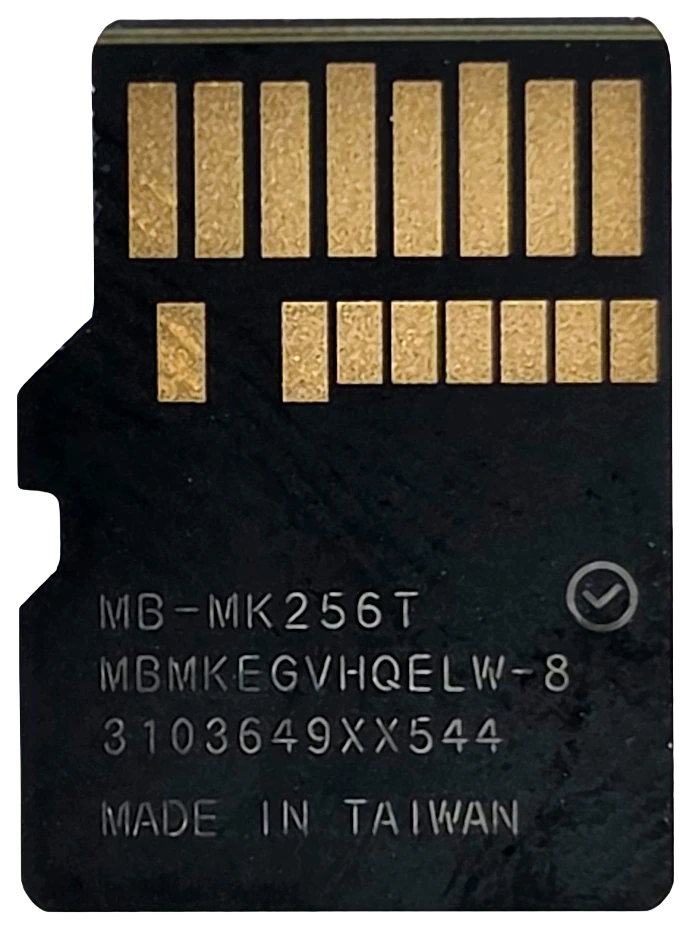
One unit, purchased retail. Everything below is a measurement from that one card, and three passes are an indicator, never an endurance test.
Why my write numbers read lower than other reviews. Every write here is committed to the card and confirmed before the clock stops, the way a dash cam actually writes, so my figures land below burst benchmarks like CrystalDiskMark that measure a few seconds of the card's RAM buffer. That rule, and the decimal MB/s and binary MiB conventions used throughout, are set out on the how we test and score page.
What the box claims, and what the card did
Measured figures are from the SD Express run unless the row says otherwise, because that is the interface the card is sold for. Read speeds are always attributed to a reader, since the reader changes the answer rather than just the precision.
| Claim | Printed | Measured | Verdict |
|---|---|---|---|
| Capacity | 256 GB (front) | 256.3 GB written and verified, 0 mismatched bytes | VERIFIED |
| Read speed | Up to 800 MB/s (front) | 618.3 MB/s best single pass, 453.7 MB/s across the whole card (Selore microSD Express reader) | MISSED (77% best case) |
| Read speed, fallback | "Backward compatible with UHS-I" (front) | 89.68 MB/s (ProGrade PGM0.5, UHS-I) | MET, but slower than every UHS-I card here |
| Write speed | Not printed | 212.87 MB/s sequential, 190.6 MB/s across the whole card | NOT CLAIMED |
| Speed class | C10 (back) | 161.27 MB/s worst ten seconds | HELD |
| UHS speed grade | U3 (card face) | 161.27 MB/s worst ten seconds | HELD |
| Video speed class | V30 (back) | 161.27 MB/s worst ten seconds, enough for V90 | BEATEN, three classes |
| App performance class | A1 (back) | 5,530 read IOPS on Express, 1,487 on UHS-I, against a 1,500 floor | MET on Express, FAILED on UHS-I |
| 4K Ultra HD | 4K UHD logo (back) | 161.27 MB/s worst ten seconds, far past any 4K bitrate | HELD |
| Endurance rating | None printed | n/a | NOT CLAIMED |
| Operating temperature | No range printed. "Temperature proof" only (back) | Reached 194.8F (90.4C) under sustained write without throttling | NOT A PERFORMANCE CLAIM |
| Warranty term | 3 year limited (back) | n/a | NOT A PERFORMANCE CLAIM |
The six "proof" claims on the back (water, wearout, X-ray, temperature, magnet and drop) all carry the same footnote, and it is worth reading before you rely on any of them: "Any damage or loss of data incurred as a result of exposure to water, high temperatures, X-rays, magnets, drop, and wear-out are not warranted by Samsung." They are marketing claims tested in a lab, not a warranty term.
Samsung P9 Express 256GB
Every byte, written and read back
Run Samsung-P9-Express-256GB_2026-08-10_213229 · cardcheck v0.8.2 · Selore microSD Express reader
One minute of loop-recording abuse
This card: run Samsung-P9-Express-256GB_2026-08-10_213229 · reference card: lab baseline, same bench, same test
It got hot. Very hot. It did not slow down.
A 4K30 dash cam writes about 6 MB/s, roughly a twenty-seventh of this workload · Run Samsung-P9-Express-256GB_2026-08-10_213229
How fast is the Samsung P9 Express, really?
Here is the same card, the same day, no reformat in between. The only thing that changed was what it was plugged into.
| Measure | ProGrade PGM0.5 (UHS-I fallback) | Selore Express reader |
|---|---|---|
| Sequential read | 89.68 MB/s | 596.70 MB/s |
| Sequential write | 87.74 MB/s | 212.87 MB/s |
| Random 4K read | 1,487 IOPS | 5,530 IOPS |
| Random 4K write | 1,506 IOPS | 9,134 IOPS |
| Sustained write, worst ten seconds | 87.03 MB/s | 161.27 MB/s |
| Whole card read back | 86.9 MB/s (49m 09s) | 453.7 MB/s (9m 25s) |
| Video speed class held | V60 | V90 |
| A1 app class | Failed by 13 IOPS | Passed by 3.7 times |
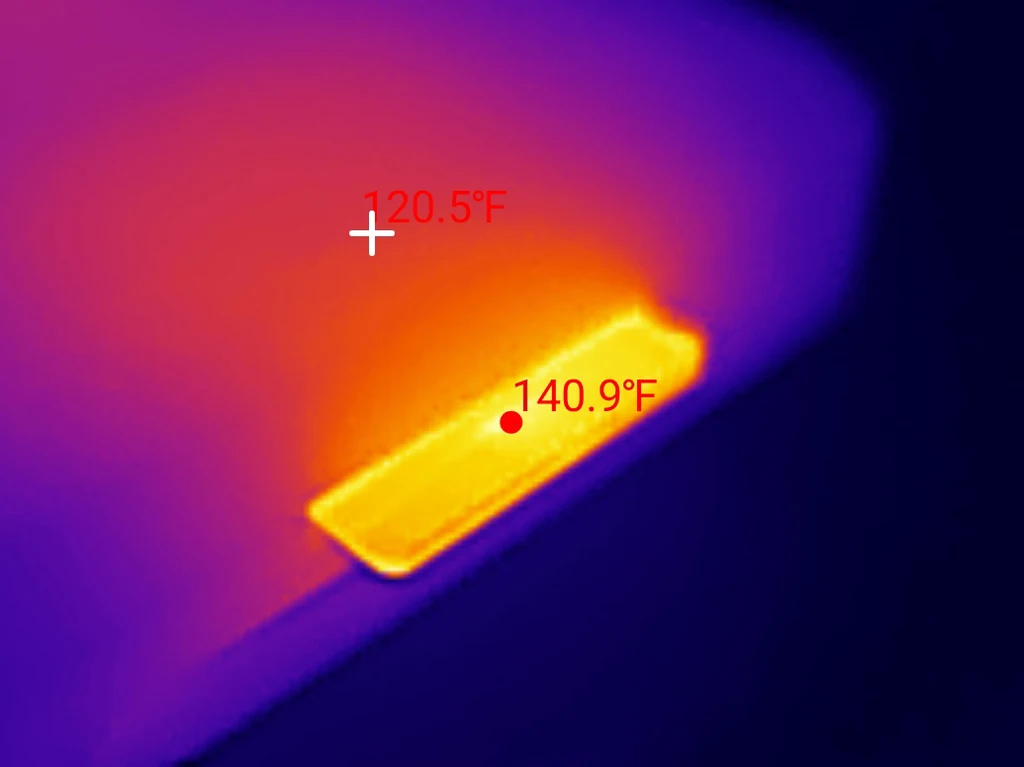
| Peak temperature | 140.9F (60.5C) | 194.8F (90.4C) |
Reading the whole card took 49 minutes and 9 seconds through the ordinary reader and 9 minutes and 25 seconds through the Express one. That is the same 256 GB of data and the same card, five times faster because of a different row of pins.
The line I keep coming back to is the A1 one. A1 is an app performance class, and it is printed on the card's own face. Through the ProGrade the card managed 1,487 random read IOPS against A1's 1,500 floor, missing by thirteen. Through the Express reader the same card did 5,530. It is not that the measurement was imprecise. The card genuinely does not meet the mark printed on it when you use it the way most people will use it, and it clears that mark comfortably when you do not. A speed class is supposed to be a floor you can rely on. This one depends on your hardware.
The V-class corridor
Both bars are the same unit on the same day, no reformat between them. The upper bar is what the card does when the bus lets it work. The lower one is what its legacy SD path allows, and that path, not the flash, is what holds it there.
Does the P9 Express work in a normal card reader?
Yes, and Samsung prints it on the front: "Backward compatible with UHS-I." That is true, and it is worth knowing exactly what it buys you, because the honest answer is less than you would guess.
In the ProGrade reader the card read at 89.68 MB/s. For comparison, six other cards on this bench read between 92.9 and 96.9 MB/s through the same reader, which is where UHS-I's SDR104 mode runs out of road. The P9 Express is below all of them. Its read speed and its write speed also land within 2 MB/s of each other, at 89.68 and 87.74, where a normal UHS-I card reads noticeably faster than it writes. When both directions pin to the same number, one shared path is the limit, and it is not the bus, because six other cards get past it.
The card's own registers tell the same story. Read on a Raspberry Pi with no USB bridge in the path, its SD command classes and command support fields match a 2019-vintage Samsung EVO Plus and fall short of a 2023 PRO Ultimate, despite this card being manufactured in November 2025. Its SD mode is a compatibility shim, not a performance path, and Samsung clearly did not spend engineering effort there. Why would they? The product lives on the other row of pins.
So the practical version: this card works in your camera. It will just be the slowest good card in it.
Does it slow down when you fill it up?
No, and this is the result that impressed me most.
Nearly every memory card has a fast cache at the front and a slower reality behind it. Fill past the cache and the write speed falls off a cliff, sometimes by half or more. This is the single most common way a card that benchmarks well turns out to be miserable in real use.
The P9 Express does not have that cliff. Across a five minute sustained write it held 163.21 MB/s with the first quarter averaging 164.2 and the last quarter 163.2, a drift of about one part in a hundred and sixty. Then the capacity test wrote every one of the 256.3 GB on the card and averaged 190.6 MB/s doing it, still with no knee anywhere in the curve. In 300 seconds of sustained writing there was not a single block that took longer than 500 milliseconds to commit, and the worst one took 33 milliseconds.
That matters because on the Express reader the write path was genuinely the card's limit rather than the connection's. The same link was delivering over 600 MB/s on reads at the time, so nothing was holding writes back except the flash itself. A card that writes at a flat 163 MB/s from the first byte to the last, with no cache to run out of, behaves the same on minute one and minute forty.
How hot does the Samsung P9 Express get?
Very. It reached 194.8F (90.4C) under a sustained write with the cooling fan off, against an ambient of 76F (24.4C). That is a rise of 118.8F (66C) over the room, and it is the hottest reading in this entire corpus by 34F (19C). The previous record holder, a VIOFO High Endurance 128GB, peaked at 160.8F (71.6C).
Two things stop that from being a straightforward failure. First, it did not throttle. The write curve is flat right through the hottest part of the run, and the worst ten second window landed at second 62, not at the end. Whatever thermal headroom the controller has, it did not run out of it. Second, most of that heat is the interface rather than the storage. On the ordinary reader, doing the same kind of work, the card peaked at 140.9F (60.5C). Powering the PCIe lane and the NVMe controller is what costs the extra 54F (30C), and that cost is inherent to what SD Express is.
It is still worth taking seriously. 90.4C is above the 85C operating rating that consumer flash usually carries, and after a long run the card was too hot to remove from the reader by hand. In a Switch 2, in a case, on a warm day, that is a real consideration rather than a curiosity.
One nice detail: the P9 spreads its heat much more evenly than a conventional microSD. Most cards on this bench show a tight hot spot at one end with a steep falloff. The P9's whole body glows, with only 9.7F (5.4C) between its hottest point and the middle of the card. Spreading heat over more area is what lets it run this much power without a worse peak.
What reader do you need for a microSD Express card?
This is the part people get wrong, and it costs them the entire point of the card.
A microSD Express card has a second row of pins, and so does a microSD UHS-II card. They look the same and they are not. UHS-II's second row carries differential signalling; Express's carries PCIe. A UHS-II reader and an Express card will physically mate perfectly and then negotiate all the way down to UHS-I, because that is the only language they share. My ProGrade PGM0.5 is UHS-II on both slots and it still only got 89.68 MB/s out of this card. Having a second row of pins on both sides is not enough. Which reader you actually need, for this card and for ordinary ones, is worked through in which SD card reader should you buy.
The reader I used for the Express run is a Selore microSD Express reader, a dual-slot unit rated up to 900 MB/s that ships with both USB-C and USB-A cables. It did its job: it carried 693 MB/s during the cache-leak check, comfortably more than the card ever asked for, which is how I know the card and not the reader is what limits the 453.7 MB/s figure. One caveat worth stating plainly is that it is still a USB bridge, not a native SD Express slot. A Switch 2 has no protocol translation in the path at all, so it is possible the card goes faster there than it did here. I have not measured that, so I am not claiming it.
It also disconnected itself from the bus once, after 24 minutes of continuous full-card writing at 90.4C. The test data was already written and verified by then, so nothing was lost, but it is worth knowing.
How the Samsung P9 Express scores
Samsung P9 Express 256GB
Scored against the CKBench rubric. Five dimensions, each out of 5.
Final score: 4 out of 5. It rounds down rather than up, because the number printed largest on the package is the one it does not reach.
Frequently Asked Questions
Does the Samsung P9 Express really hit 800 MB/s?
No, not on my bench. The fastest single read pass I measured was 618.3 MB/s, which is 77% of the claim, and reading the entire card averaged 453.7 MB/s. The reader was not the limit: it carried 693 MB/s during the cache-leak check, more than the card ever asked for. A native SD Express slot such as the one in a Nintendo Switch 2 has no USB bridge in the path and could be faster, but I have not measured that.
Will a microSD Express card work in a normal camera or dash cam?
Yes. Samsung prints "Backward compatible with UHS-I" on the front and it is accurate. The catch is what you get: 89.68 MB/s read in my UHS-I reader, which is slower than every ordinary UHS-I card I have tested in the same reader. It works, but you are paying Express prices for below-average UHS-I performance.
Will a UHS-II reader read a microSD Express card at full speed?
No. This is the most common and most expensive mistake with these cards. UHS-II and SD Express both add a second row of pins, but UHS-II's row carries differential signalling and Express's carries PCIe. They cannot talk to each other, so the two devices fall back to UHS-I. My UHS-II ProGrade reader got 89.68 MB/s from this card. You need a reader that specifically says microSD Express.
Does the Samsung P9 Express slow down as you fill it?
No. It wrote all 256.3 GB at an average of 190.6 MB/s with no cache cliff at any point, and a five minute sustained write drifted only from 164.2 MB/s in the first quarter to 163.2 in the last. Most cards have a fast cache that runs out partway through a large transfer. This one does not appear to.
Does the Samsung P9 Express get too hot?
It gets hot, but it does not throttle. I measured a peak of 194.8F (90.4C) during a sustained write with the fan off, against a 76F (24.4C) ambient. That is the hottest card in my corpus by 34F (19C) and above the 85C rating consumer flash usually carries, yet the write speed stayed flat throughout. Most of the extra heat comes from powering the PCIe interface, since the same card only reached 140.9F (60.5C) on an ordinary reader.
Is the Samsung P9 Express 256GB really 256 GB?
Yes. I wrote and read back 256.3 GB across 239 test files with zero mismatched bytes and zero read errors, which is 100.1% of the label. Its own capacity register reports 500,695,040 sectors of 512 bytes, or 256,355,860,480 bytes, 100.14% of the printed figure.
Does the Samsung P9 Express meet its A1 rating?
It depends entirely on the reader, which is the strangest result in this review. Through an SD Express reader it managed 5,530 random read IOPS against A1's 1,500 floor, clearing it 3.7 times over. Through an ordinary UHS-I reader the same card managed 1,487, missing the floor by thirteen IOPS. Same card, same day, same printed mark.
The bottom line on the Samsung P9 Express 256GB
If you have a Switch 2 or another SD Express host, this is an easy recommendation and the 800 MB/s shortfall will not change your day. What you actually get is a card with completely real capacity, a write curve so flat it is dull, no cache cliff anywhere in 256 GB, and a V90 hiding behind a printed V30. Those are the properties that matter when a card is doing work rather than sitting in a benchmark.
What stops it being a 5 is the number on the front of the box. 800 MB/s is the largest thing Samsung printed, and I measured 618.3 at best and 453.7 across the whole card, with a reader that had already proved it could carry 693. The heat is the other reservation: 194.8F (90.4C) without throttling is impressive engineering and still hot enough to think about.
And if you do not have an Express host, do not buy this card yet. It will work, and it will be the slowest good card you own.
Device identity: what this card reports about itselfRead on a Raspberry Pi, no USB bridge in the path
| Raw CID register | 1b534d3845345338…9b00 (serial digits elided) |
| Manufacturer ID (MID) | 0x1b, Samsung |
| OEM / application ID (OID) | 0x534d, "SM" |
| Product name (PNM) | 8E4S8 |
| Product revision (PRV) | 0.0 |
| Serial number (PSN) | 0x33b6… (truncated) |
| Manufacture date (MDT) | November 2025 |
| Declared capacity (from CSD) | 500,695,040 sectors of 512 bytes = 256,355,860,480 bytes, 100.14% of the label |
| Declared SD spec generation | 7.xx, the generation that introduced SD Express. No other card in this corpus declares above 6.xx |
| Captured on | Raspberry Pi 4 native SD host, no USB bridge in the path · 2026-08-11 |
The manufacturer ID, OEM ID, product name and revision are model level: another P9 Express 256GB should report the same values. The serial number and manufacture date are specific to this unit. The most interesting field is the spec generation, because the card announces itself as an SD 7.x device through the legacy SD interface, which is the one interface that cannot use anything SD 7.x added.
Disclosure: I bought this card and this reader myself at retail. Nothing here was supplied by Samsung or by Selore, and nobody reviewed this post before it went up. This post contains affiliate links. As an Amazon Associate I earn from qualifying purchases, at no extra cost to you. Affiliate links like these and my YouTube channel are what keep the site running.