
The best card reader for you depends on a number that is not on either box
Four hosts on one bench, the same cards through each. My newest reader beat my main one by 12.58% on read and by nothing at all on write, and for most cards here the right answer is still to buy nothing.
Prefer to watch?
No video for this one yet. I cover dashcams, storage, and the gear around them on the channel, so subscribe to catch the next bench run the moment it goes up.
The short version
There is no single best card reader, because the reader you should buy is decided by a card you have probably never measured. Work down the list below and stop at the first line that describes you. It is ordered cheapest first, which turns out to also be the order of how much each step is worth: the USB port is free and was worth 2.30x, the reader is cheap and has been worth anywhere from 1.001x to 6.65x depending entirely on the card, and the card is the expensive part you cannot undo. One warning about the middle step: the more expensive reader here is the less capable one, so read branch 3 against branch 4 before you spend. Two of the six answers below are buy nothing, and I mean them.
Verdict: measure the card, then buy the reader it can useTransfers running around 40 MB/s?
Buy nothing. Move the reader to a USB 3 port. This is the biggest single win on this page and it costs nothing.
Measured: 41.58 MB/s read on a USB 2.0 socket against 95.73 on a USB 3 socket. Same card by volume serial, same reader unit, seventy minutes apart. 2.30x, and a full video speed class.
Card reads about 96 MB/s in more than one reader?
Buy nothing. That number belongs to the card, and no host I own has ever moved it.
Measured: a SanDisk Ultra 128GB read 96.74 MB/s on my main reader and 96.82 on a host capable of 203.47. The per-pass ranges overlap. Seven units from five brands sit between 96.08 and 96.85 on the same slot.
microSD only, and the card reads above about 145 MB/s anywhere?
The SanDisk QuickFlow microSD reader with USB-C. It is the fastest microSD host I have measured, and the only one of mine that could settle a printed 190 MB/s claim. It has since settled a 205 and a 200 as well: the Lexar Silver Plus and the Amazon Basics 128GB both read 206 on it, and the Amazon card wrote 189 MB/s where my main reader held it to 157.
Measured: 203.47 MB/s when this published, since raised to 206.26 by the Amazon Basics 128GB, the bench read record either way. On the two cards with headroom it beat my main reader by 12.58% and 7.19%. It also costs more than the reader in branch 4 and does less. Prices are in the full-size SD section below.
Any full-size SD card, or you own both form factors?
The ProGrade PGM0.5 dual-slot reader. Not a close call, the only option: the QuickFlow has no full-size slot at all.
Measured: 296.91 MB/s on a UHS-II V60 card in its full-size slot, against 95.00 for the same card in a UHS-I reader. 3.13x. It is also the cheaper of the two picks, which makes it the default unless you already know your microSD card has headroom.
Hoping a reader makes your camera or dash cam record better?
No reader will do that. Everything a recording device depends on is a write number, and writes did not move.
Measured: across four cards run on two hosts, the sustained write floor moved between -3.07% and +0.54%, and the -3.07% belongs to a card with a documented fault.
You own an SD Express card?
You need a reader with a PCIe path. I own one, the Selore microSD Express reader, and I am pointing at it rather than recommending it.
Measured: 596.73 MB/s on the one card I have run on it, against 89.68 for the same card in an ordinary reader. One card, one unit, no review, no long-term data.
Why there is no single best card reader
I already published the evidence that the reader matters, and it matters more than most people expect: across four host tiers the spread on one card reached 6.65x, a USB 2.0 port cost three video speed classes, and on one card a better reader bought a rounding error. That post answers does a card reader affect SD card speed. This one answers the question people ask straight afterwards, which is harder: so which one do I buy?
The reason it is harder is that a reader is half of a pair. The speed you get is whatever the reader and the card can both agree to, and neither box tells you what the other end is capable of. That means the honest buying guide is not a ranked list of readers. It is a short set of branches, each one keyed to a number you can measure on your own machine in thirty seconds.
Since the tiers post went up, a fourth host joined the bench and changed one of the answers, so this is not a rewrite of that page. My main reader turned out to have a read ceiling of its own that had been quietly capping the fastest cards in the corpus, and the reader I bought to test that theory is now the one I recommend for fast microSD. Both of those are measurements, not impressions, and both are below with the run files they came from.
Every figure here names the host it came from, because on this question an unattributed speed is a wrong speed. The cards themselves each have a writeup in CKBench, and the badge system that keeps showing up in these results is unpicked in what the speed class badges actually promise.
Disclosure: I bought every reader on this page myself, and every card was either bought at retail or came bundled with dash cam hardware I bought. Nothing was supplied by a manufacturer for review, and nobody reviewed this post before it went up. Every number is reproducible from the run files named under each panel. This post contains affiliate links. As an Amazon Associate I earn from qualifying purchases, at no extra cost to you. Affiliate links like these and my YouTube channel are what keep the site running.
Why my write numbers read lower than other reviews. Every write here is committed to the card and confirmed before the clock stops, the way a camera actually writes, so my figures land below burst benchmarks like CrystalDiskMark that measure a few seconds of the card's RAM buffer. That rule, and the decimal MB/s and binary MiB conventions used throughout, are set out on the how we test and score page.
Three cards that look identical on one reader
Check the USB port before you spend anything at all
I found this one by accident and it is still the largest single loss in my corpus. A SanDisk Extreme 512GB that had read 180.31 MB/s three days earlier came back at 41.58. The card was fine. The reader was in a USB 2.0 socket. Moved to a USB 3 socket, same card, same reader, seventy minutes later, it read 95.73.
That is 2.30x on sequential read, and it is a free fix. It also cost the card a video speed class: 40.27 MB/s through its worst ten seconds on the slow socket, which holds V30, against 86.30 on the fast one, which holds V60. If your transfers sit near 40, nothing else on this page applies to you yet.
The tell that separates a bad port from a dying card is worth memorising. Sequential read fell 2.30x while random 4K read moved only 1.13x and random 4K write 1.01x, because a bandwidth ceiling squeezes big transfers and leaves small scattered ones alone. A failing card drags both down together. There is also a second signature: on the slow socket the card read 41.58 and wrote 40.84, a ratio of 1.018, and flash normally reads several times faster than it writes. Anything landing near 1.0 is being held upstream of the flash. The full workup is in the tiers post.
Most cards on my bench cannot use a faster reader at all
The strongest result for a buying guide is the one that tells you not to buy, so it goes before the recommendations rather than after them.
Take the 2018 SanDisk Ultra 128GB. On my ProGrade PGM0.5 it read 96.74 MB/s across three passes of 96.75, 96.67 and 96.81. On the SanDisk QuickFlow, a host that has produced 203.47 MB/s with a different card, it read 96.82 across passes of 96.84, 96.72 and 96.90. The two ranges overlap. Two independent hosts with different chipsets, one of them more than twice as fast on paper, and the two answers differ by 0.08 MB/s.
It is not one card, either. A SanDisk High Endurance 128GB read 96.09 in a basic Transcend and 96.78 in the ProGrade, which is 1.007x. And seven units from five brands land between 96.08 and 96.85 MB/s on the same slot. That band is standard UHS-I signalling, which is what the overwhelming majority of memory cards do and all they do. Whether a given unit speaks the faster mode is a property of its build, not its label: two High Endurance cards with one model code split 96.78 against 174.94 on the same slot, and the LinkMore XV23 Lite 128GB reads 96.84 on that slot while the SUNEAST Ultimate Pro 128GB, another brand's card whose CID matches it in every field but the serial and the date, reads 181.76.
So the first buying rule is a subtraction. If your card reads about 96 MB/s in two different readers, that number is the card's decision, and no reader I own or have read about will lift it. Any review telling you otherwise did not measure your card.
The fastest microSD reader I have measured is the SanDisk QuickFlow
I bought this one for a specific reason, not as an upgrade. My corpus had three unrelated cards all reading about 180 MB/s on the same slot, which is either a coincidence or a wall, and no amount of staring at one reader can tell you which. So I bought a second host with a higher rating and ran the same cards through it.
It was a wall. On the two cards that had headroom left, the QuickFlow returned more:
| Card, microSD | ProGrade PGM0.5 | SanDisk QuickFlow | Change |
|---|---|---|---|
| SanDisk Ultra 128GB, 2026 unit | 180.74 MB/s | 203.47 MB/s | +12.58% |
| SanDisk Extreme 512GB | 180.31 MB/s | 193.28 MB/s | +7.19% |
| SanDisk High Endurance 512GB | 180.48 MB/s | 180.40 MB/s | -0.04% |
| SanDisk Ultra 128GB, 2018 unit | 96.74 MB/s | 96.82 MB/s | +0.08% |
Three of those four pairs were run on the same day. The Extreme pair is eight days apart, which is the weakest link in the set and worth saying out loud.
Read the bottom two rows before the top two, because they are what stops this being a puff piece. The 2018 Ultra gained nothing, exactly as the section above predicted. And the High Endurance 512GB returned 180.40 against 180.48, which is the same number twice on two different chipsets. That card really does stop at 180.4, and I only know it because a faster host agreed with a slower one.
So the recommendation is real but narrow: if your microSD card reads above about 145 MB/s on anything, this reader is worth buying, and if it does not, this reader is worth nothing to you.
Four caveats on my own recommendation. It is microSD only, with no full-size slot, so it cannot help a camera that takes full-size SD. Its own ceiling is not established: its best figure, 203.47, came from a card whose three passes agreed to within 0.03%, which is what a card sitting against a wall looks like, so I cannot yet tell whether that card is a 203 card or this is a 203 reader. It is rated 250 MB/s read and has produced 203.47, so I am recommending it on what it did rather than on what its box says. And it is the more expensive of my two picks, by a wide margin. Paying the difference here buys read speed on one form factor and takes away the other one.
One metric moves. The three that matter for recording do not.
A faster reader will not make your camera record better
The panel above is the single most useful thing in this post for anyone shopping on behalf of a dash cam or a camera, so here it is in numbers. Same cards, nothing changed but the host.
| Metric | Ultra 128GB, 2026 | Extreme 512GB | Ultra 128GB, 2018 |
|---|---|---|---|
| Sequential read | +12.58% | +7.19% | +0.08% |
| Sequential write | +0.68% | +1.04% | +2.93% |
| Sustained write, steady state | -0.08% | +0.64% | +0.34% |
| Sustained write, worst ten seconds | -0.46% | +0.25% | +0.54% |
The bottom row is the one the video speed class is scored on, and it did not move on any card. Neither did the row above it. A camera or a dash cam never asks a card to read; it asks it to accept a continuous write and not stall, and that is a conversation between the card and its own flash that the reader is not part of.
I left the fourth card out of that table on purpose. The SanDisk High Endurance 512GB shows -9.63% on sequential write between the two hosts, which looks like a finding until you look at the passes. Its three write passes on the ProGrade were 147.59, 147.77 and 109.54 MB/s: a 34.8% spread inside one run, on one host. That card has a fault that follows it across readers, and the QuickFlow's figure lands inside the ProGrade's own range. The card's noise is bigger than the difference I would be trying to measure, so that pair says nothing about either reader and I am not going to pretend it does.
A better reader changes how fast you get footage off the card. It changes nothing about what the camera can put on it.
If you shoot full-size SD there is only one answer on this bench
Everything above is microSD, because the QuickFlow is a microSD reader and has no full-size slot. For a full-size SD card the comparison does not exist, and the recommendation is my primary bench reader by default and on merit.
It is also the cheaper of the two, which is worth saying out loud because it inverts what people expect. Checking on 29 August 2026, the QuickFlow was 49.99 USD, while the ProGrade listed at 29.99 and was discounted to 22.49 on ProGrade’s own store. So the reader that takes both form factors, runs UHS-II on both slots and reaches 296.91 MB/s costs somewhere between two thirds and half of the one that only takes microSD, depending on the day you look. Treat those three numbers as a snapshot with a date on it and the ratio as the part that decides: unless you already know your microSD card has headroom above about 145 MB/s, the cheaper reader is also the more useful one, and it is where I would start.
The ProGrade PGM0.5 is UHS-II on both slots. In its full-size slot a ProGrade SDXC V60 128GB read 296.91 MB/s against 95.00 for the same card in a UHS-I reader, which is 3.13x and the biggest gain any reader has produced for me outside SD Express. Writes on the same pair went from 88.52 to 108.42, only 1.22x, because on writes the flash runs out of road long before the bus does. That asymmetry is the most misunderstood thing about UHS-II and it is covered properly in do you need a UHS-II SD card.
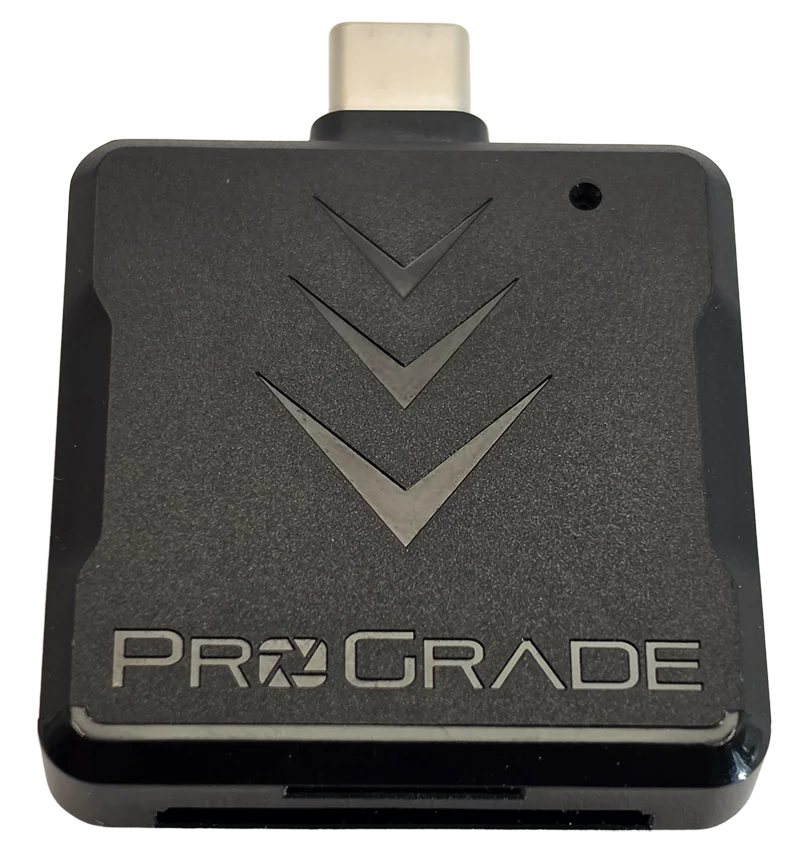
Two caveats before you buy it, both measured and both already published. Its microSD slot reads no faster than about 181 MB/s, so on a fast microSD card it will under-report by up to 12.58% against the QuickFlow, which is the whole reason I own a second host. And its two slots do not transfer at once: across 330 seconds of testing with both slots loaded, the number of seconds where both moved data was zero. The second slot is sequential convenience, not a parallel lane. Both of those, and one bad morning where it made two healthy cards look broken, are in the full reader review.
A card reader is a measuring instrument with a ceiling of its own
Here is the result that reorganised how I test, and it is also the best argument I have for owning a second reader rather than a faster one.
On the ProGrade's microSD slot, three unrelated cards from three different product lines at two different capacities read 180.31, 180.48 and 180.74 MB/s. That is a spread of 0.24%. Nothing has ever gone faster than 180.74 in that slot across the entire corpus. Three cards agreeing that closely is not a fact about the cards, it is a fact about the slot.
Put the same three cards in the QuickFlow and they separate: 193.28, 180.40 and 203.47, a spread of 12.8%. One of them got a real answer out of it. The High Endurance 512GB returned essentially the same figure on both hosts, so 180.4 is genuinely that card's limit. The other two were being clipped.
The consequence for anyone reading speed figures, mine included: a read figure within about 1.5% of a host's known ceiling is a measurement of the host, not the card. You cannot see that from inside one reader. It takes a second one that goes faster.
It also moved two printed claims:
| Card | Printed read | ProGrade PGM0.5 | SanDisk QuickFlow | Against claim |
|---|---|---|---|---|
| SanDisk Extreme 512GB | 190 MB/s | 180.31 MB/s | 193.28 MB/s | 101.7% |
| SanDisk Ultra 128GB, 2026 | 195 MB/s | 180.74 MB/s | 203.47 MB/s | 104.3% |
One correction I owed you rather than quietly fixing. The Extreme's own review on this site carried a verdict of NOT SETTLED ON THIS HARDWARE against that 190 MB/s claim for eleven days after this measurement existed, because NOT SETTLED was the honest call on the bench that existed the day it was written. It has now been amended: the row reads BEATEN, its claim-accuracy score moves from 4 to 5, and the final score stays 4.5 because nothing else about the card changed. I am leaving this paragraph here rather than deleting it, because a review that quietly improves its own scores is worth less than one that shows you when and why it moved.
And the rule bites my own recommendation, which is the part I want to be straight about. An instrument has to be able to exceed a claim before it can test that claim. I own a Lexar Silver Plus that advertises 205 MB/s. My best host has produced 203.47. Even now I do not own a reader that could adjudicate that number, and that card's review still carries a NOT TESTABLE read verdict for exactly this reason.
If you run software off the card, none of the above is your number
Everything so far is sequential: big files, moved end to end. If you boot a Raspberry Pi from a card, run apps off it, or keep a photo catalogue on it, the figure that governs your day is random 4K, and it behaves completely differently.
It is also the weakest data on this page, and the weakness is itself the finding. Across my four cross-host pairs, random 4K read moved by +3.20%, +23.35%, +27.03% and +28.55% on the same cards with nothing changed but the reader. Random 4K write moved between -4.75% and +11.36%. A number that swings 28% on host alone is not a property of the card, and that means nobody's random 4K figure is portable between machines, mine very much included. Compare random IOPS within one host or do not compare them.
What does move random 4K decisively is a genuine bus change rather than a faster reader on the same bus. The UHS-II V60 card went up 105.8% on random read when it moved to a UHS-II host, which in latency terms is 0.99 milliseconds per operation down to 0.48. The Samsung P9 Express on a PCIe host went up 272% on read and 506% on write. Meanwhile the vendor fast mode, which is what a better UHS-I reader buys you, is a bandwidth feature: the Extreme gained 1.88x sequential read from a reader change and 1.04x random 4K read from the same change.
I want to be careful about how hard I state that. It rests on one unit per card, and the V60's low starting figure is partly the card rather than the host. Call it a strong pattern rather than a settled law. The practical version is safe enough: if you copy big files off cards, a faster reader on the same bus is a real upgrade, and if you run things from the card, only a genuine bus upgrade helps.
SD Express needs its own reader, and I can only point at mine
SD Express stops pretending and runs PCIe over the card's second row of contacts. A Samsung P9 Express 256GB read 89.68 MB/s through the ProGrade and 596.73 through a Selore microSD Express reader. That is 6.65x, the largest host-driven gain anywhere in the corpus.
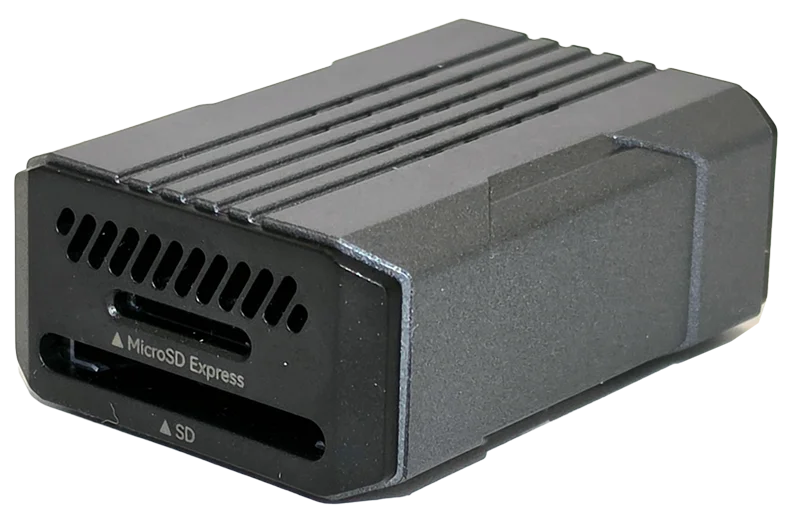
The reversal is the part worth carrying away. Through a reader that does not speak its bus, the fastest card I own reads 89.68 MB/s, which is slower than a Botslab dash cam card that came free in a box at 95.97, and slower than the FitcamX bundled card at 92.94. The best card in the world is worth nothing in the wrong host.
So why is this a pointer and not a recommendation? Because one card has ever run on it, I have not reviewed it, it is a single unit with no long-term data, and its full-size slot has never had a card in it. That is not enough to tell you to buy something. It is enough to tell you that if you have an SD Express card, an ordinary reader is throwing away five sixths of it.
What I am not recommending, and exactly why not
A buying guide that only lists winners is hiding something. Here is everything I considered and left out, with the reason attached, including the several places where the honest reason is that I have no measurement.
| Not recommending | Why not |
|---|---|
| Transcend TS-RDF5 | It works, and it is the before figure in nearly every pair on this page. But it is UHS-I only, which makes it a bus dead end: on a UHS-II card it produces a number near 40% of the claim that looks like catastrophic failure and is really just the wrong pin row. I keep it as a control, not because I would buy another. |
| The card slot built into your laptop | No measurement. I have never benched one. It is probably the most common card host in the world and I have nothing to say about it, so I am saying nothing. |
| USB hubs and front-panel ports | No measurement. The only port data I have is one rear USB 2.0 socket against one rear USB 3 socket on one machine. I would not extrapolate from that to a hub, and the difference I did measure is large enough that guessing would be irresponsible. |
| SanDisk Professional PRO-READER | The Extreme's own packaging names it as the way to reach the stated speeds. It appears to be end of line: every variant I could find is listed unavailable rather than out of stock. No measurement, and now no way to get one, so do not chase it. |
| Any reader rated at or below the claim you want to test | An instrument has to exceed a claim before it can test it. That rules out several inexpensive fast-mode readers on their own published ratings alone. I want to be explicit that this is reasoning rather than measurement: I have not bought or benched any of them, so treat it as a filter for your shortlist, not a verdict on a product. |
| Any reader chosen off its box rating | The reader I am recommending is rated 250 MB/s read and has produced 203.47 on my bench. Retailer listings for it do not even agree with each other about whether it is UHS-II. Buy on a measurement, whether it is mine or someone else's, but do not buy on the box. |
| Buying the more expensive reader by default | On this page the pricier one is the less versatile one: the QuickFlow costs more than the ProGrade and only takes microSD. Paying the difference buys you read speed on one form factor, not capability, so check which of those you actually need first. Dated figures are in the full-size SD section, and I have quoted the ratio rather than leaning on the numbers, because one of them was a sale price the day I looked. |
What your own transfer speed is telling you
The thirty-second check that tells you which of these you need
You do not need my bench. Copy one large file, ten gigabytes or more so the card's cache cannot hide the answer, off the card and read the transfer rate once it settles.
| What you measure | What it means | What to do |
|---|---|---|
| Around 40 MB/s | A USB 2.0 port | Move to a rear USB 3 socket, not a front panel header or an unpowered hub. Free, and worth 2.30x and a video class here. |
| Around 96 MB/s, on everything | Standard UHS-I, the card's own ceiling | Buy nothing. Seven units from five brands live in that band permanently on my bench. |
| 145 MB/s or more, anywhere | The card speaks the vendor fast mode | A better microSD host is worth buying. On my two cards with headroom it was worth 12.58% and 7.19% over an already good reader. |
| Almost exactly 180 MB/s on a good reader | Possibly your reader's ceiling rather than your card's | Try a second host before you conclude anything. Three of my cards read 180.3 to 180.7 on one reader and 180.4 to 203.5 on another. |
One caveat on doing this at home: Windows Explorer reports a burst figure that includes the operating system's cache, so use a large file and read the number after it has settled rather than the peak it flashes in the first second.
The pick for full-size SD, or for both
ProGrade Digital PGM0.5 dual-slot card reader
UHS-II on both slots, and the host behind almost every figure on this site. 296.91 MB/s measured on a UHS-II V60 card. Its microSD side caps near 181, and its two slots do not transfer at once.
SanDisk QuickFlow microSD card reader with USB-C
The pick for fast microSD. It produced 203.47 MB/s, the fastest read figure this bench has recorded, and it is the only host of mine that could settle a printed 190 MB/s claim. microSD only, with no full-size slot, and worth nothing at all on a card that reads about 96.
No packshot for this one yet: I have not shot my own photo of it, and I do not put manufacturer renders on this site. Every figure attached to it on this page came off my own runs.
Check price on AmazonSelore microSD Express card reader
Here because it is the only PCIe host I own and it produced 596.73 MB/s, not because I have tested it properly. One card, one unit, no review, and its full-size slot has never had a card in it. A pointer, not a recommendation.
Check price on AmazonFrequently asked questions
Which SD card reader should I buy?
It depends on one number you can measure in thirty seconds. If your card reads around 40 MB/s you have a USB 2.0 port and the fix is free. If it reads around 96 MB/s in more than one reader, buy nothing, because that is the card's own ceiling. If it reads above about 145 MB/s and it is microSD, the SanDisk QuickFlow is the fastest host I have measured at 203.47 MB/s. If you use full-size SD cards, the ProGrade PGM0.5 is the only option on my bench and it reached 296.91 MB/s.
Is a faster card reader worth it?
Only if your card can use it, and most cannot. Across my corpus a better reader has been worth anywhere from 1.001x to 6.65x on the same measurement, entirely depending on the card at the other end. Two cards with the same model code and the same UPC, which you could not tell apart in a shop, differ by 81% on read on my bench.
Will a faster card reader make my camera or dash cam record better?
No. I measured four cards on two hosts and the sustained write floor, which is the figure a video speed class is scored on, moved between -3.07% and +0.54%. A reader only affects getting footage off the card. It is an offload upgrade and nothing else.
What is the fastest microSD card reader you have tested?
The SanDisk QuickFlow microSD reader with USB-C, which produced 203.47 MB/s on a SanDisk Ultra 128GB. That is the fastest read figure on my bench. Its own ceiling is not established, because that card's three passes agreed to within 0.03%, which is what a card sitting against a host limit looks like.
Do I need a UHS-II reader for a UHS-I card?
Only if that particular card speaks the vendor fast mode, and nothing on the packaging tells you whether it does. On a card that does not, I measured a gain of 1.001x, which is nothing at all. On cards that do, the same class of upgrade has been worth 1.76x and 1.88x.
Why does my card read exactly 180 MB/s?
That may be your reader rather than your card. Three unrelated cards on my bench read 180.31, 180.48 and 180.74 MB/s in the same slot, a spread of 0.24%, and in a different reader the same three read 180.40, 193.28 and 203.47. A read figure within about 1.5% of a host's known ceiling is a measurement of the host.
Are laptop SD card slots slow?
I do not know, and I am not going to guess. I have never benched one, and the host differences I have measured are large enough that an unmeasured opinion would be worse than no answer.
Does a card reader change random 4K speed?
Yes, and by more than you would expect. Across four cards run on two hosts, random 4K read moved by +3.20%, +23.35%, +27.03% and +28.55% with nothing changed but the reader, and random 4K write moved between -4.75% and +11.36%. That is why random IOPS figures only compare within a single host.
Buy the reader your card can actually use
Four hosts, and an honest ranking of what each layer was worth. The USB port was free and worth 2.30x. The reader was cheap and worth 12.58% on a card with headroom, 1.001x on a card without it, and 3.13x on a card with a second row of pins. The card is the expensive part and the only one you cannot change your mind about afterwards.
If you take one thing away, take the order rather than the products. Measure first, because the measurement costs you thirty seconds and it is the only step here that cannot be wrong. Two of the six branches at the top of this page end in buy nothing, and one of them on its own, the plain 96 MB/s card, covers exactly half the UHS-I units on my bench.
And the closing honesty, because this post would be dishonest without it: the reader I am recommending has a ceiling I have not found yet, there is a card in my own corpus whose printed claim I still cannot test at all, and two more reviews on this site are waiting on re-runs this reader has now made possible. Every card behind these figures has its writeup in CKBench, and the method, including why my write numbers read lower than everyone else's, is on the how we test and score page.