
The microSD card in the box: is the bundled Botslab 128GB any good?
It prints the whole speed-class ladder and not one speed number. On the bench it held every class it claims, ran cooler than any other 128GB card here, and swung between 34 and 82 MB/s on a ten second cycle while doing it.
Prefer to watch a review?
No video for this lab run yet, but I cover dashcams, storage, and the gear around them on the channel. Subscribe to catch the next test the moment it goes live.
Updated 19 September 2026: the score moves from 3 to 4.5, and not one measurement changed. In September every CKBench score was re-derived on fixed scoring tables, and this card was one of six whose published score the tables set differently. Three things the August score docked are now reported instead of scored: printing no speed figure (a card that prints only class marks and holds them has made no false claim), printing no endurance rating (the tables score measured fade and recovery, and this card had none of either), and the nine-second write cycle (a one-second sampler cannot score it fairly, so the sustained row uses the worst ten seconds, 53.4 MB/s, and the cycle stays in the write-curve section as the thing to know about this card). The claim accuracy, sustained and endurance rows moved; capacity and thermal did not. Every number in the review is the August measurement.
The short version
This is the 128GB microSD that ships inside the Botslab G980H four channel dash cam, and it is a more interesting card than a bundled freebie has any right to be. It carries no printed speed figure at all, just the class marks, and it held every one of them: C10, U3 and V30 all stood up, with the worst ten seconds of a five minute write landing at 53.9 MB/s against a 30 MB/s floor. It also delivered every byte of its capacity under verification and ran cooler than any other 128GB card on this bench. What it does not do is write at a steady rate. Across three separate runs it oscillated between roughly 34 and 82 MB/s on a repeating cycle of about nine and a half seconds, which is eleven times more variation than any other 128GB card here. In the camera it came with, that never matters. Outside it, it might. My rating: 4.5/5, scored against the CKBench rubric (3/5 from August to September 2026; the update note below says what moved).
Verdict: 4.5/5, honest about everything it claims, wildly inconsistent about how it gets thereWho this card is for
- YesDash cam loop recording, including multi channel rigsThe camera it ships with writes about 4.8 MB/s across four channels at once. The card holds a floor of 53.9 MB/s, so it has roughly eleven times the headroom the job needs, and the swing never dips close to the requirement.
- NoPhone storage, tablets, or anything that runs apps from the cardIt prints an A1 badge, and A1 is about small random reads and writes rather than video. I cannot verify A1 properly over a USB reader, but the indicative numbers came in below both floors, so treat the badge as unproven rather than earned.
At 124.6 GB usable and about 4.8 MB/s of combined four channel footage, this card holds a little over seven hours before the loop starts overwriting. Work out your own numbers in the dash cam storage calculator.
Why test a card nobody chose to buy?
Nobody shops for the card that comes taped inside a dash cam box. It arrives, it goes in the slot, and it records until it does not. Occasionally that is a lucky break: the best card in this entire corpus arrived exactly that way. That makes it exactly the kind of card worth putting on a bench, because it is the card an enormous number of people are actually running and almost nobody has measured. This is one unit, bundled with a camera rather than bought at retail, and tested on August 2, 2026. Three passes are an indicator, never an endurance test. It joins CKBench, the running index of every card on the bench, alongside the VIOFO High Endurance pair, which is the closest thing here to a direct comparison at the same capacity and class, and the Kioxia Exceria G2 128GB, the other dash cam bundled card in the corpus.
Why my write numbers read lower than other reviews. Every write here is committed to the card and confirmed before the clock stops, the way a dash cam actually writes, so my figures land below burst benchmarks like CrystalDiskMark that measure a few seconds of the card's RAM buffer. That rule, and the decimal MB/s and binary MiB conventions used throughout, are set out on the how we test and score page.
What the card claims, and what the card did
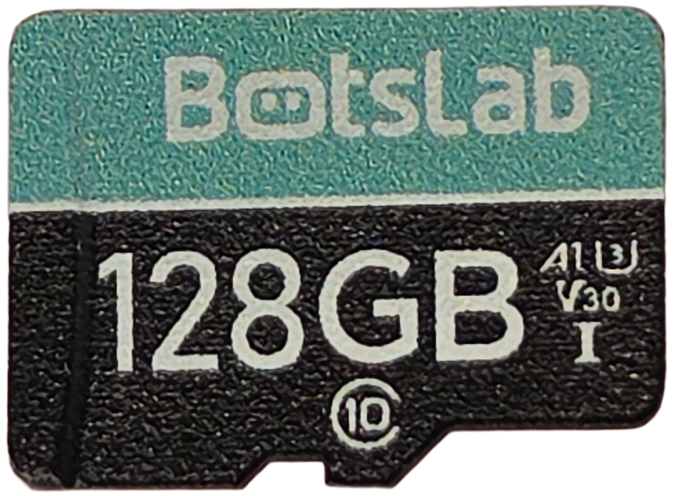
This card came bundled with a camera, so there is no retail packaging and no spec sheet behind it. Every claim below is read off the card face itself, which is the only thing it ever claimed. Note how many rows are empty: the face prints the entire class ladder and not a single speed figure, which means there is no headline write number here to beat or miss.
| Claim | Printed (card face) | Measured | Verdict |
|---|---|---|---|
| Capacity | 128GB | 124.6 GB written, read back and verified, zero mismatches | VERIFIED |
| Read speed | None printed | 96.0 MB/s (ProGrade MSD PGM0.5, at the UHS-I bus ceiling) | NOT CLAIMED |
| Write speed | None printed | 59.0 MB/s sequential, 58.5 MB/s average sustained | NOT CLAIMED |
| Speed class | Class 10 | 53.9 MB/s worst ten seconds against a 10 MB/s floor | HELD |
| UHS speed grade | U3 | 53.9 MB/s worst ten seconds against a 30 MB/s floor | HELD |
| Video speed class | V30 | 53.9 MB/s worst ten seconds, 1.8 times the 30 MB/s floor | HELD |
| App performance class | A1 | 1,338 read and 457 write IOPS against 1,500 and 500 floors | NOT TESTABLE |
| Endurance rating | None printed | n/a | NOT CLAIMED |
| Operating temperature | None printed | n/a | NOT CLAIMED |
| Warranty term | None printed | n/a | NOT A PERFORMANCE CLAIM |
Two rows need a word of explanation. The read figure flat-lines against the reader rather than the card: 96.0 MB/s is where a standard UHS-I bus tops out, so that number describes my hardware, not this card's ceiling. And A1 is marked not testable rather than failed, because the A-class floors assume command queuing that a USB card reader does not do. The indicative numbers came in under both floors, which is worth knowing if you were planning to use this as phone storage, but it is not a fair verdict against the badge.
Why does the write speed swing between 34 and 82 MB/s?
Here is the shape of a five minute sustained write, sampled once per second. Most cards draw a flat line across this chart. This one draws a saw.
Botslab 128GB · the saw
300 one-second samples · worst 10 s at 0:18 · knee scan outcome NO_KNEE_STABLE · Run Botslab-128GB_2026-08-02_142918
The cycle repeats about every nine and a half seconds, and it is remarkably regular. Roughly three seconds pinned at a ceiling of 81 to 83 MB/s, then about six seconds down at 40 to 50, then back up. Around thirty one of those cycles fit into the five minute run, and the average level does not drift: the card ends the run doing exactly what it was doing at the start.
What causes it is a write cache that is too small for the job. Fast flash cards keep a small region of memory configured to store one bit per cell, which is quick to write, and then fold that data down into denser three bit storage in the background. While the card is filling that fast region it hits 81 MB/s. When the region is full it has to fold, and folding while still accepting new writes is what drops it to the mid forties. Working backwards from the cycle, that fast region is somewhere around 240 MB, which is small.
I checked the obvious alternative explanations and none of them hold. It is not heat: this was the coolest card in the corpus and the pattern is identical in all three runs. It is not the card stalling, because the longest single pause in the entire run was 116 milliseconds and nothing came close to half a second. And it is not random background housekeeping, because random behavior does not repeat on a nine second beat for five minutes straight.
The part worth sitting with is that none of this breaks anything. The lowest single second across all three runs was 33.6 MB/s, and the V30 badge promises 30. The card is certified honestly. It just gets there by a route no other card here takes.
Would a normal benchmark have caught this?
No, and this is the part I found genuinely useful. In the same test session, the standard sequential write test wrote three one gigabyte files and returned 58.90, 58.98 and 59.22 MB/s. That is a spread of half a percent, which would rank this as the most consistent card I have ever measured. It is not. A one gigabyte write takes about eighteen seconds, which swallows two entire cycles and averages them into a single tidy number.
Meanwhile a short probe at the very start of the session, lasting only a moment, happened to land in a trough and reported 33.1 MB/s.
So the same card, on the same afternoon, measures 33, 59 or 82 MB/s depending purely on how long you watch it. Any tool that reports one averaged figure, CrystalDiskMark included, will tell you this card is flat. It took sampling once a second for five minutes to see the shape at all.
That also changes how repeatable the headline number is. On a steady card like the VIOFO High Endurance 128GB, the worst ten second figure repeats across runs to within three quarters of a percent. On this card the same measurement varied by about five percent across three runs, because where the ten second window happens to land relative to a trough changes the answer. The verdict survives it comfortably, since the worst of the three runs still came in at 1.7 times the V30 floor, but it is worth knowing that a card like this has a wider margin of error than a flat one.
How hard does a dash cam actually push a memory card?
This card arrived almost full, with about six weeks of real recordings still on it, which is a rare chance to measure what the camera genuinely asks for rather than guessing from a spec sheet. Across the four channels the G980H records, the footage worked out like this: the front camera wrote about 2.09 MB/s, and the rear, left and right channels wrote about 0.9 MB/s each. Combined, the camera writes roughly 4.8 MB/s.
Set that against the card's own numbers. Its worst ten seconds under a punishing synthetic load was 53.9 MB/s. The camera it lives in asks for 4.8. That is about sixteen percent of the V30 floor the card is certified to, and roughly nine percent of what the card actually delivered at its worst.
Which is the honest context for everything above. The saw-tooth is real, it is measurable, and in the device this card was sold inside it is completely invisible. The card is not being stretched. It is idling.
One minute of loop-recording abuse
This card: run Botslab-128GB_2026-08-02_142918 · reference card: lab baseline, same bench, same test
Does the bundled card overheat in a dash cam?
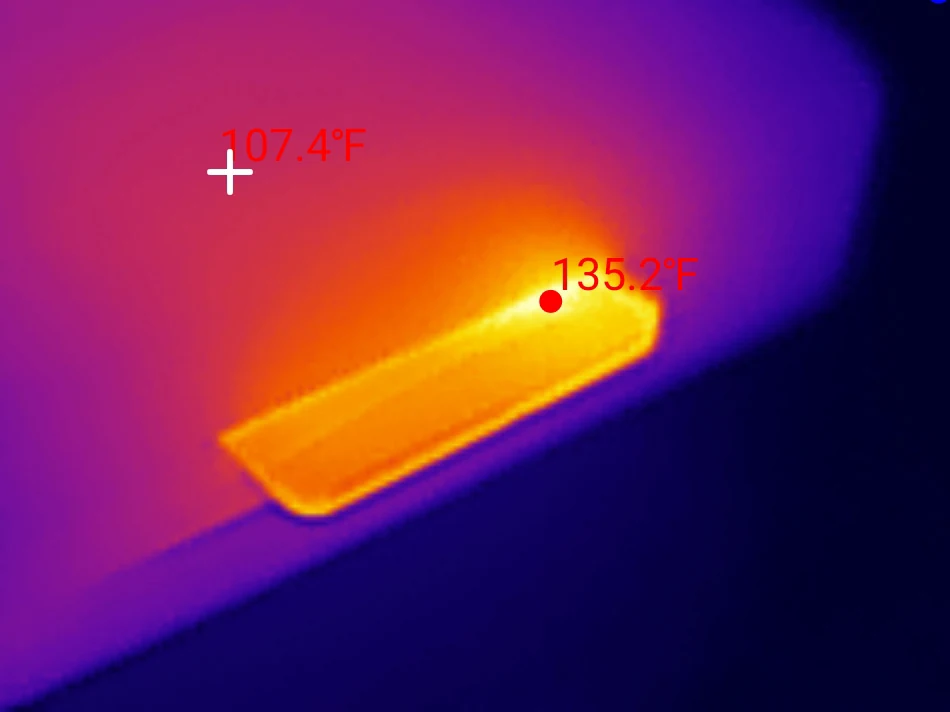
Not this one. With the cooling fan switched off to simulate a sealed camera housing, it peaked at 135 F against a room at 76 F, a rise of 59 F. That makes it the coolest 128GB card that has been through this bench, and it was not close: the VIOFO High Endurance 128GB reached 160 F under the same conditions while writing about 2.4 MB/s slower.
All three runs peaked at exactly 135 F, which is worth mentioning because it means the reading is repeatable rather than a lucky sample. Heat matters more for dash cams than for most uses, because the card sits in a sealed plastic body stuck to a windscreen in direct sun, and the camera's own heat has nowhere to go. A card that runs 25 F cooler while doing the same work has a real advantage there, and it is the single dimension where this card outperforms everything else in its class here.
It stayed cool. It kept cycling.
A 4K30 dash cam writes about 6 MB/s, roughly a tenth of this workload · Run Botslab-128GB_2026-08-02_142918
Who actually made this card?
Every SD card carries a small identity register that names its manufacturer, and reading it is the only way to find out who really made a card sold under a camera brand. Botslab does not make flash memory, so something else does.
This card reports manufacturer ID 0xFE with a product name of SZYL, made in October 2025. That combination does not appear in any public manufacturer registry, which on its own means little, since the SD Association does not publish its ID assignments. A third card has since turned up reporting the same 0xFE, and it is not a bundled card at all: the Newegg TeamGroup 128GB is sold at retail in a printed package, and its SD Status register is byte for byte identical to this one.
Update, September 2026: a fourth, the Gigastone High Endurance Pro 128GB, followed with the TeamGroup's identity string and this card's nine-second write cycle, from the same 80 MB/s cache fill rate. That settled what the cycle is: the platform's write cache, rather than a fault of this unit. What differs between the four is the speed the card falls to while the cache empties, and this card's 34 to 45 MB/s sits between the TeamGroup's 5 and the Gigastone's 47 to 52. A fifth card, the PNY Premier-X 128GB, has since turned up with the same registers behind a different manufacturer ID, 0x74, and a fold that stops almost dead for a second and a half every four seconds. A sixth, the Speederlash 128GB, a no-name retail card, followed in October with the TeamGroup's identity string and a three-and-a-half-second cycle that folds to about 6 MB/s. This platform is also the only one on the bench where the write floor drops once the card has been written full: this card’s fill fell from 51.5 to 42.0 MB/s through its worst ten seconds, the Gigastone’s from 58.6 to 45.4, and no other 128 GB card moved more than 3 percent.
What is interesting is what happened when I read the card out of a completely unrelated camera on the same day. The 64GB card bundled with the FitcamX dash cam reports the same manufacturer ID and the same product name, made one month later. Two different dash cam brands, two different cameras, one flash supplier. If you have ever wondered whether the bundled card is basically the same part regardless of whose logo is on the camera, here is one piece of hard evidence that sometimes it is. That FitcamX card has since been through the full bench in its own right, and came out of it better than this one.
The register is also filled in sloppily in a way the name brands are not. The OEM field is supposed to hold two readable letters, the way SanDisk's says SD and Kioxia's says TM, and on both of these cards it holds bytes that are not letters at all. The product name field is four characters where the standard expects five. And the serial number, which should be a large effectively random value, is a three digit number on this unit, where every name brand card here uses the full range.
None of that means the card is fake, and I want to be precise about it. This card passed its capacity test completely: every one of its 124.6 GB was written, read back and verified with zero mismatches and zero read errors. A sloppy identity register points at a low tier programming operation, not at dishonesty. The counterfeit I found earlier this year is the proof of that distinction, because its identity register was a flawless, coherent SanDisk imitation and the card was still lying about its capacity. Tidy paperwork and honest hardware are separate things.
Does the 128GB card actually hold 128GB?
Yes, within the normal margin. The test fills every available byte with verifiable data and reads all of it back. This card took 124.6 GB and returned all of it intact: zero mismatched bytes across 117 files, zero read errors. That is a clean pass.
124.6 GB is 97.4 percent of the 128 GB on the label, which is ordinary. Some of the difference is space the controller keeps for itself to manage wear and replace failing blocks, and manufacturers make different choices about how much to reserve. For comparison, the SanDisk High Endurance handed over 100 percent of its label, the VIOFO High Endurance 128GB gave 97.4 percent like this one, and the Kioxia Exceria G2 gave 96.7 percent.
Separately, and this is the part that panics people: when you put this card in a Windows machine it will report about 116 GB, not 124.6 and definitely not 128. Nothing is wrong. Drive manufacturers count a gigabyte as a thousand million bytes, and Windows counts it as 1,073,741,824 bytes, so the same card gets two different numbers. The card is fine. The arithmetic is just inconsistent, and it has been for thirty years.
Every byte, written and read back
Run Botslab-128GB_2026-08-02_142918 · cardcheck v0.8.0 · ProGrade MSD PGM0.5
How the Botslab 128GB scores
Botslab 128GB microSD
Scored against the CKBench rubric. Five dimensions, each out of 5.
Final score: 4.5 out of 5. A card that is entirely honest about the little it claims and unusually good at staying cool. The five rows were restated on the September 2026 scoring tables on 19 September 2026: claim accuracy rose to 5 because a card that prints only class marks and holds them has made no false claim, sustained rose to 4 on the absolute ladder because the sampler cannot score the nine-second cycle, and endurance rose to 5 because the tables score fade and recovery rather than the absence of a rating. They average 4.6, rounded to 4.5. Published at 3 out of 5 from August to September 2026; the update note at the top says what moved and why, and the write-curve section still says what it always said.
Frequently Asked Questions
Should I replace the microSD card that came with my dash cam?
Not on the evidence of this one. The bundled Botslab 128GB held every speed class printed on it, delivered and verified its full capacity, and ran cooler than any other 128GB card on this bench. Its write speed is inconsistent, but its worst measured second was still above the V30 floor and about seven times what the camera actually asks for. Replace a bundled card if it starts producing corrupted or missing files, not on principle.
Why does my 128GB microSD card only show 116GB in Windows?
Two separate things are happening. First, memory card makers count a gigabyte as one thousand million bytes while Windows counts it as 1,073,741,824, so a card is always smaller on screen than on the label. Second, the controller reserves some space to manage wear and swap out failing blocks, which on this card is about 2.6 percent. Neither is a fault, and a card that shows roughly 116GB for a 128GB label is behaving normally.
Why does this card's write speed jump between 34 and 82 MB/s?
It has a small fast write cache, roughly 240 MB, that it fills at about 82 MB/s and then has to empty into slower dense storage. Emptying it while still accepting new data drops the rate into the mid forties for about six seconds, then the cycle repeats roughly every nine and a half seconds. It is normal behavior for a budget controller, and on this card it never dropped below the 30 MB/s its V30 badge promises.
Can I use the Botslab microSD card in my phone?
You can, but it is not what this card is good at. It prints an A1 badge, which is about the small random reads and writes that apps depend on rather than video recording. That rating cannot be tested properly through a USB card reader, and the indicative figures I measured, 1,338 read and 457 write IOPS, came in below the 1,500 and 500 the badge calls for. Treat A1 on this card as unproven and use it for video.
Who manufactures the microSD cards bundled with dash cams?
Often the same company, whatever the camera brand. The card bundled with this Botslab camera and the card bundled with a completely unrelated FitcamX camera report the same manufacturer ID and the same internal product name, made one month apart. Neither appears in any public registry, which is common for smaller suppliers, and it does not by itself indicate a problem: this card passed its full capacity verification with zero errors.
The bottom line on the Botslab 128GB
Bundled cards have a reputation, and it is mostly the reputation of the worst ones. This is not one of those. It holds every class mark printed on it, it delivered and verified its whole capacity without a single bad byte, and it runs cooler under load than any other 128GB card I have measured. For the job it was packed in the box to do, recording four channels of video at less than five megabytes a second, it has an enormous amount of headroom and no observable weakness.
What keeps it at a 3 is what happens when you look closely. The write rate never settles, cycling between 34 and 82 MB/s every nine and a half seconds for as long as you care to watch, which is behavior I have not seen from any other card here and which points at a controller built to a price. The card also claims nothing at all about endurance, which is a strange gap in something sold inside a device that can record continuously, including while parked. Neither of those hurts it in a dash cam. Both would matter if you moved it somewhere more demanding, and neither is something the card gives you any way to know in advance.
So: a better card than it needed to be, in a camera that does not need it to be. If yours is still working, leave it in.
Device identity: what this card reports about itselfFor readers checking their own unit against mine
| Raw CID register | fe0268535a594c0020…019a00 (serial digits elided) |
| Manufacturer ID (MID) | 0xFE, not listed in any public registry |
| OEM / application ID (OID) | 0x0268, which is not valid ASCII |
| Product name (PNM) | SZYL (four characters, where five are expected) |
| Product revision (PRV) | 2.0 |
| Serial number (PSN) | Truncated. A three digit value, where every name brand card tested here uses the full 32 bit range |
| Manufacture date (MDT) | 10/2025 |
| Declared capacity (from CSD) | 243,445,760 sectors of 512 bytes = 124,644,229,120 bytes, 97.4% of the label |
| Captured on | Raspberry Pi 4 native SD host, no USB bridge in the path · 2026-08-02 |
The manufacturer ID, OEM ID, product name and revision are model level fields: they should be identical on every unit of this card, so you can compare your own against them. The serial number is unique to this individual card and is truncated here on purpose. The capacity figure comes from the card's own CSD register, which is what the card declares about itself before any filesystem exists. Worth saying what is missing: these registers do not reveal the flash controller or the NAND part number, which need a vendor specific tool, so this table is not a full picture of what is inside.
Disclosure: This microSD card was not bought separately. It arrived bundled inside a Botslab G980H dash cam that I purchased for review, and it was tested after roughly six weeks of ordinary use in that camera. This post contains affiliate links. As an Amazon Associate I earn from qualifying purchases, at no extra cost to you. Affiliate links like these and my YouTube channel are what keep the site running.