
Gigastone High Endurance Pro 128GB: good out of the pouch, different once it has been full
A dash cam card that prints TLC on its face, ships in a pouch that says nothing, and turned out to be two cards depending on what had been done to it last. Fresh, it sustains a 59.6 MB/s floor. After I had written every byte of it once, the same card on the same reader floored at 31. Then I erased it properly and the 59.6 came back. This review is the whole story, including what the erase proves and what the TLC does not.
No video for this bench run
The numbers on this page come from the bench, not a camera. The channel covers the dash cams and readers these cards end up in; subscribe and the next one lands in your feed the day it goes up.
The short version
A good V30 dash cam card with one unusual property and one honest limit. Fresh from the pouch it held 59.6 MB/s through its worst ten seconds of committed writing, writing in a steady nine-second saw-tooth between 47 and 84. After I had filled every byte of it once, the same card on the same reader held 31.0, because it now spent one to six seconds at a time reclaiming space; a full SD erase on a Raspberry Pi returned it to 54.5 with no dips at all. Every one of its 125.0 GB verified with zero errors. It read 94.5 MB/s against a 100 MB/s figure from Gigastone’s own page, a little under the bus ceiling every other card here reaches. It ran cool, 125 °F on three runs and 132 on the fourth. And its identity register says it is the same controller platform as a house-brand card I tested as a cheap negative control, which the TLC on the label cannot change. My rating: 4.5/5, scored in the used state, against the CKBench rubric.
Verdict: 4.5/5, V30 in the state a dash cam keeps it in, and a floor that comes backWho this card is for
- YesA dash cam, including one that keeps the card permanently fullThat is the used state, and the card held V30 in it on two readers with its worst single second at 23 MB/s, about three and a half times what a 4K dash cam actually writes. It never stopped; it slowed for a few seconds at a time.
- YesAnyone who wants a card whose capacity has been proven117 files of unpredictable data, 125,035,741,184 bytes, read back and compared with zero mismatches and zero read errors. 97.7% of the label, inside the range every genuine card on this bench occupies.
- YesA hot windshield125 °F at the end of five uncooled minutes on three runs and 132 on the fourth, in a 76 °F room, with no slowdown across the leg. Only three generic cards that write a quarter as fast ran cooler here.
- NoAnything that needs V60 or a high-bitrate 4K120 streamThe card prints V30 and that is what it holds. Fresh it averages 61 MB/s, but it spends six of every nine seconds near 50, and used it floors at 31. The 35 MB/s a high-bitrate 4K120 recorder needs is not there once the card has been full.
- NoAnyone buying the TLC on the label as a tested endurance claimNo bench can read a card’s NAND type, Gigastone publishes no hours or terabytes for this card, and the pouch prints nothing at all. The mark is a statement about what is inside; this review explains what it does and does not tell you.
125.0 GB of usable space is roughly 5 hours 47 minutes of single-channel 4K at 6 MB/s, or about 11 hours 35 minutes of 1080p60 at 3 MB/s, before a dash cam loop starts overwriting. Work out your own numbers in the dash cam storage calculator.
Is the Gigastone High Endurance Pro any good?
Gigastone is a Taiwanese brand that sells a lot of memory cards on Amazon and prints one thing on this one that no other card on my bench prints: TLC, on the card face, in the same weight as the class marks. It is there to tell you what kind of flash is inside, and by implication that it will outlast a cheaper kind. The pouch it ships in tells you nothing else. No speed figure, no class marks, no endurance rating, no warranty term, no capacity disclaimer; a brand name, a window, a barcode label and four corporate addresses. The card face carries the marks, U3, V30 and A1, and Gigastone’s own product page supplies the numbers, Read/Write up to 100/50 MB/s and a five-year limited warranty. The Amazon listing says only up to 100MB/s with no direction attached.
So I bought one, at retail, and ran it the way I run every card on the CKBench corpus: a register dump on a Raspberry Pi to learn who made it, then the full suite on my primary reader including a fill of every byte, then the suite again on a second reader. The second run came back with a write floor half the first one’s. That is the kind of result that is usually the reader’s fault, and this time it was not. Working out what it was took two more runs and a procedure I had never used on a card before, and it is the most useful thing on this page.
Every write figure on this page is a committed write: the data is on the flash before the clock stops, with no operating-system cache in the way. That is why the numbers here read lower than a marketing sheet or a quick benchmark; the methodology page explains the difference and why it is the one that matters for recording.
What the card claims, and what the card did
| Claim | Printed or published | Measured | Verdict |
|---|---|---|---|
| Capacity | 128GB (card face) | 125.0 GB written and verified, 97.7% of label, zero errors | VERIFIED |
| Read speed | Up to 100 MB/s (Gigastone’s product page; the pouch prints nothing, the listing says 100 with no direction) | 94.5 MB/s on the ProGrade PGM0.5, 94.7 on the SanDisk SDDR-B751; every other UHS-I card here reads 96 to 97 on both | MISSED, 94.5% of claim |
| Write speed | Up to 50 MB/s (product page) | 60.6 MB/s committed fresh, 58.5 used (ProGrade); 57.8 (SDDR-B751) | BEATEN, 117 to 121% of claim |
| Speed class | None printed (no circled 10 on the face) | 31.0 MB/s worst ten seconds used, 59.6 fresh, against a 10 MB/s floor | NOT CLAIMED, floor cleared |
| UHS speed grade | U3 | 31.0 MB/s worst ten seconds used, 59.6 fresh, against a 30 MB/s floor | HELD |
| Video speed class | V30 | Holds V30 in both states on both readers; 59.6 fresh is 0.4 short of V60 | HELD |
| App performance class | A1 | 1,377 read / 531 write IOPS at QD1 on the ProGrade, under the 1,500 read floor; 1,649 / 547 on the SDDR-B751, over it. The A classes assume a command queuing mode USB readers do not do | NOT TESTABLE |
| Endurance rating | None printed, none published (High Endurance Pro is the name; the page states no hours and no TBW) | n/a | NOT CLAIMED |
| Operating temperature | None published (temperature-proof on the page, no range) | 55.6 °C peak on the card body under five minutes of uncooled writing | NOT CLAIMED |
| Warranty term | 5-year limited (product page) | n/a | NOT A PERFORMANCE CLAIM |
Three rows need their reasoning attached. The read miss is real but small. A plain UHS-I card cannot read faster than about 96 to 97 MB/s on any reader, and every 100 MB/s card on this bench lands there, which the rubric treats as met. This card reads 94.5, on both readers, agreeing to 0.2%: it is 2.2 MB/s slower than the bus, and that is the card, not the reader. Three of the four cards on its controller platform do the same thing, as the identity section shows. A1 is not testable on a USB reader, and this card is the second on my bench to pass the A1 read floor on one reader and miss it on the other with the same card, which is the reader deciding, not the card. The 50 MB/s write is comfortably beaten, and the V30 mark held in every state and on every reader, with 1.0 MB/s to spare at its worst.
A pouch that says nothing
The card comes in a foil zip pouch with a red band and a clear window, in a small case with a Gigastone UHS-I SD adapter. The back of the pouch carries a California Prop 65 warning, a barcode label with the retail SKU, recycling marks, Made in Taiwan, four addresses and a copyright line. That is the complete inventory. It is the least a boxed card has told me about itself on this bench, and it is worth setting against the SanDisk High Endurance blister, which prints an hours ladder, the bitrate the hours assume, a definition of a gigabyte and the warranty on its back panel. Price and disclosure do not track each other in memory cards, and this pouch is the widest gap I have seen.
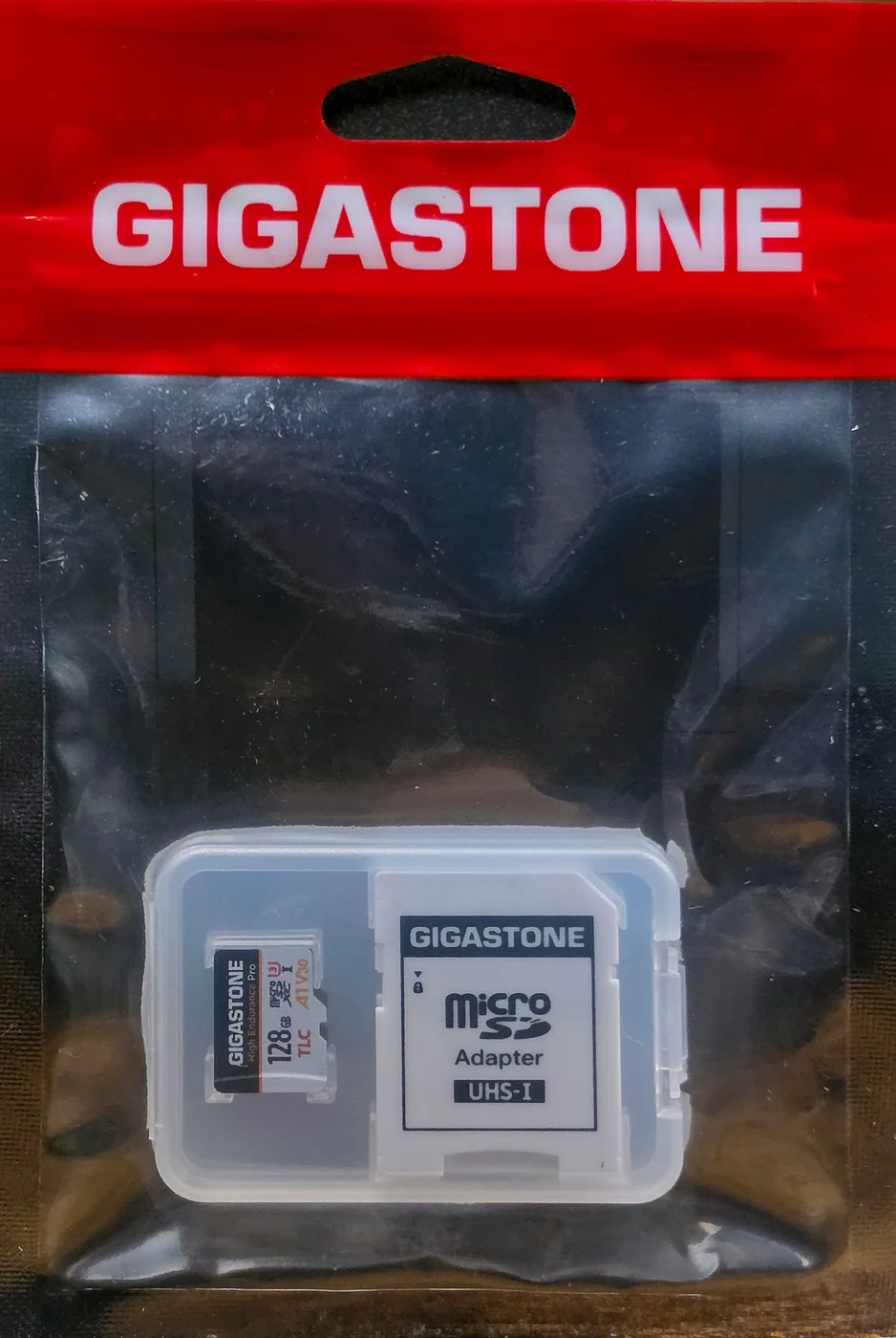
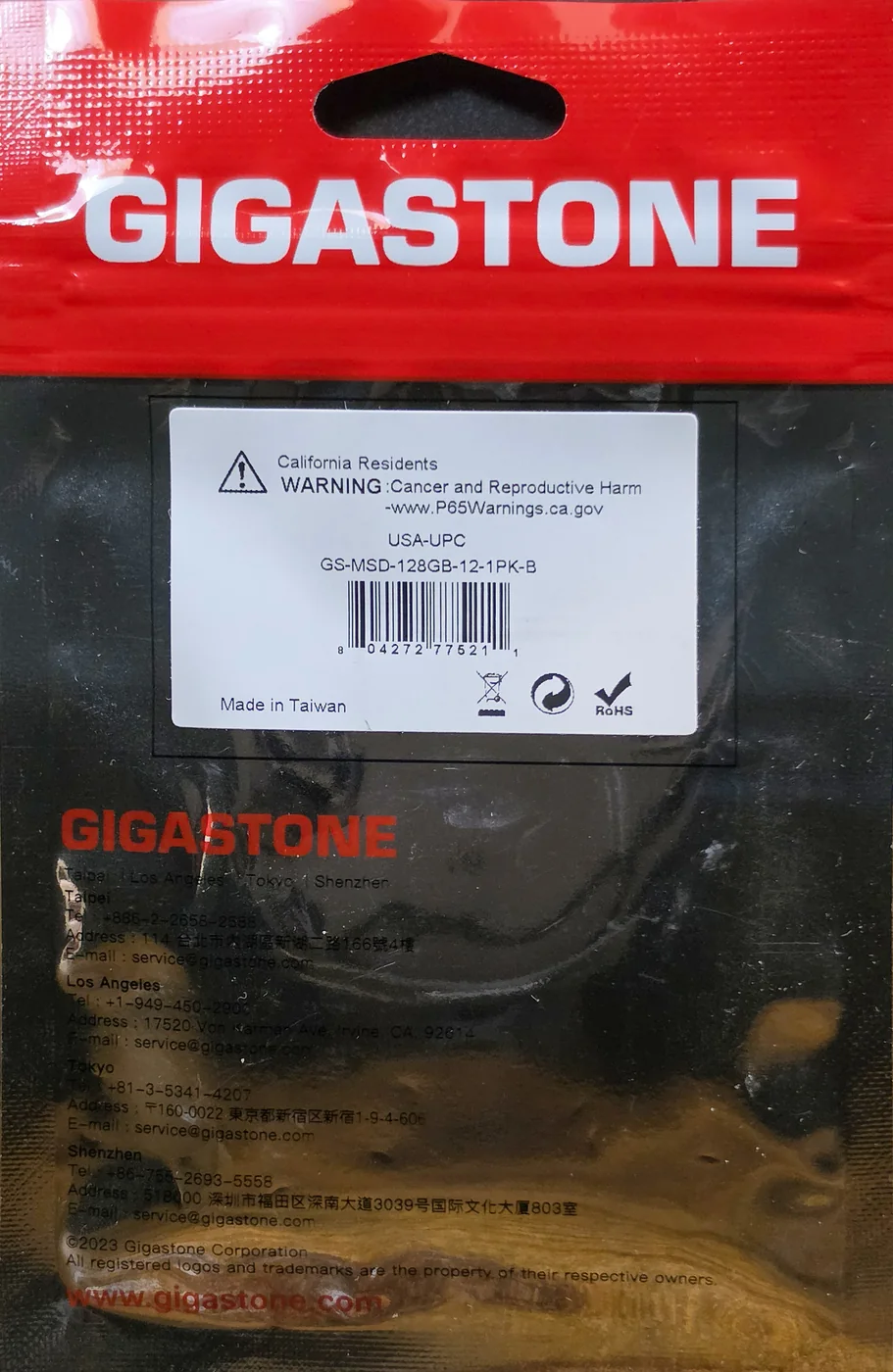
The one useful string on it is the SKU on the barcode label, GS-MSD-128GB-12-1PK-B, which identifies the listing rather than the part inside. Everything else this review has to say about what is inside came from the card’s own identity register, further down.
A nine-second saw-tooth, and a floor that depends on the card’s history
This is the panel that decides a video class, and on this card it needed four runs to read correctly. The trace below is the scored run: run 3, on my primary reader, after the card had been written end to end and emptied again, which is the state a dash cam keeps a card in. What you are looking at is two things at once. The regular pattern, about three seconds near 82 MB/s and six near 45, is the card’s write cache filling and emptying; every cached card does this, and this one just has a small enough cache, about 220 MB, that a one-second sampler can see the seam. The irregular part, the drops to 23 MB/s that last one to six seconds, is what changed after the fill. They set the worst ten seconds at 31.0, and that is the number the V30 verdict rests on.
Gigastone High Endurance Pro 128GB, used state
Here is why it needed four runs. The first run, on a sealed card, drew the saw-tooth with no drops at all: worst ten seconds 59.6, lowest single second 44.0, the cycle so regular that its nine-second autocorrelation is 0.96, the cleanest periodic trace I have recorded. That run also filled the card, every byte, and the fill’s own trace is where the change began. The second run, ten hours later on a second reader, came back at 32.3 with the drops. The third, back on the first reader, came back at 31.0 with more of them. Same card, same slot as the clean run, half the floor.
The one-second sampler makes the fresh run’s 59.6 slightly lucky, for what it is worth: a nine-second window over the same data reads 60.5 and an eleven-second window 58.6, because ten seconds spans just over one cycle. The honest fresh figure is “about 55 to 60”, and the fourth run below landed at 54.5. The used figure is not phase-sensitive at all; the drops set it, and they read 31.1, 31.0 and 31.1 across the same three window widths.
The floor gave way in the last third of the fill
The whole-card fill on run 1 is 2,106 one-second samples, and cutting it into 150-second slices shows exactly when the card stopped being the card from the first five minutes. For the first 80 GB, the worst ten seconds of every slice sits between 58.5 and 59.3 MB/s, the same floor as the sealed-card run. Past 82 GB it slips to 55.4; past 91 GB to 49.8; and over the last 25 GB it sits at 45 to 47, with the first second under 35 MB/s arriving at 100 GB written and the fill’s lowest second, 23.07, at 122.7 GB. That value, 23.07, is the identical lowest second the used runs produced. The average barely moved, 60.5 to 56.4; what changed was the floor.
I scanned every whole-card fill on file for the same thing, comparing the worst ten seconds of the last quarter of each card against its first half. Every SanDisk, VIOFO, Vantrue, Kioxia, Samsung and Lexar 128 GB card holds its floor within 3% from the first file to the last. Two cards do not: this one, and the Botslab 128GB, which fell from 51 to 42. The Botslab is the other nine-second saw-tooth card on my bench, and the identity section explains why that is not a coincidence.
I erased it properly, and the floor came back
A card reader connected over USB never tells a memory card that a deleted file is gone. The operating system deletes the directory entry; the card’s controller still believes every block it wrote is holding valid data. A card straight from the factory has a full pool of never-written blocks and writes into them without pausing. A card that has been written end to end has only the small reserve its controller keeps back, and every new write means clearing an old block first, in the foreground, while the recording is happening. That was my candidate explanation for the drops, and it makes a prediction: a real SD erase, the command a native SD host can send and a USB reader cannot, should give the card its factory floor back.
So I put the card in a Raspberry Pi, whose slot is a native SD host, confirmed its serial number against its register dump, read three one-megabyte samples off it and hashed them, and issued a whole-device erase. The card discarded all 125,069,950,976 bytes in 26.5 seconds, which is the controller clearing its map rather than grinding through flash, and the same three samples read back as solid ones, the value this card’s registers say erased data reads as. Then a quick format on Windows with the SD Association’s formatter, which reproduced the factory layout to the byte, and the suite again on the primary reader.
| Run | State | Reader | Steady state | Worst 10 s | Lowest second | Seconds under 35 MB/s |
|---|---|---|---|---|---|---|
| 1 | Sealed, fresh | ProGrade PGM0.5 | 61.3 MB/s | 59.6 | 44.0 | 0 |
| 2 | Used, after the fill | SanDisk SDDR-B751 | 56.5 MB/s | 32.3 | 23.1 | 19 |
| 3 | Used, scored | ProGrade PGM0.5 | 56.0 MB/s | 31.0 | 23.1 | 50 |
| 4 | Erased on the Pi, quick-formatted | ProGrade PGM0.5 | 61.3 MB/s | 54.5 | 40.9 | 0 |
Run 4 is run 1 on every statistic. The steady state is back at 61.3, the nine-second cycle is locked again, the sequential passes are flat again where the used runs had a sag in the middle pass, the settle finished in 60 seconds like the first run rather than 90 like the used ones, and not one second of the five minutes dipped under 40. The worst ten seconds landed at 54.5 rather than 59.6, which is one slightly deeper slow phase at 44 seconds and the same scoring band. The 204 GB I had written to the card had not changed the card. What had changed was the controller’s idea of what was on it, and telling it the truth put the speed back.
Three things follow, in order of how much they should change what you do. First, the slower floor is not wear. It arrives the first time the card is filled, it does not get worse with more writing in any way an erase does not undo, and nothing in this review touches the endurance the TLC mark implies. Second, a dash cam never erases. In-camera formats and every format you can do through a USB reader, including the one I just did, write filesystem structures and leave the controller’s map full, and a dash cam then keeps the card written end to end and overwriting, permanently. So the used state is the state this card lives in, and 31 to 32 MB/s at its worst ten seconds, 23 at its worst second, is the honest description of it in service. That is still V30 and still three and a half times what a 4K dash cam writes. Third, the fresh floor is reachable on demand, but only from a native SD host; a computer with a built-in slot that is a real SD controller rather than a USB reader can do it, a Raspberry Pi can, and a card reader cannot. That is not true of every card: the Pi would not erase the SUNEAST Ultimate Pro 128GB, which one fill had also slowed, and that card has stayed slow. What each kind of format actually does to a card, how the same whole-card write went the other way on a Samsung, and which cards on the bench never showed the drop at all are in the used-card explainer.
What scattered writes do to it
Loop recording is not one long write. It is a long write interrupted constantly by small ones: event clips, directory updates, overwrites of the oldest file. Random 4K writes are the bench version of that abuse, three twenty-second passes of it, and the question is whether the third pass is as fast as the first. On the scored run the answer is that it got faster: 506, 536 and 550 write IOPS, no fade, and the card was back at its full sustained rate in the first ten-second window after the churn leg. The fresh runs did the same, 563 rising to 600 on the sealed card. The second reader’s used run was the only one that faded, 563 to 514, and the rubric scores the primary reader.
One minute of loop-recording abuse
This card: run Gigastone-High-Endurance-Pro-128GB_2026-09-17_084818 · reference card: lab baseline, same bench, same test · cardcheck v0.8.3
The absolute numbers are modest. 500 to 600 write IOPS and 1,300 to 1,650 read IOPS put this card in the lower half of the bench for small scattered writes, near the Botslab and the TeamGroup and well under the SanDisk High Endurance. That is a fair description of a card built for one long stream, which is what a dash cam asks of it. What the rubric scores, and what matters for loop recording, is whether the churn costs the card anything it does not get straight back, and here it did not.
Every byte, written and read back
The bench wrote 117 files of unpredictable, dedup-proof data until the card was full, 125,035,741,184 bytes, then read every one of them back and compared. Zero mismatched bytes. Zero read errors. The read-back ran at 96.5 MB/s, the same bus-limited figure the card reads at everywhere, and the whole card came back in 22 minutes 37 seconds. The write spread across the first, middle and last tenth of the card was 5.35%, which is the fill’s floor giving way in the last third, as the section above showed; the reads spread 1.05%.
Every byte, written and read back
125.0 GB is 97.7% of the 128 GB on the label, which is ordinary provisioning overhead and sits inside the 96.7% to 100.1% range every genuine card on this bench occupied when this review went up. It is a new value on my bench: SanDisk declares 99.9 to 100.1, the Longsys-made cards 98.2 to 99.1, Kioxia and TeamGroup 96.7, the two bundled dash-cam cards 97.4. Windows will show you about 116 GB, because it counts in binary, and that is not a shortfall; the methodology page covers why. Gigastone publishes no usable-capacity figure and no definition of a gigabyte anywhere, so there is no printed number to hold it to beyond the 128.
Among the coolest cards on the bench
Gigastone publishes no operating range for this card, so the rubric scores it against the 85 °C most cards are rated to. At the end of five minutes of uncooled writing the thermal imager read 125 °F, or 51.7 °C, on the card body at the reader’s slot mouth, on three separate runs across both readers. The fourth run, after the erase, read 132 °F (55.6 °C) at the same 76 °F ambient, and the rubric takes the highest reading on file. Either way it is a cool card: of the 128 GB microSD cards on this bench that write faster than 25 MB/s, only this one and the TeamGroup peak under 135, and the SanDisk High Endurance units run at 151 to 157.
It stayed cool. It did not slow down.
Runs 1 and 2 returned 125 °F as well; run 4 read 132 °F and is the figure the score uses · Run Gigastone-High-Endurance-Pro-128GB_2026-09-17_084818 · cardcheck v0.8.3 · ProGrade MSD PGM0.5
The drops in the write trace are not heat. They appear in the first minute of the used runs, before the card has warmed, they are absent from a fresh card at the same temperature, and an erase removes them without changing anything thermal. The reading is a floor rather than a peak, because the imager sees the part of the card outside the slot and the controller is inside it, and that caveat applies to every card on this bench equally. Heat cost this card nothing on any run, and it has more headroom than almost anything else I have measured.
What TLC on the card does and does not tell you
TLC means each flash cell stores three bits. The cheaper alternative, QLC, stores four, and wears out sooner; the expensive one, MLC, stores two and lasts longer still. Gigastone sells an MLC-marked industrial line above this card, so the mark is partly a tier label inside its own catalogue and partly a shot at unnamed QLC competitors. It is the first NAND-type declaration I have seen printed on a card face, and I want to be exact about what this bench can do with it, which is nothing directly. No SD register reports the flash type. No class mark depends on it. No test in the suite distinguishes three bits from four. It is a statement about construction, and it stays one.
What the bench can do is describe the behavior and let you judge whether it is consistent with the label. Three things it saw. The saw-tooth in the write trace is the card’s cache, a slice of the flash run in single-bit mode as a buffer, filling at 82 MB/s and emptying into the main array at about 50. Every cached card writes this way; a QLC card with the same cache would too, so the pattern neither confirms nor contradicts the mark. The drops after a fill are the controller, not the cells; any flash type behind a controller that reclaims in the foreground would show them, and the erase proved they are not wear. The one number that leans toward the label is the rate the main array accepts data at: about 50 MB/s while the cache is emptying, and about 60 across a 125 GB fill of fresh flash. A four-bit array on a UHS-I microSD typically writes well under 30 direct, and the identity section below has a card on the identical controller that writes at 5 when its cache is full. That is consistent with TLC. It is not proof, and I am not scoring it.
The larger point is what the mark is standing in for. SanDisk prints an endurance rating on its High Endurance box, in hours at a stated bitrate, which a reader can at least turn into arithmetic. Gigastone prints a construction claim and, on its product page, no hours and no terabytes at all. Neither can be verified in a review, but one is a number and the other is a description of what is inside the package, and a card called High Endurance Pro is the third brand on this bench, after VIOFO and Vantrue, to sell endurance without stating any.
Who actually makes the Gigastone High Endurance Pro
Every SD card carries a 128-bit identity register, written at the factory, that a USB reader cannot show you but a native SD host can. I read this card’s on a Raspberry Pi. The manufacturer ID is 0xFE, which is not a registered manufacturer code, the OEM field reads 42, the product name field reads SD padded with nulls, and the revision is 2.0. I had seen every one of those before. They are, field for field, the identity string the Newegg TeamGroup 128GB reports, the card I bought as a cheap negative control in August, made twenty-one months apart. And the SD Status register, the block that declares the card’s classes and its erase geometry, is byte-identical across four cards on my bench: the TeamGroup, the Botslab, the FitcamX, and this one.
A shared manufacturer code is weak evidence on its own; 0xFE could be a default several module houses never bother to change. What lifts it here is that the four cards behave like one platform and differ in exactly one way. All four accept data into their write cache at the same 80 to 82 MB/s. Where they part is what happens when the cache is full and the main array has to take the data itself.
| Card on manufacturer ID 0xFE | OEM / product name | Cache fill rate | Slow-phase average | Lowest second | Worst 10 s |
|---|---|---|---|---|---|
| Newegg TeamGroup 128GB (identical identity string) | 42 / SD | 79.9 MB/s | 33.9 MB/s | 5.2 | 35.5 |
| FitcamX 64GB (bundled) | 4p / SZYL | 79.6 MB/s | 41.1 MB/s | 8.4 | 43.8 |
| Botslab 128GB (bundled) | h / SZYL | 80.0 MB/s | 52.0 MB/s | 33.5 | 53.9 |
| Gigastone High Endurance Pro 128GB, fresh | 42 / SD | 82.0 MB/s | 52.4 MB/s | 44.0 | 59.6 |
| Gigastone High Endurance Pro 128GB, used | 42 / SD | 80.7 MB/s | 43.7 MB/s | 23.1 | 31.0 |
The TeamGroup, on the identical identity string, falls to 5 MB/s when its cache is full. This card holds 50 on a fresh card and 35 to 47 used. Whether that gap is the flash type the face declares, the grade of the flash, the number of dies or the firmware, the bench cannot tell, and I will not pretend it can. What it can say is that the TLC mark sits on the best-behaved card of the four on this platform, that three of the four read a step under the bus ceiling where every other card on my bench reaches it, and that the Botslab’s saw-tooth, which its own review treated as a fault of that card, is the platform’s cache and not the card’s.
Two things I am careful not to say. I do not know who the module house is; Made in Taiwan is on the pouch, and TeamGroup is a Taiwanese brand, and that is as far as the evidence goes. And the four cards do not share a byte count: four different declared capacities on one platform, so the capacity a card delivers belongs to its flash lot, not its controller. A fifth card has since matched this one to the byte, and under a different manufacturer ID: the PNY Premier-X 128GB declares the same 125,069,950,976 bytes, carries the same three capability registers, and reports 0x74 in the identity field, which is the first time the platform has turned up behind a number other than 0xFE. A sixth, the Speederlash 128GB, a no-name card from Amazon, comes closer still: this card’s identity string apart from the serial and the date, the same 125,069,950,976 bytes and the same SD Status, one flag apart in the SCR, and a write cycle that drops to about 6 MB/s, the TeamGroup’s kind of fold rather than this card’s. My manufacturer ID register carries every one of them.
How the 4.5 breaks down
Gigastone High Endurance Pro microSDXC 128GB
Scored against the CKBench rubric. Five dimensions, each out of 5, every row read off its published table. Scored run: run 3, the used state, on the primary reader.
Final score: 4.5 out of 5. The five dimensions average 4.3. A card that verifies every byte, holds its marks in the state it will actually be used in, runs cool, and gives back a half point for a read that does not quite reach the bus and a sustained floor that is honest rather than generous.
One decision in that block should be visible. This card has two floors, and I had to choose which one to score. The rubric’s own instinct, when two readers disagree, is to take the lower figure and say so, and the used state is also the one a card lives in once it has been in a camera for a day. Scored fresh, the sustained row would be a 4 and the overall would still be 4.5. I chose the used state and put the fresh figure beside it, and the erase section is the receipt for both.
Frequently Asked Questions
Is the Gigastone High Endurance Pro 128GB a good dash cam card?
Yes. It holds V30 in both of the states I measured it in, fresh from the pouch at a 59.6 MB/s worst ten seconds and after being written end to end at 31.0, and its worst single second in the used state was 23 MB/s, about three and a half times what a 4K dash cam writes. Every one of its 125.0 GB verified with zero errors, it never slowed down with heat, and it peaked at 125 to 132 °F where most endurance cards on my bench run over 150. It scores 4.5 out of 5.
Why did the card get slower after it had been filled?
Because a USB card reader never tells the card that deleted files are gone. After a full write, the controller still treats every block as holding data, and each new write has to clear a block first, which showed up as one-to-six-second drops to 23 MB/s and took the worst ten seconds from 59.6 to 31.0 MB/s. A full SD erase from a native SD host, in my case a Raspberry Pi, put the fresh floor back in 26.5 seconds; a quick format through a card reader does not. A dash cam keeps a card in the used state permanently, so the 31.0 figure is the one that describes the card in service.
What does TLC on the Gigastone card mean, and does it matter?
TLC means three bits per flash cell, which wears out later than the four-bit QLC used in some cheaper cards. No bench can read a card’s flash type, no SD register reports it, and Gigastone publishes no endurance hours or terabytes for this card, so the mark is a statement about construction rather than a tested claim. What I can say is that the card’s main array accepts data at about 50 MB/s when its cache is full, which is consistent with TLC, and that a card with the identical controller identity from another brand drops to 5 MB/s in the same situation.
Who makes the Gigastone High Endurance Pro?
The card does not say and the pouch says only Made in Taiwan. Its identity register reports manufacturer ID 0xFE, which is not a registered code, with the OEM field 42, the product name SD and revision 2.0, field for field the same identity the Newegg TeamGroup 128GB reports. Its SD Status register is byte-identical to four cards on my bench, including two bundled dash-cam cards, and all four fill their write cache at the same 80 to 82 MB/s. It is one controller platform sold under several brands; which factory assembles it, the registers do not say.
Is the Gigastone High Endurance Pro really 128GB?
Yes. I filled every free byte with unpredictable data and read all of it back: 125,035,741,184 bytes written and verified, zero mismatched bytes and zero read errors. That is 97.7% of the 128 GB label, ordinary provisioning overhead inside the range genuine cards occupy. Windows will show it as about 116 GB because it counts in binary; that is not a shortfall and it is not a sign of a fake.
Does the Gigastone High Endurance Pro hit 100 MB/s?
Not quite. It read 94.5 MB/s on a ProGrade PGM0.5 and 94.7 on a SanDisk SDDR-B751, against the 100 MB/s figure on Gigastone’s product page. Every other 100 MB/s UHS-I card on my bench reads 96 to 97 on the same readers, which is the bus ceiling, so this card is about 2 MB/s slower than the bus rather than limited by it. It beats its 50 MB/s write figure easily, at 58.5 to 60.6 committed.
Does the Gigastone High Endurance Pro get hot?
No. It peaked at 125 °F (51.7 °C) on three of four runs and 132 °F (55.6 °C) on the fourth, at the end of five minutes of uncooled writing in a 76 °F room, with no drop in speed. Of the 128 GB microSD cards on my bench that write faster than 25 MB/s, only the TeamGroup peaks as low; the SanDisk High Endurance units read 151 to 157 °F on the same test and the Vantrue Endurance PRO 170.
The bottom line
This is a good V30 dash cam card that was honest with me once I asked it the right question. It verifies every byte, it beats its write figure, it holds its marks on two readers in both of the states a card can be in, and it runs cooler than nearly everything else here. Its read is two megabytes a second short of the bus. Its cache is small enough to see. And once it has been full, which in a dash cam is always, its floor is 31 rather than 59, still V30, still three and a half times what the camera asks, and recoverable in half a minute from a native SD host if you ever have a reason to want the fresh figure back.
The TLC on the face is the least useful thing on it. Not because it is false, and the numbers lean its way, but because a construction claim on a pouch that prints no endurance figure is asking you to take the important part on trust. If Gigastone put an hours figure and a bitrate on the pouch, this would be a 128 GB endurance card I could recommend without a paragraph of caveats. As it stands it is one I can recommend with them, and the caveats are the review.
Sample size: one unit, purchased retail from Amazon on 11 September 2026. Four runs on two readers, 16 to 18 September 2026, under CKBench protocol v1.20; the fourth after a full SD erase on a Raspberry Pi.
Device identity: what this card reports about itselfFor anyone tracking silent hardware revisions
| Raw CID register | fe3432534400000020…019b00 (serial digits elided) |
| Manufacturer ID (MID) | 0xFE (not a registered manufacturer; also reported by the Newegg TeamGroup 128GB, Botslab 128GB, FitcamX 64GB and Speederlash 128GB on this bench) |
| OEM / application ID (OID) | 0x3432, “42” (the TeamGroup reports the same) |
| Product name (PNM) | “SD”, two characters null-padded to five (the TeamGroup reports the same) |
| Product revision (PRV) | 2.0 |
| Serial number (PSN) | A three-digit number, truncated here (per unit); the Botslab on the same platform reports a similarly tiny serial |
| Manufacture date (MDT) | 11/2025 |
| Declared capacity (from CSD) | 244,277,248 sectors of 512 bytes = 125,069,950,976 bytes, 97.71% of the label; a different byte count from every other card on the platform |
| SD specification (from SCR) | SD_SPEC 2 with SD_SPEC3 = 1 and SD_SPECX = 2 (specification 6.x), so the UHS-I, U3 and V30 marks are legitimately declared; erased data reads as ones |
| SD Status | C10, U3, V30, A1 declared, 4 MB allocation unit, no command queue or cache function, no DISCARD or FULE support; byte-identical to the TeamGroup, Botslab and FitcamX |
| Factory format | exFAT, 128 KB clusters, one partition starting at 16 MiB, the SD Association formatter’s layout; no user files present |
| Captured on | Raspberry Pi native SD host, no USB bridge in the path · 2026-09-17 |
The MID, OEM ID, product name and revision are model-level: another Gigastone High Endurance Pro 128GB should report the same four, and a different set would be the first sign that Gigastone’s supplier has changed the card under the same pouch. The serial and the manufacture date are per unit. The serial on this platform carries almost no information, which is worth knowing if you ever try to tell two of these cards apart by it.
Disclosure: I bought this card at retail from Amazon on 11 September 2026. Gigastone had no involvement in or knowledge of this review, saw no result before publication, and had no opportunity to influence any number on this page. This post contains affiliate links. As an Amazon Associate I earn from qualifying purchases, at no extra cost to you. Affiliate links like these and my YouTube channel are what keep the site running.