
Samsung EVO Plus 128GB: seven years old, and every byte still checks out
This card prints no speed at all, and Samsung sold three different versions behind the same red face. So I asked the chip how old it was, then wrote to all 128 GB and read every byte back.
Prefer to watch a review?
No video for this lab run yet, but I cover dashcams, storage, and the gear around them on the channel. Subscribe to catch the next test the moment it goes live.
The short version
This Samsung EVO Plus 128GB is one of two used cards on the bench, alongside a SanDisk Ultra that dates to September 2018. It was made in June 2019, it has lived a real life, and it came back clean: all 128,022,478,848 bytes written and read back with zero mismatches and zero read errors, at a speed that does not sag from the first tenth of the card to the last. It holds V60 on throughput while printing no video speed class at all, and it hands back slightly more space than the label promises. The one thing it is not good at is small scattered reads, which makes it a poor choice as phone app storage. My rating: 5/5, scored against the CKBench rubric.
Verdict: 5/5, seven years on and nothing has degradedWho this card is for
- YesDash cams, action cams and ordinary camera dutyIt holds 83.6 MB/s through the worst ten seconds of a five minute write, which is about fourteen times what 4K30 dash cam recording actually needs.
- NoRunning apps from a phone or a handheld consoleIt manages 1279 random read IOPS against the 1500 an A1 card promises. It never claims A1, but the limit is real and small scattered reads are exactly what app storage does.
128 GB of verified space holds roughly 4 hours 45 minutes of 4K dash cam footage at 60 Mbps, or about 14 hours at a more typical 20 Mbps. Work out your own numbers in the dash cam storage calculator.
Why test a card that has been in a drawer for years?
Every other card on this bench was bought to be tested. This one was not. It is my own, it has been in and out of devices since before I started measuring any of this, and I have no idea how much has been written to it. That makes it the only unit here that answers the question most people actually have, which is not "which card should I buy" but "is the one I already own still any good". It joins CKBench, the running index of every card on the bench, alongside the Kioxia Exceria G2 128GB and the SanDisk High Endurance 128GB, the two cards that anchor every comparison I make.
Why my write numbers read lower than other reviews. Every write here is committed to the card and confirmed before the clock stops, the way a dash cam actually writes, so my figures land below burst benchmarks like CrystalDiskMark that measure a few seconds of the card's RAM buffer. That rule, and the decimal MB/s and binary MiB conventions used throughout, are set out on the how we test and score page.
What the box claims, and what the card did
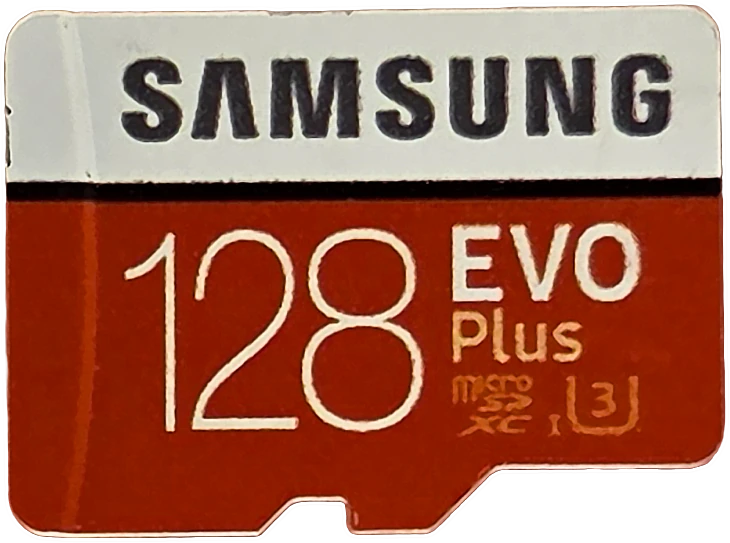
There is no box. This card came with no packaging and its face prints six things and nothing else: SAMSUNG, 128, EVO Plus, the microSDXC logo, the UHS-I mark and U3. The two speed figures below are not printed anywhere on it. They come from Samsung's published specification for the generation this unit's own register dates it to, and the next section explains how that was settled.
| Claim | Printed | Measured | Verdict |
|---|---|---|---|
| Capacity | 128 GB | 128.02 GB written and verified, 100.02% of the label | VERIFIED |
| Read speed | not printed, up to 100 MB/s for this generation | 96.1 MB/s (ProGrade PGM0.5, at the SDR104 bus ceiling) | MEASURED AT THE CEILING |
| Write speed | not printed, up to 90 MB/s for this generation | 88.1 MB/s on a clean pass, 86.3 MB/s held for five minutes | MET |
| Speed class | none printed | 83.6 MB/s worst ten seconds, C10 floor is 10 | HELD |
| UHS speed grade | U3 | 83.6 MB/s worst ten seconds, U3 floor is 30 | HELD |
| Video speed class | none printed | 83.6 MB/s worst ten seconds, enough for V60 | NOT CLAIMED |
| App performance class | none printed | 1279 read and 607 write IOPS, against A1 floors of 1500 and 500 | NOT CLAIMED |
| Endurance rating | none printed | n/a | NOT CLAIMED |
| Operating temperature | none printed | n/a | NOT CLAIMED |
| Warranty term | none printed | n/a | NOT A PERFORMANCE CLAIM |
The card will not say how fast it is, so I asked the chip
Samsung has sold EVO Plus 128GB in at least three versions behind this exact red face. The 2017 model is rated up to 100 MB/s read and 90 write. The 2020 model reads the same 100 but writes at only 60. The 2021 model reads 130 and prints an A2 mark. Nothing on the card in my hand picks between them, and picking wrong is not a small error: quote 60 and this card looks like it beats its spec by 45%, quote 130 and it looks like it falls short.
Every SD card carries a small read-only identification register called the CID, and one of its fields is the month it was manufactured. You can read your own with the SD card CID decoder. This one says June 2019, which is before the 2020 and 2021 models existed. That makes it the 2017 generation, up to 100 read and 90 write, and those are the numbers the claim table above is judged against.
Two other things agree without using the date at all. The 2021 model prints A2 on its face and this card does not. And the card's own SD Status register reports UHS Speed Grade 3 with no video speed class, while its configuration register reports a physical layer spec of 3.0x with none of the 4.x bits, which is silicon from before video speed classes existed. The printed marks, the chip and the date all tell the same story.
A spec sheet the card does not print
Why 96 MB/s is not this card's read speed
Three read passes came back at 96.19, 96.03 and 96.03 MB/s. A spread that tight is not a measurement of a card, it is a wall. Ordinary UHS-I tops out around 96 MB/s in practice, and most of the cards in this collection land on the same number regardless of what they cost. The same reader slot reaches 145 and 175 MB/s on cards that speak a faster non-standard extension, so the reader is not what is holding this back.
What that means for the claim table is simple. The 100 MB/s figure for this generation is neither met nor missed here, because the bench cannot get past 96 to find out. All I can honestly say is that this card reads at least 96 MB/s, and that in normal use it will feel exactly like every other UHS-I card when you copy footage off it.
What happens when you write to it for five minutes straight
This is the test that separates cards that are fast for a moment from cards that are fast for a job. Five minutes of continuous committed writing, fan off, sampled once a second. The number that matters is the worst ten seconds anywhere in the run, because that is the moment a camera would drop a frame.
It held 83.6 MB/s through its worst ten seconds and settled at 86.3. There is no cache cliff: the speed at the end of the run is within a tenth of the speed at the start. Three brief dips into the high 60s show up at 1:14, 2:27 and 4:16, which are garbage collection pauses rather than the card running out of fast storage. They are also what dragged one of the three sequential write passes down to 69.9 while the other two sat at 88, so the honest pair of numbers for this card is 88.1 on a clean pass and 86.3 held indefinitely.
Samsung EVO Plus 128GB
Is the 128 GB still all there?
On a used card this is the test I actually cared about. Flash wears out by losing blocks, and a card that has quietly retired part of itself will still report its full size while failing to give the data back. The only way to know is to write the whole thing with data that cannot be faked, then read every byte back and compare.
It wrote 128,022,478,848 bytes across 120 files and every one came back correct. Zero mismatched bytes, zero read errors, nothing remapped that I could detect. It also delivers slightly more than the label promises, which is normal for Samsung: every Samsung card I have measured hands back a fraction over its decimal rating.
The part that says most about its age is the speed across the card. Writing to the first, middle and last tenth reads 83.7, 82.2 and 83.8 MB/s, and reading them back reads 91.3, 91.3 and 91.4. A card with a worn region shows a slow tail. There is no tail here.
Every byte, written and read back
Run Samsung-EVO-Plus-128GB_2026-08-21_181428 · cardcheck v0.8.2 · ProGrade MSD PGM0.5
How hot does it get, and does it slow down?
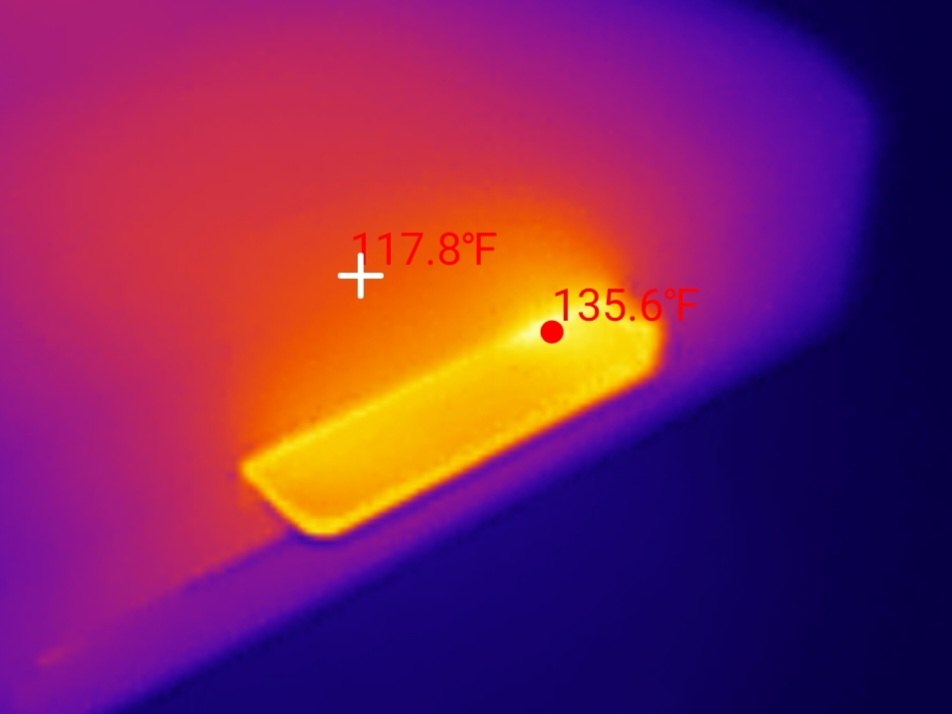
Five minutes of flat-out writing with no airflow took the card to 135 degrees Fahrenheit against a 76 degree room, a rise of 59 degrees. That is warm to the touch and entirely normal. What matters is whether the card responds to heat by slowing down, and this one does not: the last second of the run is within a tenth of a megabyte per second of the first, and the whole-card fill then held the same speed for another 26 minutes.
Read the thermal frame carefully, because it carries two numbers. The marker on the card body is the hot spot at 135.6 degrees. The crosshair sits a few millimetres away on a cooler part of the assembly and reads 117.8. An 18 degree gradient across that short a distance is what it looks like when the flash itself is the heat source and the metal around it is just carrying the heat away.
It got warm. It did not slow down.
A 4K30 dash cam writes about 6 MB/s, roughly a fourteenth of this workload · Run Samsung-EVO-Plus-128GB_2026-08-21_181428
How it scores, and why a seven-year-old card gets a 5
Samsung EVO Plus 128GB
Scored against the CKBench rubric. Five dimensions, each out of 5.
Final score: 5 out of 5. Worth saying plainly, because a perfect score on an old card that is only mid-pack for raw speed looks generous: the rubric measures whether a card does what it says and keeps doing it, not how fast it is against cards in other classes. This one is at the ceiling on all five, and the standings carry the speed comparison separately.
Frequently Asked Questions
Is a seven-year-old microSD card still safe to use?
This one is. All 128 GB wrote and read back with zero bad bytes and no slow region anywhere on the card, which are the two things a worn card fails. That is one unit and not a guarantee about yours, but it does show that age alone does not ruin a card. Wear comes from how much has been written, not how many years have passed.
How do I tell which version of the Samsung EVO Plus I own?
Look for an A2 mark on the face. The 2021 model prints one and the older models do not. If there is no A2 and no V30, you have a pre-2020 card rated up to 100 MB/s read. The only way to be certain is to read the card's CID register, which carries the month it was manufactured.
Why does this card read at 96 MB/s when it is rated for 100?
Because 96 MB/s is roughly where standard UHS-I runs out, not where the card does. Three passes landed within 0.2% of each other, which is what hitting a wall looks like. The card reads at least 96 MB/s and the bench cannot measure any higher on this connection.
Is the Samsung EVO Plus 128GB good for a dash cam?
Yes. It held 83.6 MB/s through the worst ten seconds of a continuous five minute write, and 4K30 dash cam recording needs about 6 MB/s. It clears that workload roughly fourteen times over, and it did not slow down as it heated up.
Can I use it as storage for phone apps?
No, this is the one job it is poor at. It manages 1279 random read operations per second against the 1500 an A1-rated card promises, and app storage is almost entirely small scattered reads. The card never claims A1, so this is not a broken promise, but it is a real limit.
Does the current Samsung EVO Plus perform the same?
Not necessarily, and that is why this review is careful about which version it tested. The card sold as EVO Plus 128GB today is the 2021 model rated up to 130 MB/s read, a different product from the June 2019 unit measured here. Nothing on this page should be read as a measurement of the current card.
The bottom line on the Samsung EVO Plus 128GB
The interesting result here is not a speed. It is that a card with an unknown number of years and an unknown amount of writing behind it came back indistinguishable from a healthy one: full capacity, every byte readable, flat speed end to end, no thermal throttling, and no fade under repeated scattered writes. If you have one of these in a drawer or an old dash cam, the honest advice is to check it rather than replace it, and this is roughly what a healthy result looks like.
Against the rest of the bench it lands in an interesting spot. At 83.6 MB/s through its worst ten seconds it is the first card in this collection to sit between my two reference points, the Kioxia Exceria G2 at 62.6 and the SanDisk High Endurance at 88.0, and it does it on the same standard UHS-I connection as both. It is not the fastest card here and it is not trying to be. It is the one that proves the boring virtues hold up.
Device identity: what this card reports about itselfthe register that dated this unit
| Raw CID register | 1b534d454434515430…013600 (serial digits elided) |
| Manufacturer ID (MID) | 0x1B, Samsung |
| OEM / application ID (OID) | SM |
| Product name (PNM) | ED4QT |
| Product revision (PRV) | 3.0 |
| Serial number (PSN) | 0x2D2F… |
| Manufacture date (MDT) | 06/2019 |
| Declared capacity (from CSD) | 250,085,376 sectors of 512 bytes = 128,043,712,512 bytes, 100.03% of the label |
| Captured on | Raspberry Pi 4 native SD host, no USB bridge in the path · 2026-08-07 |
The manufacture date is the only field here that is specific to this unit and useful: it is what identifies which generation of EVO Plus this is, and therefore which specification the claim table is judged against. The product name and revision are model-level and shared with every other card from the same production family. The serial is unique to this card and partly hidden above for that reason. The register was read twice, three days apart, and returned identical bytes both times.
Disclosure: This card is my own, bought years ago for ordinary use and not supplied by anyone. Samsung has sold three different cards under this name, so the link below is deliberately the same generation I tested, the MB-MC128GA, and not the newer and faster EVO Plus that shares its name. This post contains affiliate links. As an Amazon Associate I earn from qualifying purchases, at no extra cost to you. Affiliate links like these and my YouTube channel are what keep the site running.