
VIOFO A119M Pro review: a mini 4K dash cam, measured on a chart
VIOFO's smallest 4K camera, put through a printed resolution chart, my own footage software and an overnight battery bench. The 4K is real, HDR is what reads a plate at night, and the polarizing filter in the box earns its place. There is no rear camera, and no way to add one.

Plays via YouTube. Google may set cookies when the player loads. Privacy policy
The short version
The VIOFO A119M Pro is a genuine 4K camera, and I measured that on a test chart rather than taking the part number on trust. With HDR on it read every plate I stopped behind at night, the polarizing filter in the box takes the dashboard's reflection off the windshield, and parking mode does what VIOFO say, down to the 15 seconds before an event. The compromises: HDR ships off, the sharpening is the heaviest I have measured with HDR on and cannot be turned down, the camera's own menu stops recording until you back out of it, and a plate much past 20 feet on a dark road still turns white. It is front only, and nothing can be added later.
Real 4K in a small box; turn HDR onDisclosure: VIOFO sent me the A119M Pro to review, along with three things they sell separately: a 64 GB VIOFO High Endurance microSD card, their BTR200 Bluetooth remote and their HK6 hardwire kit. All four were free. VIOFO did not pay me and are not reimbursing me for anything. Before I recorded the video, VIOFO read its script to check facts, and I changed a line only where they showed me it was factually wrong; nothing else was theirs to change. They did not see this write-up before it went live. This post also contains affiliate links. As an Amazon Associate I earn from qualifying purchases, at no extra cost to you. Affiliate links like these and my YouTube channel are what keep the site running.
Coming from the video? The two things it points here for are the full chart results and the overnight parking battery curve. This page also keeps every number the video cut for time.
What is the VIOFO A119M Pro?
The VIOFO A119M Pro is a small, front-only 4K dash cam built around a genuine 4K Sony sensor, and it comes with a polarizing filter in the box, which almost nothing at this price does. I have had VIOFO's A229 Plus in my own car for over a year, one I bought myself, so I know the brand well.
It is also the second dash cam to go through the whole bench on this site: a printed 48 by 27 inch test chart, DashCheck (software I wrote that reads every clip a dash cam writes), and a battery bench that runs parking mode until a hardwire kit cuts the power. Every figure on this page comes from one unit, tested between September 15 and October 17, 2026, on firmware V1.2 build 20260817, the version it shipped with and the current one on VIOFO's site at the time. I never updated it.
What comes in the VIOFO A119M Pro box?
The box calls it a "4K Ultra HD Mini Dash Cam", and down one side, in much smaller print, it says "Multiple Exposure HDR". That little phrase turns out to be the most literally true thing on the box, and the HDR section below shows why.
The camera sits on top in its own foam bed. Underneath come the static-cling windshield stickers on a card, the quick-start guide and the full user manual. In the accessories: a car charger rated 5 V at 3.1 A (15.5 W, for 12 to 24 V sockets), which is plenty of headroom for a one-camera system, with its power cable; a short USB-A to USB-C cable for your computer; a trim removal tool; spare adhesive pads; and the polarizing filter, VIOFO's CPL-100.
The camera earns the "mini" in its name. It weighs 105 grams on its own and 125 with the mount on my scale, and my calipers read 46.3 by 74.5 to 74.8 mm against VIOFO's published 46 by 74.7 mm. The one figure that does not match is the depth: I measured 40.0 mm for the body against a published 47.2, which I take to include the mount. It tucks in behind the rear-view mirror, with a 1.5 inch screen on the back for setting it up. The GPS receiver lives in the mount, which connects to the camera through spring-loaded pins, so the camera pops off the glass while the mount stays put.
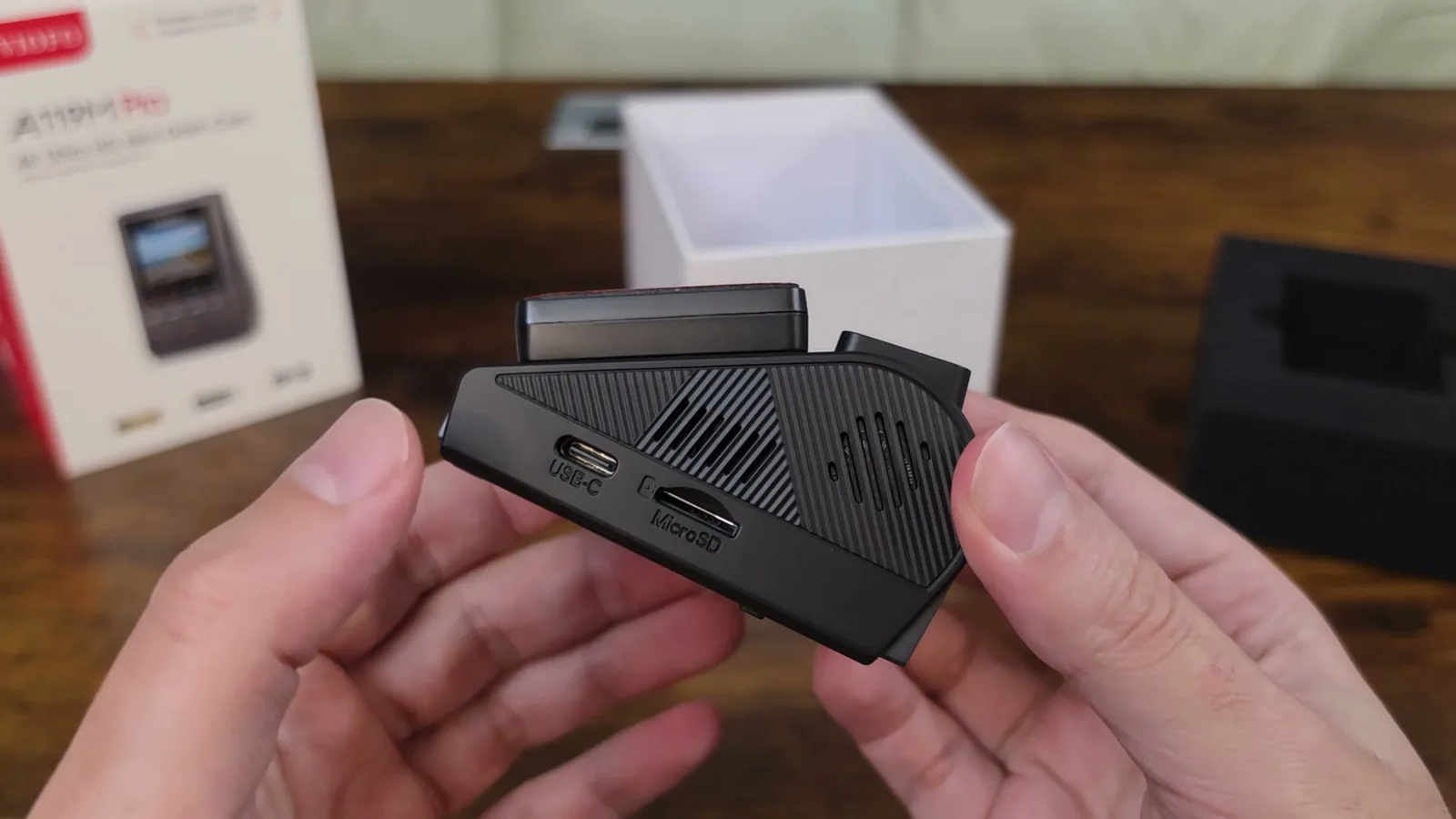
There is no battery inside. It uses a supercapacitor, which is what I want in a car that bakes in the Georgia sun all summer. VIOFO publish no rating for it; in the internal photos of the camera's FCC filing it is a single blue cylinder, about 8.5 by 29 mm by the filing's own ruler, lying across the body under the lens, with its printing too small to read.
Two things are not in the box. There is no microSD card, so budget for one. And there is no hardwire kit, so parking mode means buying one. VIOFO sent their HK6 kit along: one 4 meter (13 foot) cable with a USB-C plug for the camera and three wires for the fuse box (constant power, accessory and ground), a slide switch for four cutoffs from 11.8 to 12.4 volts (23.6 to 24.8 V on a 24 V truck), and two sets of fuse taps in four sizes (ATO, Mini, Micro2 and Mini Low Profile), which is a nice touch, since every car seems to use a different one.
The remote is the BTR200: a coin-cell puck about 33 mm square and 10.8 mm thick, 10.4 grams, on a replaceable CR2032. Its big button locks the current clip and takes a still photo; the two side buttons are yours to assign in the menu, and I set one to toggle HDR. That HDR button turned out to be the most useful thing in this whole package.
How do you install the VIOFO A119M Pro?
Installation is straightforward. Clean the windshield first. I like static-cling stickers, because the camera comes off clean and they leave no residue. I used the same one for more than a month and took the camera off and put it back at least six times, and as long as you keep it clean, it keeps working. Stick the mount to the sticker behind the mirror and click the camera on.
Route the power cable along the headliner, down the A-pillar and to your 12-volt socket. Check where your side curtain airbag is and route around it, never across it; every car is a little different here, and cable clips make the job much easier.
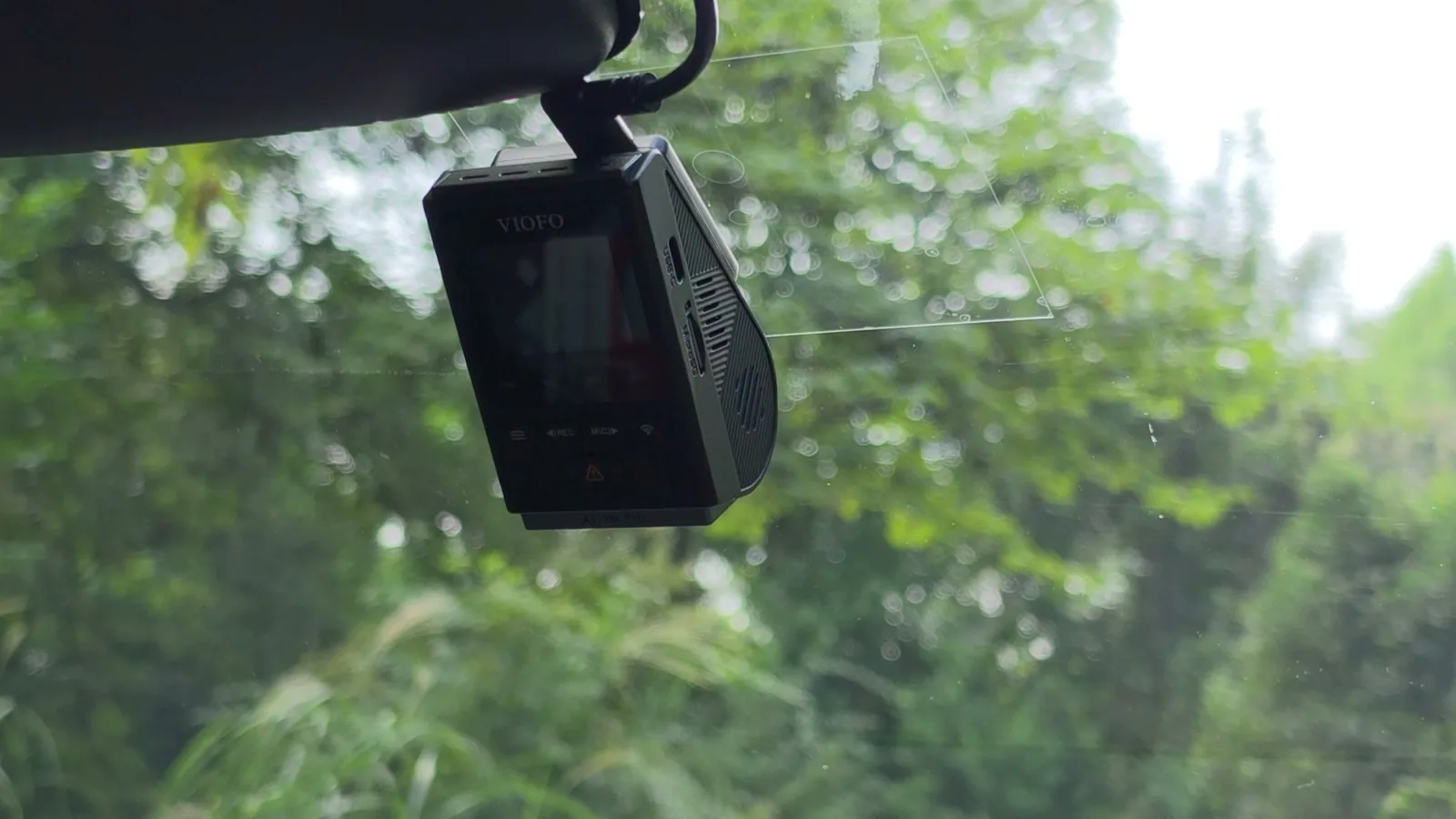
The filter clips over the lens and snaps in place. It fits only one way round, so you cannot put it on backwards, and whether it goes on one way up or the other makes no difference (I checked that on the bench, below). One tip: steady the camera with your other hand when you take the filter off. The first time I pulled mine off, the whole camera tipped down about seven degrees in its mount, and I did not notice until I watched the footage.
Then put in your card and format it in the camera. Mine formatted it exFAT with 64 KB clusters; it had also recorded happily to a card formatted on a computer before that.
How did I test the A119M Pro?
Three tools carry this review. The first is my test chart: 48 by 27 inches (about 122 by 69 centimeters) on an easel, with Siemens star targets that measure resolution directly, tilted black squares whose edges reveal sharpening, grey ladders, and five license plates that shrink across the bottom. Before any dash cam saw it, I photographed the print itself with a Canon R7 in raw and characterized it, so when a patch reads dark I know how much of that is the paper and how much is the camera.
The second is DashCheck. Point it at a folder of footage and it reads every clip: bitrate, dropped frames, gaps between clips, blown highlights, and how much real detail is in the picture. Draw a box on a frame, around a license plate for example, and it tells you exactly what happened inside that box. No AI, just arithmetic on the pixels the camera wrote to the card.
The third is my power bench. Parking mode means hardwiring into your fuse box, so most reviews skip it. Instead of using my car as a guinea pig, I built a stand-in: a 7 Ah sealed lead-acid battery, a battery monitor that logs every ten seconds, the hardwire kit, and a toggle switch on the accessory wire. Flip the switch and the camera thinks the engine just turned off. There is also a USB power meter between the charger and the camera, so every watt on this page is measured, not read off a label.
Is the VIOFO A119M Pro real 4K?
Yes, and VIOFO did not make this part easy to check. The manual has no specification table at all, and the product page names the processor only as "Novatek". So I went into the firmware, which VIOFO publish as a file anyone can download, and inside it the camera pretty much describes itself.
The processor is a Novatek NS02302, a 64-bit chip with two ARM Cortex-A53 cores that the firmware sets to 1.1 GHz (that is the setting, not a speed I measured), with 512 MB of memory. And the sensor driver is sitting right there in the file: a Sony IMX678 Starvis 2, with its own tuning file for HDR.
Starvis 2 is on almost every dash cam listing now, but it is a family of sensors, not a resolution. There are Starvis 2 parts made for 1080p, for 2K and for 4K, so the badge alone does not tell you what you are getting. The part number does. The IMX678 is an 8.29 megapixel sensor with a native 3840 by 2160 grid, so this one can genuinely fill a 4K frame. Two dash cams with the same sensor can still look very different, because the processor decides what ends up on the card; I wrote a whole post on why the same IMX678 looks different from one dash cam to the next. The chart section below checks this one's.
For the curious, the rest of the hardware. The firmware file and the internal photos in the camera's FCC filing agree: the memory is one Samsung DDR4 chip (K4A4G165WF), of which Linux gets 120 MB and the video pipeline 384 MB for capture, image processing and encoding; the camera's own software lives on 128 MB of Winbond serial flash (your footage goes to the microSD card); and WiFi and Bluetooth come from an AMPAK AP6611S module with a Synaptics chip inside, a genuine WiFi 6 part, so the "WiFi 6" on the box is real silicon. The firmware also carries an H.265 encoder, but the camera records H.264. The main board is dated May 2025, and the mount's GPS board is carried over from the earlier A119 Mini.
Here is something I did not expect. A competitor told me, unprompted, which processor this camera uses, the same day I read it out of the firmware myself, and described it as "especially good for night vision", better than others at reading plates at night. That is a competitor's opinion, and a testable one; the night section tests it.
Modes, bitrates and the field of view
It records 4K, a wider 21 by 9 version of 4K (3840 by 1600), 2K and 1080p, all at 30 frames per second; there is no 60. The 21 by 9 mode is a letterbox: the same field of view and the same pixel scale on my chart, with the top and bottom cut off. Files are H.264 in MP4 with mono audio.
There are three bitrate settings, and I measured all of them: High is 61.4 megabits per second, Medium 51.3 and Low 32.8, each with a keyframe every half second, and each holds its rate rock steady while driving. It ships on Medium, and 51 megabits for a single camera is a lot of data. The one exception I found was parked: in a sunlit, tree-lined lot with the engine running, Medium averaged 54.5 megabits over a clip, with single seconds up to 99.9, then dropped straight back to 51.2 the moment the car rolled.
The lens is F1.8, and this is where VIOFO's numbers stop agreeing. Their product page says 140 degrees, the Amazon listing says 130, and one forum measurement says 112. So I measured it: I put the camera on a tripod and turned it five degrees at a time until my chart ran off the edge of the frame. It sees 104 to 106 degrees from side to side and about 57 from top to bottom. The 140 is most likely measured corner to corner, but working the corners out from the same lens shape I get somewhere around 121 to 126 degrees, so the 140 looks generous to me. That corner figure is extrapolated, not measured.
The operating temperature has the same problem: -20 to 65 C on VIOFO's product page, 5 to 149 F (about -15 to 65 C) on Amazon, and -20 to 60 C in at least one review. The heat section below puts a number on the case.
What should you change on the A119M Pro on day one?
From the moment it gets power it is recording in about five seconds, timed off the power meter's clock rather than a stopwatch.
A few settings I would change right away. Mine arrived set to GMT+2 with kilometers per hour, a 50 Hz light-flicker setting and the clock 19 days behind, so as far as it knew I was driving around Europe last month. HDR ships off, and by the end of this page I think you will want it on. The GPS stamp ships at All Info, which prints your coordinates on every frame: great evidence, but every clip you share shows exactly where you were, your driveway included. And the red VIOFO logo stamp in the top-left corner is on by default too.
The menu stops recording, and it does not time out
Open the menu on the camera itself and recording pauses; back out and it picks up again. What it does not do is time out on its own. I left it sitting on the settings screen for ten minutes, and the card has a 10 minute 28 second hole with no file at all. So always back out of the menu before you drive.
GPS
GPS is quick. It found a fix sitting on my desk indoors, six seconds into the first clip it ever recorded, and in the car it fixed inside the first second after a short stop. After about four hours parked under trees it took 105 seconds. Besides printing your position on the picture, it writes a GPS log inside the video file itself, one point a second, in a plain format other dash cam players can read, not only VIOFO's app. The first fix also sets the clock: my hand-set clock had drifted 11 seconds ahead in two days, and the first fix stepped it back mid-clip.
The app and the WiFi
The app is quick, and there is no login. It connected in about 20 seconds, and the live view runs about half a second behind real time (0.4 to 0.5 seconds, measured against a timer on a monitor). Downloads ran at about 40 megabytes a second (38 MiB/s), faster than the 30 VIOFO quote, so a full three-minute 4K clip, about 1.2 GB, came across in about half a minute. While you browse files in the app the camera stops recording, and its screen just says microSD card reader mode.
The clip I downloaded through the app was identical to the one on the card, byte for byte by SHA-256, with all 180 of its GPS points intact. So a clip you send from your phone is as good as the original.
A few things to know about the WiFi. It turns itself off about ten minutes after power-up (10 minutes 8 seconds, give or take two seconds, on three drives), and once it did that in the middle of a download. VIOFO told me the ten minutes is fixed. Every time the WiFi switches on or off, even on its own, the recording pauses: 5.6 to 7.3 seconds when I switched it by hand, 4.5 to 4.8 seconds at the automatic switch-off. VIOFO's engineers explained why: bringing the WiFi 6 radio up or down takes processing the camera also needs for 4K, so rather than risk a damaged file it closes the clip cleanly, switches, and starts a new one. And if you switch the WiFi on yourself and never switch it off again, it comes back on every time you start the car, even after it has timed out, and you get a clip of about three seconds and then six seconds of nothing before it settles. That is the extra clip people complain about in the reviews. VIOFO say all of this is by design, so when you are done with the app, switch the WiFi off yourself. It also costs power: 0.86 watts with nothing connected.
Voice control
Voice control was on from the start, and the complaint you will see in reviews is that the car stereo sets it off. On one 52 and a half minute drive I checked the camera's own audio against everything it did: a talk podcast on the stereo, my own talking, a spoken phone command and a speakerphone call, and it did not trigger once. It never did in the rest of my driving either. That is a good sign rather than a promise.
The remote, the HDR button and locking clips
The remote is where this camera gets fun. With one side button set to HDR, you flip it mid-drive without touching a menu, and the camera prints HDR on its timestamp, so you always know which one you are looking at. Each press does start a new clip, though: one file closes and the next opens 2.6 to 4.8 seconds later, so about four seconds of footage go missing each time. Do not click it in the middle of anything interesting. There is also an HDR timer in the menu that switches HDR at a set time of day, with a two to three second break when it switches.
The lock button moves the whole current clip, from its own start, into a protected folder the loop will not touch, and saves a still photo. Eleven of my twelve locks stuck. The one that did not had an HDR press five seconds after it, so I tried to repeat that, pressing HDR two to four seconds after the lock, and all three held, so I do not know what happened to that one. Two things to know. If you press HDR before the camera says "Video protected", it announces the HDR change instead and you will not hear the confirmation, but the clip is still locked. And when I locked six seconds into a new clip, it locked the one before it too, which is exactly what you would want (one observation). One thing I did not get to test is whether a hard stop while driving locks a clip on its own: a bridge joint at 75 miles an hour locked nothing at the G-sensor's shipped Low setting, which says it does not cry wolf, not that a real bump would lock.
How long does a card last, and how hot does it get?
At the Medium bitrate it ships on, it writes 23.3 gigabytes an hour, so a 128 GB card holds about five and a half hours of driving before it starts looping, in three-minute clips of about 1.2 GB each. High uses about 20 percent more card and Low about a third less, and since the chart section shows all three resolve the same detail, I would pick the bitrate by the size of your card.
For the long test I used a SanDisk High Endurance 128 GB that I bought myself, formatted in the camera on September 17. It filled up on September 28, and by my last read on October 10 it had written another 162.6 GB on top of that, about 1.27 cards' worth, wrapping a second time on October 9. DashCheck read the whole card four times along the way. Every file decodes clean, and every driving clip is 4K at exactly 30.00 frames per second (the only 2K files on the card are parking files, which are 2K by design). When it needs space, it overwrites the oldest clips first and steps right around the locked ones and the photos; by the end, nine locked clips held 4.3 GB, 3.3 percent of the card.
In 115 clip changes after it started looping, it lost footage exactly once: 13 seconds at a red light on September 28, after which the camera announced "Recording started" and carried on. I do not know why, so I am reporting it rather than explaining it.
VIOFO's 64 GB card is a good one too, and its full review is on the site, but at this bitrate it loops in just under three hours (2 hours 42 minutes at Medium), so it was not my pick for the long test.
Power
On the USB power meter at the camera end, recording 4K with the WiFi off, it draws 3.40 watts (0.657 amps at about 5.2 volts), averaged by the meter's own counter. Turning the WiFi on adds 0.86 watts even with nothing connected, the High bitrate adds 0.67, and HDR on actually measured 0.21 watts lower in my one run. In the car, steady-state 12 to 19 minutes into a drive, it drew 2.93 watts. The supplied charger holds the camera end above 5.1 volts even at its current peaks.
Heat
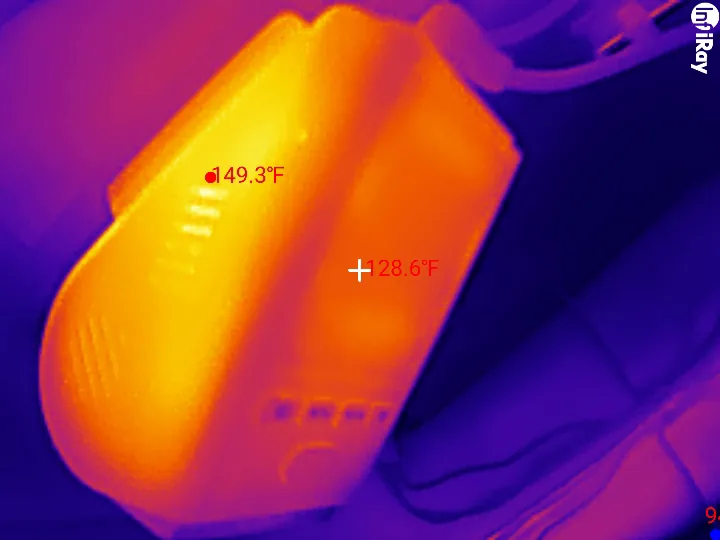
Heat matters a lot in Georgia, and I caught the last properly hot afternoon of the year. The car sat in the sun for about three and a half hours, with the temperature logger on my windshield reading 123 F or more the whole time and up to 146.1 F (63.4 C), and when I started the car the camera was recording within about ten seconds. After the drive home I parked in the sun with the engine and AC running and put my thermal camera on it. The hottest spot on the case, at the vents on the side, read 149.3 F (65.2 C), with the back and body at 125 to 141 F and about 85 F outside. VIOFO rate it up to 149 F, or 65 C, but that rating is for the air around the camera, not the case. And it recorded that whole drive without missing a second.
How sharp is the A119M Pro on a resolution chart?
Start with the star. It is 72 pairs of black and white spokes meeting at the center, so the closer in you look, the finer the detail. DashCheck finds the radius where the camera can no longer separate the spokes, and since the star is a fixed physical size, that gives a resolution figure that does not change with distance.
From eight feet away (my far mark), this camera holds half its contrast at 76.8 percent of the finest detail its pixel grid can hold with HDR on, and 72.4 percent with it off. Four repeat takes with HDR on ranged from 75.6 to 77.0. At my near mark, 44 inches, it read within 4.5 percent of the far mark, which also says the fixed focus reaches that close. For a dash cam lens, that is an excellent result.
The sharpening is heavy
The tilted squares measure sharpening. A lens can only lose contrast, so a reading above one is the processor adding it. This camera reads 1.49 with HDR off and 1.89 with HDR on, measured over 64 edges and four frames in each state, and that HDR-on figure is the heaviest sharpening I have measured on any dash cam. At least it is even: horizontal and vertical edges are treated the same, within 2.3 percent. There is no setting to turn it down.
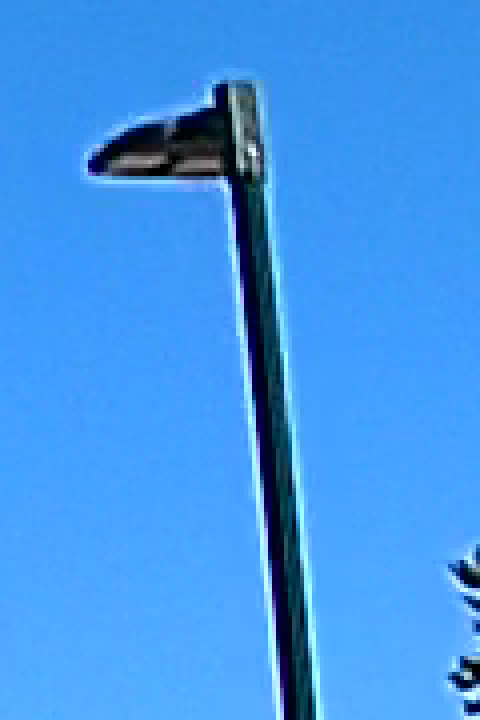
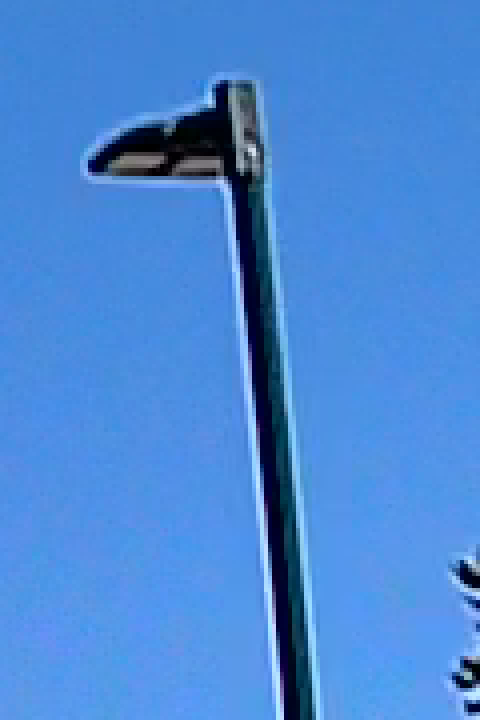
On the road you see it as a bright outline around power lines, signs and poles against the sky. Parked at an intersection full of wires, I switched HDR four times and DashCheck profiled every wire against open sky: 15,738 profiles, and a bright rim on both sides of 99.3 percent of them with HDR off and 98.0 percent with it on, the weaker side a median 43 and 35 grey levels above the open sky. Out on the road, unlike on the chart, the rim is brighter with HDR off. The light pole below shows the same thing up close: a lens can only spread the pole's darkness into the sky beside it, never make that sky brighter, so a bright line along both edges is the processing.
No smaller sensor hiding behind the 4K label
That sharpening flatters the star too, so treat the 77 percent as a ceiling. But sharpening cannot invent detail that was never captured, and on this chart faint but real detail (the point where the spokes keep a tenth of their contrast) survives right out to 99 percent of the pixel grid's limit with HDR off, and 97 percent with it on. A picture upscaled from 2K cannot carry anything past 67 percent, because 2560 is two thirds of 3840. So there is no smaller sensor hiding behind the 4K label. It is the real thing.
The 2K mode backs that up. It is a proper downscale of the whole picture, not a crop, so you keep the full view: the star measures 70.6 pixels across in 2K against 106.3 in 4K, a ratio of 0.664 against the 0.667 a pure downscale gives. And on the same chart, 4K resolved 1.43 times finer detail than 2K. The 4K file carries detail the 2K file physically cannot hold, so leave it in 4K.
As for the bitrate, Low, Medium and High all read the same star: 0.3805, 0.378 to 0.385, and 0.3765 cycles per pixel, within the 2 percent that repeat takes at one setting vary by. The encoder is not the bottleneck at any setting, which is a nice problem to have.
How small a plate can it read on the chart?
Now the part most of you care about. The five license plates across the bottom of the chart shrink from almost five inches wide to under one, and each is full of characters that are easy to confuse: 8 and B, 5 and S, 0, O and Q. From eight feet away, they are the size a real 12 inch plate looks from 20, 30, 40, 60 and 100 feet. The A119M Pro reads every character on the first two, so a plate at 30 feet, with HDR off or on. At 40 feet it reads most of it, but the Q turns into an O, and at 60 feet it is dark smudges. From my near mark, 44 inches, the 60-foot plate becomes a 27-foot plate and reads cleanly, 8 and B, 6 and G included, so the limit at eight feet is pixels on target, not focus. Real plates use bigger characters for their size than my chart does, so treat these distances as the conservative end. I read these by eye, knowing the strings. At night, a reflective plate is a different story, and the night section covers it.
Red light costs a third of the detail
Then I lit the chart with a red LED, and the star fell from 77 percent to 49. On a color sensor the color filters come in blocks of four, one red, one blue and two green, because green carries most of the detail the eye sees. So only one pixel in four sees red (about 2.07 million of the IMX678's 8.29 million), and anything lit mostly by red light costs this camera about a third of its resolving power. Every dash cam pays some version of that.
So I went looking for it in traffic. Stopped behind cars at dusk with their brake lights on, at 11.7 to 15 feet with HDR on, I read every plate in full. And in the frame where one car's brakes let go, its plate did not change at all (contrast 0.979 against 0.980, red-to-green balance 0.892 against 0.893), while the whole picture got 14 to 17 percent darker. Brake lights light up the scene around the plate. The plate itself is lit by your headlights and its own little plate lights, so the red-light penalty barely reaches it.
Should you turn HDR on the VIOFO A119M Pro?
Yes. Back to that phrase on the box, "Multiple Exposure HDR". To check it, I swung a dark card across the chart. With HDR off its edge is a smooth motion blur. With HDR on it is a hard, jagged edge with a see-through copy of the card and my hand trailing behind it. That second copy is two exposures disagreeing about where the card was, so the box is telling the literal truth, and that is the trade-off: fast-moving things can double up.
On the road, I looked for that second copy. In clear midday sun, passing under two overpasses and a sign gantry at 55 to 66 miles an hour, I found none: in that light the exposures are so short that a copy has nowhere to go. At night, at 71 to 77 miles an hour, an overhead sign's lettering did show two offset copies of each stroke, by eye. So it is there, and it takes darkness and speed to see it.
On the chart: free, until the chart is the brightest thing in the room
On a normally lit chart, HDR costs nothing: under a spotlight at 45 degrees, the star read 0.3966 cycles per pixel with HDR on against 0.3755 off, and blown highlights went from 0.041 to 0.003 percent. Then I put a spotlight right beside the lens, so the chart was the brightest thing in a dark room. With HDR on the star lost about a third of its detail, from 75 percent of the grid's limit to 50 to 54. But below the chart hung three real license plates, and they went the other way. With HDR off, 42 to 60 percent of each plate blew out to white. With HDR on, under 2 percent did (0.66, 1.2 and 1.5 percent), and every plate read like a plate. On a dash cam the plate is the target, so that is a trade I will take every time.
On the road
On the road I used the remote to flip HDR every one to three minutes. On an overcast day the typical frame had 6.6 percent blown out with HDR off, mostly sky, and 0.04 percent with it on (15 clips off, 12 on). At a red light at night, eight seconds apart with the camera untouched, the lit signs and traffic lights blew 2.2 to 12.8 percent of their area with HDR off and 0.00 to 0.04 percent with it on. Driving into a low sun, HDR shrank the sun's blown-out disc to about a fourteenth of the area (a radius of 69 pixels against 263 at a matched pair), and the frame's blown share from 1.28 to 3.19 percent down to 0.20 to 0.28.
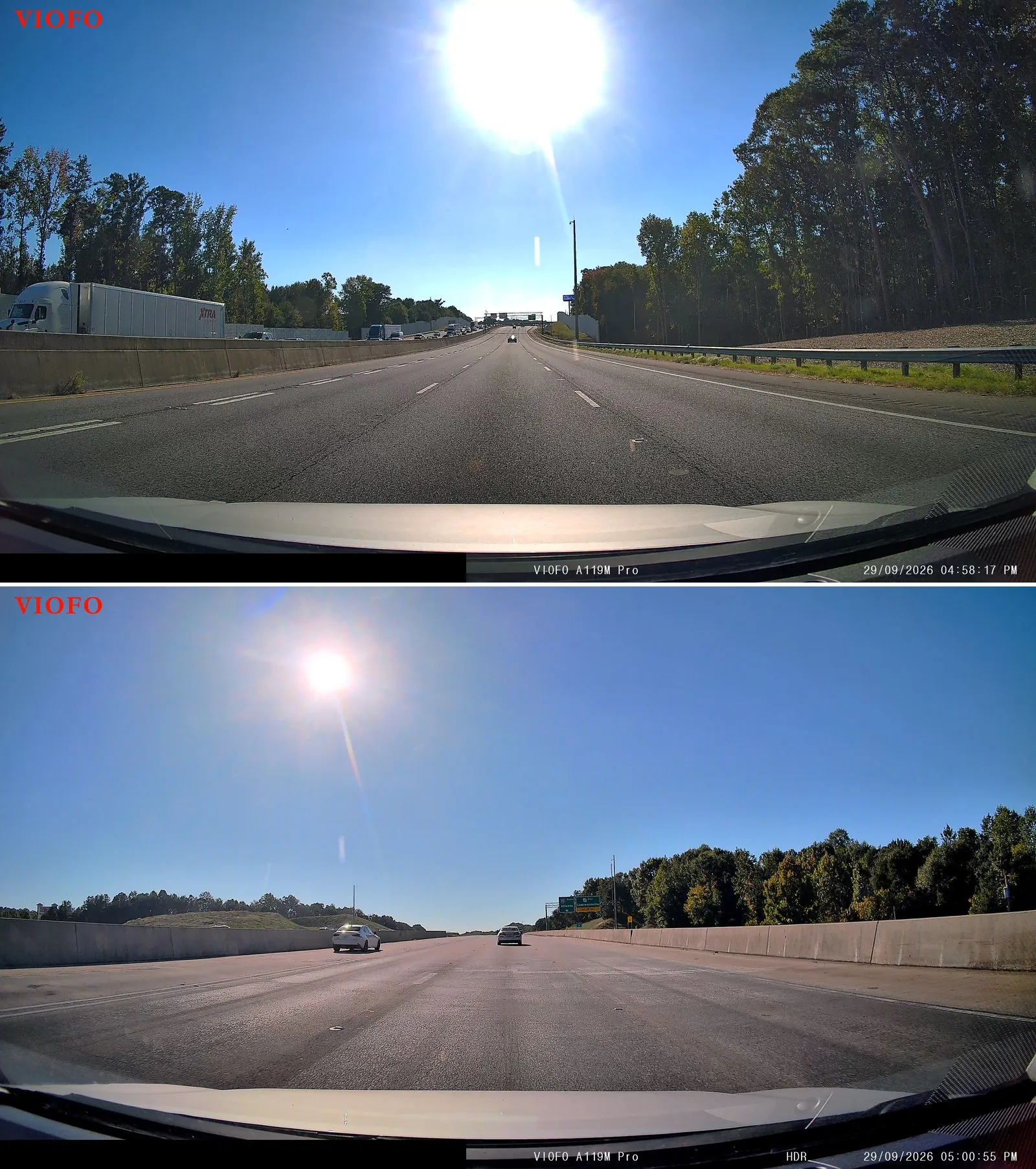
The cost is in the shadows. With HDR on, 3.1 to 4.2 percent of the frame went to pure black into that low sun, against 0.26 to 0.38 percent with it off, and at night it was about 7 percent of the frame against 1.4. It also sharpens harder on the chart. It does not change the frame rate or the bitrate, it adds no noise that I could measure at night, and it does not cost any extra power.
So I would turn it on, and the night section shows exactly why.
How does the A119M Pro look in daylight?
Daylight is where this camera is easy to like. My first drive was straight out of the box: HDR off, no filter, midday sun. The typical frame had about 2 percent blown out (2.26 percent, the median of the clips), but the worst one hit 16.2 percent, which is a lot of white sky. Stopped behind a car at a light, its plate came out crisp, with every character right down to the county name and the little registration sticker: 175 by 73 pixels, nothing clipped.
That big bitrate pays off here too. Even in busy scenes, DashCheck never flagged any blockiness (a median of 1.12 and a worst clip of 1.18, both inside the normal band), so the encoder never broke a sweat. Coming out of a covered bridge into sun with HDR off, it adjusted by about six and a half stops and was 90 percent of the way there 2.3 seconds after the exit, with up to 8.3 percent of the frame clipped while it caught up.
Does the included CPL filter actually help?
It does, and what it does depends on where the sun is. With the sun beside you or behind you, it darkens a blue sky by almost half a stop (about 0.4) and makes the trees 10 to 20 percent more colorful. With the sun ahead, it leaves the sky alone and does something more useful: it takes the reflection of your dashboard off the windshield. I drove the same loop without the filter, with it, and without it again, with a second camera along to confirm the light, and the run with the filter had less dashboard haze in every one of the 15 stretches facing the sun. The runs without it agreed with each other to within 0.02 on that measure, so the difference is the filter, not the day.
The best example was a red light with a low sun right in the frame. Without the filter, the dashboard's reflection was lying right over the car in front of me, and the plate's characters had less than half the contrast (0.102 against 0.247 with it). That is the worst time for a reflection.
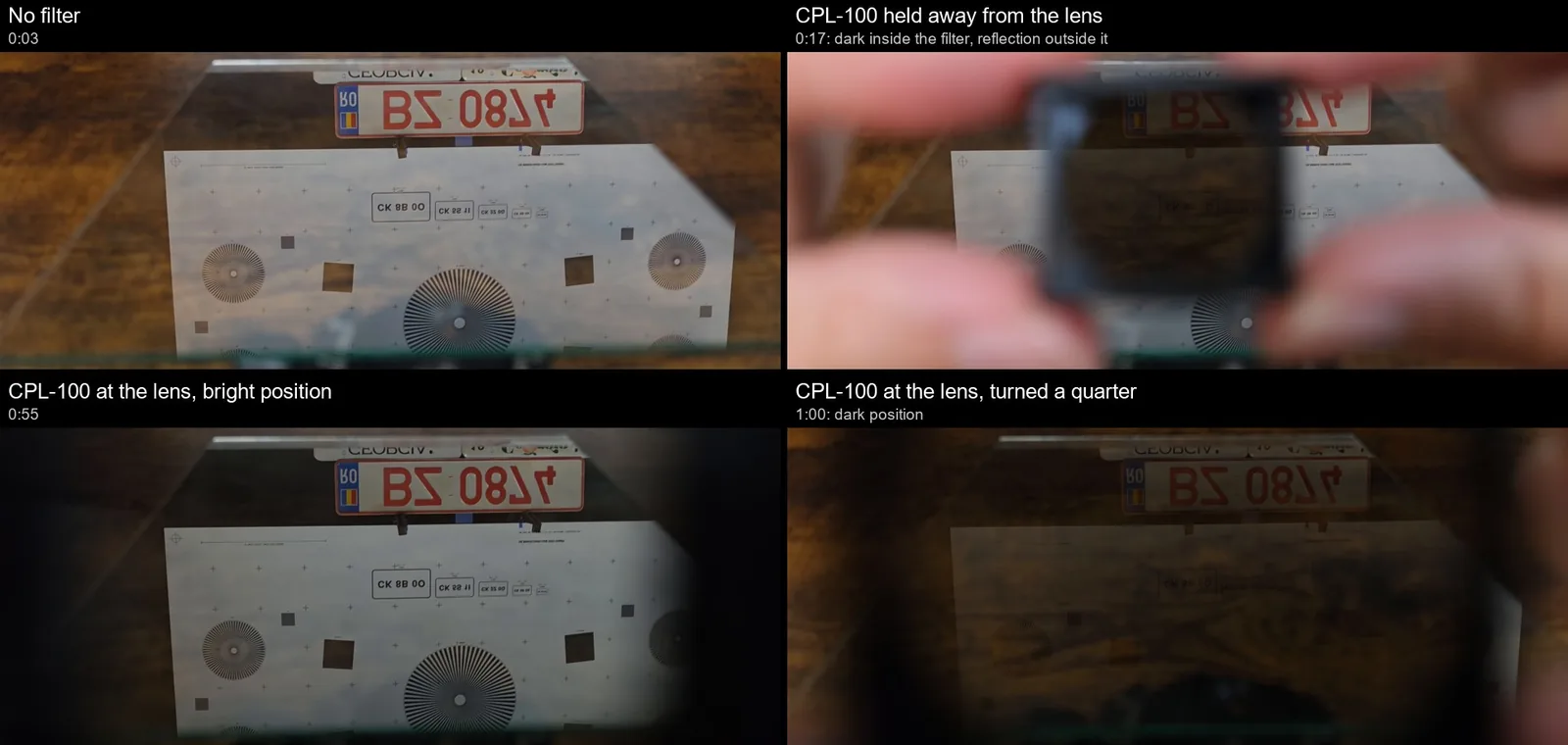
On my desk, filming a reflection of the chart in a sheet of glass at about a windshield's angle, the filter took out about 97.5 percent of it in its dark position. A plate higher on the same glass kept about 11 percent, and that is the viewing angle rather than the filter: by the physics of reflection, how much a polarizer can remove depends on the angle, and a raked windshield puts your dashboard's reflection close to the angle where nearly all of it can go. Turning the filter top-for-bottom made no difference, and flipping it back-to-front showed it is a true circular polarizer, which is what "CPL" promises. It clips on only one way round, so that one way to waste a CPL is designed out.
In daylight I could not find any cost: the resolution measure and the noise in flat areas did not change, because the camera simply opens up a little more to make up the light. What a polarizer cannot fix is a license plate in your headlights. Plates are retroreflective, and that coating scrambles the polarization of the light it throws back, so there is nothing for the filter to cut. I kept it on for my night driving, and I did take it off for part of the plate test in the next section. At 21 feet, the plate was a white slab with the filter on and with it off, so the filter is not what turns plates white at night. One thing I did not test is whether the filter costs a readable close plate anything, and with HDR off the picture was 10 to 17 percent less noisy without it.
Can the VIOFO A119M Pro read license plates at night?
With HDR on, a car stopped in front of you: yes, every time I tried. Much past 20 feet on a dark road: do not count on it. The test that decides whether a dash cam is evidence or just scenery is a license plate at night. A plate is basically a mirror for your headlights, so when the camera opens up for a dark road, the plate throws your own light straight back at it.
On a pre-dawn drive I flipped HDR with the remote. A Jeep in the next lane caught both sides of one press. With HDR off its plate and tailgate turned into one white slab, with only fragments of the characters left. With HDR on, all seven characters were there, even though the Jeep had pulled a little farther away (its plate went from about 80 pixels wide to 60).
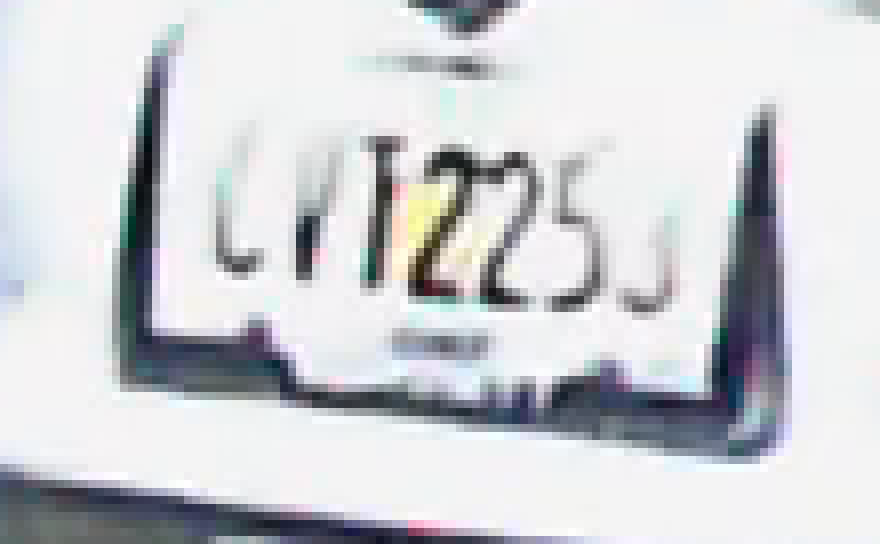
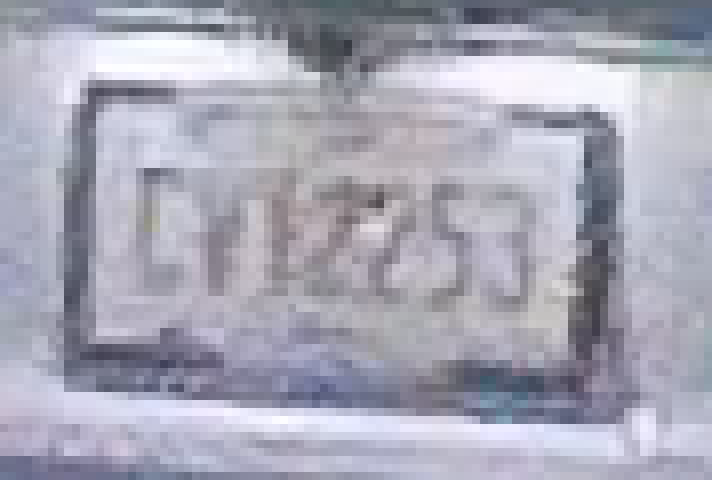
So for the rest of my night driving I left HDR on. Stopped behind four different cars 11.5 to 18 feet back under streetlights, every plate was fully readable, right down to the county strip and the month sticker. Even a pickup with its plate low on the bumper, closer to my headlights, had only about 1 percent clipped (21 percent near-white, still readable). On another pre-dawn drive, four more plates behind stopped cars at about 13 feet read in full.
But on a dark highway at 54 miles an hour, following a pickup at about 33 feet, its plate was a white slab in all 60 frames I checked, with HDR and the filter both on. Most of it was not technically pure white (only 0.7 percent of it reached 250 out of 255), but it sat so close to white, a median of 246, that the characters were gone. That is why DashCheck counts near-white pixels and not just clipped ones.
The plate ladder: distance or the dark road?
So was that the distance, or the dark road? To find out, I took two of my own plates to a dark parking lot, lit only by my low beams, and set them on stands at about 13, 21 and 28 feet, flipping HDR off and on for each setup.
With HDR off, not a single plate was readable, not even the one at 13 feet: every one was a flat white rectangle at 239 to 244 out of 255. With HDR on, the plate at 13 feet read perfectly, every character, while the plates at 21 and 28 feet, in the very same frame, were still white slabs at 247 to 249. Same frame, same exposure, so it is the distance. From farther away, your headlights and the camera look like they are in the same spot to the plate, so it throws more of your own light straight back into the lens. And a far plate on its own read just as white as it did beside the lit near one.
I do have to be upfront: a dark lot with nothing else around is about the worst case there is. Out on the highway it has been hit and miss. One sedan's plate read fine at about 30 feet at 77 miles an hour, turned a 6 into a 5 at about 42 feet, and went near-white at 50 to 60; that pickup at 33 feet did not read at all. So with nothing but your headlights on the plate, count on reading the car stopped right in front of you with HDR on, not the one 20 feet ahead.
So, is it especially good at reading plates at night, like that competitor said? With HDR on and a car stopped in front of me, it read every plate I gave it. Past about 20 feet in the dark, I would not count on it. In fairness, that is still one of the best sensor and processor pairings I have tested.
Can you add a rear camera to the A119M Pro?
No. For me, the biggest thing missing is a rear camera. VIOFO are upfront about it: they sell this as a front-only camera, and there is no rear camera you can add later. The only ports are the USB-C on the mount for power and the one on the camera for your phone or computer.
So if someone rear-ends you, you will have beautiful 4K footage of whatever was in front of you.
The obvious answer is to buy a second one and stick it on the back window, and I am only half joking, because a second one would bring that HDR and that sensor with it. But I measured my rear glass with a light meter: my tint lets through 27 percent of the light against 74 percent for my windshield, so a camera back there gets about a third of the light, about a stop and a half less.
I have not put this camera back there. I did try another 4K dash cam with the same Sony sensor and HDR on, looking through that same tinted glass, and at night it simply opened up: the picture came out as bright as on my windshield, with no extra noise and no detail lost that I could measure. What hurt it was the glass itself. What looks like a defroster line right in front of the lens smeared a band across the middle of the picture, and every spot on the window turned into a halo around the streetlights. So if you try it, put the lens between the defroster lines as best you can and clean that patch of glass first. That was a different camera with its own processing, so I cannot promise this one does exactly the same.
If you need a real rear camera, VIOFO make two-channel cameras, and the A229 Plus I have run for over a year is one of them.
How does parking mode work, and how long will it run?
Parking mode needs a hardwire kit, so this is where the power bench earns its keep. But first, one thing to know before you switch parking mode on.
Without the kit, it parks itself after five still minutes
Running off the lighter socket instead of a kit, there is no wire telling the camera you have parked, so it watches the picture instead. If nothing moves in front of it for five minutes, say while you sit in the driveway warming up the car, it switches to whichever parking mode you have set (mine was 2K at one frame a second), without announcing it. Mine did exactly that in my driveway, 4 minutes 57 seconds into a stop with the engine running, and came back 14 seconds later when someone walked past the hood. Something moving, a clear change in the light, or driving off faster than about 5 miles an hour (8 km/h) brings it back to full recording, and it loses about three seconds each way. VIOFO told me this is by design, and that the five minutes cannot be changed or switched off on its own; the only off switch is parking mode itself. That may be where some of the "drops to 2K" complaints in the reviews come from. So if you do not have the kit, leave parking mode off, which is how it ships. With the kit, the switch into parking is announced: "Parking recording started".
Three kinds of parking mode, all in 2K
There are three kinds: event detection, time lapse (1, 2, 3, 5 or 10 frames a second, plus a 1 fps night vision version), and a low-bitrate mode that just keeps recording. Every one of them records 2560 by 1440, even with the camera set to 4K, into its own parking folder, in files that split every 5,400 frames (90 minutes at 1 fps, 9 at 10 fps, 3 in low bitrate). Parking duration ships at 48 hours, with 12 and 24 as the alternatives.
Event detection works exactly as advertised. It keeps 15 seconds before the event and 30 after, to the frame, on all five events I triggered, in 45-second clips with sound. A bump gets locked into a protected folder, with three beeps and a voice saying "Video protected". Motion, like someone walking past, gets saved quietly and is not locked, so you hear nothing when it records someone at your car.
None of the modes is really a low-power mode, though. In ten-minute windows on the meter they all drew 2.53 to 3.16 watts at the camera, 74 to 93 percent of what it uses while driving, and two windows of the same mode were 18 percent apart, more than any mode differed from the rest. Ten frames a second drew no more than one. So pick the mode for what it records and how much card it eats, not for the battery: one frame a second takes 0.58 GB per parked hour (about nine days on a 128 GB card), low bitrate 1.89 GB (2.8 days), and ten frames a second 5.59 GB (about 23 hours).
The overnight run on the HK6
For the long test I set the HK6 to its lowest cutoff, 11.8 volts, put the camera in one-frame-a-second time lapse with HDR off, flipped the accessory toggle, and let it run on my small 7 Ah battery, rested at 12.86 volts, until the kit cut the power. That took 17 hours and 8 minutes. I pointed the camera at my battery monitor's live dashboard the whole time, so the footage itself shows the voltage falling through the night, right up to the last frame before the cut.
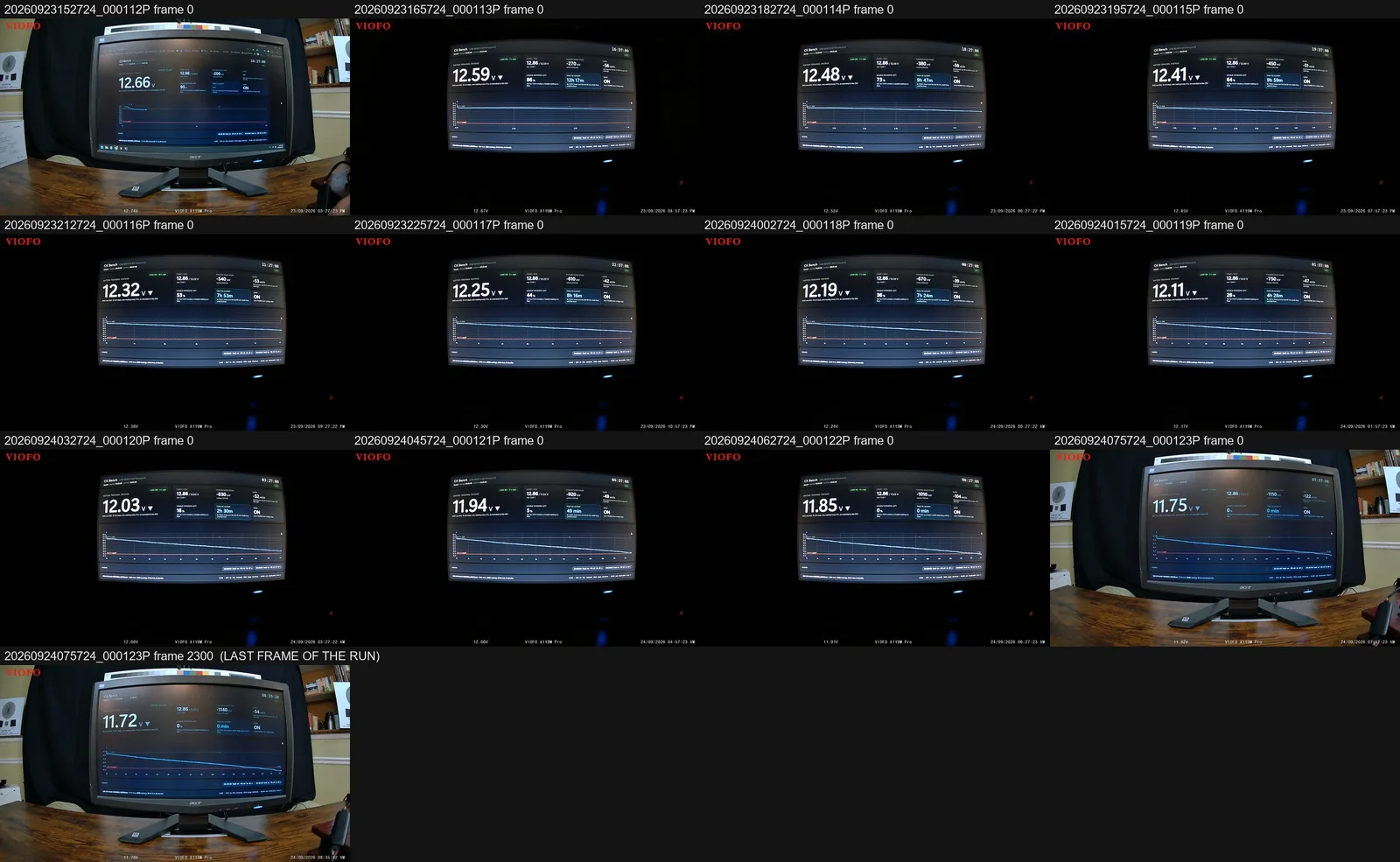
And here is a feature I love. With the HK6 connected, the camera stamps the car's battery voltage onto every frame, so the footage is its own voltage log. Over 6,168 paired readings it ran an average of 60 millivolts above my battery monitor, which is close enough to be genuinely useful, and by its own reading the kit cut at 11.78 volts, right at its 11.8 setting (11.72 at the battery posts). Once it cut, it stayed off while the battery recovered above the setting, which is what you want, and it re-enabled when the accessory line came back. It also cuts with the accessory line on, so it still protects the battery if you leave the key in accessory with the engine off. When the power went, the camera closed its last file cleanly, so all 17 hours play right to the end.
One small gripe: the kit waited about three and a half minutes below its setting before cutting (212 seconds with the accessory off, 202 with it on), where VIOFO say 90 seconds, give or take 10. Not a dealbreaker: a parked camera drains a battery so slowly that those extra two minutes cost a few thousandths of a volt.
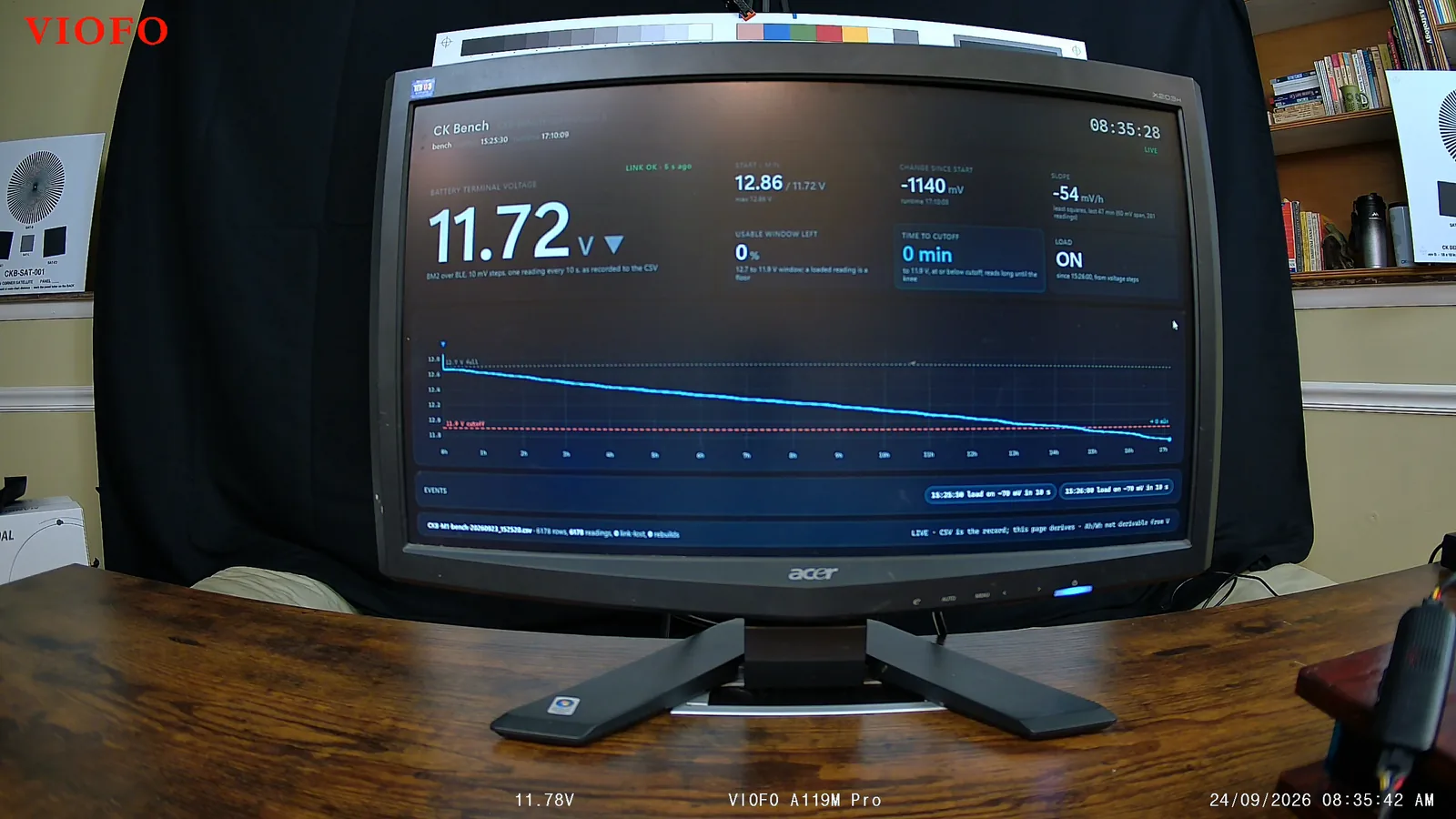
- 11.72 V: the battery at the posts, as the bench monitor reads it, 17 hours after the accessory drop.
- 11.78V along the bottom: the kit's own reading, stamped by the camera on every frame.
- The red dashed line is the dashboard's 11.9 V reference, not the kit's 11.8 V setting, so its time-to-cutoff tile ran about two hours short all night.
- Load: ON. The camera is still recording; the kit cut it within the next few seconds.
Doing the math, a full day of parking uses 6 to 8 amp-hours at the battery whichever mode you pick (5.9 to 6.4 for the one-frame-a-second run above), which is about an eighth of a typical 50 to 60 Ah car battery. At the camera, the meter counted 8.41 amp-hours and 43.5 watt-hours at 5 volts over the run, an average of 2.54 watts. The parking timer ships at 48 hours, and even that runs out long before a healthy battery does, unless it is old or it is freezing out. To run your own battery through the numbers, try the parking calculator.
Storage is not the problem while parked: the one-frame-a-second run wrote 0.556 GB an hour, about 13 GB a day.
One last thing: parking clips are not safe from the loop. Once my card filled up, it overwrote my whole overnight parking run just like ordinary driving clips, so if something happens while you are parked, copy it off before you drive much further, unless it was a bump, which gets locked. And if you use the time lapse, a bump still counts: when I knocked the desk a couple of minutes into a time-lapse session, the camera locked the whole time-lapse file, including the minutes before the knock, and saved two 2K still photos of the moment. It did that two times out of two.
What do you need to buy with the A119M Pro?
The box covers the camera, the mount, the charger, the cables and the polarizing filter. Two things you will want are separate purchases:
- A microSD card, because none is included. I ran the SanDisk High Endurance 128 GB for a month of looping without a bad file. VIOFO's own High Endurance 64 GB did well on my card bench too, but at this bitrate it loops in under three hours, so I would go bigger.
- VIOFO's HK6 hardwire kit, if you want parking mode. It is the kit everything in the parking section was measured on.
The camera itself is the VIOFO A119M Pro on Amazon. I quote no price here because prices move, so check the listing on the day. VIOFO also gave me a code for 5 percent off at checkout, CKTECH119MP.
Who should buy the VIOFO A119M Pro, and who should not?
The 4K is the real thing, and I measured it rather than taking it on trust. With HDR on, it read every plate I stopped behind at night, though on a truly dark road, a plate much past 20 feet still turns white. The filter in the box earns its place on a sunny day, and parking mode does what VIOFO say it does, right down to the 15 seconds before an event and a cutoff at the voltage on the switch.
What works
- Native 4K, proven on a chart: detail out to 99 percent of the pixel grid's limit
- With HDR on, every plate I stopped behind at night read in full
- The CPL filter in the box removes the dashboard's reflection, at no cost I could measure in daylight
- 51 megabits by default and never a blocky frame; all three bitrates resolve the same detail
- Parking mode does what it says: 15 seconds before, 30 after, and a voltage readout on every frame with the HK6
- Four full-card reads, every file clean, one 13-second gap in 115 clip changes
The compromises
- No rear camera, and no way to add one
- HDR ships off; turn it on
- The heaviest sharpening I have measured with HDR on, and no setting to turn it down
- The camera's menu stops recording until you back out, with no time-out
- With parking mode on and no hardwire kit, it parks itself after five minutes without movement
- No microSD card or hardwire kit in the box
Beyond that one 13-second gap, it simply worked, and it looks great.
Buy it if you want one honest 4K front camera with a polarizing filter included, and what happens in front of you is what you care about. Turn HDR on, set your time zone, and you are good to go.
Skip it if being hit from behind is what you are actually worried about. This camera cannot help you there, and you will want a two-channel camera instead, or a second one of these. I would rather tell you that now than have you find out after something happens.
My rating: 4.5/5. A real 4K sensor and processor that I could measure rather than take on trust, a plate you can read in your own headlights at a stop, a filter in the box that does something, and parking numbers that match the switch. The half point goes for the heavy sharpening you cannot turn down and the menu that stops recording without timing out. The missing rear camera is a choice VIOFO make openly, so it shapes who should buy this rather than the score.
Frequently Asked Questions
Is the VIOFO A119M Pro really 4K?
Yes. Its firmware loads a driver for the Sony IMX678, an 8.29 megapixel sensor with a native 3840 by 2160 grid, and the test chart backs that up: faint but real detail survives to 99 percent of the pixel grid's limit, where anything upscaled from 2K stops at 67 percent. Its 4K mode also resolves 1.43 times finer detail than its own 2K mode on the same chart.
Can the VIOFO A119M Pro read license plates at night?
With HDR on, a car stopped in front of you, yes: it read every plate I stopped behind at 11.5 to 18 feet under streetlights. In a dark lot lit only by my low beams it read a plate at 13 feet, while plates at 21 and 28 feet in the same frame were white slabs, and on a dark highway a plate about 33 feet ahead was unreadable. With HDR off it read no plate at all in the dark lot, not even at 13 feet.
Should I turn HDR on the VIOFO A119M Pro?
Yes. It ships off. With HDR on, an overcast sky went from 6.6 percent of the frame blown out to 0.04 percent, and a plate in the headlights went from a white slab to every character readable. It costs a little shadow detail and sharpens harder, but it does not change the frame rate or the bitrate. Each press of the HDR button starts a new clip and loses about four seconds.
How long will the VIOFO A119M Pro run in parking mode?
On my bench, in one-frame-a-second time lapse, it ran 17 hours and 8 minutes on a small 7 Ah battery before VIOFO's HK6 hardwire kit cut it at 11.78 volts by the kit's own reading. A full day of parking uses 6 to 8 amp-hours whichever mode you pick, about an eighth of a typical 50 to 60 Ah car battery, so the 48-hour parking timer runs out first unless the battery is old or it is freezing out.
Does the VIOFO A119M Pro come with a CPL filter?
Yes, the CPL-100 is in the box. With the sun ahead it removes the dashboard's reflection from the windshield, and with the sun beside or behind it deepens a blue sky by almost half a stop. In daylight it cost nothing I could measure. It cannot help a license plate in your headlights, because retroreflective sheeting scrambles the polarization it sends back.
What microSD card should I use in the VIOFO A119M Pro?
The box has no card. At the Medium bitrate it ships on, it writes 23.3 gigabytes an hour, so a 128 GB card holds about five and a half hours before it loops. I ran a SanDisk High Endurance 128 GB for a month of looping and every file read clean. Format the card in the camera.
Can you add a rear camera to the VIOFO A119M Pro?
No. It is sold as a front-only camera, and its only ports are USB-C for power on the mount and USB-C for a phone or computer on the camera. If being hit from behind is your main worry, buy a two-channel dash cam instead.
The bottom line on the VIOFO A119M Pro
VIOFO's little front-only camera is genuinely 4K, genuinely good at a stop at night with HDR on, and comes with a filter that does something you can see. The compromises are small ones you can mostly set your way around. If what happens in front of you is what you care about, this is a great dash cam, and I would tell you to get it.
The chart, DashCheck and the power bench each get their own write-up and video, and every dash cam I review from here on goes through the same chart, so the numbers on this page become a baseline.