
Should you leave dash cam HDR on all the time, or use the timer?
I've now measured HDR on three dash cams. On two of them it cost nothing I could find by day and kept the plate readable at night, which leaves an HDR timer nothing to do but lose footage. The third is my VIOFO A229 Plus, and the reason I turned HDR off on it in 2025 still holds.

Plays via YouTube. Google may set cookies when the player loads. Privacy policy
The short version
Leave HDR on all the time if turning it on doesn't lower your dash cam's frame rate. On the VIOFO A119M Pro and the COXPAL A17D it didn't, it cost nothing I could measure in daylight, and at night it was the difference between a readable plate and a white rectangle. Skip the timer on cameras like those: every HDR switch ends the clip and leaves a couple of seconds unrecorded. On my VIOFO A229 Plus, HDR halves the frame rate, so that one stays off.
Verdict: on, unless it costs frame rateShould you leave dash cam HDR on all the time?
Whether you should leave dash cam HDR on all the time comes down to what HDR costs on your camera, and I can finally answer that with numbers from three of them. In December 2025 I wrote a whole post on why I turn HDR off on my VIOFO A229 Plus, and on that camera I still do. Since then I've measured two more dash cams built on Sony's Starvis 2 sensors, the VIOFO A119M Pro and the COXPAL A17D, on my test chart, my power bench and a lot of road, and on both of them the answer flipped.
Then a viewer asked under my A119M Pro review whether to keep HDR on a timer that switches it on before evening, or just leave it on. It's a better question than it sounds, because the timer has a cost of its own. This post is the long answer.
Disclosure: VIOFO sent me the A119M Pro for review, free of charge, along with a memory card, a remote and a hardwire kit, and COXPAL sent me the A17D free of charge. I bought the A229 Plus myself. Neither VIOFO nor COXPAL paid me, and neither saw this post before it went live. This post also contains affiliate links. As an Amazon Associate I earn from qualifying purchases, at no extra cost to you. Affiliate links like these and my YouTube channel are what keep the site running.
Which dash cams should leave HDR on?
Here's where each camera landed. The rest of this post is how I got there, and at the end there's a five-minute check you can run on your own camera.
| Camera | Frame rate, HDR off to on | Double images in daylight | Plate at night, HDR on | My setting |
|---|---|---|---|---|
| VIOFO A119M Pro | 30 to 30 fps | None found, at up to 66 mph (106 km/h) | Read at 13 ft (4 m), where HDR off read nothing | On, all the time |
| COXPAL A17D (front) | 30 to 30 fps | None; it behaves like single-exposure HDR | 5% blown on my bench, against 79% with HDR off | On, all the time |
| VIOFO A229 Plus (front) | 60 to 30 fps | Yes, a doubled speed-limit sign | No better than HDR off (2025) | Off |
The A17D's rear camera has no HDR at all, so on that camera the switch only changes the front. The Mangoal 4K and the Vantrue Pilot 2 are on my bench right now, and they'll join this table once their reviews are out.
Does HDR lower your dash cam's frame rate?
On some cameras it does, and that's the cost that decides everything else. My A229 Plus records its front camera at 60 frames per second with HDR off and 30 with it on, so turning HDR on throws away every other frame. For a camera whose whole job is catching what happens in a fraction of a second, that was the main reason I turned it off.
The A119M Pro and the A17D record 4K at 30 fps no matter what. Both wrote exactly 30.00 frames a second with HDR on and with it off, and the A119M Pro wrote the same 51.6 megabits a second in both states, so HDR doesn't cost it any card space either. If your camera records at 30 fps either way, there's no frame rate for HDR to take. If you want to know why some cameras pay and others don't, I dug into the two kinds of HDR these sensors offer in my IMX678 deep dive.
Does dash cam HDR cause ghosting in daylight?
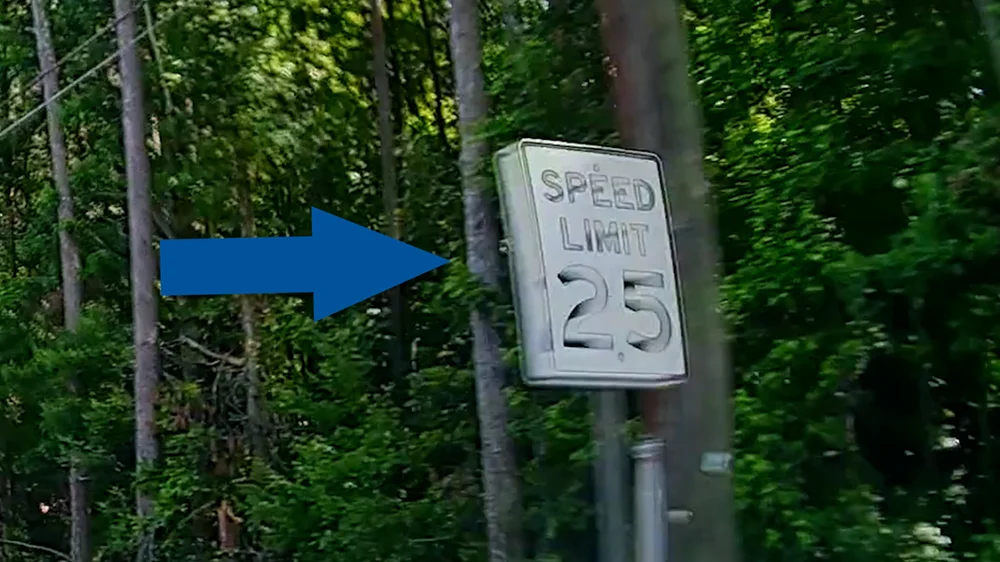
It can, and it's the other reason people put HDR on a timer. Multi-exposure HDR merges a short exposure and a long one taken one after the other, so anything that moves between them can show up twice. In my 2025 post, a speed-limit sign on the A229 Plus came out doubled in broad daylight.
The A119M Pro uses the same multi-exposure kind of HDR. Swing a dark card past its lens indoors with HDR on and it leaves a see-through second copy of itself, which you can see in the animation below. And yet on the road in daylight, I couldn't find a single double image on it. I went looking at the fastest, highest-contrast moments of a midday drive: two overpasses at 55 and 61 mph (89 and 98 km/h), a sign gantry at 66 mph (106 km/h), and an oncoming van's lettering sweeping across the edge of the frame. Every edge came out single.
The difference is time. A ghost sits as far from the real edge as the scene moves between the two exposures, and in daylight the A119M Pro's exposures are very short. One evening, with a low sun ahead and HDR on in both cameras, I lined the A119M Pro up frame for frame with my A229 Plus on the same windshield and measured how long each one smeared moving lettering: about 6.5 milliseconds on the A229 Plus, and about 1 millisecond or less on the A119M Pro. Sharpening draws an outline at both ends of a smear, so the A229 Plus's letters looked doubled and lost a trailer's phone number that the A119M Pro read at the same instant. Whether the A229 Plus also makes a true second copy from two exposures, I haven't settled. For what you see on screen, it doesn't matter.
The A119M Pro isn't ghost-free, though. At night, when the exposures get long, the lettering on a lit overhead sign came out as two offset copies at 71 to 77 mph (114 to 124 km/h). That cost lands at night, which is exactly when an evening timer has HDR on anyway.
What does HDR do for a dash cam during the day?
Mostly, it keeps the sky and the sun from blowing out. On an overcast morning I flipped HDR from the A119M Pro's remote every couple of minutes: with HDR off, the typical frame had 6.6% of its pixels blown to pure white, mostly sky, and with it on, 0.04%. The A17D did the same on a daylight drive, its worst single frame dropping from 14.7% blown with HDR off to 0.39% with it on.
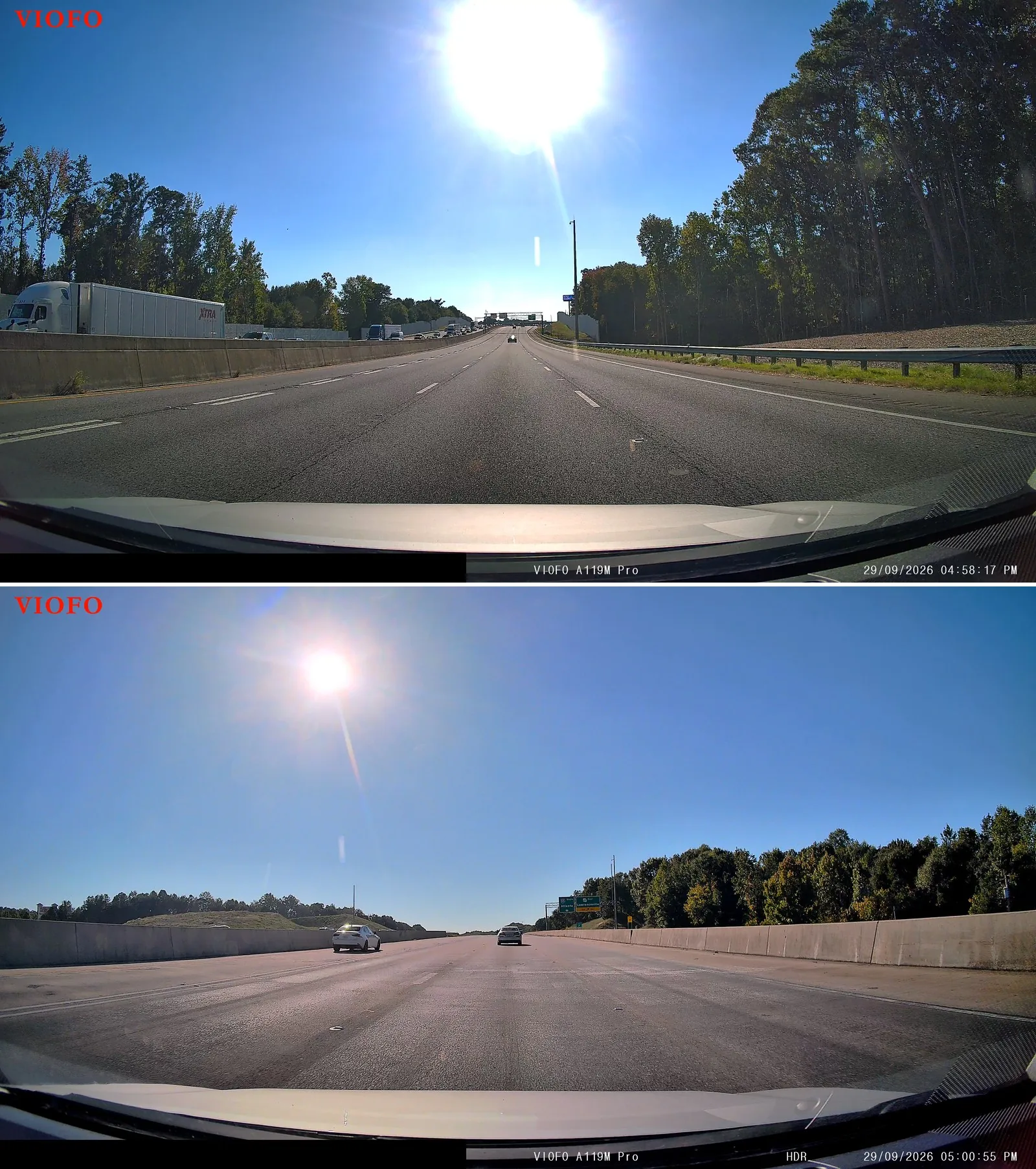
Driving into the sun is where it shows most. Late in the afternoon, more than two hours before sunset, HDR on shrank the A119M Pro's blown-out sun to about a fourteenth of the area it covered with HDR off. A timer set for evening leaves that whole stretch with HDR off, and, depending on when it switches back off, the low morning sun too.
Neither camera paid for it in detail. On my resolution chart, the A119M Pro held 76.8% of its pixel grid's limit with HDR on and 72.4% with it off, and the A17D held 65.2% against 63.6%, in two takes six seconds apart. One outdoor test of the A17D did show HDR costing it detail, and I couldn't make that happen again on the bench.
What HDR does cost by day is a little shadow. Into that low sun, 3.1 to 4.2% of the A119M Pro's frame went to pure black with HDR on, against under half a percent with it off, and on the overcast morning about 1.1% against 0.4%. The A17D crushed about 1% of its darkest pixels with HDR on and almost none with it off.
The A119M Pro also sharpens harder with HDR on, at least on the chart: 1.89 against 1.49, on a scale where a lens alone can't pass 1.00. On sunny roads it went the other way, and the bright outlines around poles and power lines against the sky were stronger with HDR off. The A17D sharpened harder with HDR off on the chart. Either way, sharpening isn't a reason to pick one setting over the other.
Does HDR help read license plates at night?
On the A119M Pro and the A17D, it's the difference between a plate and a white rectangle. A license plate is built to throw your headlights straight back at you, and with HDR off, both cameras let it run to white.
A Jeep in the next lane caught both sides of one press of the A119M Pro's HDR button, about five seconds apart. With HDR off, its plate and tailgate were one white slab. With HDR on, all seven characters were there, even though the Jeep had pulled a little farther away.
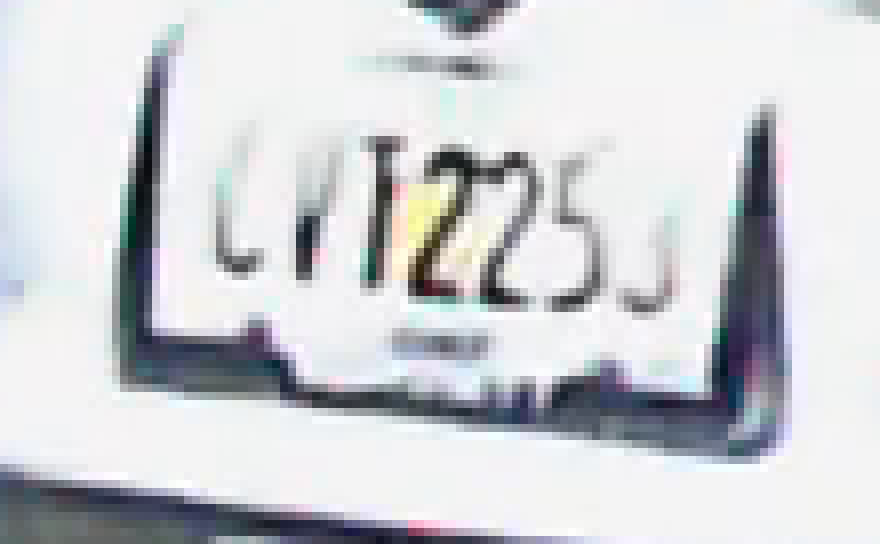

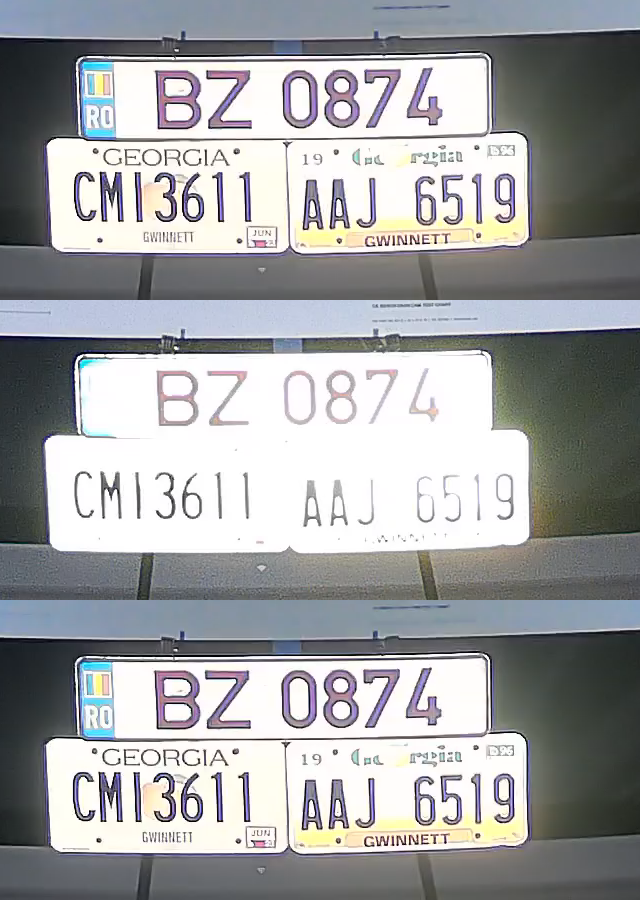
Then I took two of my own plates to a dark parking lot and set them on stands, lit by nothing but my low beams. With HDR off, the A119M Pro read none of them, not even the plate at 13 feet (4 m). With HDR on, that plate read in full. On my bench, with a spotlight beside the lens the way a headlight sits, the A17D's plate went from 79% blown with HDR off to 5% with it on.
HDR isn't magic, though. In that same lot with HDR on, the plates at 21 and 28 feet (6.4 and 8.5 m) were still white slabs, and on a dark highway a pickup's plate about 33 feet (10 m) ahead never read. On my A229 Plus in 2025, HDR made no difference to a plate at night at all, which is the other half of why mine stays off.
At night, HDR costs the A119M Pro some shadow, about 7% of the frame at pure black against 1.4% with it off. On my bench, with the spotlight beside the lens, it also gave up about a third of the chart's fine detail, while it kept the plates under that same light under 2% blown against 42 to 60% with HDR off. That's a trade I'd take every time.
Should you use the HDR timer?
Only if HDR costs your camera something in daylight. On the A119M Pro, the HDR menu has Off, On and Auto, and Auto adds a timer with an on time and an off time. I set it to switch HDR on at 3:35 PM, and it did, right on the minute: the clip without HDR closed at 3:35:00 and the next one opened at 3:35:02 with the HDR tag on its timestamp. That's a 2 to 3 second hole in the recording.
That's not really the timer's fault; it's how HDR switches on this camera. On one drive I flipped HDR from the remote 21 times, and every time the clip closed and the next one opened 2.6 to 4.8 seconds later. A timer does that twice a day, at whatever moment the clock says, and it has no idea whether something is happening in front of you.
A fixed time also drifts against the light. Across most of the US, sunset moves three to four hours on the clock between late June and early December, a little under three in Miami and almost five in Seattle. A switch time that's right in July leaves you with HDR off through dusk in December, and one that's right in December turns HDR on in full daylight in June. On the A119M Pro the daylight costs nothing, so there's nothing for the timer to protect.
A timer makes sense on a camera where HDR costs something by day but earns its keep at night. My A229 Plus costs half its frame rate by day and didn't earn anything at night, so it doesn't get a timer either. It just stays off.
How can you check HDR on your own dash cam?
You don't need a test chart for this, just a computer, one sunny drive and a parked car at night.
- Frame rate. Record 20 seconds with HDR off and 20 with it on. On a computer, open each file's properties (in Windows, right-click it, then Properties, then Details) and compare the frame rate. If HDR halves it, that's your cost.
- The HDR tag. Many cameras print HDR on their timestamp when it's on; the A119M Pro and the A17D both do. Glance at a frame from each clip so you know which is which.
- Daylight ghosts. On a sunny drive with HDR on, find a clip where you pass a road sign at speed, then step through it frame by frame at home (in VLC, the E key moves one frame). A faint second copy of the sign or its letters is the merge showing through.
- A plate at night. Park with your low beams on another car's rear plate about 13 feet (4 m) away, record with HDR off and then on, and zoom in. If the plate goes white with HDR off and reads with it on, HDR is earning its place.
- The timer's gap. If you use a timer, look at your clip list around the switch time. A short clip, or a jump in the timestamps, is footage the switch cost you.
Frequently Asked Questions
Should I leave HDR on all the time on my dash cam?
If turning HDR on does not lower your camera's frame rate, yes. On the VIOFO A119M Pro and the COXPAL A17D it cost nothing I could measure in daylight and kept license plates readable at night. On the VIOFO A229 Plus it halves the frame rate from 60 to 30 fps, so I leave it off.
Is the dash cam HDR timer worth using?
Only if HDR costs your camera something in daylight. Every HDR switch closes the current clip: on the VIOFO A119M Pro the timer left a 2 to 3 second gap, and a fixed switch time drifts against sunset by three to four hours over a year in most of the US.
Does HDR lower a dash cam's frame rate?
On some cameras. The VIOFO A229 Plus drops from 60 to 30 fps with HDR on. The VIOFO A119M Pro and the COXPAL A17D record 4K at 30 fps with HDR on or off, so there is nothing to lose.
Does dash cam HDR cause ghosting?
It can, because multi-exposure HDR merges two exposures taken one after the other. On the VIOFO A119M Pro I found no double images in daylight at up to 66 mph (106 km/h); the only doubling was the lettering on a lit highway sign at night, at over 70 mph (113 km/h).
Does HDR make license plates readable at night?
At short range, on the two cameras where I measured it, yes. With HDR off, the VIOFO A119M Pro read no plate in my low beams, not even at 13 feet (4 m); with HDR on it read that plate in full. Past about 20 feet (6 m) on a dark road, plates still turned white.
What I told my viewer
Leave it on. On the A119M Pro, the hours an evening timer leaves HDR off are exactly where it helped me in daylight, it cost nothing I could measure there, and the timer itself loses a few seconds of footage every time it switches. Set HDR to On and forget about it. The A119M Pro ships with HDR off, so if that's your camera, check that setting first.
If your camera is more like my A229 Plus, where HDR costs half the frame rate, run the checks above before you decide. Your mileage may vary, but at least now you can measure it.