
COXPAL A17D review: a real 4K front camera, measured on a chart
The first dash cam I have reviewed on a printed resolution chart and my own footage software. The 4K is native, the front camera reads a plate at night, and parking mode matched COXPAL's own battery numbers. The rear camera is weak in the dark. The camera restarted itself six times at startup in five weeks.
Plays via YouTube. Google may set cookies when the player loads. Privacy policy
The short version
The COXPAL A17D's front camera is the real thing. The 4K is native, and I measured it on a test chart instead of trusting a part number. It reads a license plate in its own headlights at night, it holds a sunset sky with HDR on, and at night it keeps both the highlights and the shadows. The rear is honest 2K that does its job in daylight, and after dark it is a second angle, not a second witness. Parking mode works the way COXPAL says, right down to their battery figures. Two things hold it back: a bitrate that is a little thin for 4K, with sharpening you cannot turn off, and reliability at startup. It restarted itself six times in five weeks, three times into loops that recorded nothing for minutes.What holds it back is a bitrate that is a little thin for 4K, with sharpening you cannot turn off.
A real 4K front camera; check it is recording before you drive offDisclosure: COXPAL sent me the A17D and their 3-wire hardwire kit free of charge to review. They did not pay me, they are not reimbursing me for anything, they had no editorial input, and they do not see this review before it goes live. This post also contains affiliate links. As an Amazon Associate I earn from qualifying purchases, at no extra cost to you. Affiliate links like these and my YouTube channel are what keep the site running.
Coming from the video? The three things it points here for are the full chart results, the overnight parking battery curve and the complete restart timeline. The two things it points here for are the full chart results and the overnight parking battery curve. This page also keeps every number the video cut for time.
Why review a dash cam from a brand I had written off?
This COXPAL A17D review starts with a confession: I had already written the brand off. COXPAL's only other listing at the time was a five megapixel front camera with a rear camera I would not wish on anyone. Then they emailed me a full user manual, a real spec page and the exact sensor part numbers, none of which I had asked for. That almost never happens, so the A17D, a 4K front and 2K rear dual dash cam, got the full treatment.
It is also the first dash cam review on this site where every number came off a printed test chart and a piece of software I wrote to read dash cam footage. Both get a short introduction below, and from then on they do the talking. Every figure on this page traces to a measured session between August 22 and October 3, 2026, on one unit running firmware COXPAL A17.V1, the version it shipped with (no update was offered).
What comes in the COXPAL A17D box, and what does not?
In box order: four static-cling stickers and a detailed, well-written manual, then the accessories box. That holds a dual USB car charger for your 12-volt socket, an 11-foot (3.5 meter) USB-C power cable with a right-angle plug, the rear camera on a short pigtail with an 18-foot (5.5 meter) cable to connect the two, a trim removal tool, the mount, and spare 3M adhesive pads.
The main camera is a barrel, the style most flagship dash cams use now, and the first barrel-style camera I have reviewed. It has no screen at all: two buttons, two LEDs, and everything else happens in an app on your phone. Power and the rear camera plug in over USB-C, and the microSD card goes in just below those ports. The GPS receiver is built into the body, so there is no separate puck to route: the internal photos in the camera's FCC filing (FCC ID 2AWDM-A17D) show its antenna on a small board in the end of the barrel the mount clips onto, right beside the USB-C port. The mount itself is just a plastic clip.
There is no battery inside. It uses a supercapacitor, which is what I want in a car that bakes in the Georgia sun all summer. The manual lists a 5.5 V pack of two 7 F cells rated to 85 C, which is 3.5 F as a pair, and its only job is to hold enough energy to close the open file when the power drops. Later on this page you will see it do exactly that under a real power cut.
The same FCC photos show the pack itself, and it matches the manual: one sleeve over two cells, printed 5.5V 3.5F and rated from -40 to +85 C. The logo on it is not one I could match to any capacitor brand, and COXPAL have never said who makes it. Charged to 5 volts it holds about 44 joules, and what sits above 3 volts would keep it recording for five to eight seconds, depending on whether the rear camera is plugged in, against the second or two it needs to close a file.
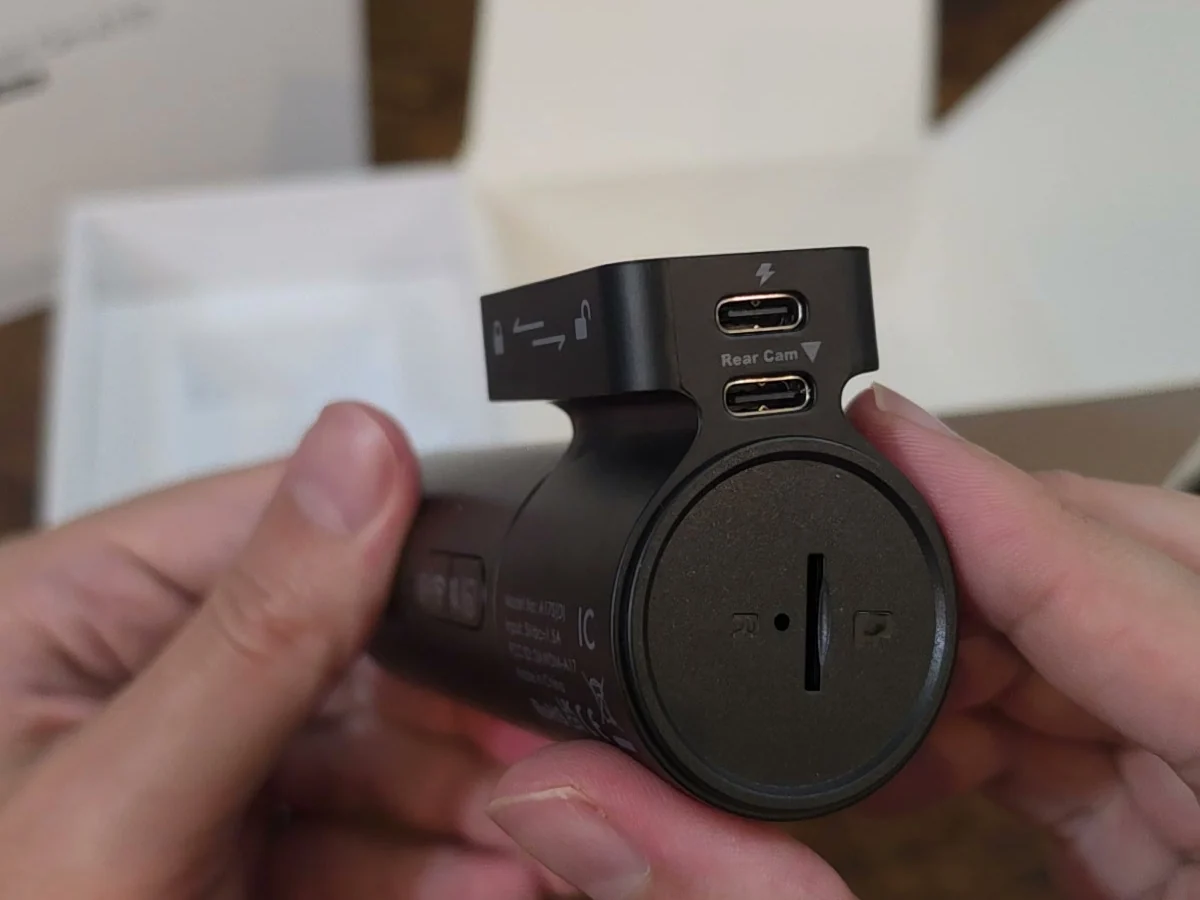
Three things are not in the box. There is no microSD card, so budget for one; the storage section below says which ones I would buy. There is no hardwire kit, so parking mode means buying one. COXPAL did send me their own kit: a fuse-tap kit that should fit most cars, installed in the fuse box under the dash, not the one under the hood. And there is no CPL (polarizing) filter, because COXPAL confirmed one does not exist for this model. The manual spends a full page on windshield glare and then offers no fix beyond a dash mat, so if your dash is a light color, know that going in.
One thing this review does not do is grade the build. I have not weighed the camera or measured how rigid the mount is, so there is no build-quality verdict here beyond what the photos show. It is a sealed unit, so there is no teardown either; the internal photos in the FCC filing are where its insides are on public record.
How do you install the COXPAL A17D?
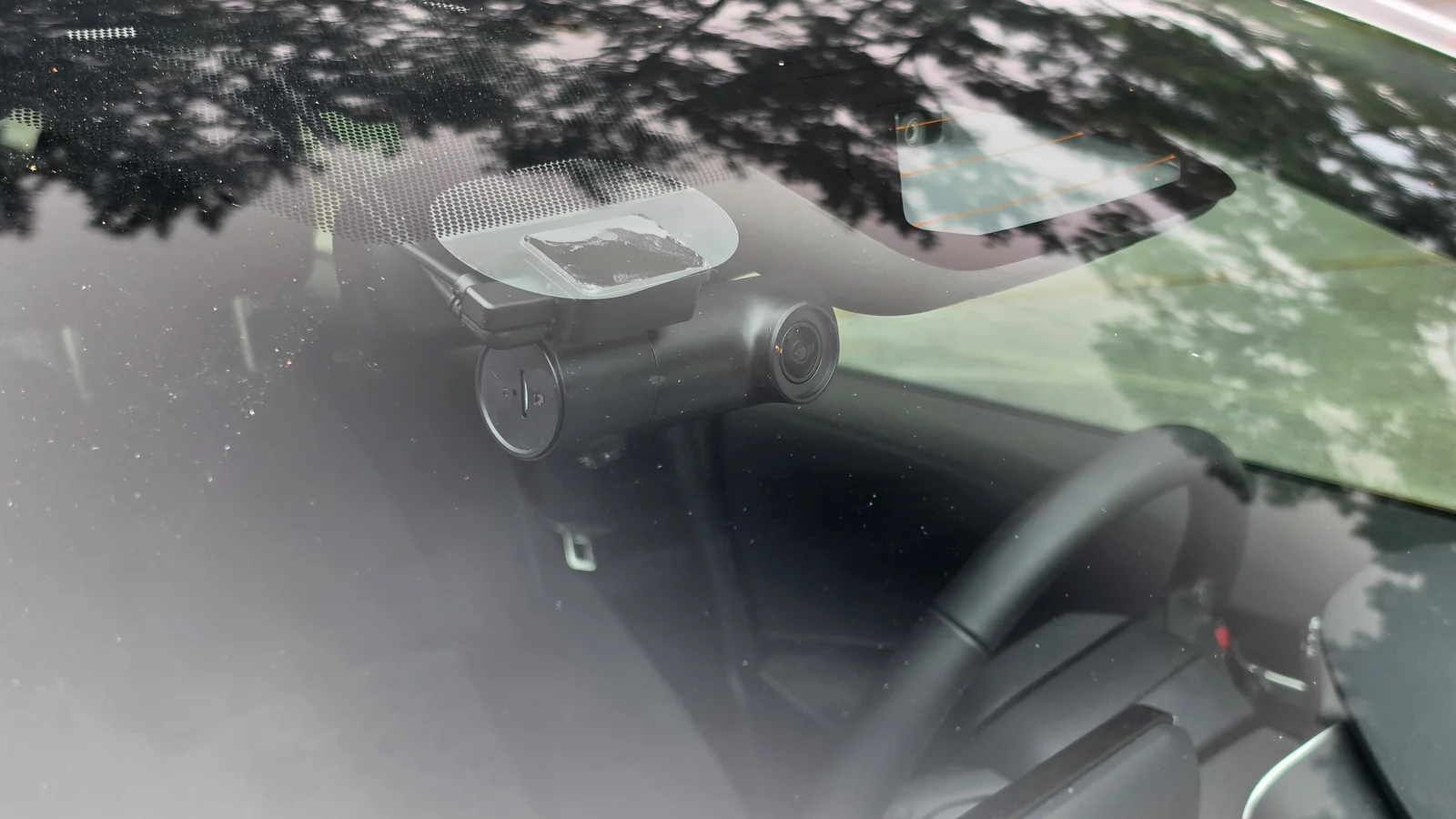
It is straightforward. Clean the windshield first. I like to put the static-cling sticker on the glass and stick the mount to that, because the camera then comes off without leaving residue. Cling stickers usually do worse in hot climates; this one held through a humid southern summer.
Snap the mount onto the camera, peel the backing off the 3M pad (I always have to fight these, but it is black VHB tape rather than the grey kind), attach it to the cling sticker, and insert your card. Plug in the power cable and route it along the headliner, down the A-pillar and to the socket. Check where your side curtain airbag is and route around it, never across it; this part is different on every car. Cable clips make the job much easier. Then connect the rear camera, route its cable to the back, and stick it to the rear glass.
The first time you power it up, it asks you to format the card, and the timing matters more than the manual suggests. Hold the right button for about two seconds, wait for the voice to say "short press to confirm format", then give it one short press. If you miss the window it shuts itself down and asks again on the next boot. The manual says to hold for three seconds, which is already past the window, and that same button is the power button. The restart timeline below shows what that costs.
One more trap: if you mount the camera upside down with the picture flipped, as on my test rig, the left and right buttons swap, so the format button ends up on your left. Do not reset the camera three times in a row thinking you are formatting the card. That did not happen to me at all.
What are the test chart and DashCheck?
Two new tools carry this review. The first is a printed test chart, 48 by 27 inches (about 122 by 69 centimeters), on an easel in my office: Siemens star targets that measure resolution directly, tilted black squares whose edges reveal sharpening, a grey ladder, a shadow ladder, six identical grey patches that check how evenly the chart is lit, and five license plates that shrink across the bottom, so one frame from four feet away is a plate test at the equivalent of 10, 15, 20, 30 and 50 feet. Before any dash cam saw it, I photographed the print itself with a Canon R7 in raw and characterized it, so when a patch reads dark I know how much of that is the paper and how much is the camera.
The second is software I built, called DashCheck, the dash cam half of my test suite. You point it at a folder of footage and it reads every clip: timestamps, bitrate, dropped frames, gaps between clips, duplicate frames, blown highlights, and how much real detail is in the picture against how many pixels the file claims. Draw a box on a frame, around a license plate for example, and it tells you exactly what happened inside that box. No AI, just arithmetic on the pixels the camera wrote to the card. Same chart, same software, every dash cam from here on.
Is the COXPAL A17D real 4K?
Yes, and this time I did not have to go digging for the sensor, because COXPAL printed it on page 24 of the manual. I checked it instead.
The front sensor is a Sony IMX678 Starvis 2. Starvis 2 is on almost every dash cam listing now, but it is a family of sensors, not a resolution: there are Starvis 2 parts made for 1080p (the 2 megapixel IMX662), for 2K (the 5 megapixel IMX675) and for 4K, so the badge alone does not tell you what you are getting. The part number does. The IMX678 is an 8.29 megapixel sensor with a native 3840 by 2160 grid, and real 4K needs about 8.3 million pixels. Plenty of dash cams sold as 4K run on a five megapixel sensor that physically cannot capture the picture on the box.
I did not take the part number on faith either. On the chart, faint but real detail (the point where the star's contrast falls to a tenth) survives to between 79 and 86 percent of the way to the pixel grid's limit across my sessions: 84.5 percent on the September 4 far-mark frame shown in the chart section, 79 percent on a September 17 frame with HDR off. A picture upscaled from 2K cannot carry anything past 67 percent, because 2560 is two thirds of 3840. There is no smaller sensor hiding behind this 4K label.
The rear camera is a GalaxyCore GC4653: four megapixels, native 2560 by 1440, so the 2K claim is honest too. It is a one-third-inch sensor from a 2019 datasheet, a much older and cheaper part than the front's. Flagship front, economy rear. That is a defensible way to build a dual dash cam, as long as you know it going in. Both lenses are F1.8 and both are listed at 140 degrees, with seven glass elements in front and six in the rear.
Here is the first thing the chart caught. From the same spot, the same star target fills 2.75 percent of the front frame and 3.44 percent of the rear frame. So the front camera sees about 25 percent more of the world, and the rear about 20 percent less. Both are labeled 140 degrees; they are not both 140 degrees.
Now the files, because the manual never states a bitrate. The front records 4K at 30 frames per second at 33.6 megabits per second, the rear 2K at 30 at 18.0. Both are H.264, not the H.265 I assumed from the chipset, and both run a constant rate: across every clip I analyzed the bitrate moved by a tenth of a percent, with no padding. Every full loop clip is exactly 300.000 seconds and 9,000 frames, with every frame interval on 33.3 milliseconds. This encoder is a metronome.
The number that matters more than bitrate is bits per pixel. The rear gets 0.163 bits for every pixel it records; the 4K front gets 0.135, so the flagship channel is the more compressed of the two streams. A High bitrate option in the app raises the front to 36.9 megabits, 0.148 bits per pixel. On my chart, at the near mark with the two clips 12 minutes apart, the star resolved 6.7 percent finer with it on, but that is about the size of this camera's normal day-to-day wander on the chart, so I will not promise you will see it. It costs about ten percent more card space, and I would still turn it on.
I asked COXPAL why a sensor that reads out 4K at 60 frames per second only records at 30. Their engineer answered in writing: the IMX678 can do 60, but the Novatek NT98529 processor can only encode 4K at 30. The sensor is better than the chip it is paired with. That is the general point too: the sensor sets the floor, and the processor and its encoder decide what ends up on your card, which is why two dash cams with the same sensor can look very different. I wrote a whole post on why the same IMX678 looks different from one dash cam to the next.
For the curious, here is the hardware behind that answer. What is inside a Novatek dash cam is usually hard to pin down, because Novatek does not publish its datasheets and the chip's marking is barely legible in the FCC photos. This time the answer comes from the camera's own firmware, which COXPAL's engineer sent me (the build of September 15), because a firmware image carries a description of the hardware it runs on. The NT98529 has two ARM Cortex-A9 processor cores, a 32-bit design. The firmware lists them at 960 MHz, and its bootloader can clock this chip as high as 1.2 GHz, a speed it says only the NT98529 supports. Beside it sit 512 MB of Samsung DDR3 memory and 128 MB of Macronix flash, which holds the camera's own software; your footage goes to the microSD card. The firmware's memory map gives the same 512 MB and 128 MB as the part numbers COXPAL gave me (Samsung K4B4G1646E and Macronix MX35LF1GE4AB), and the internal photos in the FCC filing are consistent with all of it. Of the 512 MB, the firmware gives 160 MB to the camera's Linux system and sets the other 352 MB aside for the video pipeline, the buffers that capture, image processing and the encoder work in. It also names the WiFi chip, a Realtek RTL8821CS, a dual-band 802.11ac part, which is how the camera runs its own 5 GHz network, and it loads a driver for the IMX678 on the front.
The same firmware explains something about the rear camera. It is set up for what Novatek calls an EthCam: the rear is a small networked camera in its own right, with its own chip doing its own image processing, and it streams its video to the main unit over the cable. That fits two things I measured: the HDR switch does nothing to the rear, and the rear's video lands about 0.4 seconds behind the front's for the same moment.
The manual earns two corrections. It lists storage as "SDHC microSD, up to 512GB", but SDHC stops at 32GB. And its compliance page declares only a 2.4 GHz radio, while the camera's own network is called COXPAL_A17_5G and the FCC grants cover both bands. Somebody copied from an older document.
How does the COXPAL A17D app work, and what does the settings screen do?
With no screen, the LEDs are how the camera talks to you, and the two have separate jobs. Per the manual, one is for WiFi: solid red while the camera's network is on, solid blue when it is muted. The other carries recording: flashing red means it is recording the front camera, flashing blue means both channels, a slow flash means parking mode, and solid red means recording is paused. I timed them off my bench videos: the recording flash is one second on and one second off, and in parking mode it slows to two seconds on and two off (timed with the rear camera connected). Solid red on the recording LED is also what both kinds of restart loop below show while the camera writes nothing, so from the driver's seat a loop looks just like a pause.
WiFi is on by default with a ten-minute timer, after which it turns itself off. The left button locks a clip, and holding it for three seconds turns WiFi back on so you can connect the app. The default WiFi password is doourbest, the same on every unit and printed in a manual anyone can download, so do your best and change it.
To its credit, the manual is blunt about the app: it says the app runs slow, is not built for bulk downloads, and that you have to close CarPlay or Android Auto before it will connect. Speed was not a problem for me, and the app is feature-rich, with quality-of-life options like flipping and mirroring both the front and rear pictures independently. There is no account to create; you join the camera's WiFi and you are in. While your phone is on that network it has no other connection, so disconnect when you are done.
I did not test the app's live-preview latency, its download speed, or whether a clip downloaded through the app is bit-identical to the file on the card, so this review makes no claim on any of the three.
Opening settings stops recording, and it stays stopped
This behavior is documented, and it still bit me twice. Open the Settings or Playback screen and the camera stops recording. DashCheck first found it as a 14.6-minute hole in a drive where the car covered about two kilometers, and COXPAL confirmed it in writing: enter Settings or Playback and recording stops. The second time I tested whether it comes back on its own. I left the app's settings screen open at a stop and drove off, and the camera recorded nothing for 15 and a half minutes, from 10:28:44 to 10:44:17, through the phone's own screen going dark, until I closed the screen. It does not resume by itself. Close the app before you pull away.
The clock and the GPS
Two small ones. Whenever the GPS is in charge of the clock, the clock runs an hour slow, because the camera syncs to Eastern Standard Time with no daylight saving: I watched the timestamp read 16:47, the GPS get its first fix, and the next clip get stamped 15:49. It also runs about three seconds fast against its own GPS. And the GPS position stored in each clip's data is scrambled, so only COXPAL's own player can map where a clip was shot. Once the camera has a fix, the picture itself stamps the coordinates on the bottom line of every frame, so blur or crop that line before you share a clip publicly, and if you ever hand a clip to an insurer, that line is where the location lives.
Does the COXPAL A17D restart itself? The complete restart timeline
Yes. In five weeks of driving, from August 22 to September 30, the A17D restarted itself on six separate occasions. Every one happened in the first minutes after power-up, and none happened mid-drive. Three were single restarts, or a short burst, that cleared on their own and cost up to about three minutes of footage. The other three turned into loops that recorded nothing for five to fourteen minutes until something changed. This is the full record, with what was measured each time.
| Date | The start | What happened, and what was measured | Recorded | How it ended |
|---|---|---|---|---|
| Aug 25 | First start of the day, in the driveway, three days after install | Three restarts in a row while my phone was joining the camera's WiFi | Nothing for the window | On its own once the phone's WiFi was off |
| Sep 1, morning | First start of the day, after parking overnight | One restart 65 seconds after the first clip opened | A 28-second hole on the front, 32 on the rear | On its own |
| Sep 1, afternoon | Leaving after about four hours parked on a 93 F day | One restart before the first clip | About three minutes lost | On its own |
| Sep 6 | First start after about 2.6 hours parked at a hike | A loop, filmed: 14 seconds dark, about 5 seconds booting, up for 15 to 48 seconds, then dark again, four cycles in 313 seconds. Each boot played the chime and nothing else: no voice prompt, no power-off tone | Nothing for at least 5 minutes | Pulling the charger's plug out of the socket and putting it back |
| Sep 20 | First start after about 3.2 to 3.4 hours parked at a hike | A loop, filmed, with the camera's own card in the slot: at every boot it spoke "hold the right button down 3 seconds to format the card", then played its own power-off tone 9 to 10 seconds after the LEDs lit and shut down. The one boot that spoke no prompt stayed up | Nothing for about 12 to 14 minutes | A reset, then reseating the card |
| Sep 30 | First power-up after 4 hours 18 minutes parked in the sun; windshield 124 to 128 F with 80 F outside | A loop, filmed with a USB power meter at the camera end of the cable: eleven boots, one every 66.7 seconds, the LEDs lit for 53.0 seconds each time (six whole cycles, 52.9 to 53.1) and then a reset, with no prompt and no power-off tone. The camera got 4.72 to 4.84 volts and 3.8 to 5.5 watts while it ran | Nothing for 10.5 minutes (the first ten boots) | On its own, on the first boot that began after the car started moving |
Two kinds of loop, told apart by their sound
The loops look the same from outside, because a reboot takes the same 13 seconds either way, but the camera's own sounds separate them. The September 20 loop is the camera refusing its card. At every boot it asked me to hold a button to format, then announced its own shutdown with its power-off tone, the same tone it plays when a parking session ends normally, and went dark four seconds later. A camera that is losing its supply does not play a tone and wait four seconds. It was not losing power; it was deciding to turn off.
I reproduced that kind on the bench with a SanDisk MAX Endurance 128GB that I had formatted on a Windows PC to the exact format the camera uses on its own card (FAT32 with 64 KiB clusters). The camera refused it the same way, four boots in a row, power-off tone 16 to 20 seconds after each, and a USB meter at the camera end read 5.24 to 5.37 volts through every shutdown and every boot. So a card the camera formatted itself is accepted, the same file system made by a PC is refused, and on the morning of September 20 it refused its own card twice before accepting it. What exactly it checks on a card, I cannot tell you.
The fix for a refused card is the format, and the format has a timing trap. COXPAL explained it: the hold has a window, and the same button is the power button. Hold it about two seconds and the camera says "short press to confirm format"; one short press and it formats. Every hold on my recordings was longer, at 3.5, 3.7, about 10.5 and 16.5 seconds measured from the video frames, and each one powered the camera off instead. The manual says three seconds, which is already past the window. A camera that asks you to hold a button and then shuts down 16 to 20 seconds later whether you do or not, on a button whose window is under three seconds, punishes you for following the manual. With the two-second hold, the same MAX Endurance card formatted, came back with the camera's own folder structure, and recorded.
The September 6 and September 30 loops are the other kind: the chime, no prompt, no tone, and a reset. On September 30 I finally had a meter in the power path, and it says the camera was not short of power. While it ran it drew its normal 3.8 to 5.5 watts. Forty-seven of the meter's readings were below 4.75 volts, the level COXPAL told me turns the camera off, and the camera kept running through them; the three resets the meter caught came at 4.78 to 4.81 volts, each 53 seconds after the LEDs lit. The resets follow a timer, not the voltage. A three-second power interruption in the middle did not clear it, and neither did taking load off the splitter. One thing about the supply is worth knowing anyway: COXPAL's charger and cable delivered 5.03 volts with no load and lost 0.275 volts per amp at the camera end, below the 5.1 to 5.3 volts the manual promises for that charger.
What sets that kind off, I cannot prove. Every loop came at the first start after the car had sat for hours, and the September 30 one followed a park in the sun, with the windshield logger at 124 to 128 F and 158 F on the camera body by my thermal camera during the loop; COXPAL says the camera has no temperature detection. But on September 26 the camera started cleanly after 3 hours 55 minutes parked, the condition that had looped twice. On my bench, with the car's own splitter, COXPAL's charger and the same cables, I rebuilt the after-park start five times (20 minutes recording, two to three hours off, power on) and it never looped. COXPAL's own desk test did not reproduce it either. I have reported the loops to COXPAL, and the cause is not established.
What that means if you own one: get in the habit of glancing at the camera after a long stop, before you drive off. If it is cycling off and on, or talking to you about formatting, deal with it there. Format a new card in the camera with the two-second hold. Reseating the card got mine going one time and reseating the charger plug the other, and the September 30 loop ended by itself once the car moved.
How reliable is the COXPAL A17D's loop recording, and which card should you buy?
Once it is up and running, tThe recording is rock solid. The same 128GB card has been in the camera since August 22, filling up and looping the whole time. I read the whole card twice, a month apart: 157 clips on September 4 and 623 on October 3, 780 in all. DashCheck read every one of them clean, with no missing frames and the frame rate never off 30.00. The front never lost a second between clips; the one 31-second gap on the front was me cutting the power on purpose, to see how it closed its files. The rear does drop a little now and then: in the second read, 15 of its 275 clip changes lost 0.6 to 1.0 seconds each, 13.8 seconds in a week of driving. When the card filled, it recycled the oldest clips first, front and rear together, and kept about two gigabytes free as working room. That is the durability test a five-minute demo cannot do, and apart from the rear's dropped seconds it passed outright.
COXPAL says a 128GB card holds 5.8 hours of front and rear recording. I measured 23.2 gigabytes an hour, which is 5.4 hours. Front only, they say 8.9 hours and I measured 15.1 gigabytes an hour, 8.3 hours. Both claims run seven percent high, consistently, which suggests the table was worked out from a slightly lower bitrate than the camera actually writes. Not a lie; just round it down. For any other card size, the dash cam storage calculator does the arithmetic.
That card was a SanDisk High Endurance 128GB, and since the box has no card, it is the one I would buy, or the SanDisk MAX Endurance 128GB, which also worked once the camera formatted it. Both have been through my card bench. With High bitrate on and both cameras recording, the A17D writes about 6.9 megabytes a second. The SanDisk High Endurance 128GB held about 88 MB/s through its worst ten seconds of continuous writing and qualifies for V60 against the V30 on its package; the MAX Endurance held 51.6 MB/s and exactly the V30 it prints. So even the slower card has more than seven times the headroom this camera needs. The cheaper High Endurance is the faster card, and the MAX's premium buys a 60,000-hour endurance rating against 10,000 and a ten-year warranty against two. The full results are in the SanDisk MAX Endurance 128GB review, which carries the head-to-head, and the SanDisk High Endurance 128GB review.
Whichever card you buy, let the camera format it. The card in mine is FAT32 with 64 KiB allocation units at 128GB, which Windows cannot create (it refuses FAT32 above 32GB), so the camera made it. The manual wants FAT32 on every card from 64GB up and says the camera will do it, which is right, as long as you use the two-second hold from the install section above. Hold it longer and the same button powers the camera off instead, with no format.
The lock works, and I know because it caught me. It fired on the bench while I was working around the camera, and it moved the whole current clip, front and rear, into an Event folder, flagged read-only and safe from the loop. That folder does not exist until the first lock, which is why a card that has been in the car for weeks can look as if the G-sensor never fires. Whether my bench lock came from the button or a bump is not on record.
And twice the car cut the camera's power mid-clip when I switched off, and both times the file on the card closed cleanly and played. I have not timed the supercapacitor's hold-up on the bench, but the parking section has the cleanest proof of it doing its job.
How hot does the COXPAL A17D get?
Heat matters a lot down here, so I put a thermal camera on it. After about an hour of recording front and rear on a mild overcast morning, the hottest point on the housing read 137.7 F (58.7 C) with the cabin at 86 F (30 C). On a 93 F day, heat index 103, thirty minutes into a drive with the AC set to 73 (which never reaches the top of the windshield), it read 164.4 F (73.6 C) on the case, with the surroundings at the camera reading 107 F.
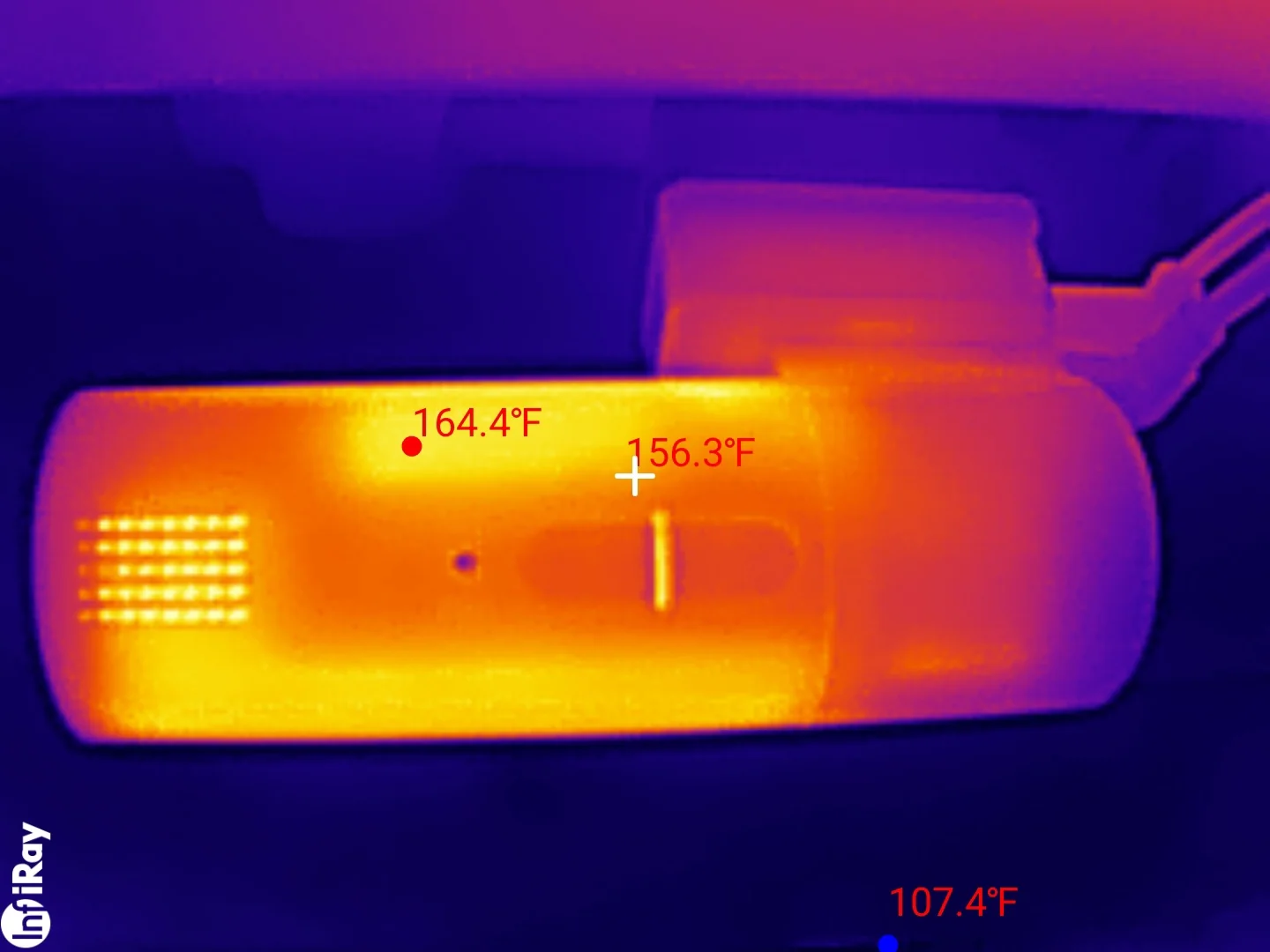
COXPAL rates the camera at 158 F (70 C), so the case passed the number on the box by six degrees. Two things are true about that. The rating is for the air around the camera, not its case, so it is not a spec violation as written. And the chip inside runs hotter than the case. What held up on both days is the rise: this camera runs 50 to 57 F hotter than whatever is around it. COXPAL's own manual prints a chart showing a cabin at 140 F on a 95 F day; add 57 to that.
And it kept recording. Every clip through that 164 F afternoon was exactly 300.000 seconds, every packet on the 33.3 millisecond median, the front channel seamless end to end; the rear dropped six tenths of a second at one joint, which it does now and then in any weather. COXPAL told me the camera has no thermal cutoff, by design. They also say its temperature plateaus rather than climbing; two spot readings on two days cannot test that, and the time series that could has not been run, so I make no claim either way.
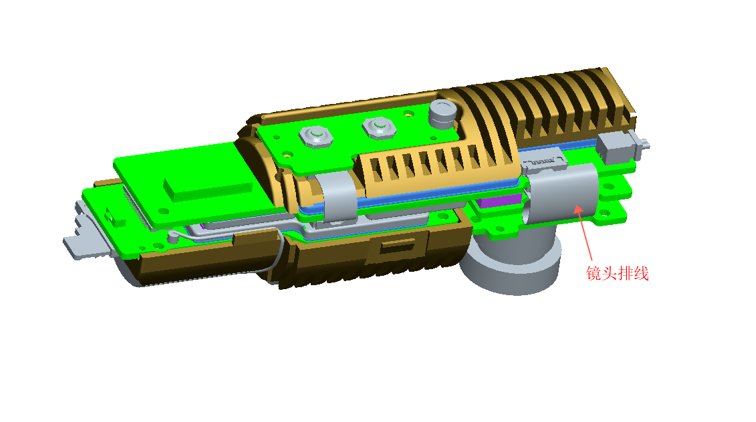
What helps is the construction. Inside the barrel is a finned block about 70 millimeters long that carries the lens at one end and the supercapacitor in a pocket behind it, with thermal pads between the main board's shielding and the housing. That is visible in the FCC filing's internal photos and in COXPAL's render above. It spreads the processor's heat into the body, which is why the case gets so hot: the design puts the heat there.
How sharp is the COXPAL A17D? The full chart results
The center of the chart is a Siemens star: 72 pairs of black and white spokes converging on a point, so the closer to the center you look, the finer the detail. DashCheck's star reader walks in from the rim and finds the radius where the camera stops separating the spokes. That radius, expressed as a percentage of the finest detail the camera's own pixel grid could hold (its Nyquist limit), is a resolution figure that does not depend on the camera's resolution or on how far away the chart is.
How the chart images on this page are made
Every chart image here is a crop of the camera's own recorded frame at 100 percent: one image pixel to one pixel on your screen, never scaled, saved as lossless PNG. That matters because the size difference between two crops is itself the finding; scaling a 2K crop and a 4K crop to the same size on the page would hide exactly what they show. On a high-density screen your browser enlarges every pixel by the same whole amount, without smoothing. Each card prints the camera, the declared resolution, the bench distance, the chart ID, and the session's light check: the spread across the chart's six identical grey patches, which says how evenly the chart was lit. Under the room lamps at the far mark that spread reads about 24 percent, almost all of it top to bottom, the lamps' reflection in the chart's laminate rather than uneven light on the star; the spotlight frames read 16 to 83 percent by design. Every reading on a card was re-measured from that card's own frame.
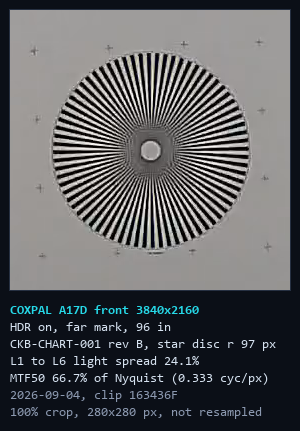
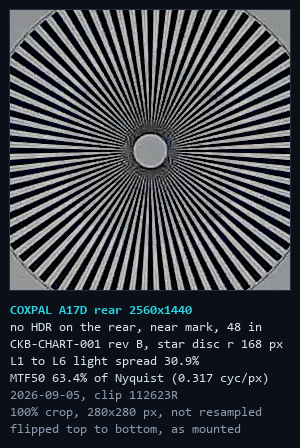
Left, the front camera at the 96-inch far mark: the spokes separate to 66.7 percent of its grid. Right, the rear camera, which only held still at the 48-inch near mark: 63.4 percent of its own grid on this frame, 63 percent as the median of eight still frames. The rear star is bigger here because it was twice as close, not because the rear resolves more; per degree of view, the front resolves about 1.27 times finer.
The front camera holds half its contrast (MTF50) at 66.4 to 66.7 percent of its pixel grid on September 4 and 5, a good result for a dash cam lens. It does wander from day to day: on September 17, same bench and same mark, it read 58 to 65 percent across the session's takes, with visibly lighter sharpening, so I quote it as 60 to 66 percent depending on the day. The rear resolves to 63 percent of its own grid, the median of eight still frames that ranged from 60 to 65 percent. In real terms, on the same physical star, the front resolves detail about 1.27 times finer per degree than the rear. That is less of a gap than 4K against 2K would suggest, because the rear makes good use of the pixels it has. The rear is doing its job; it is just a smaller job.
The near mark measured focus, not resolution
I got one of these wrong first, which is why I trust the chart. I shot the same star from four feet and got 44 percent; from eight feet, 67. Those cannot both be the lens, because this unit does not change with distance. The four-foot read was inside the camera's focus distance, so it was measuring focus. Dash cams are focused for the road, not the desk, and every front resolution figure here is from eight feet.
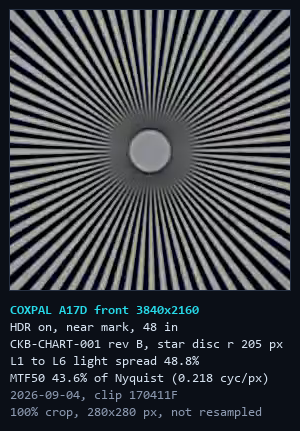
The front camera at four feet, same session as the far-mark card above: the grey core is far wider, 43.6 percent of the grid on this frame (44.3 in the session record). That is focus, not the lens's resolution.
Sharpening you cannot turn off
The tilted black squares are edges, and an edge shows how much contrast the camera reproduces at each level of fine detail. That number has a ceiling: a lens can only lose contrast, so it can never be above one. This camera reads 1.11 with HDR on and 1.24 with it off at half its Nyquist limit (1.13 on the card's own frame, all 16 edges). The processor is adding 11 to 24 percent more contrast than the scene has. The halos around edges measure about 51 percent of the edge height on the chart, and 24 to 37 percent on road footage, rising to 68 percent in high sun. That is the crunchy, outlined look on power lines and signs, and COXPAL told me plainly there is no sharpness setting. Every owner gets this, permanently. In its favor, the sharpening is even: horizontal and vertical edges get the same treatment to within eight percent, where some cameras sharpen one direction much harder than the other.
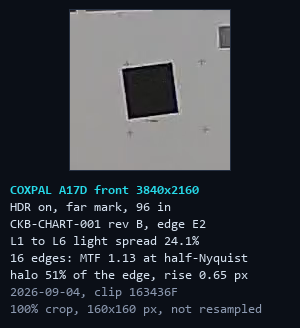
One of the four tilted squares at 100 percent. The pale band along each edge is the sharpening halo: 51 percent of the edge height on this frame.
The 2K mode is a crop of the sensor
There is a 2K mode for the front camera, and I wanted to know which of two things it does. If it scaled the whole sensor down, the chart would be the same size in both frames. If it cropped, the chart would get bigger. It got bigger: it fills 49.2 percent of the 4K frame and 74.1 percent of the 2K frame, and the star disc measures the same 206 pixels either way (205.5 and 206.5). So 2K mode is a window cut out of the middle of the sensor. You lose a third of your horizontal field of view, and because it is the same pixels at the same size, there is no low-light benefit either. 2K on this camera buys smaller files and nothing else. Leave it in 4K.
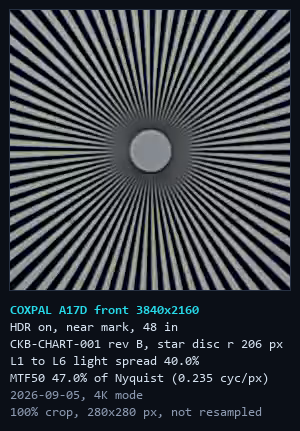
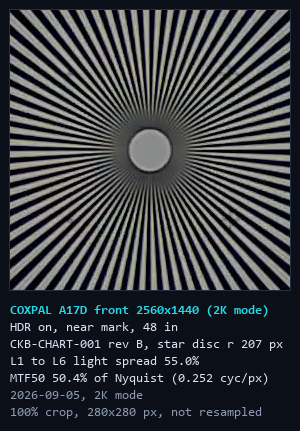
4K mode left, 2K mode right, same distance, both at 100 percent. Same star, same size in pixels (a disc of 205.6 and 206.6 pixels by the cards' own reads). A downscale to 2K would have drawn it at about 137.
Tone, and what red light costs
The grey ladder told me two things. Chart white recorded at 163 out of 255, about 1.2 stops under, which is the auto-exposure pulling a big bright panel toward middle grey; every dash cam I have put in front of this chart does it. And the print has two quirks, a pair of dark steps that are physically identical (the camera read them at 51.9 and 52.2) and a shadow step that dips where it should not, and the camera reproduced both exactly. That is how I know that when the camera does something odd, it is the camera.
Then I did something white light cannot. I lit the chart with a red LED and read the star again, camera untouched. Resolution fell from 65.2 percent of the grid to 51.5 percent, a factor of 1.27. The mechanism: a color sensor is a grid where only one pixel in four sees red, and the rest guess from their neighbors. Under white light every pixel is working; under red, three quarters of them are half blind. So a plate lit mainly by the brake lights of the car in front of you costs this camera about a fifth of its resolving power before you even count the lower light. I have never seen anyone measure that, and it applies to every dash cam with a color sensor.
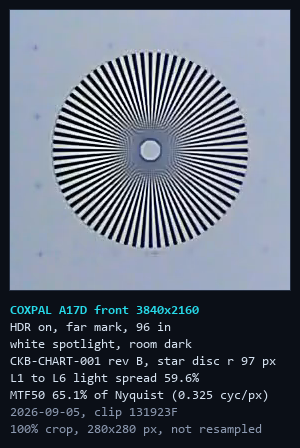
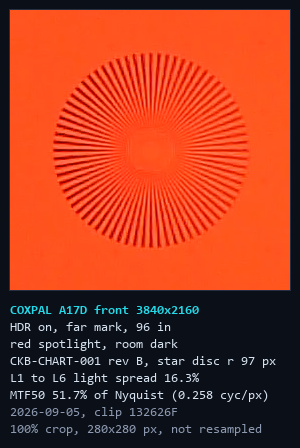
Same camera, same position, same star, white spotlight left and red right, both at 100 percent: 65.1 against 51.7 percent of the grid on these two frames (65.2 and 51.5 in the session record).
Distortion: a straight row of marks bows by 1.69 percent of its length about a quarter of the frame height below center (509 pixels), normal barrel for a 140-degree lens. Only one row was measurable, so there is no curve of distortion against position. What this review does not claim from the chart: anything about the true corners of the frame, which a flat chart cannot reach on a 140-degree lens, any absolute black level, and any color-patch number.
How small a plate can it read on the chart?
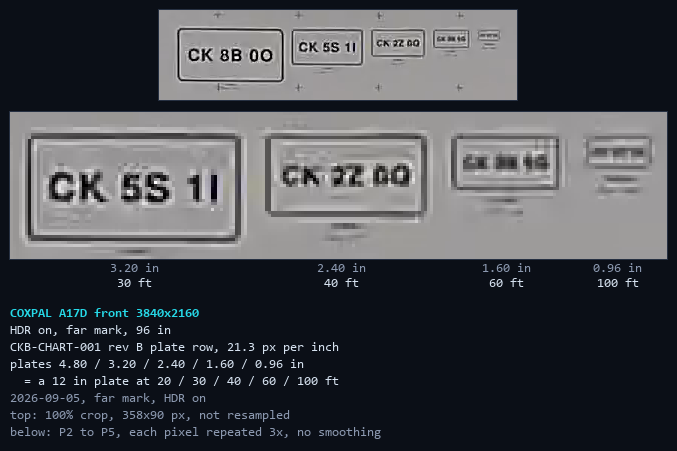
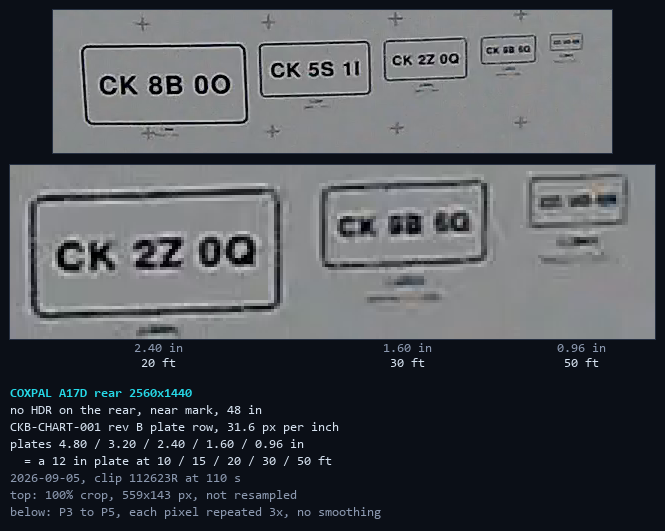
Along the bottom of the chart are five printed license plates, 4.80, 3.20, 2.40, 1.60 and 0.96 inches wide, and every one is set in characters that are easy to mix up: 8 and B, 5 and S, 1 and I, 2 and Z, 0, O and Q, 6 and G. A real plate is 12 inches wide, so from eight feet those five plates are the size a real plate looks from 20, 30, 40, 60 and 100 feet. This is a test of reading text at a known size, not a plate test. The chart's plates are printed flat and evenly lit, where a real plate is embossed or reflective and gets hit by headlights at night (the night section below is the real-plate test). Real plates also set their characters bigger in proportion, roughly two and a half to three inches tall, against about 1.8 inches if this chart's plate were scaled up to 12 inches, so treat these distances as conservative.
The front camera, at the eight-foot mark with HDR on as it ships, reads the two biggest plates cleanly, every confusable pair included: a plate at 20 and 30 feet. On the 2.40-inch plate, a plate at 40 feet, the characters are there if you already know what they say, but the 2 and the Z smear together and the Q has lost its tail, so I would not trust it. The 1.60-inch plate is a row of smudges. HDR off, and a second session on September 17, land on the same step. The rear only held still at the four-foot mark, where the same plates stand for a real plate at 10, 15, 20, 30 and 50 feet. It reads the 2.40-inch plate cleanly, tail on the Q and all, which is a plate at 20 feet; at 1.60 inches, a plate at 30 feet, the 8 runs into the B and the G turns into a Q. So on this chart the front holds every character to about 30 feet and the rear to about 20. The plates step by a factor of 1.5, coarser than the 1.27 times the star measured between the two cameras, so read those as steps, not exact distances.
Every chart result in one table
| Measurement | Result | Conditions |
|---|---|---|
| Front resolution, MTF50 | 66.4 to 66.7% of Nyquist | Far mark (96 in), HDR on, September 4 and 5; 58 to 65% across the takes of September 17 |
| Front resolution, MTF10 (faint detail) | 79 to 86% of Nyquist | Far mark, across sessions; a 2K upscale cannot pass 67% |
| Rear resolution, MTF50 | 63% of Nyquist | Median of eight still frames at the near mark (60 to 65%) |
| Front against rear, per degree | about 1.27x finer | Same physical star |
| Field of view | front about 25% wider | Same star fills 2.75% of the front frame, 3.44% of the rear; both listed at 140 degrees |
| Near mark (4 ft) against far (8 ft) | 44.3% against 66.7% | The near mark is inside the focus distance |
| Sharpening, MTF at half Nyquist | 1.11 HDR on, 1.24 off | A lens alone cannot exceed 1.00 |
| Edge halo | about 51% on the chart | 24 to 37% on road footage, up to 68% in high sun |
| Sharpening, horizontal against vertical | within 8% | Even in both directions |
| 2K mode | a crop | Chart 49.2% of the 4K frame, 74.1% of the 2K; star disc 205.5 against 206.5 px |
| High bitrate (36.9 Mbps) | +6.7% at the near mark | Clips 12 minutes apart; inside the day-to-day wander |
| Red light | 65.2% to 51.5%, 1.27x | White and red spotlight, camera untouched |
| HDR on against off, resolution | 65.2% against 63.6% | Under a spotlight, 6 seconds apart; 66.4% against 64.2% under the room lamps |
| Chart white | 163 of 255 | About 1.2 stops under; the print's identical steps read 51.9 and 52.2 |
| Chart plate row, every character read | front to a 30 ft plate, rear to 20 ft | Printed plates 4.80 to 0.96 in in confusable characters; front at 8 ft (HDR on and off, two sessions), rear at 4 ft; printed flat, not a real plate |
| Distortion | 1.69% row bow | One row, 509 px below the frame center |
Does HDR help on the COXPAL A17D?
COXPAL says HDR on is better in most situations. That is a testable claim, so I toggled it mid-drive and let DashCheck count pixels. In daylight with HDR off, the worst frame had 14.7 percent of the picture at pure white: sky gone, no cloud, no structure. With HDR on, the worst frame was 0.39 percent and the typical frame 0.02, on the same road at matched brightness (an average level of 114 with HDR on against 118.5 off, so this is dynamic range rather than a darker exposure). I repeated it indoors on the chart under a spotlight and got 0.006 percent against 0.9, and at night on the chart, 0.07 against 0.58.
The cost is small and real. HDR on crushes about one percent of the darkest pixels to black, where HDR off crushes almost none. And it changes the tone curve: measured against the chart, HDR lifts the darkest step about 19 percent, the middle about 8, the near-white step 1, and white not at all. It compresses the picture from both ends into the middle, which is what HDR is supposed to do.
I want to be careful with one thing, because I nearly published it wrong. One outdoor session suggested HDR costs a quarter of the resolution. I then measured it twice more indoors, once on a deliberately high-contrast scene, and both times the star read the same with HDR on or off within three percent; the tightest pair is below, six seconds apart with the camera untouched. Two controlled tests say no cost and one says otherwise, so I am not claiming a cost. HDR also has nothing to do with the sharpening: turn it off and the road halos drop from 33 percent to 25, still far more than the picture needs.
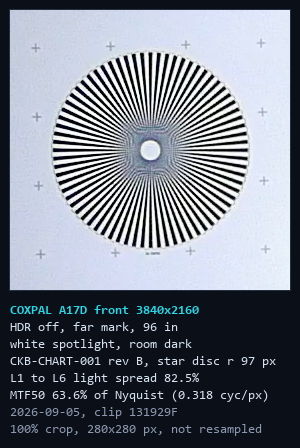
HDR on left, off right, six seconds apart: 65.1 against 63.6 percent of the grid. HDR costs this camera no resolution in a controlled test.
HDR on this camera behaves like Sony's Clear HDR rather than the two-exposure kind. COXPAL's answer named both of the sensor's HDR modes without saying which the camera uses, so I tested it: a card swung fast past the lens with HDR on left one smooth blur, never a doubled edge, and an overhead highway sign at speed came out as one continuous smear. Two exposures taken one after the other would leave a second edge on anything that moves between them. Fast-moving things smear a little instead of ghosting, which is what you want. The difference between the two HDR modes, and why it matters for a plate at night, is in the IMX678 explainer.
On the rear camera, the HDR switch does nothing. Not less; nothing. Same bitrate to the second decimal, same resolution, same halos, and the rear never prints the HDR tag on its own timestamp. That matters at night. Leave HDR on.
How does the COXPAL A17D look in daylight?
Daylight is where this camera is easy to like. Stopped at a light behind three cars across three lanes, DashCheck found every plate at zero percent blown. The one that surprised me was an SUV at the far left edge of the frame, at an angle, where a wide lens usually gives up: six of its seven characters were readable, and the seventh was hidden by something on the SUV itself, not by the lens.
On a midday highway drive with the sun high over dense trees, the typical frame had 0.01 to 0.14 percent blown across fifteen clips, and the worst frame was 1.82 percent. Then I drove into a sunset: twenty-five minutes of light falling from full daylight to dusk, the frame's average brightness sliding from 84 to 47 out of 255 while the blown highlights stayed at 0.00 to 0.03 percent the whole way down. DashCheck found no exposure steps anywhere in that ramp, so the camera never lurched; it slid, which is what you want going into a tunnel.
Where it does show strain is the encoder. Bright sun over dense trees and the grainy picture at dusk are the busiest scenes it sees, and that is where compression blockiness crosses the line where artifacts become visible: a blockiness score of 1.19 to 1.51 in bright sun and 1.24 to 1.33 on the darkest dusk clips. That is the 33 megabit budget again, and one more reason to turn on High bitrate.
Can the COXPAL A17D read license plates at night?
The front camera can. Night driving first: the frame averages around 30 out of 255, which is dark, and the camera keeps both ends of it. Blown highlights 0.00 to 0.02 percent, crushed blacks a quarter of a percent at most. Street lights and signs read, and the shadows off the side of the road are dark but not gone. For a single-exposure dash cam that is the best tonal result I have measured.
Now the test that decides whether a dash cam is evidence or scenery. A license plate is a mirror for your own headlights: the camera opens up for a dark road, and the plate throws the light straight back at it.
A car stopped in front of me at a light, plate square in my beam: DashCheck drew a box on the plate face and counted 1.1 percent of it blown, 2 percent on the worst frame, and every character plus the state name was readable at every instant, including through the bloom when they hit the brakes. Following another car at 33 miles an hour, under five percent blown and still readable.
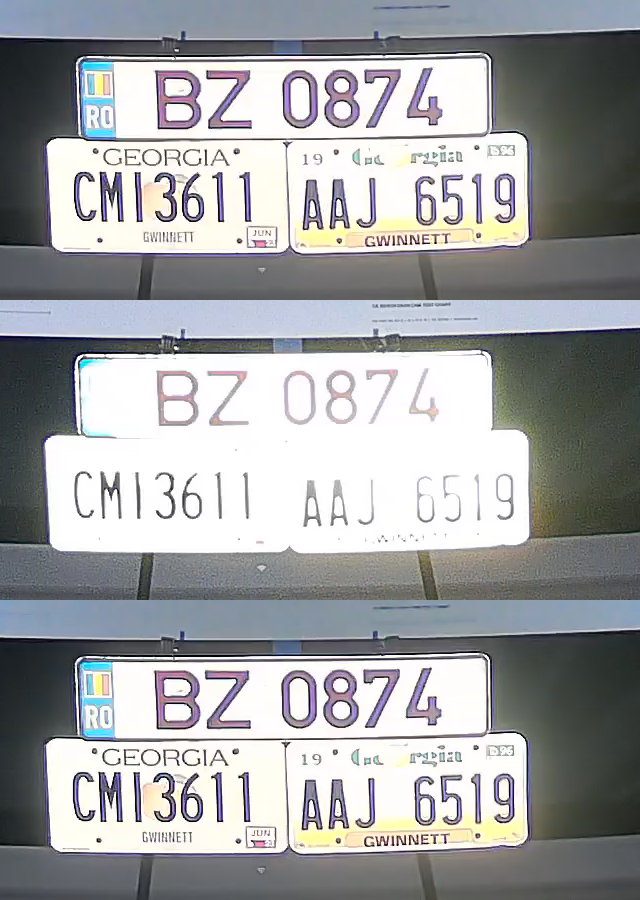
That is the front. I could not get a rear camera plate shot at night on the road, so I built the situation on the bench: three real plates under the chart, a spotlight eight inches from the lens so the light comes back at the camera the way headlights do, the room dark, both cameras looking at the same plates at the same second.
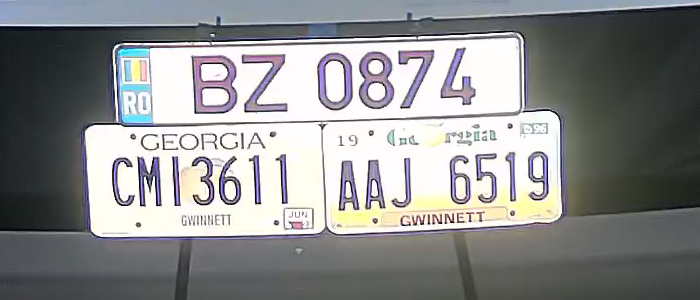
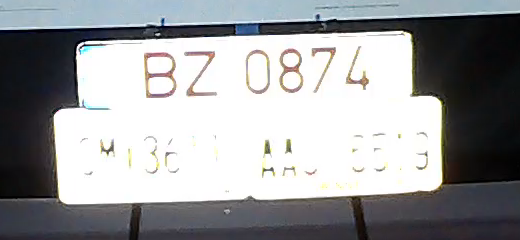
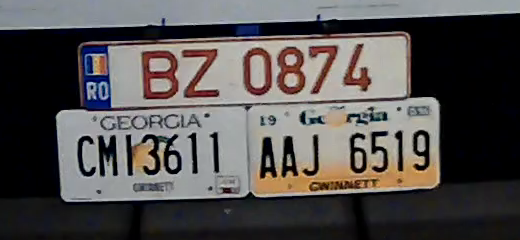
The rear has no HDR, the front does, and this is the exact scene HDR exists for. I measured the mechanism frame by frame. When the light comes on, both cameras settle their exposure in under two seconds (0.83 and 1.70 seconds), and both settle to the same target: a frame that averages about 26 out of 255, because most of the frame is a dark room. The plate is a tiny bright thing in a big dark picture, and a camera that meters the whole picture will always sacrifice it. The front survives that because HDR keeps a shorter exposure in reserve; the rear has nothing in reserve. And for about two and a half seconds while the spotlight was still coming up, the rear read all three plates perfectly, until its own exposure loop pushed them to white. It had the plate and gave it away.
To prove it is the HDR, I ran the same setup with the front camera's HDR switched off, then back on, three clips in a row without touching anything else. HDR off: 78.7 percent of the same plate face blown, contrast down from 202 to 132, and the plates bloomed into one white slab; the characters survived as thin strokes. HDR on again: 4.6 percent blown, contrast 209. The other two plates told the same story (19.5, 81.4 and 11.7 percent; 27.1, 65.5 and 14.5 percent). That is the whole difference on one switch, and the rear camera has no switch. On this camera, HDR is the plate setting.
One more bench beat, because oncoming headlights are the other night failure. I pointed the spotlight straight into the front lens from a few feet away. With HDR on, the lamp itself never clipped more than a quarter of one percent of the frame (0.11 to 0.24), the black backdrop across the room lifted from about 10 to about 20 out of 255, and a small purple ghost of the lamp appeared in the opposite corner. A glow and a lifted floor, not a white wall. I only ran it with HDR on, so that is all it says.
How good is the COXPAL A17D rear camera at night?
The rear's problem is not only plates. On a sunset drive I ran both cameras through the same light at the same instants, and as the light fell the rear's real detail fell with it, step by step, while the front's stayed flat. On the darkest clip the rear crushed 25 percent of a typical frame to pure black and 53 percent of the worst one; the front, under half a percent. It sharpens gently, at about half the front's halo (14 to 22 percent against 24 to 37), so what it does record looks natural. It just does not record much of the dark. On a pre-dawn drive, through my tinted back window, it sent 11 to 62 percent of a typical frame to black.
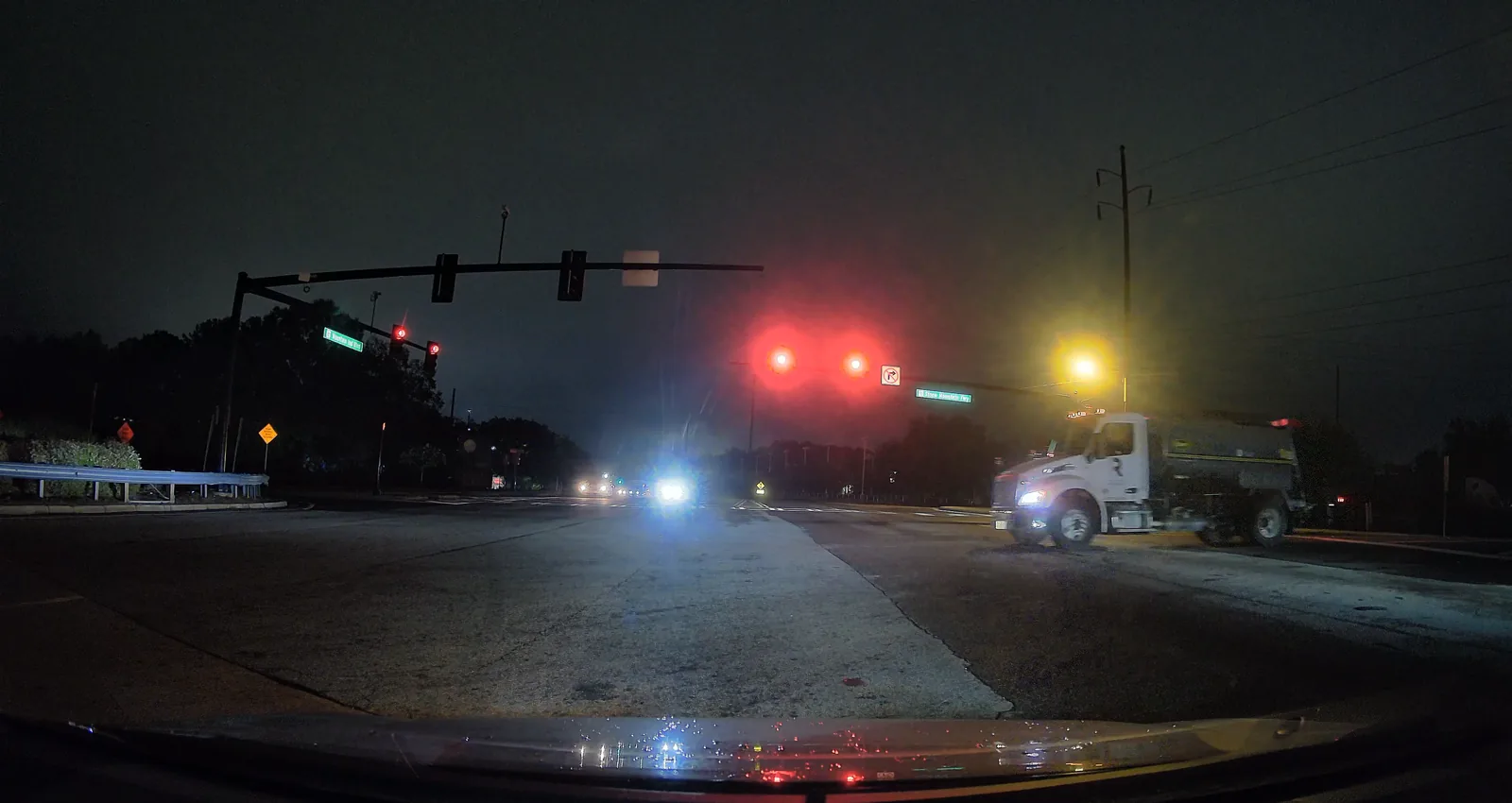
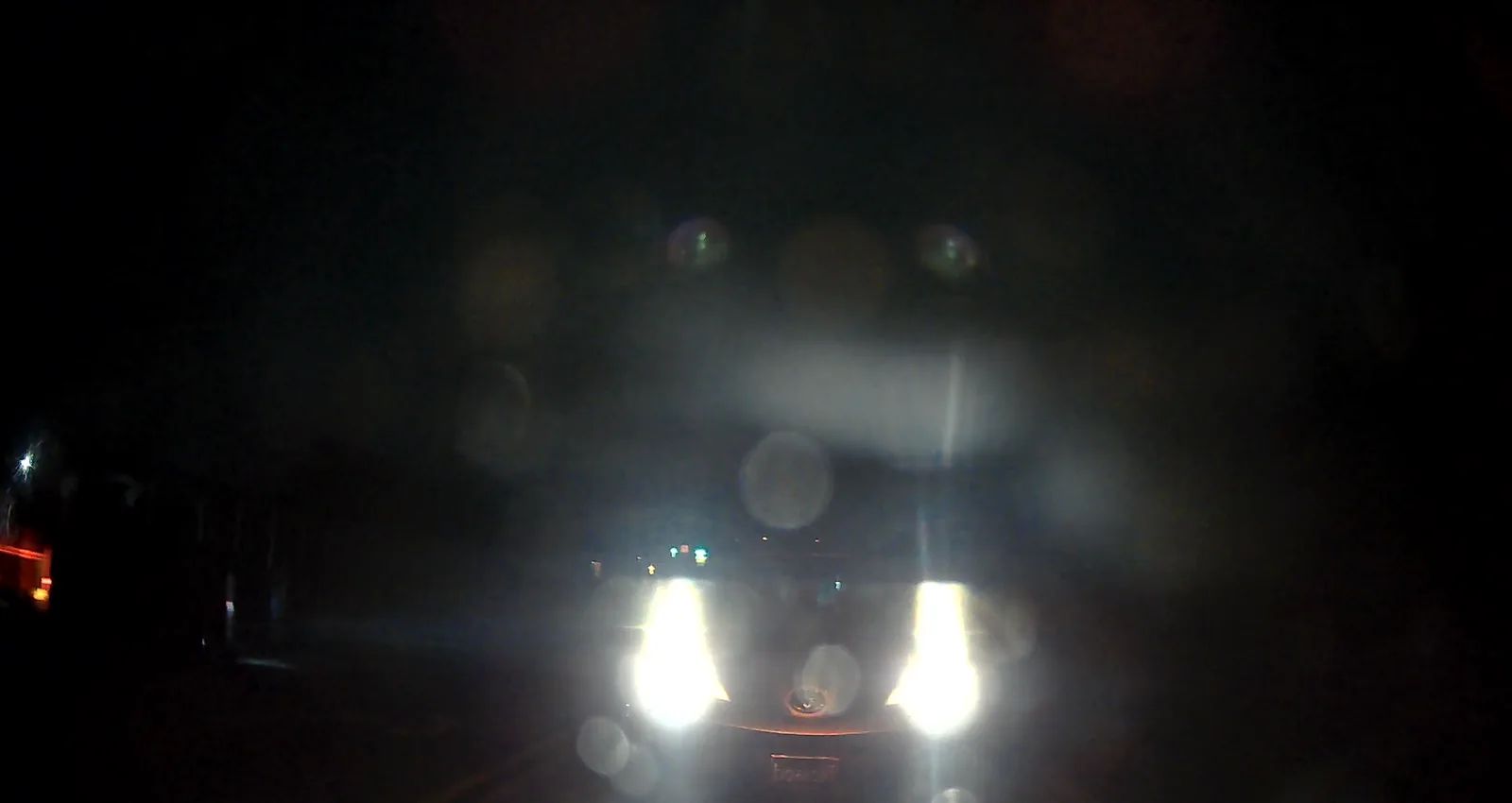
The manual pre-excuses the rear by blaming window tint, and to be fair, every car's back glass is different, and most reviews only ever show the rear camera through it. Mine is tinted. I put a light meter on it: my back glass passes 27 percent of the light and my windshield 74, so in my car the rear starts every night with about a third of the light the front gets. So I took the tint out of the equation and stuck the rear camera on the windshield, about an inch from the main camera, behind the same clear glass.
Even in daylight it struggled under a wide overpass with cars all around. The rear exposed for the bright opening ahead and everything under the deck went dark: the plate on the pickup in front of me was 96 pixels wide on the rear, twice the size of plates it reads fine in the open, and it came out as a ghost with a contrast of 10 out of 255. The front read the same plate at 123. That is not the glass; both cameras were behind the same windshield.
Then I went out before sunrise, stopping behind cars on lit roads and dark ones, and the rear surprised me. Stopped behind a Lexus, a Camry and a pickup, it read every plate. It is softer than the front, the small print around the plate goes first, and the contrast inside the plate was about 60 to 75 percent of the front's, but every character was there. The pickup's plate, down in its bumper, came back much brighter on both cameras, about 10 percent blown on the front and 58 to 75 percent on the rear, and I could still read it.
Anything moving is a different story. Passing a parked SUV at 23 miles an hour, the front read its plate and the rear recorded a smeared white rectangle. Someone walking by a crosswalk sign is clear on the front and a dark smudge on the rear that you have to brighten the picture to find. And outside my headlights it still goes black: across all thirty driving clips the rear sent 12 to 68 percent of the frame to pure black, about a third on a typical clip, against a third of one percent on the front. Through the tinted glass it had been 11 to 62. With nearly three times the light, the rear made the same picture at about the same brightness, because it aims for that brightness whatever glass is in front of it. The tint is not what turns its shadows black. That is the camera, and it has no HDR to fall back on.
I have to be upfront about one thing. Facing forward, the rear was reading plates lit by my own headlights, which is the best this camera can do. Facing backward, where it lives, the car behind shines its headlights straight into the lens, and its front plate, if it has one, is lit by nothing but my taillights. Under streetlights it holds up; on a dark road with someone behind you, you get two headlights and nothing else.
And here in Georgia, one of 22 states that issue only a rear plate (as of September 2026), the car behind you often has no plate facing your rear camera at all. So at night the rear camera's real job is recording the car itself, its make, color and damage, and on a dark road it cannot do that either.
How long does COXPAL A17D parking mode last? The overnight battery curve
Parking mode needs constant power, which means a hardwire kit, which means the fuse box, which is why most reviews skip it. So instead of my car, I built a bench: a 7 Ah sealed lead-acid battery, COXPAL's own hardwire kit, a battery monitor logging the voltage every ten seconds, a USB power meter at the camera end of the cable, and a toggle switch on the accessory (ACC) wire. Flip the switch and the camera thinks the engine just went off.
It switches over cleanly. About 7 to 8 seconds after the drop the normal clip closes and the parking clip opens, with no power cycle in between, and normal recording is back 4 to 6 seconds after the accessory line returns. GPS and WiFi both turn off in parking mode: in the car, all 900 parking frames on both channels carried no GPS fix, the 80 milliamp step WiFi adds was missing from the parking draw, and a scan from my phone found no network.
There are two recording parking modes, a time lapse at one frame a second or full 1080p video at 30, and COXPAL's own table says the time lapse uses more battery: 10 amp-hours over 24 hours for time lapse with both cameras, 9 for 1080p with both, 6 and 5 with the rear off. That sounds backwards, and it is true. The time lapse runs the whole 4K pipeline and keeps one frame in thirty (the files are 3840 by 2160 at one frame a second in a 30 fps container, so a minute of parking plays in two seconds), while 1080p mode really drops both channels to 1920 by 1080 at a real 30 frames per second.
| Parking mode | Measured at the camera (5 V) | COXPAL's claim (12 V, per 24 h) |
|---|---|---|
| Time lapse, front and rear | 0.725 A, 3.81 W | 10 Ah |
| 1080p, front and rear | 0.605 A, 3.17 W | 9 Ah |
| Time lapse, front only | 0.477 A, 2.51 W | 6 Ah |
| 1080p, front only | 0.350 A, 1.85 W | 5 Ah |
The measured ratios (1.00, 0.83, 0.66 and 0.48) line up with COXPAL's (1.00, 0.90, 0.60 and 0.50), and the absolute figures agree with their table at any converter efficiency between 72 and 90 percent. The rear costs 0.25 amps, 1.3 watts at 5 V, in both modes. Parking mode here is recording with the encoder throttled, not a sleep state: normal front-only recording with WiFi off draws 3.01 watts, so time lapse saves only 17 percent of that and 1080p 39. In the parked car the time-lapse draw repeated within 3 percent (0.708 A, 3.71 W). These are the figures the A17D preset uses on my dash cam parking mode battery calculator.
The 15-minute shutdown was a setting
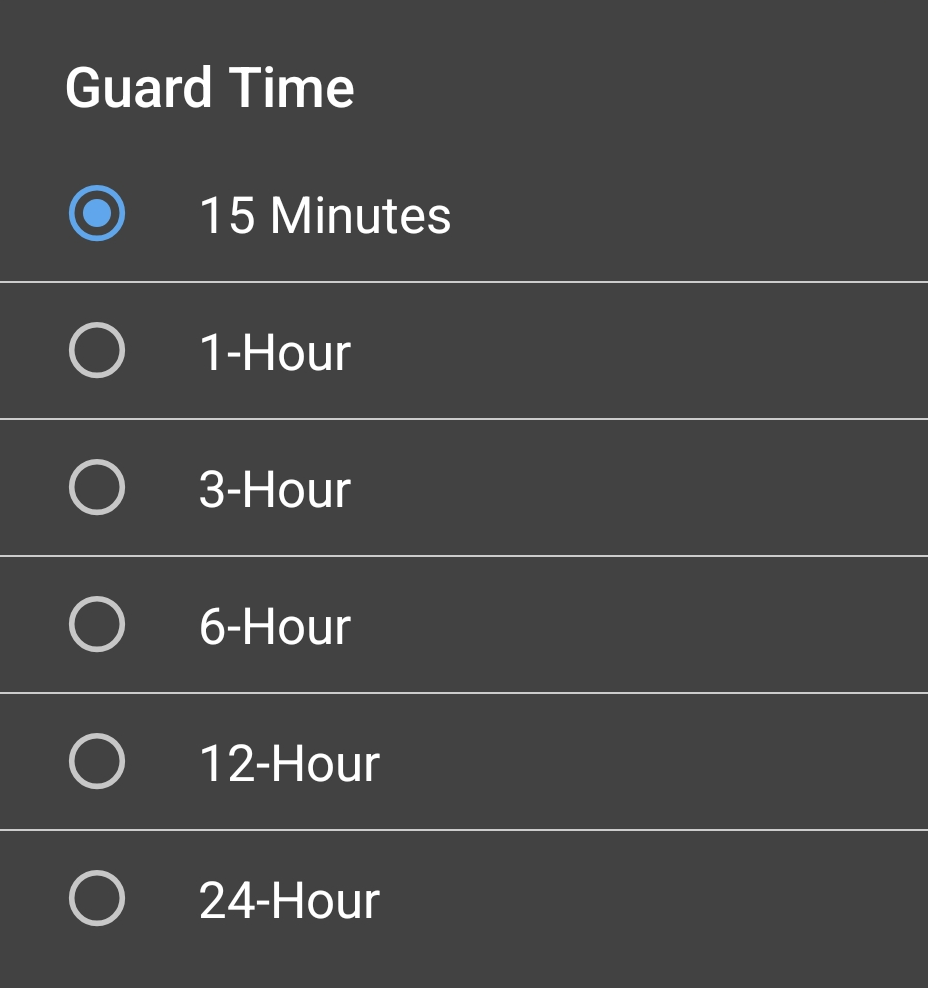
The first time I tried it in the car, it shut itself off after exactly 15 minutes and 18 seconds of parking, with the battery at 12.64 volts and the kit still supplying 5.36. It closed both files cleanly, played its power-off tone, turned its LEDs off, and dropped to 21 milliamps. That turned out to be a setting called Guard Time, with options of 15 minutes, 1, 3, 6, 12 and 24 hours, and mine was on 15 minutes, the factory default. The manual lists the 15-minute stop under the cigarette lighter column, so it is easy to miss. Set Guard Time to 24 hours in the app before you rely on parking mode. After Guard Time ends, the camera's 21 milliamp standby is about 0.2 amp-hours a day at 12 volts, before the kit's own standing draw.
The overnight run
With Guard Time at 24 hours, the app disconnected, and dual time lapse running, I opened the accessory switch at 17:54:11 on September 20 and left it. The camera ran for 9 hours and 33 minutes, until the kit cut it at 03:27:20 with the battery at 11.93 volts, against the kit's rated 11.9. The battery then rested back up 250 millivolts to a flat 12.17 volts over the next two and a half hours, and nothing switched back on.
Battery voltage at the posts, ten-minute means of the battery monitor's ten-second record, hours after the accessory drop. Solid: the parking load. Dashed: the rest after the kit cut it. Room temperature 76 F (24 C).
| Clock | Hours after ACC off | Battery (V) | What is happening |
|---|---|---|---|
| 17:54:11 | 0 | 12.81 | ACC off, time lapse starts |
| 18:00 | 0.1 | 12.80 | Parking |
| 19:00 | 1.1 | 12.67 | Parking |
| 20:00 | 2.1 | 12.56 | Parking |
| 21:00 | 3.1 | 12.47 | Parking |
| 22:00 | 4.1 | 12.38 | Parking |
| 23:00 | 5.1 | 12.30 | Parking |
| 00:00 | 6.1 | 12.22 | Parking |
| 01:00 | 7.1 | 12.13 | Parking |
| 02:00 | 8.1 | 12.05 | Parking |
| 03:00 | 9.1 | 11.95 | Parking |
| 03:27:20 | 9.55 | 11.93 | Last loaded reading; the kit cuts the camera |
| 04:00 | 10.1 | 12.15 | Resting, nothing switched back on |
| 05:00 | 11.1 | 12.17 | Resting |
| 06:00 | 12.1 | 12.17 | Resting |
At the camera, the meter counted 7.37 amp-hours and 38.7 watt-hours at 5 volts over the run, an average of 0.771 amps and 4.05 watts, about 6 percent above the desk-hour figure. On the 12-volt side the bench has no current sensor, so the draw comes from the battery itself: taking the usual working assumption that 60 percent of a 7 Ah battery is usable down to the cutoff, the run works out to 0.40 to 0.44 amps, which is 9.5 to 10.6 amp-hours a day. COXPAL's 10 amp-hours a day for this mode is 0.42 amps, inside that band. Their figure is consistent with my measurement to the limit of what the method can tell; it cannot show whether it is exactly right or ten percent generous, and I would rather say that than round it to a pass. The kit's converter works out to about 75 to 83 percent efficient on the same assumption.
On a real car, that means this: a full 24 hours of time-lapse parking uses about 10 amp-hours, which is about a fifth of a typical 50 to 60 Ah car battery (16 to 21 percent across the measured band). So the 24-hour Guard Time ends the session long before a healthy battery runs down to the kit's cutoff, unless the battery is old or it is freezing out. To run your own battery through the numbers, the parking calculator carries the A17D as a preset. Its preset uses the desk-hour draw from the table above, so on the bench's 7 Ah battery it predicts 10.0 to 12.5 hours; the night itself ran 9 hours 33 minutes, about 5 percent under the 10.1 hours COXPAL's own 10 amp-hour figure implies, because that night's draw ran 6 percent above the desk hour and about 0.4 amp-hours had already left the battery while the camera recorded on the rig for 49 minutes before the switch.
The camera filmed its own cutoff
This is my favorite piece of evidence in the review. The camera was pointed at the bench dashboard all night, and its last frames show the moment the kit cut the power. Frame 182 of its final file shows the battery at 11.93 volts with the dashboard clock at 03:27:29. Frame 183 shows 12.01 volts and the cutoff banner at 03:27:30, and the next two frames the same at :31 and :32. The rear channel's last frame and the USB meter's timer both stop at 03:27:29. So the supply left, the rear went dark, and the front kept capturing for three more seconds on its supercapacitor with the cutoff on the screen in front of it, then closed both files cleanly. That is the supercapacitor doing the one job it exists for, under a real cut, with seconds to spare.
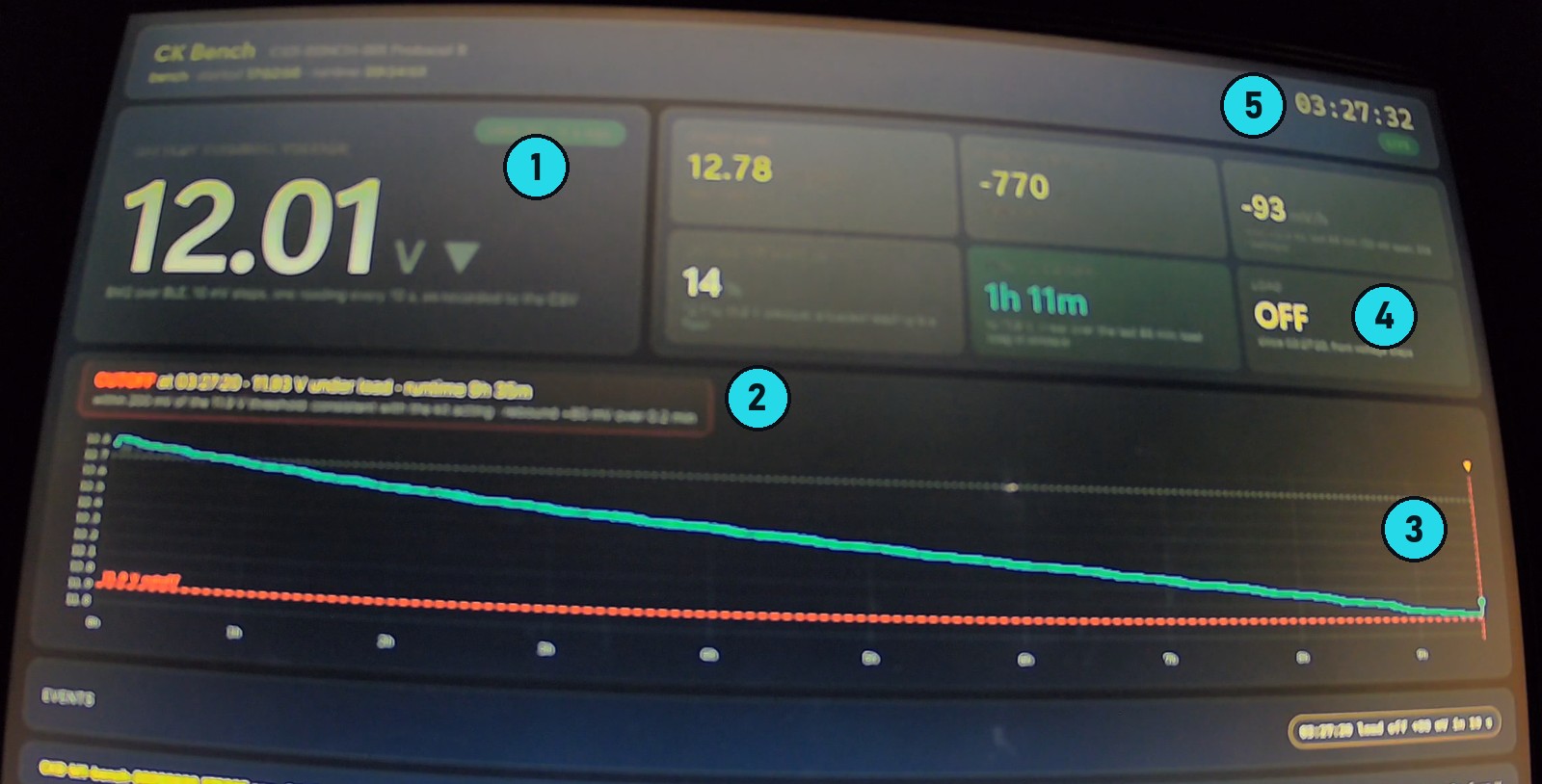
- 12.01 V: the battery has jumped back up from 11.93 V, because the camera's load is gone.
- The cutoff banner: CUTOFF at 03:27:20, 11.93 V under load, runtime 9 h 33 min.
- The night's discharge curve ends on the kit's 11.9 V line, drawn in red.
- Load: OFF. The dashboard reads that from the voltage step.
- 03:27:32 on the dashboard clock. The camera is still recording on its supercapacitor, three seconds after the cut; it closed both files after this frame.
Storage while parked
Storage is not the constraint in time lapse. It writes 15-minute files of 900 frames on both channels whatever the loop length (38 of them plus a tail over the night, 34,386 front frames, continuous), at 0.51 gigabytes an hour on the front and 0.28 on the rear, so a full 24-hour park is about 19 gigabytes and a 128GB card holds about six days of it. Just know that parking clips go into the same loop as your driving footage, with no separate parking folder and no lock. In 1080p parking mode with both cameras, at 9.15 gigabytes an hour, a 128GB card fills in about 14 hours, and then it starts overwriting the drive you parked after.
Not tested yet: whether a bump wakes the camera through the G-sensor after Guard Time has ended, and whether it comes back on its own when the accessory line returns after one. I will add both when they have run.
What do you need to buy with the COXPAL A17D?
The box covers the camera, the rear camera, their cables and the car charger. Two things you will want are separate purchases. I quote no prices here because they move, and this brand runs coupons, so check the listings on the day:
- A microSD card, because none is included: the SanDisk High Endurance I used for six weeks, or the SanDisk MAX Endurance 128GB for the longer warranty.
- COXPAL's 3-wire hardwire kit, if you want parking mode. It is the kit everything in the parking section was measured on.
The camera itself is the COXPAL A17D on Amazon.
Who should buy the COXPAL A17D, and who should not?
A main camera and a separate rear camera means two verdicts.
The front camera is the real thing. The 4K is native, and I measured it rather than trusting a part number. It reads a license plate in your headlights at a stop and while following, it held a sunset sky without blowing a frame, and at night it keeps both the highlights and the shadows. The compromises are a bitrate that is a little thin for 4K, which you should turn up, and sharpening you cannot turn off.
The rear is honest 2K, it looks natural, and in daylight it does its job. After dark it is a second angle, not a second witness. If a truck rear-ends you at a light, the rear will record a truck rear-ending you; on a dark road it will not give you the car, let alone the plate.
Then there is reliability. Once it is running, the recording is rock solid: 780 clips over six weeks without a bad frame, and parking mode that works the way COXPAL says, right down to their battery numbers. But it restarted itself six times in five weeks, three times into loops that recorded nothing for minutes, and the settings screen stops recording with nothing but a red light to tell you.Then there is reliability, and the recording itself is rock solid: 780 clips over six weeks without a bad frame, and parking mode that works the way COXPAL says, right down to their battery numbers. The one that would catch me out is the app: open the settings screen and the camera stops recording until you close it, with nothing but a red light to tell you.
Buy it if you want a genuinely native 4K front camera without paying flagship money, you are going to hardwire it, and you will treat the rear as a second angle. Turn the bitrate up, leave HDR on, set Guard Time to 24 hours, format your card in the camera with the two-second hold, and check that it is recording before you pull away.
Skip it if what you are actually worried about is being hit from behind at night. This rear camera will not give you the car, let alone the plate, and I would rather tell you that now than have you find out after something happens.
And COXPAL, the rear is the camera that needs HDR. On my bench the front blows that plate to 79 percent with HDR off and 5 with it on; the rear, which has no HDR at all, blows it to 85.
My rating: 3.5/5. The front camera alone earns a 4. Half a point goes for the startup restarts, six in five weeks and three of them loops that recorded nothing for minutes, because a dash cam's one job is to be recording when something happens.My rating: 4/5. That is what the front camera earns: a native 4K sensor that is measured rather than claimed, a plate you can read in your own headlights, and parking numbers that match the box. The point it drops is the rear camera after dark, the sharpening you cannot turn down and the bitrate you have to turn up yourself.
Frequently Asked Questions
Is the COXPAL A17D really 4K?
Yes, on the front camera. It uses a Sony IMX678, an 8.29 megapixel sensor with a native 3840 by 2160 grid, and the test chart backs the part number up: faint but real detail survives to between 79 and 86 percent of the pixel grid's limit across my sessions, where anything upscaled from 2K stops at 67 percent. The rear camera is a GalaxyCore GC4653 at a native 2560 by 1440, so its 2K claim is honest too.
Can the COXPAL A17D read license plates at night?
The front camera can. With HDR on, a car stopped at a light in my headlights had 1.1 percent of its plate blown and every character readable at every instant, and a car I followed at 33 miles an hour stayed readable. The rear camera has no HDR: on my bench it blew 85 percent of a plate under a spotlight and could not be read, and on a dark road it records the car behind you as two headlights.
How long will the COXPAL A17D run in parking mode?
On my bench, in dual time-lapse parking mode with Guard Time at 24 hours, it ran 9 hours 33 minutes on a small 7 Ah battery before COXPAL's hardwire kit cut it at 11.93 volts. That works out to about 10 amp-hours a day, which matches COXPAL's own figure and is about a fifth of a typical 50 to 60 Ah car battery, so on a healthy battery the 24-hour Guard Time ends the session long before the battery does, unless it is old or it is freezing out. Guard Time ships at 15 minutes, so set it first.
Why does my COXPAL A17D keep restarting?
Mine restarted six times in five weeks, always in the first minutes after power-up and never mid-drive. If it speaks a format prompt at every boot and then plays its power-off tone, it is refusing the card: format the card in the camera by holding the right button for about 2 seconds, waiting for it to say short press to confirm format, and pressing once. If it only chimes and resets about once a minute, reseating the charger plug cleared it once and moving off cleared it once; the cause of that kind is not established.
What microSD card should I use in the COXPAL A17D?
The box has no card. I used a SanDisk High Endurance 128GB for six weeks without a fault, and the SanDisk MAX Endurance 128GB also worked once the camera formatted it. The camera writes about 6.9 megabytes a second at its highest bitrate with both cameras recording, and both cards hold many times that on my card bench. Format whichever you buy in the camera, not on a computer.
Does the COXPAL A17D stop recording when you open the app?
Opening the settings or playback screens stops recording, and it does not resume until you close them. I left the settings screen open after a stop and the camera recorded nothing for 15 and a half minutes of driving. COXPAL confirmed the behavior. Close the app before you pull away.
Should I turn HDR on the COXPAL A17D?
Yes. In daylight HDR cut the worst frame's blown highlights from 14.7 percent to 0.39 percent, and at night it is what keeps a license plate readable: on my bench the same plate went from 79 percent blown with HDR off to 5 percent with it on. In two controlled tests it cost no resolution. The switch only affects the front camera; the rear has no HDR.
The bottom line on the COXPAL A17D
A brand I had written off sent the most complete paperwork I have ever received with a review unit, and the camera mostly lives up to it. The front is genuinely 4K and genuinely good at night, the parking numbers are honest, and the loop recording never dropped a frame in six weeks. The rear is a daylight camera. The startup restarts are a real flaw with no established cause yet. If you buy one, hardwire it, set it up the way this page says, and look at it before you drive off.
The chart, DashCheck and the parking bench each get their own write-up and video, and every dash cam I review from here on goes through the same chart, so the numbers on this page become a baseline.