
Mangoal 4K STARVIS 2 review: the hidden Corolla dash cam, now with real 4K
Mangoal's OEM-style camera for the 12th-gen Corolla is back with a genuine 4K Sony sensor and a 2K rear. I held it to everything I measured on the original in July, then measured what I couldn't back then.

Plays via YouTube. Google may set cookies when the player loads. Privacy policy
The short version
The Mangoal 4K STARVIS 2 fixes the two things that held the original back. The front camera is now a real 4K Sony IMX678 rather than a 5 megapixel picture stretched to fit, and it gets about 1.7 times the data. At night it holds onto streetlights and lit signs the original blew out, and its 2K rear holds the shadows better than any rear camera I've measured, even through tinted back glass. It still disappears behind the mirror like it came with the car. The catches: the front loses about a fifth of its fine detail once it warms up and sends a lot of the night to pure black, the clip length sometimes resets itself, and it won't warn you when the card is missing. With only my own low beams on them, neither lens read a plate. And there's no supercapacitor, though the listing used to claim one (Mangoal confirmed it and has fixed the listing), so the last couple of seconds before a power cut never reach the card.
Real 4K now; set it up, then leave it aloneDisclosure: Mangoal sent me this camera to review, along with their MG-OBD parking cable, which they sell separately and which I asked them to include. Both were free. Mangoal reached out after my review of the original and offered the new version. They did not pay me and are not reimbursing me for anything, they had no say in this review, and they did not see it or the video before either went live. This post also contains affiliate links. As an Amazon Associate I earn from qualifying purchases, at no extra cost to you. Affiliate links like these and my YouTube channel are what keep the site running.
Coming from the video? It points here for the heat readings and the measured field of view. This page also keeps every number the video cut for time, from the factory reset to the power-cut timing and the parking sleep test.
What changed from the original Mangoal for the Corolla?
In July I reviewed Mangoal's original OEM-style dash cam for the 12th-gen Toyota Corolla. It disappeared behind the mirror better than anything I had installed, and the build felt factory. The video didn't hold up as well. Its "4K" came from a 5 megapixel Sony IMX335 stretched to fill the frame, at a fixed 18.6 megabits per second, and at night a plate on a stopped car came back as a white rectangle. My verdict was to buy it for how it disappears, not for how it records.
After that review, Mangoal reached out with the new version, sold as the 4K STARVIS 2, with a 2K rear camera in place of the original's 1080p. I put the new camera in the same car. So this is a follow-up: the original's findings are the yardstick, plus a few things I couldn't measure back then.
What I wanted and couldn't do was run the two at the same moment, because the original's card slot stopped taking cards first. What I found instead is that the original had been quietly writing its GPS position into every clip. I drive the same roads all the time, so I matched the two cameras by location, months apart. That's where the old against new comparisons below come from.
Both versions are still on sale
Mangoal still sells the original beside the new one, for the same 2023 to 2026 Corolla and Corolla Hybrid (Model A, and not the Corolla Cross), so it's easy to buy the wrong one. The new one has HDR, STARVIS 2 or IMX678 in its title and a 2K rear. The original's listing still says 4K, names the IMX335 in its bullets, and comes with a 1080p rear. The new one also costs noticeably more, and both prices move, so compare the two listings on the day.
What comes in the Mangoal 4K STARVIS 2 box?
On top there's a stack of instruction cards, and right under them the memory card: a 128 GB Lexar Silver Plus (V30, U3, A2). I've reviewed that exact card on my card bench, where it scored 4.5 out of 5, so it's a good card to find in the box. The original came with a plain Kioxia card.
Then the GPS module, the rear camera's cable and the rear camera itself, the biggest change you can't see from the outside: it's 2K now instead of 1080p. Next comes the lane assist power adapter, the Toyota harness that lets the camera run off the car without cutting a single wire. In my box, Mangoal also put their MG-OBD parking cable. After that, a trim tool, the manual and, at the very bottom, the main unit. It's the same shape as the original, since it has to fit the same spot. It's pretty much the same kit as last time, which honestly is a compliment.
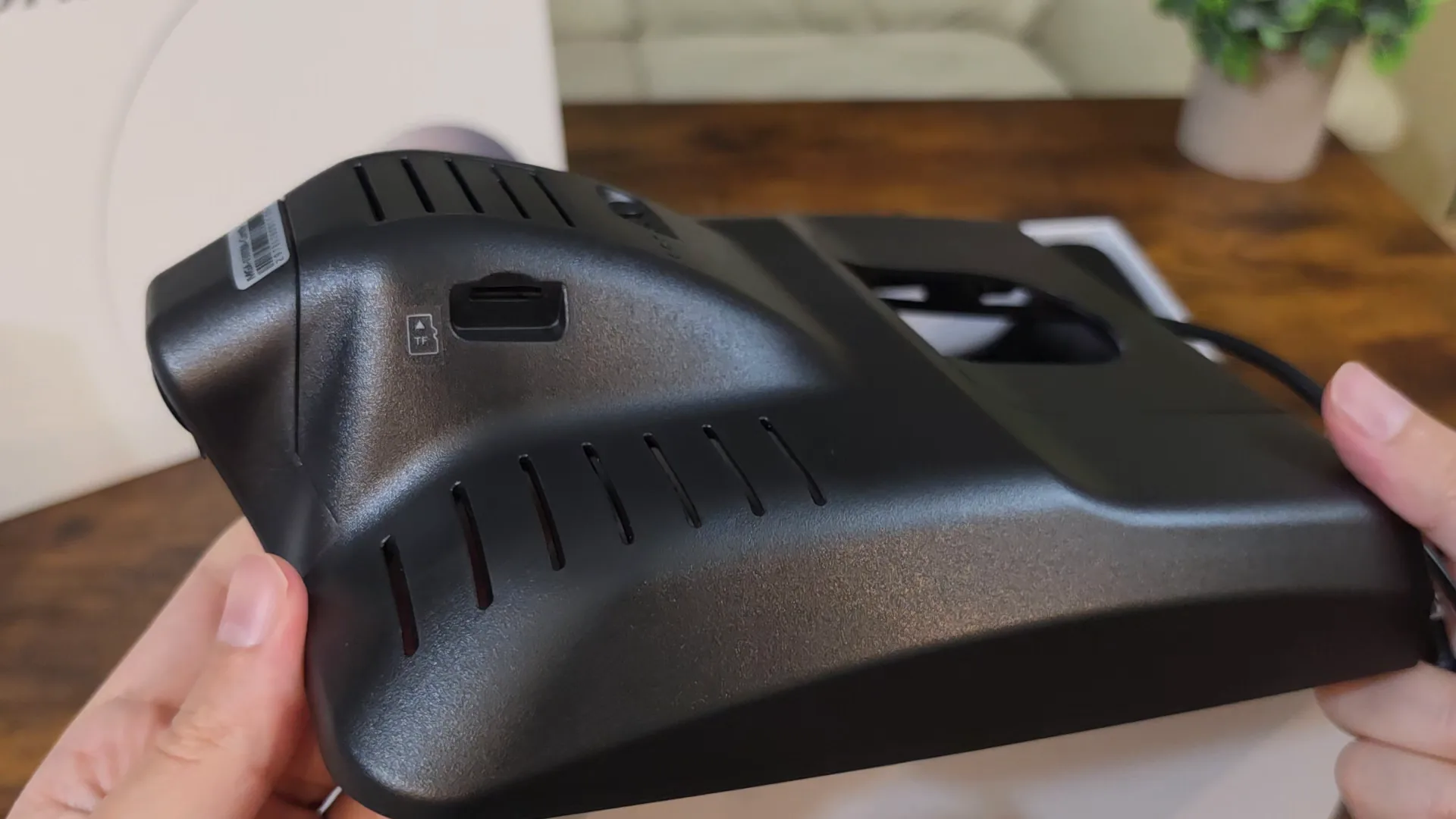
In the hand it's the same story as the original. Nothing about it feels cheap. The panels line up perfectly; it doesn't creak, and the plastic feels solid. Mangoal told me the mount and the harness are identical to the original's.
The one thing I really wish they'd changed is the GPS. It's still a separate little receiver on a stupidly long cord, and there's room for it inside that housing. On a camera whose whole point is that you can't see the wiring, that's a little silly. Amazon's own bullet admits it: "The GPS function is not built-in". The GPS section below covers how well it works, which depends a lot on where you put it.
How do you install it in a Corolla?
Exactly like the original. Mangoal confirmed the mount and the harness didn't change, so the full walkthrough in my review of the original still applies. The clips come already fitted, as they did on the original, so there's nothing to move over from your factory shroud. Power comes off the connector for the car's lane assist camera behind the mirror, so there are no fuse taps and no cut wires. It's the best part of this whole category of camera, and it's still great here. If you want parking mode, that's a different cable, and the parking section covers it.
For every road test, the main unit sat where it's meant to, installed in its housing behind the mirror. The rear camera is a different story. My back glass is tinted, so for most of the testing I mounted the rear on the windshield beside the front, facing forward, which also lets me compare the two lenses on the same scene. Every rear result on this page says which way it faced. For the last three drives it went where it belongs, on the back glass facing back.
The first drives ran on the lane assist adapter, as it comes. From late October I ran it on the MG-OBD cable instead.
How did I test the Mangoal STARVIS 2?
With the same tools as my last few dash cam reviews, introduced properly in the COXPAL A17D review: a printed 48 by 27 inch (122 by 69 cm) test chart on an easel, and DashCheck, software I wrote that reads every clip a camera writes to its card. Parking mode ran on a battery bench down to the camera's own cutoff. On the road I drove it for about three weeks with other cameras running beside it, mostly the VIOFO A119M Pro.
Every figure here comes from one unit, tested between September 17 and November 8, 2026, on the firmware it shipped with. I never updated it.
Is the Mangoal 4K STARVIS 2 really 4K?
Yes, this time. STARVIS 2 is a family of Sony sensors, not a resolution. There are STARVIS 2 sensors made for 1080p and ones made for 4K, so the part number is what tells you. Here the front is an IMX678, and that's not just Mangoal's word, it's the camera's own firmware. Mangoal's support sent me an update file, and inside it there's a driver for exactly one sensor, the IMX678, and nothing else. The same file names the processor, a Novatek NT98529. Inside that chip are two ARM Cortex-A9 cores, which the firmware runs at 960 megahertz, and it gets 512 megabytes of memory to work with.
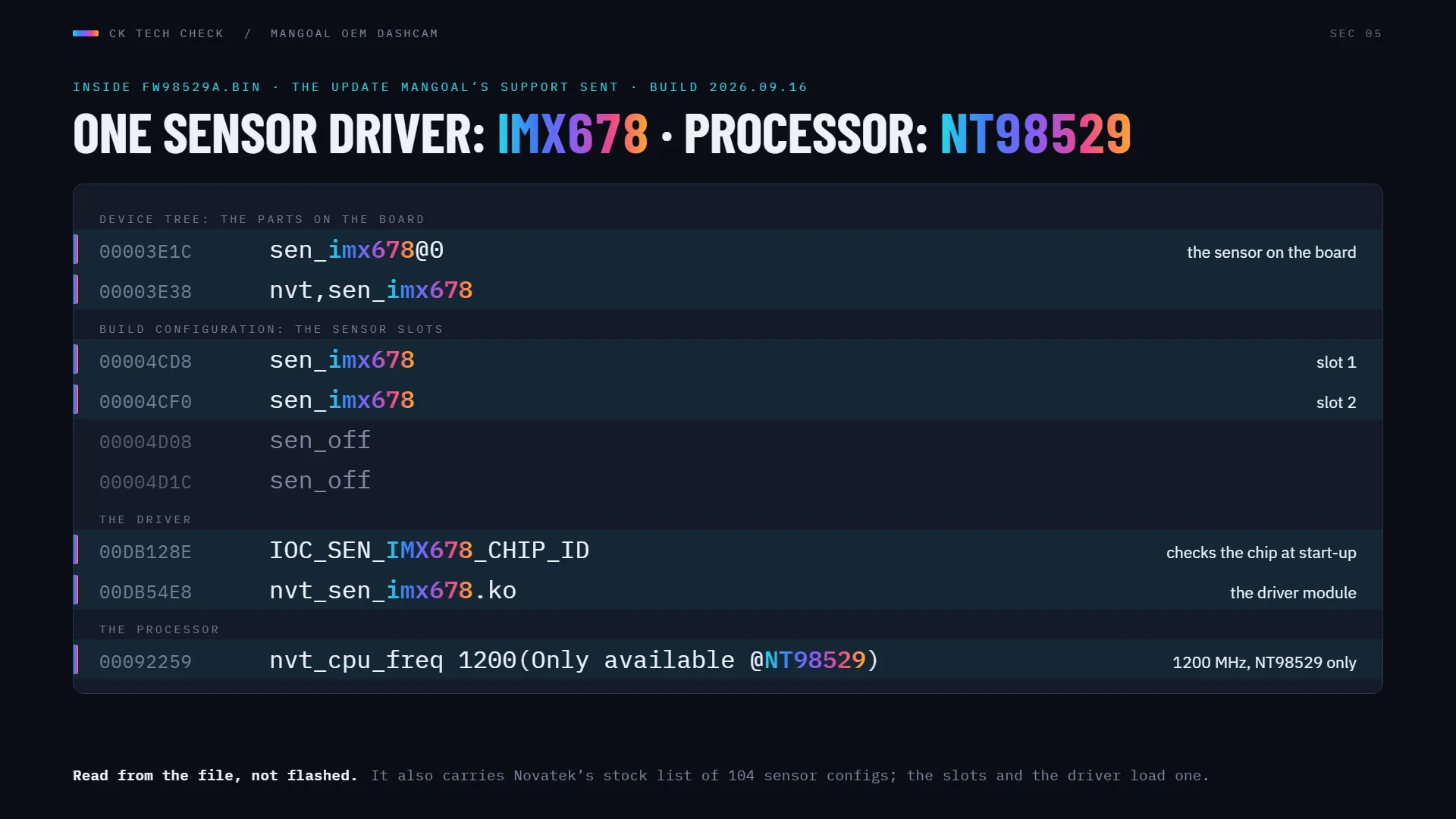
That sensor is 3856 pixels across, and 4K is 3840. So this time the 4K is the sensor reading itself out, not a 5 megapixel picture blown up to fill the frame. That was my main complaint last time, and they fixed it. Pretty cool.
The NT98529 and IMX678 are the exact pairing inside the COXPAL A17D, which makes that camera a useful twin: same processor, same sensor, different tuning. The VIOFO A119M Pro has the same sensor on a different Novatek processor. I wrote up why the same IMX678 looks different from one dash cam to the next, and this camera turns out to be a good example.
The rear camera is an IMX675, according to Mangoal. I can't confirm that one from the firmware, because the rear talks to the main unit over USB and runs its own code. What I can tell you is that it records 2560 by 1440, which is what that 5 megapixel sensor would give you in a wide frame.
Bitrate: about 1.7 times the original's
The original wrote 18.6 megabits per second in a format called TS. This one writes MP4 at almost exactly 32 megabits per second on the front and about 16 on the rear (13.9 to 16.5). So the front gets about 1.7 times the data, and this time it's describing a sensor that actually captures 4K. It's still a fixed rate, 31.95 on every full clip I measured, day or night, empty road or busy intersection, but it's a much healthier number. One caveat I come back to in the old against new section: the original used HEVC, which gets more picture out of every megabit than this camera's H.264.
There's also a 2K mode at 60 frames per second, and on the chart that one is a straight crop out of the middle of the sensor, not a downscale. You lose field of view, not detail. Last time I told you to run the original in 2K, because its 5 megapixel sensor made 2K the native mode. Not this time: 4K is the native mode now, so leave it there.
How wide does it really see?
The listing says 150 degrees, which is the exact same number the original was sold with, and that camera had a different sensor and lens. So I measured it. With the camera on a tripod, turned in front of the chart, I get roughly 115 degrees side to side, about 63 from top to bottom, and about 135 corner to corner.
Treat those as soft. The side-to-side figure is one off-axis reading by eye against the chart's known width, so call it 110 to 120 degrees; a plain lens model at this camera's center scale gives 111. The corner figure is worked out from the lens shape rather than read off the chart. I didn't measure the rear separately, but its view matches the front's to within 2 percent.
For comparison, the VIOFO A119M Pro measured 104 to 106 degrees side to side on the same chart, turned 5 degrees at a time. So the Mangoal is a little wider, but it isn't 150 either way, and the listing doesn't say whether its 150 is side to side or corner to corner.
What's inside, and where's the supercapacitor?
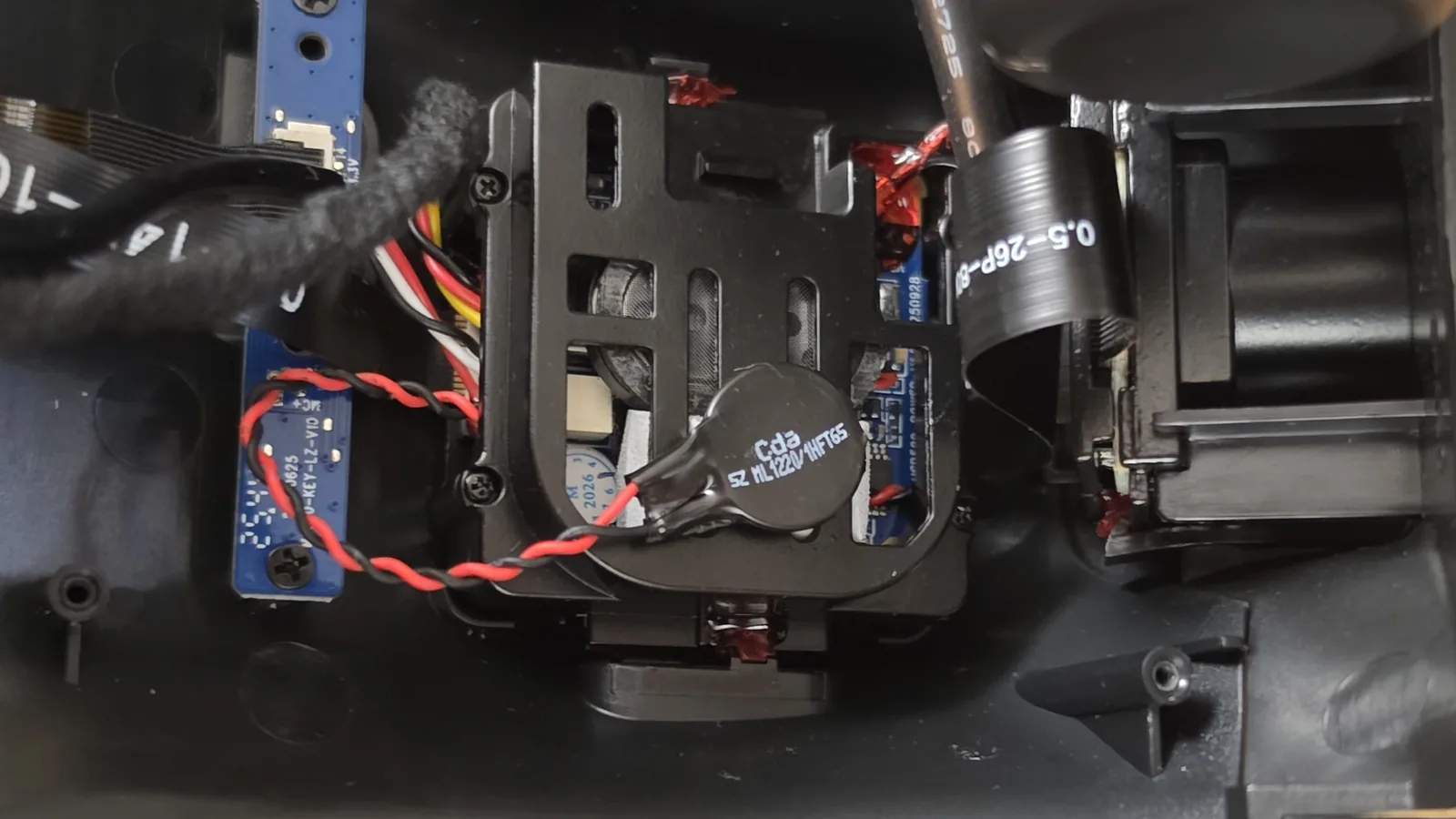
I had a quick look inside too. The Wi-Fi module is a dual-band part, a Fn-Link 6221A-SRC with a Realtek RTL8821CS inside, so the 5 GHz Wi-Fi on the box is at least possible (the app section confirms it). There's a little amplifier for the speaker that does the voice prompts, an NS4150B. And there's a red and black pair of wires running to a backup power source.
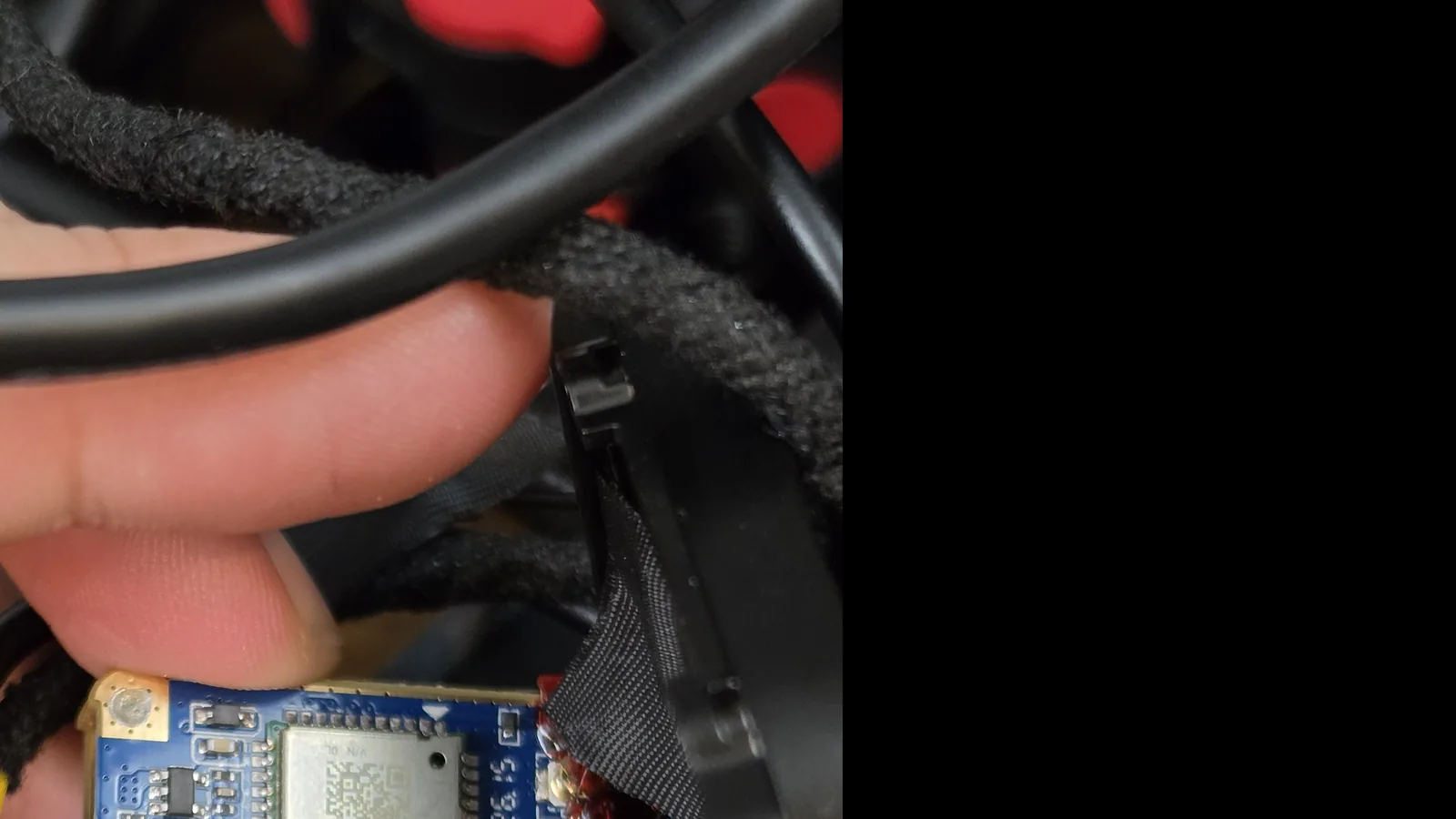
When I started testing, the Amazon listing said this has a built-in supercapacitor. Further down the same listing, the battery type said lithium metal. Those can't both be the main power backup. Last time, the "supercapacitor" turned out to be a tiny coin cell that only runs the clock, so I followed those wires.
They end at an ML1220, a rechargeable lithium coin cell about half an inch (12.5 mm) across. It's the same type as last time, and its job is keeping the clock running. So the lithium line on the listing checks out. The supercapacitor, I couldn't find, so I asked. Mangoal confirmed there isn't one: the ML1220 only runs the clock, and they told me the compact board in these OEM-style housings has no room for a supercapacitor. They called the listing line a template mistake from when the page was first made. It's gone from Mangoal's own site, and by November 11 it was gone from this kit's Amazon listing too. Credit to them for owning it and fixing it. It fits the power-cut results, too: no cut I made ever closed a file.
Warranty and firmware
The warranty is listed as 12 months on Amazon and 24 months on Mangoal's own site. I asked, and Mangoal told me in writing that since September the standard warranty is two years across the board, Amazon orders included, even where the Amazon page still shows 12 months. They didn't say whether that covers units bought before September.
My unit ran the firmware it shipped with, dated July 20, 2026 (USB529 Pro.E.TF CARD_2026.07.20), for the whole review. There's a newer build from September 16, and according to Mangoal it only adds an adjustable voltage setting for parking mode, and you only get it by asking their support. I tested it as it shipped. In November Mangoal also sent me a build dated September 30 to try against the clip-length problem; it isn't on this unit yet.
What should you set in the SkyCamm app?
The app's called SkyCamm, not the Mangoal app the listing talks about, and it's really only two pages of settings, which isn't much next to most dash cams. You get sound recording and speaker volume, the resolution, clip length, light frequency, exposure, the date and time stamp, a mirror option, WDR and HDR, collision sensing, a collision sensitivity for parking, and a time-lapse timer. Then the Wi-Fi password, the firmware version, formatting and a factory reset, and that's it. There's no bitrate setting and nothing about low voltage. Plug the GPS in and two more rows show up, one for the speed unit and one for the GPS signal.
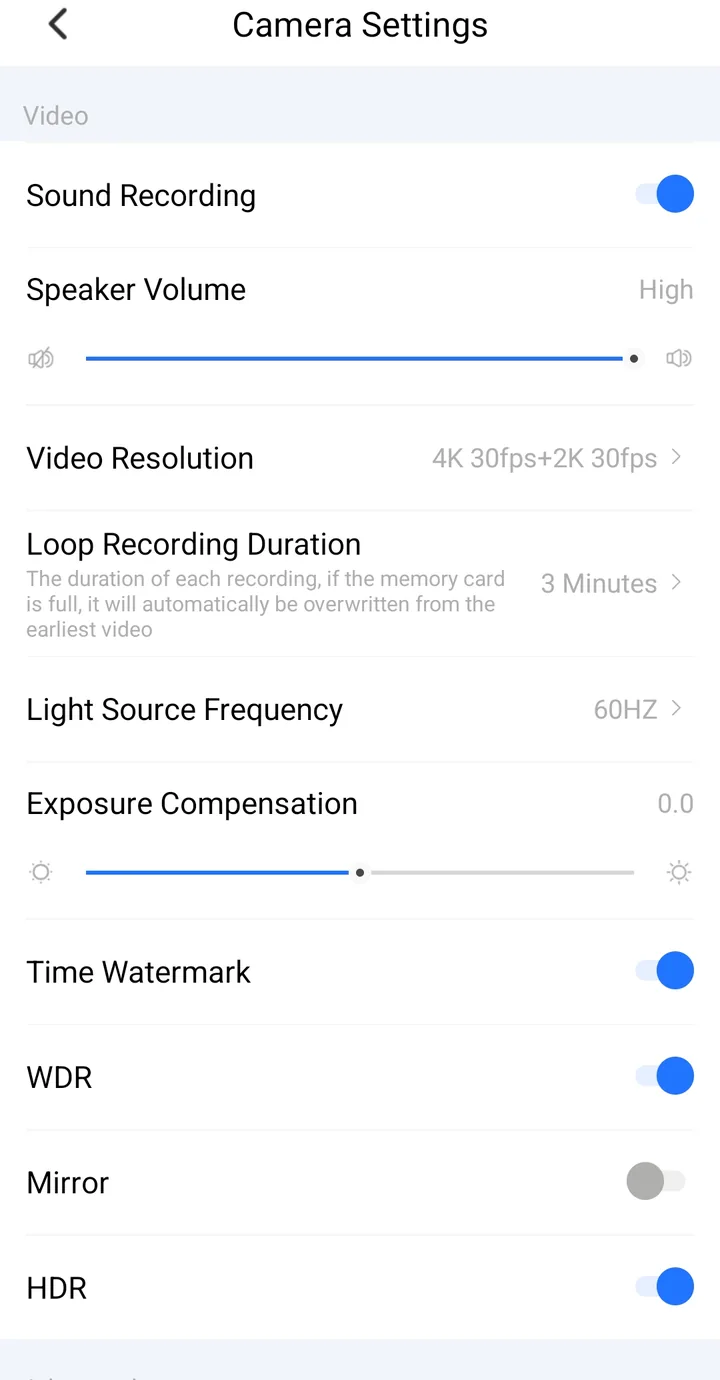
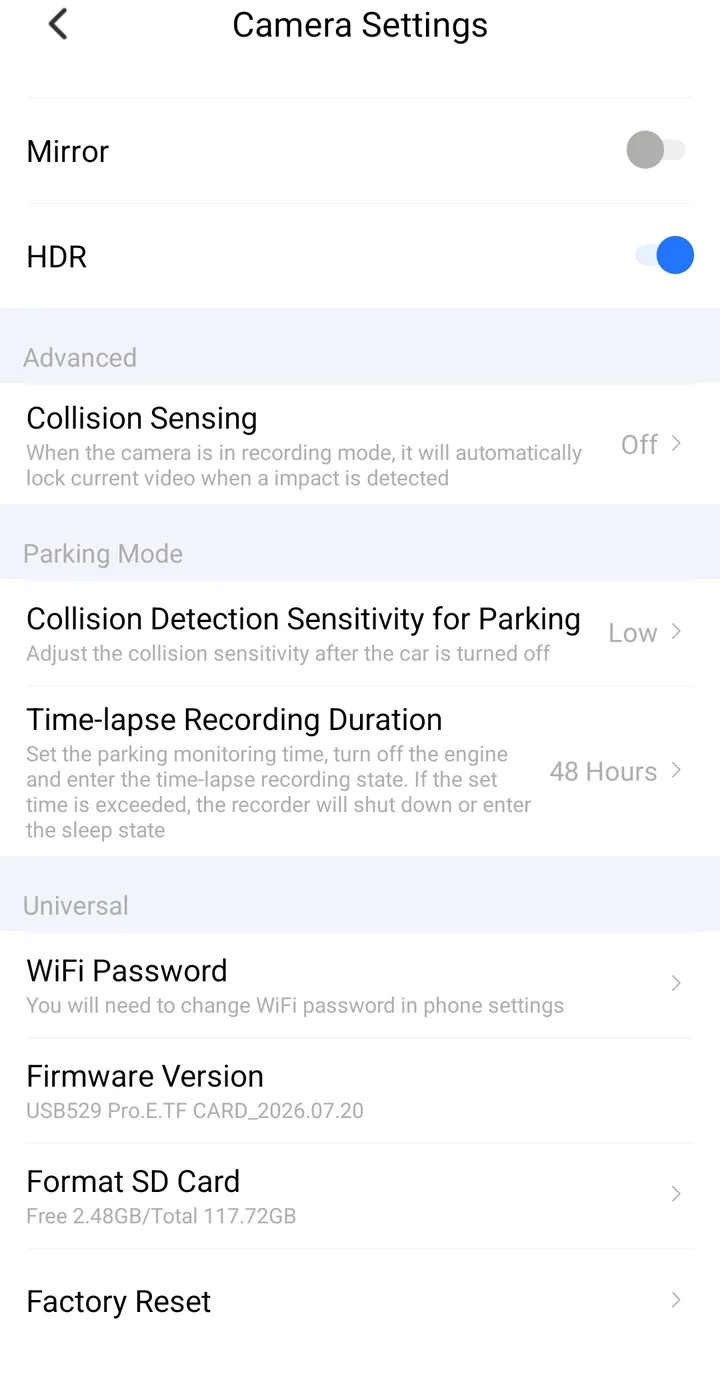
Both settings pages on October 24, with the phone's status bar cropped. I had set the clip length to 3 minutes and the time-lapse timer to 48 hours.
Turn collision sensing on, and use High
Collision sensing, which locks the clip if you hit something, was off out of the box, so turn that on. On the bench, though, Medium didn't do much. I hit the housing 16 times, pretty hard, and it never locked a thing. On High, the fourth hit did it: the camera says "Start emergency recording" and locks the whole 3-minute clip. Three more hits in the next clip did nothing, though. A hand on a camera clamped to a desk isn't a crash, so take that for what it is, but Medium is a lot less twitchy than I expected.
So I ran it on High for about two hours of real driving, highway included, and it didn't lock a single clip by accident. That's where I'd leave it.
The Wi-Fi button also locks a clip
The Wi-Fi switches itself off about 5 minutes after the camera starts. To get it back, there's a button on the unit, but that same button also locks the current clip and takes a photo. So waking up the Wi-Fi leaves you with a locked clip you didn't ask for.
WDR and HDR only change at the next start
WDR, which is the setting that brightens the shadows, only changes when the camera powers up. Change it in the app while you're driving, and nothing happens until the next time the car starts. The app doesn't tell you that; it just shows you the new setting. I tested it parked, switching WDR off and on about a dozen times, and the picture never moved. On the bench, it only changed after a restart. And HDR switches itself back on every time the camera starts, whatever you set it to.
Opening the settings stops recording
Every time you open the settings, the camera stops recording: between 4 and 21 seconds each time I went in, and once almost a whole minute. So do your settings before you drive, not at a red light.
The clip length that resets itself
And one I can't explain. I set clips to 3 minutes. Seven times now, after the car sat for a few hours or more, the camera came back on recording 1-minute clips by itself. That's seven of the fourteen starts after a long stop that I could read off the card, and it never happened after less than an hour off. Nothing gets lost when it does that; the clips are just shorter and you have more of them. But a setting that changes on its own is a setting you can't really trust.
Four times, the very next time I started the car, it was back to 3 minutes, and the last two of those I know for sure I hadn't touched anything. I also opened the app during one of the 1-minute drives. It said 3 minutes, and the front kept writing 1-minute clips anyway. So the setting's still in there; the camera just doesn't always use it.
I asked Mangoal about it. They told me nobody else has reported it and suggested a factory reset. They did confirm that 1 minute is the factory setting, so that's what it falls back to. They also told me the rear is supposed to follow the same setting, so a front on 1 and a rear on 3 isn't how it's meant to work. Their word was "definitely unusual."
So I ran the reset, on a spare card, because the warning says "Resetting will erase all the data," and it doesn't tell you whether that includes your card. It doesn't. The clip I recorded right before the reset was still on the card afterwards, which was a nice surprise. What it does reset is the clip length, back to 1 minute, and both parking settings, the timer and the sensitivity, which go to off. So if you use parking mode, set those back up afterwards.
Then I set it back to 3 minutes, and the very next morning, after the camera sat overnight, the front was right back on 1-minute clips, with the rear still on 3. It did it again that same afternoon, and once more three days later. So the reset didn't fix it. I sent Mangoal all of that, and they passed it on to their engineers, who call it a cold-start sync issue between the front and rear channels. Right before this review went up, they sent me an updated firmware, a build dated September 30, to try. Everything on this page was tested on the firmware it shipped with, so I'll test the update after publishing, and whether it fixes this goes here.
The GPS: put the receiver on the dash
Plug the GPS in, and the front video picks up your coordinates and your speed next to the date and time. The rear doesn't. The speed it records is right, by the way: against the GPS in the VIOFO A119M Pro beside it, it was within a quarter of a mile an hour (0.4 km/h) on average. I couldn't find a setting that keeps the speed and hides your coordinates, so that's worth remembering before you post a clip.
Just don't do what I did with the receiver. I velcroed it up on the headliner, under the metal roof, and it really struggled. My first drive with it was 13 minutes, and it never got a fix. The whole way, the stamp read zero north, zero east, which as far as the camera knew put me somewhere in the Gulf of Guinea. After that it took anywhere from 3 minutes to 15, and on one drive home it held a fix for 2 seconds, then lost it for the rest of the trip, highway and all.
So I moved it down to the dash, where the original's instructions told you to route it, and it turned into a different GPS. After almost three days without power, it had a fix in 39 seconds, more than a minute before the A119M Pro beside it. Two of the next three starts took 7 seconds. One took about four and a half minutes, so it's not perfect. But once it had a fix it held on, right up through 73 mph (117 km/h). So if your GPS seems slow, look at where you put it before you blame the camera.
The clock runs on its own, even with the GPS plugged in; it doesn't set itself from it. On one drive it was a second and a half ahead of GPS time, and three days later it was about 4 seconds behind. Not a big deal, but it does wander. One more for anyone who opens the files on a computer: the GPS track inside each clip carries its hour in China time on the UTC date, so a desktop GPS player showed my October drives 12 hours out.
Downloading clips in the app
Downloading through the app works fine, and the picture and sound come through exactly as they are on the card. I pulled a normal clip and a locked clip, and out of more than 500 megabytes each, only 10 bytes changed, up in the file's header (a creation time and one label). Neither clip had a GPS fix, so I can't say whether a download keeps the GPS track.
It really is on 5 GHz, like the listing says (the phone showed a Wi-Fi 5 connection, which only exists at 5 GHz), but it's not fast, at about 10 and a half megabytes a second. A 3-minute front clip takes a little over a minute, where the A119M Pro downloads at about 40. The other thing to know is that the camera stops recording the whole time you're in there: nothing was recorded for 3 minutes 27 seconds while I pulled those two clips.
How long does a card last, and does it warn you when it's missing?
Front and rear together write about 21.9 gigabytes an hour. So the 128 gigabyte card that comes in the box holds about five and three quarter hours before it starts recording over the oldest footage. If you want to try other card sizes, my dash cam storage calculator does the arithmetic.
And it loops properly. I let the card fill up, and when it ran out of room it deleted the oldest clips first, kept the one clip I'd locked, and there wasn't a single second missing where it rolled over. One small quirk: it deletes front and rear clips in pairs, so after a while your rear footage doesn't go back quite as far as your front. Not a big deal.
What it won't do is tell you when the card's missing. I took the card out to read it, forgot to put it back, and did the next day's driving without it. The camera never said a word, so that's two drives I just don't have.
I went back and tested that on the bench. With no card in, the camera doesn't make a sound. You just get a couple of blue LEDs flashing, and you can barely see those in the daytime. The app does say "Please Insert Memory Card" if you happen to open it, but you'd have to go looking. If you ever pull the card, put it straight back.
It draws about 4.8 watts once it's warmed up with the Wi-Fi off, and about 5.3 with the Wi-Fi on. That's easy on the car.
How hot does the Mangoal STARVIS 2 get?
Mangoal doesn't quote an operating temperature for this one at all, so here's what I measured. On the bench, in a room at 76 F (24 C), with the camera bare and nothing around it, the hottest point on my thermal camera was the microSD card slot. It reached 146 F (63 C) after 24 minutes, and 158 F (70 C) after 36 minutes. That's 70 to 82 degrees Fahrenheit above the room, in still air. The front of the lens stayed cool.
I didn't get a hot summer day in the car with this one: the hot season had closed by the time it was on the road, so these are bench numbers. The original hit almost 164 F (73 C) at its card slot, but that was in the car on a 95 F (35 C) day, so those two numbers aren't the same test. In its housing behind a sunlit windshield I'd expect this one's slot to run hotter than it did on the bench, but that's a prediction, not a measurement. My dash cam heat log has in-car readings from the other cameras I've tested.
Heat is also behind the strangest result on the chart: the picture softens as the camera warms up. The chart section shows how much.
What happens to the last seconds when the power cuts?
This is the question every dash cam has to answer. I've had the power cut on this one in the car five times, and every file plays. Once, the rear's very last second came out broken.
To put a number on it, I cut the power three times on the bench with a millisecond clock in front of the lens. Each time, the last second and a half to 2 seconds before the cut never made it to the card (1.4, 1.9 and 2.0 seconds). That footage is just gone. It's what you'd expect from a camera with no supercapacitor to keep it alive for a moment, and Mangoal confirmed this one doesn't have one.
There's a second, smaller catch. An MP4 file isn't finished until the camera writes its final index, and with nothing to keep it powered, this one never gets to. The video is still on the card, but a normal player stops early, 2 to 4 and a half seconds before the cut, and you'd need repair software to see the rest. The original wrote a different kind of file, called TS, with no index to finish, so whatever reached its card would play.
The rear does about the same. On four more cuts with it plugged in, its last frame landed within about a second of the front's, and no file closed on either one.
And once, out of the eleven times I started the car with the A119M Pro running beside it, this one took over a minute (65 seconds) to start recording. Long enough to miss me pulling out of a parking space. The eight starts before I plugged in the GPS were all within 2.6 seconds of the VIOFO; the three since were 20, 66 and 27 seconds behind it, so the GPS module may have something to do with it. The cause is unknown.
How sharp is the Mangoal STARVIS 2 on a test chart?
Right after a cold start, the front camera resolves fine detail out to about two thirds of what its pixel grid could hold (MTF50 at 0.333 cycles per pixel, 67 percent of the Nyquist limit). That's a solid number for a real 4K sensor behind a small dash cam lens.
Then I left it running, untouched, and watched it. Over the first 25 minutes, the fine detail dropped by about a fifth, to 0.268, and then it stayed there. Nothing about the setup changed. I restarted it a few times to make sure it wasn't something about starting up, and it came back at the warm number every time.
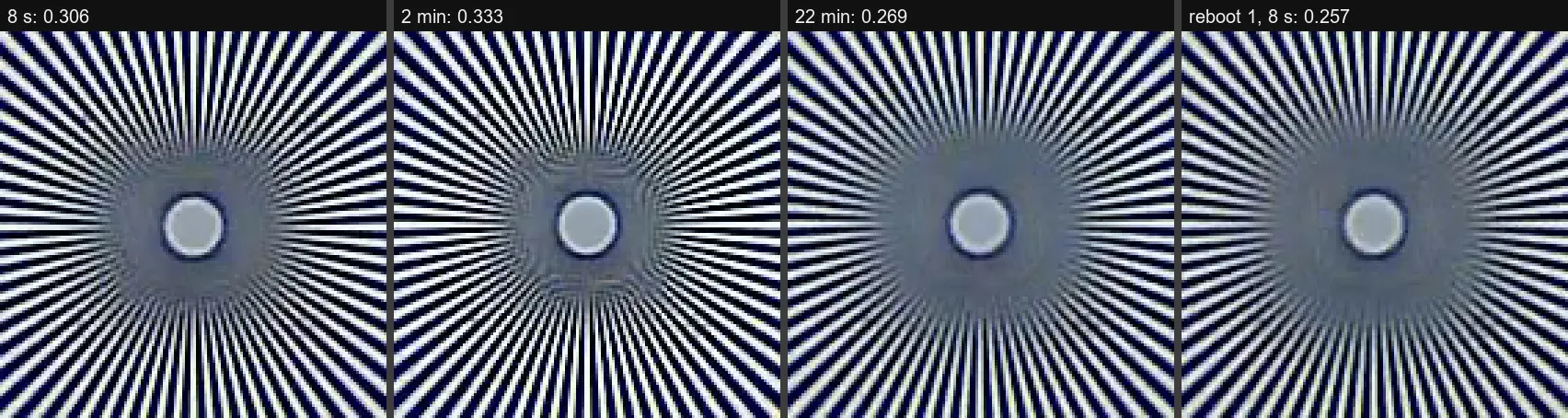
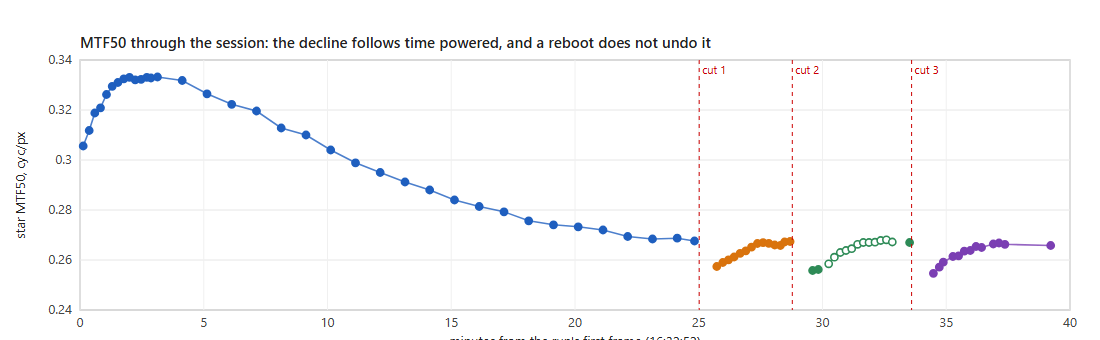
It isn't the processing. The noise stayed exactly the same while the detail fell, and the right side of the frame actually got a little sharper while the left side got softer. Processing can't move two sides of one picture in opposite directions. Heat can: as the board heats up, the lens and the sensor shift slightly against each other, and the focus tilts.
I mapped all four corners through another cold start. After about half an hour, the center had lost 21 percent of its detail, the top left 31 percent and the bottom left 37, while the top right gained 8 percent and the bottom right lost 2. On my unit, the left side of the frame is the soft side once it's warm.
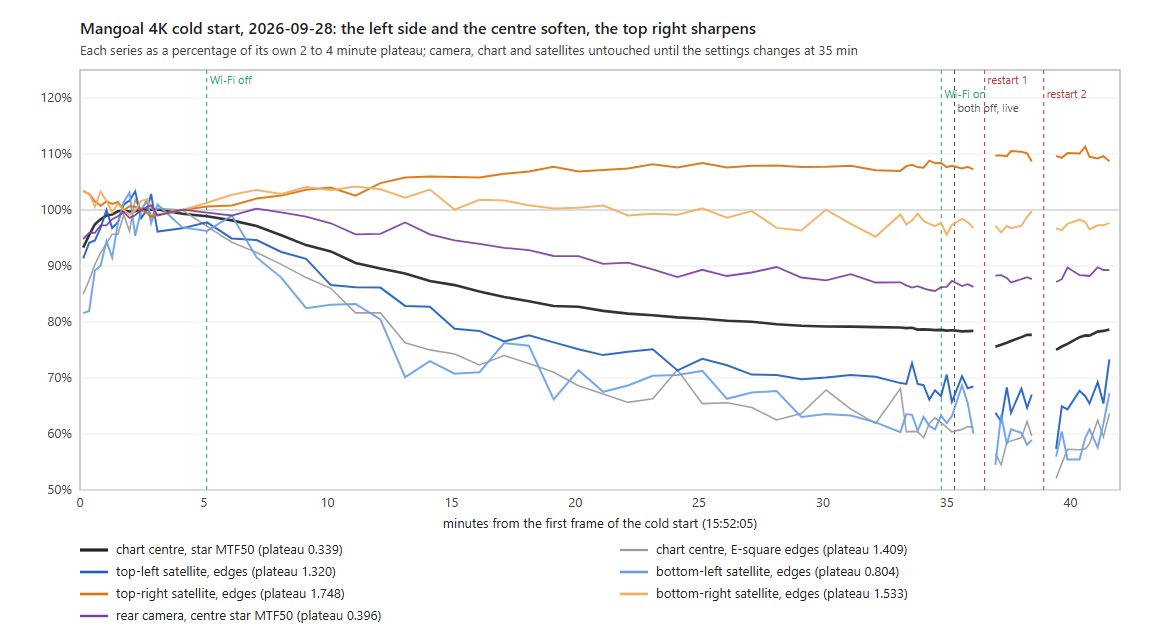
So the number that matters is the warm one, because that's the camera on your drive home. To compare cameras with different lenses, I use detail per degree of view: this one is 11.5 cycles per degree cold and 9.3 warm. The COXPAL A17D, with this same processor and sensor, lands between 10.9 and 12. The VIOFO A119M Pro, same sensor on a different processor, lands between 13.3 and 14.1, and it doesn't soften as it warms up (flat within 1.5 percent over 42 minutes). So cold, this Mangoal is right in line with its twin, and warm, it's a step behind both.
The rear on the chart
The rear on the chart is a nice surprise. Per pixel, it's actually sharper than the A17D's rear. But it also sees about a quarter more of the scene (1.22 to 1.28 times the angle), so on something far away the two come out about even when it's cold, and the Mangoal falls about 10 to 15 percent behind once it's warm. A wider view for a little less reach. That's a trade, not a win.
| Measurement | Result | Conditions |
|---|---|---|
| Front MTF50, cold | 0.333 cyc/px (67%) | 2 to 4 minutes after a cold start |
| Front MTF50, warm | 0.266 to 0.268 | From about 25 minutes on, and after every restart |
| Detail per degree | 11.5 cold, 9.3 warm | COXPAL A17D 10.9 to 12.0; VIOFO A119M Pro 13.3 to 14.1 |
| Field map, about 35 minutes in | center -21% | Top left -31%, bottom left -37%, top right +8%, bottom right -2% |
| 2K at 60 fps | a 1:1 center crop | Less field of view, the same detail per pixel |
| Rear MTF50 | 0.342 to 0.400 cyc/px | Per degree, 0.93 to 1.03 times the A17D's rear cold, 0.85 to 0.90 warm |
Does HDR or WDR make a difference on the Mangoal?
Mangoal calls the dynamic range here HDR 2.0. On the chart, switching HDR made no measurable difference, and like I said, it turns itself back on every time the camera starts anyway. So for all practical purposes, HDR is just always on.
WDR is the one that actually does something. Starting up with WDR on, the black backdrop behind the chart came out at 21 out of 255. Starting up with it off, it came out at 13. So it lifts the shadows, and it adds a bit of noise doing it (0.83 against 0.54 on the noise reading). Mangoal confirmed both come switched on from the factory, and honestly, that's how I'd leave them. Every road clip in this review is the camera as it ships, with both on.
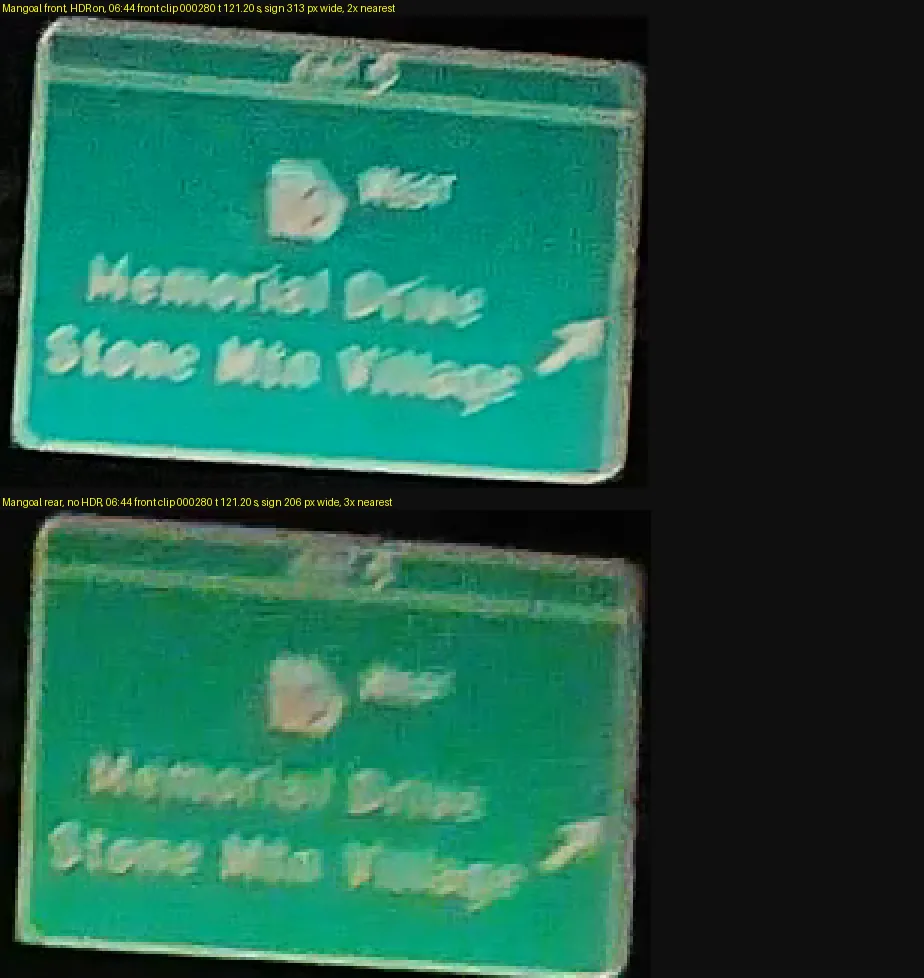
Some HDR cameras take two exposures for every frame and blend them together, and on a fast-moving sign that can leave a doubled image. I looked for that on two overhead highway signs at night, at 70 and 78 mph (113 and 126 km/h), and there's no second copy. What you see is ordinary motion blur, and the rear camera, which has no HDR at all, smears exactly the same way. For more on how different cameras do HDR, see should you turn HDR on or off on a dash cam.
Coming out of a covered bridge into full sun, it settled its exposure in about a second (90 percent of the change at 1.0 seconds), which was the quickest of the three cameras in the car that day: the rear took 2.5 seconds and the A119M Pro 2.8. Nothing blew out past 1 percent of the frame.
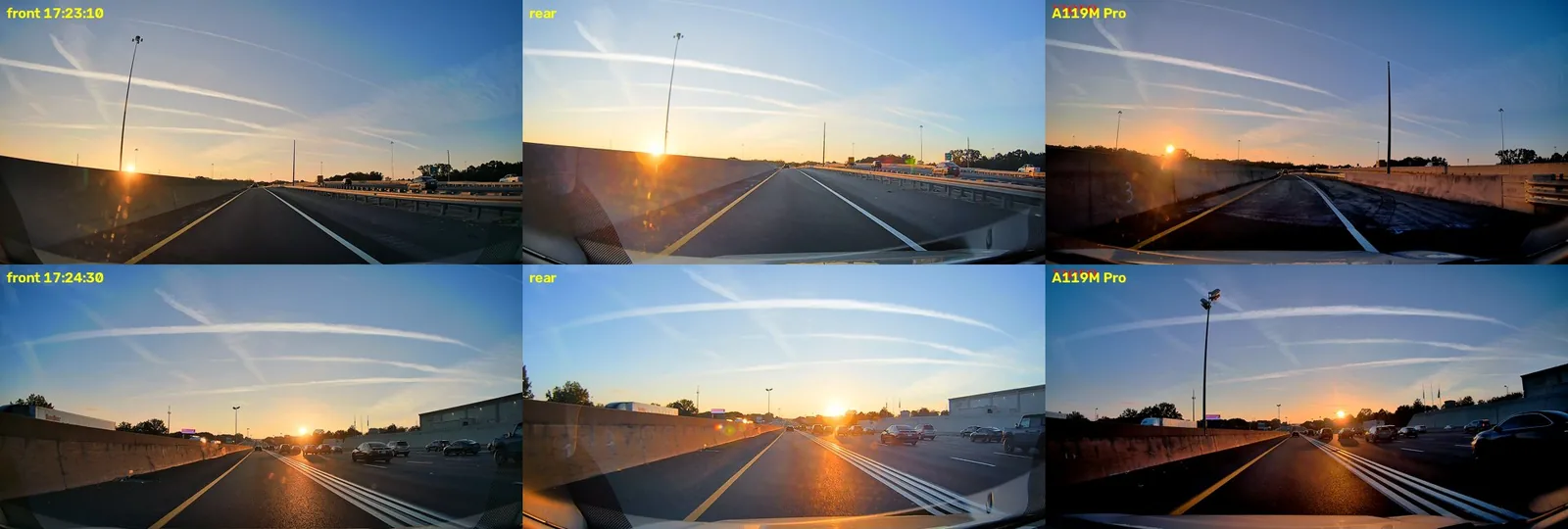
I also drove straight into a setting sun at highway speed, and this is where the front earns its keep. The sky stays blue around a small dot of sun, and you can still see the cars and the barrier. Only about 7 percent of the picture went to black (6.7 percent at a level of 16 out of 255 or darker). The A119M Pro beside it lost 30 percent, though that one had its polarizing filter on. The rear, facing forward for this, holds even more of the shadows (2.6 percent), but its sky washes out and the sun blooms a lot wider. That's one stretch of road on one evening, with the sun 1.5 to 2.6 degrees up and almost dead ahead.
How does the Mangoal STARVIS 2 look in daylight?
The daytime footage looks clean and crisp at first glance. The sky and clouds aren't blown out. I'm a sucker for a good cloudscape. Obviously, that's not the point of a dash cam, but I still like to see it.
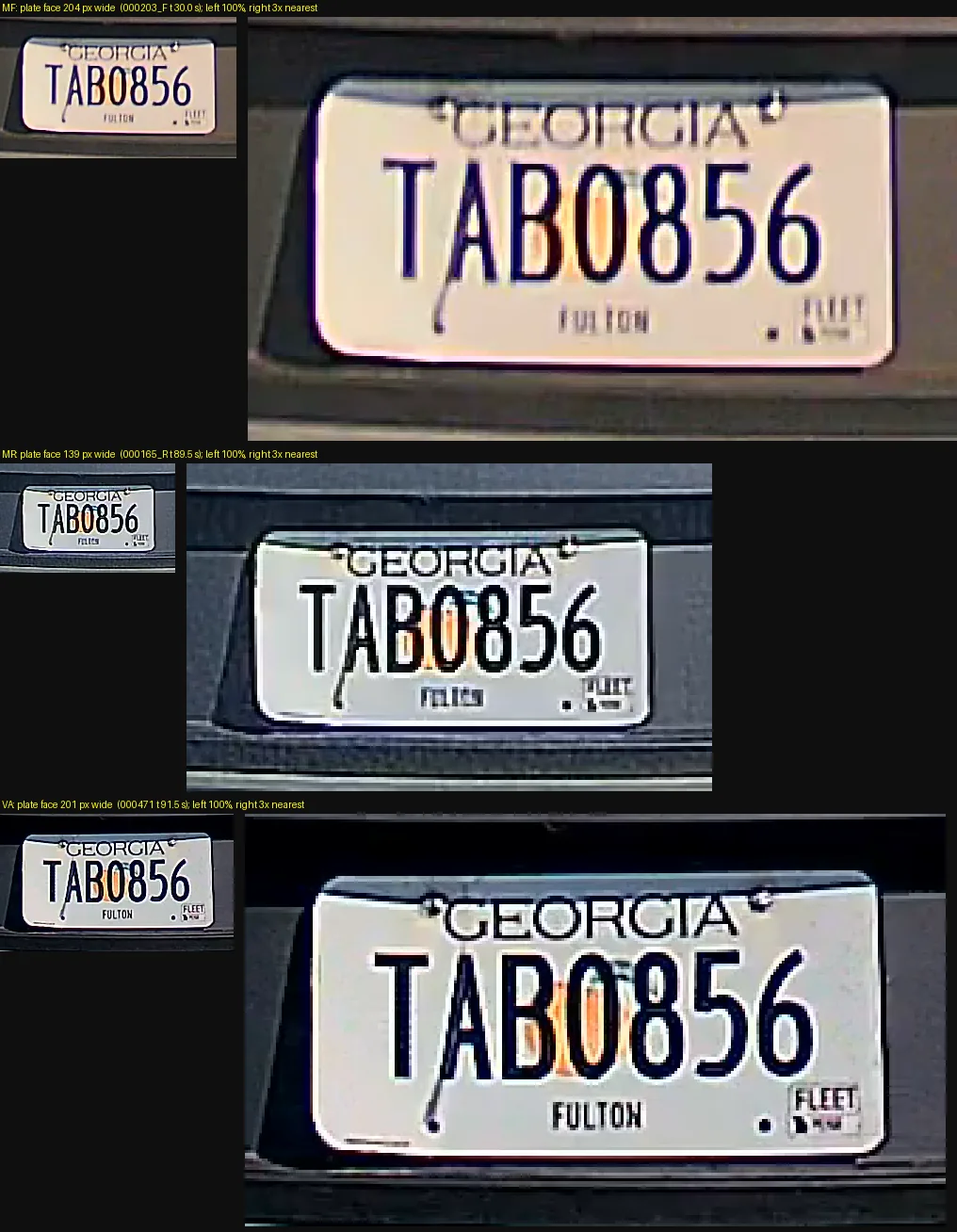
Stopped behind an SUV at a light, about ten feet (3 m) back, the plate came out 204 pixels wide on the front and 139 on the rear. Both of them read it easily, and on the front you can read the county name underneath too. On the rear, that smaller print turns to mush. The A119M Pro beside it put 201 pixels on the same plate, so at that distance the two are basically identical.
If you look closely at bright edges, there's a little purple fringing. Not something you'd ever notice at normal size.
Old against new, on the same roads
Now the comparison I really wanted. I couldn't run the two together, because the original doesn't want to take SD cards anymore. But it was quietly writing its GPS position into every clip, which I never knew, and I drive the same roads all the time. So I matched the two cameras by location, and that gave me 53 minutes of the same road in the same direction, about 34 miles (55 km). They're months apart, July against October, so the leaves are different, and the light often is too.
Start with the sky. With sun on both cameras, the original blew 5 to 12 percent of the picture out to pure white, and the new one stayed under half a percent, even with the sun sitting in the frame. To be fair to the old one, the one time it held its sky was in 2K mode under a clear blue sky, and 2K is what I told you to run it in.
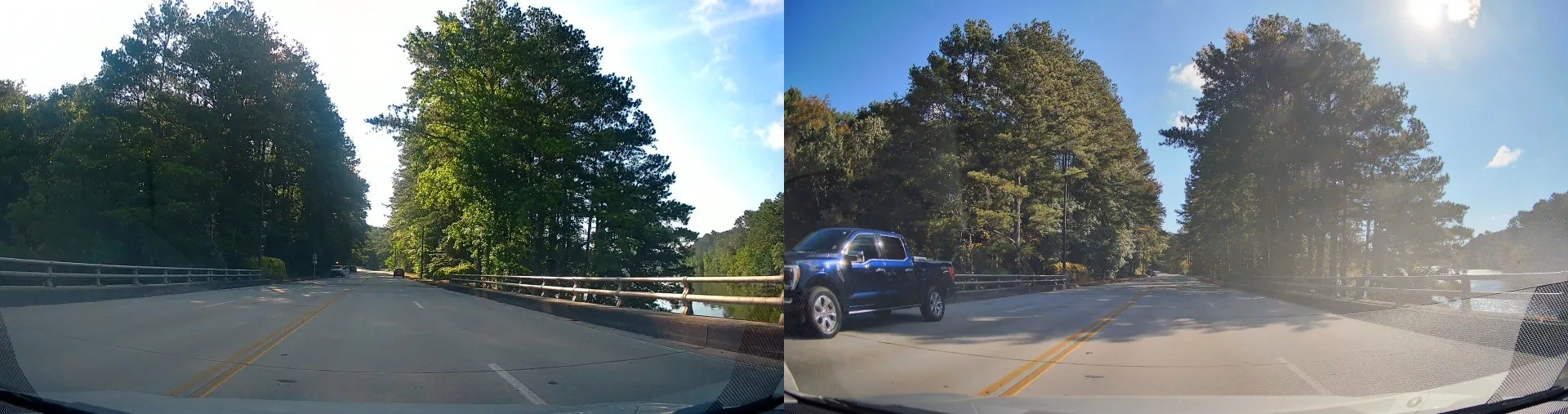
Both cameras sharpen, so don't hold me to the exact numbers, but my detail test puts the original at around 3 to 5 megapixels of the 8.3 that 4K promises (3.2 to 4.7, and that's an upper bound), and the new one has real detail past three quarters of 4K. The new one came out ahead at every step of that test.
One small gripe. The original used HEVC, which gets more out of every megabit than this camera's H.264, so that 1.7 times the data doesn't mean 1.7 times the picture. DashCheck also reads a slightly coarser compression block pattern on the new camera's road footage (1.34 to 1.53 against 1.18 to 1.19), which I'd call a soft finding.
How good is the Mangoal STARVIS 2 at night?
At night, the two halves of this camera behave completely differently.
The front sends a lot of the dark parts of the picture to pure black. On a pre-dawn drive, about 6 percent of the frame (6.3) was pure black in a typical clip. The COXPAL A17D, with the same processor and the same sensor, kept that to about a third of a percent (0.30) on a morning with the same light. So this is the tuning, not the hardware, and it's how this camera ships.
The rear is the opposite, and this surprised me. It almost never goes to pure black: under a tenth of a percent of the frame (0.09). The A17D's rear lost a third of its frame to black (33.6 percent) on the same kind of morning, measured the same way, with both rears facing forward on the windshield. That's the best night result I've measured from a rear camera so far.
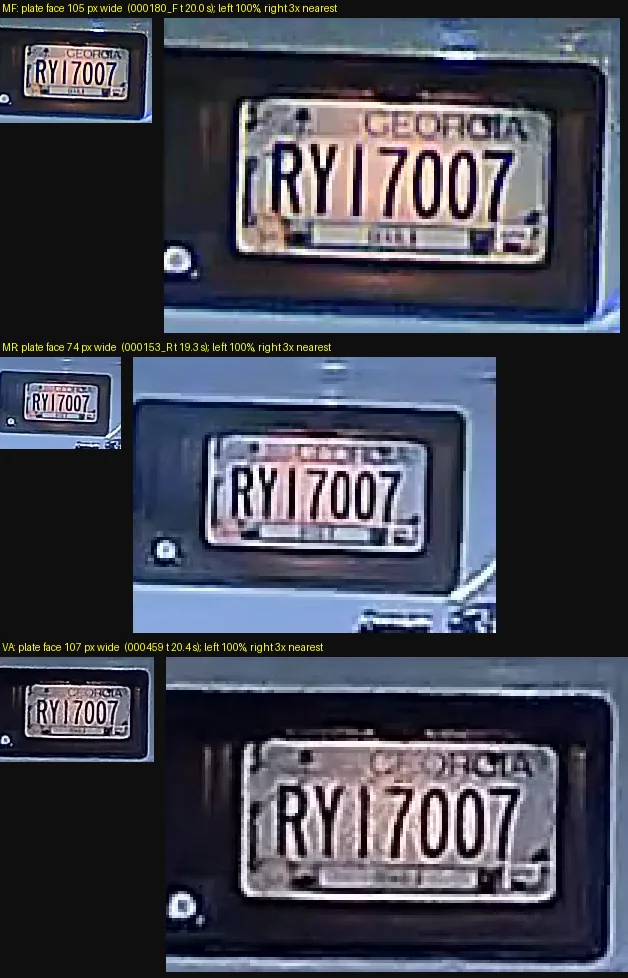
Stopped behind a van under a streetlight, about 19 feet (6 m) back, the plate read on both lenses. It was 105 pixels wide on the front and 74 on the rear. Last time, the original Mangoal turned a plate at a red light into a white rectangle. This one held it. I do have to be upfront, though: that was a streetlight doing a lot of the work, so it's a kind result.
Plates in your own headlights
So here's my proper test, with the plate in the dark and only my own headlights on it. A dark lot, just my low beams, and two real plates on stands at about 13, 22 and 30 feet (4, 7 and 9 m). Neither lens read a single plate. At 13 feet, the front left a faint ghost of the characters on one plate and nothing at all on the other. The rear gave me two white rectangles. From 22 feet on, every plate was a solid white slab, on both lenses. The A119M Pro beside it read one of the two plates at 13 feet, and nothing past that.
I think part of this is the same thing that makes the night picture look so good. The front runs that dark road about one and a half times as bright as the A119M Pro (105 to 108 against 69 to 77 out of 255), so when a reflective plate comes back at you, it's got nowhere to go. That explanation is my reading of it, not a measurement.
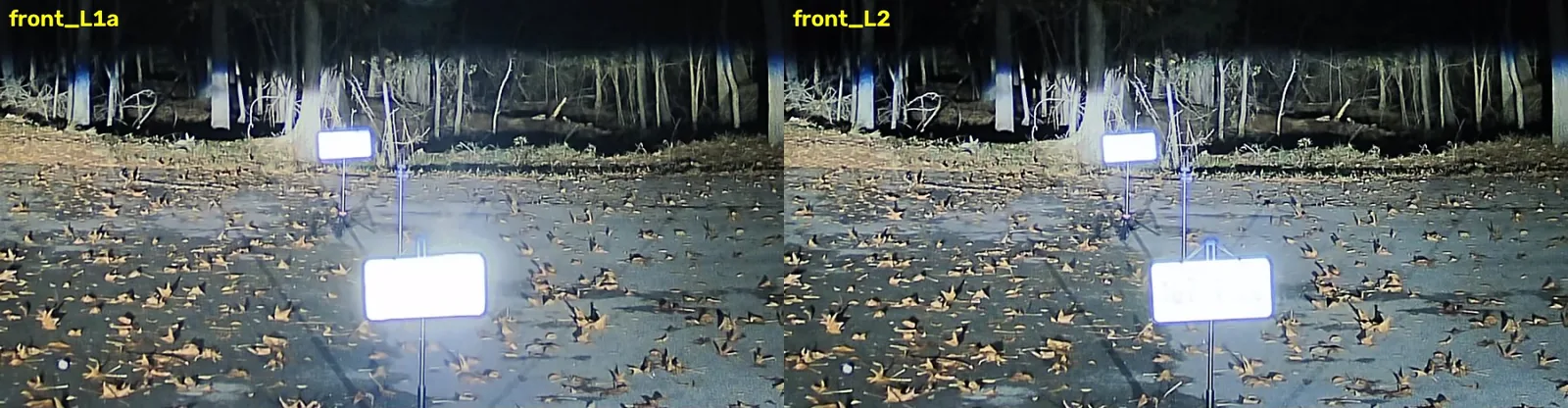
I thought the front had a purple haze problem around oncoming headlights. On an early drive it wrapped them in a big magenta cloud. So I wiped the windshield and both lenses, went looking for it again, and it was gone. That was dirty glass, not the camera. So clean the inside of your windshield before you blame your dash cam.
Old against new in full dark
Finally, the original against the new one in full dark. It's the same road in the same direction, one night in July and one night in November, about nine minutes of matched driving, and the two cameras came out almost the same brightness overall (an average of 20.8 against 21.4 out of 255). So the new one isn't winning by running darker.
At the same streetlights, the original's blown-out discs are about 5 times wider than the new camera's (2.4 to 6.6 times across 13 lamps, median 4.9). The new one even keeps the shape of the lamp.
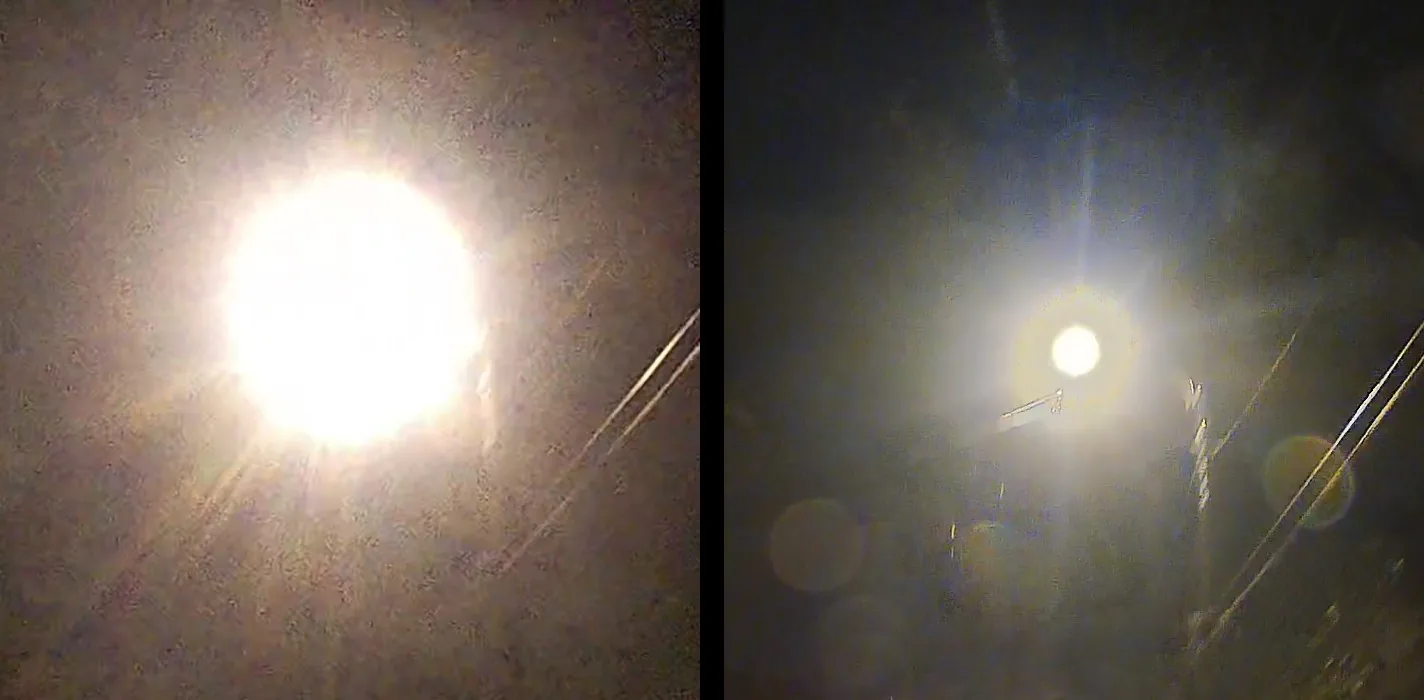
And look at this lit sign. On the original, it's a solid white slab: 78 percent of its upper face sat at or near pure white. On the new one, 5 percent, and you can read the whole thing, right down to the price on the board underneath. If you want one picture of what changed between these two cameras, that's it.
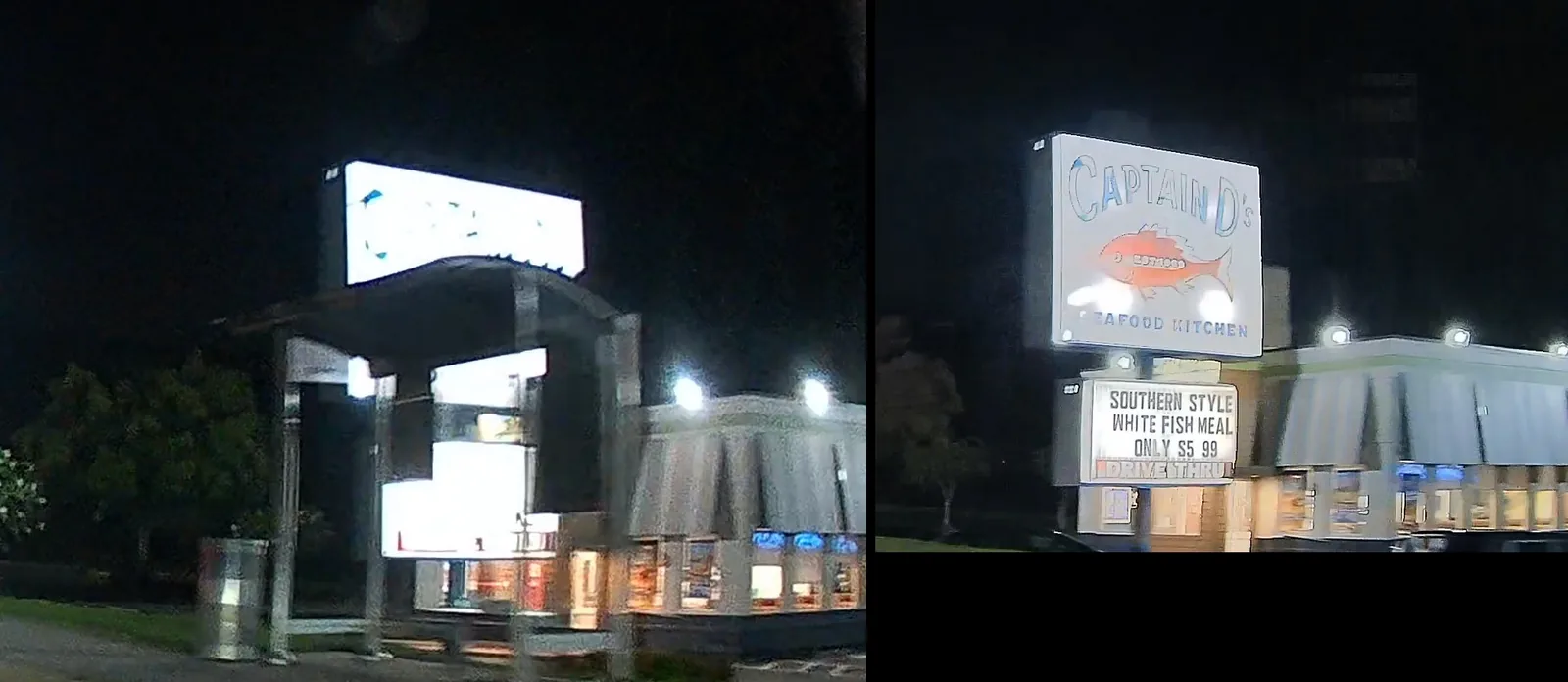
To be fair to the original, about a quarter of the new camera's picture went to pure black on this drive (25.7 percent), against about a sixth on the old one (15.2). And the brightest LED headlights still throw a blue glow and a few ghost circles on the new one. So it's a big step, but it's not magic.
How does the rear camera do on tinted back glass?
Everything you've seen from the rear so far was facing forward, because my back glass is tinted. So for three drives, two at night and one by day, I put it where it actually goes: on the back glass, facing back, with an A17D's 4K camera beside it on the same glass for comparison.
At a light, with an SUV about 14 feet (4 m) behind me, you can make out the whole car, right down to the badge and the two people inside. Not bad. The headlights blow out, but the car around them doesn't. On a dark road, a car behind you is mostly just headlights. And you won't read a plate back there, because most cars around here only carry one on the back: none of the three cars that stopped right behind me had a front plate.
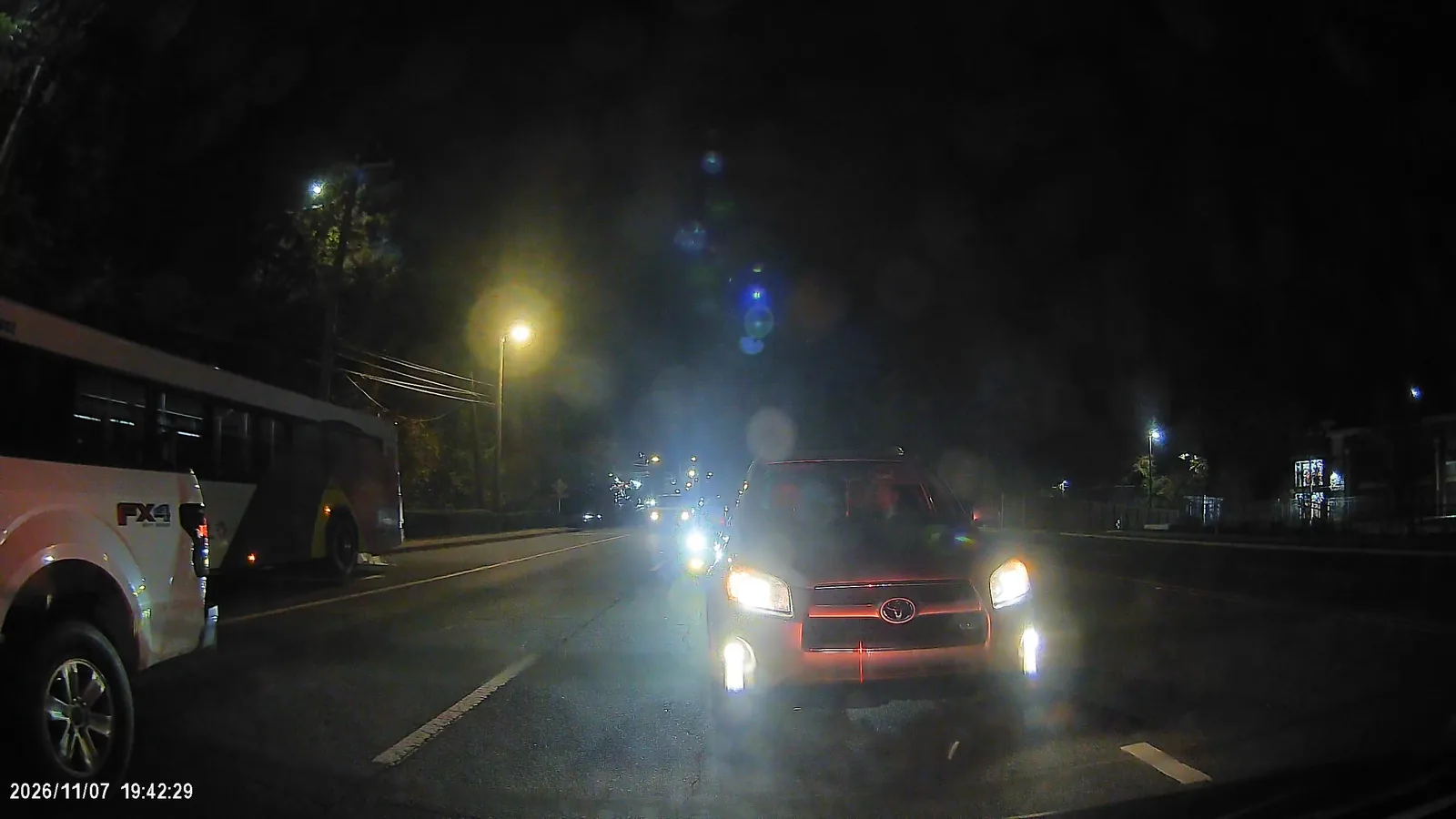
The tint didn't cost it anything I could measure. The glass passes about 27 percent of the light against the windshield's 75, and the camera's exposure simply makes it up. None of the defroster wires shows up in the picture either, where the A17D's camera beside it shows its band. Bright signs do wash out a bit. On one lit restaurant sign, 52 percent of the upper face went to near white on the Mangoal's rear against 16 percent on the A17D's 4K camera, because this rear has no HDR. The name held; the small print and the board under it went white.
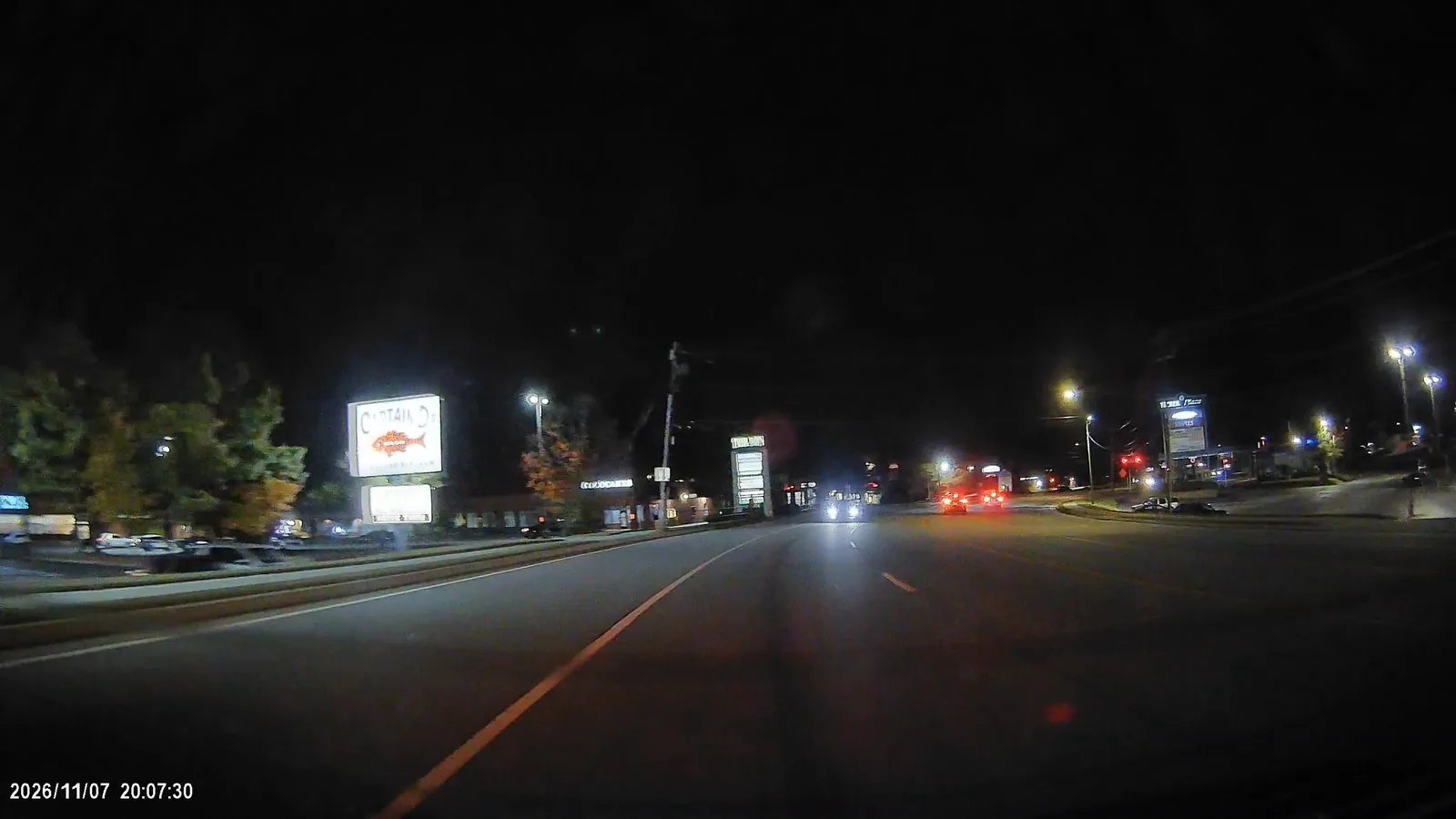
But it still almost never goes to pure black: 0.008 to 0.011 percent of the frame per clip, even lower than when it faced forward. The A17D's own 2K rear camera, behind this same glass, sat at 25.6 percent. So it's still the best night result I've measured from a rear camera, tint and all.
How does parking mode work, and how long will it run?
Out of the box, there's no parking mode. Mangoal's own instructions say the lane assist adapter doesn't support it. For that, you need their MG-OBD cable, sold on its own, which plugs into the car's OBD-II port and has a little switch on it for 24 hour mode or ACC.
With that cable, you get two parking modes, and the app decides which. Set the time-lapse timer to 12, 24 or 48 hours, and the camera keeps recording after you switch the car off, as a 2 frames per second time-lapse at full 4K, front and rear, until the timer runs out or your battery reaches the cutoff. On the front, that's about a gigabyte an hour. That's the one I ran, all night, twice.
Turn the timer off, which is how it comes from the factory, and Mangoal says the camera goes to sleep instead, and a bump wakes it up to record a one-minute locked clip. That's the only mode the cable's own listing describes, which is why it says it doesn't record 24/7.
And that little switch? Mangoal told me both positions do exactly the same thing; it's only there for troubleshooting, if the camera won't turn on or won't shut off. That matches what I saw: both nights recorded the same way, one in each position.
The sleep mode didn't work for me
I tried the sleep mode, and I couldn't get it to work reliably. On the bench, after the camera shut itself down, one of two hard hits woke it. It took about 12 seconds to start, so the hit itself isn't on video, and it wrote a normal clip just under 3 minutes long, not a locked one-minute clip. Two days later, more than a dozen hits did nothing. I never once got that one-minute locked clip. To be fair, both tries started from the low-voltage shutdown, not a normal parked car, so I can't call it broken. But I wouldn't count on it. If you want your parked car covered, use the time-lapse.
How long it runs on your battery
On my bench battery, a small 7 Ah sealed lead-acid pack starting full, the time-lapse ran 13 hours before the cutoff stopped it at about 11.9 volts, and it shut down cleanly. With the rear and the GPS plugged in it draws about 4 watts, so a full 24 hours of parking uses about 8 amp-hours, roughly a seventh of a typical 50 to 60 Ah car battery. The app's timer goes up to 48 hours, and if the battery gets low first, the cutoff stops it at about 11.9 volts. On an older battery, or when it's freezing out, I'd keep the timer at 12 or 24. My parking mode battery calculator runs those numbers for your own battery.
One quirk to know about. If the camera starts up on a weak battery, below about 12.8 volts, it records for about 17 seconds and then shuts itself off. With the engine running, that's never an issue.
What else do you need to buy?
Everything you need to record is in the box, card included, and the 128 GB Lexar Silver Plus did well on my card bench. The one thing you might add:
- Mangoal's MG-OBD parking cable, if you want parking mode. The lane assist adapter in the box doesn't support it, and everything in the parking section was measured on this cable.
The camera is the Mangoal 4K STARVIS 2 for the Corolla on Amazon, front and rear, as tested. There's also a front-only version. Check that the listing you land on says STARVIS 2 or IMX678, not the original. I quote no prices here, because they move, so check the listing on the day.
Who should buy the Mangoal 4K STARVIS 2?
Mangoal fixed the two biggest things I measured last time. The 4K is real now, and the camera gives it about 1.7 times the data to work with. At night, it holds onto lights and signs the original just blew out. It still disappears behind the mirror like it came with the car, and the rear camera holds onto the shadows at night better than any rear I've measured, even through my tinted back glass.
What works
- Real 4K: a Sony IMX678 named in its own firmware, with about 1.7 times the original's data
- At night it holds streetlights and lit signs the original blew out
- The best night rear camera I've measured, even through tinted back glass
- Disappears behind the mirror, powered from the lane assist connector with no fuse taps
- Loops cleanly and keeps locked clips, and every power-cut file plays
- Accurate GPS speed and quick fixes, once the receiver sits on the dash
The compromises
- Loses about a fifth of its fine detail once it's warm
- The front sends a lot of the night to pure black
- The clip length resets itself, and WDR changes only at the next start
- No warning at all when the card is missing
- Neither lens read a plate in my own low beams, even at 13 ft (4 m)
- Parking mode needs a separate cable, and its sleep mode never gave me a locked clip
- No supercapacitor (the listing used to claim one), so the last 1.5 to 2 seconds before a power cut are lost
Buy it if you drive a 2023 to 2026 Corolla and you want a dash cam nobody will ever notice. Get this one over the original; that's not even close.
Upgrade from the original if the real 4K and the night picture, front and rear, matter to you. If the original is working for you and those don't, you'll know.
Skip it if what you want is the most detail for your money and you don't care how it looks on your windshield. Stick-on cameras like the A119M Pro resolve more for less, though you give up the factory look and, on that one, the rear camera.
My rating: 4/5. Real 4K, a much better night picture than the original and the best rear camera I've measured, in a housing that looks like it came with the car. The point goes for the detail it loses once warm, the black it crushes at night, and settings that don't always do what the app says.
Last time I said buy it for how it disappears, not for how it records. This time, it's both.
Frequently Asked Questions
Is the Mangoal 4K STARVIS 2 really 4K?
Yes. Its firmware carries a driver for one sensor only, the Sony IMX678, which is 3856 pixels across against 4K's 3840, so the 4K is a native readout. On a test chart it resolves about two thirds of its pixel grid's limit right after a cold start, and about a fifth less once warm. The original Mangoal for the Corolla stretched a 5 megapixel IMX335 to 4K.
What's the difference between the Mangoal STARVIS 2 and the original Mangoal for the Corolla?
The STARVIS 2 version has a native 4K Sony IMX678 front sensor in place of a 5 megapixel IMX335, records about 32 megabits per second in MP4 against 18.6 in TS, and has a 2K rear camera instead of 1080p. The housing, mount and lane assist harness are the same. Both are still on sale for the 2023 to 2026 Corolla; the new one has HDR, STARVIS 2 or IMX678 in its listing title.
Which Corolla does the Mangoal STARVIS 2 fit?
The 12th-generation Toyota Corolla and Corolla Hybrid, model years 2023 to 2026, in the version Mangoal calls Model A. It does not fit the Corolla Cross. It replaces the plastic cover behind the mirror and powers from the lane assist camera's connector.
Does the Mangoal STARVIS 2 have parking mode?
Only with Mangoal's MG-OBD cable, sold separately; the lane assist adapter in the box doesn't support it. With the cable and the app's time-lapse timer set to 12, 24 or 48 hours, it records a 2 frames per second time-lapse in 4K, front and rear, drawing about 4 watts. On a full 7 Ah bench battery it ran 13 hours before its cutoff stopped it at about 11.9 volts.
How hot does the Mangoal STARVIS 2 get?
On the bench in a 76 F (24 C) room, with nothing around it, its microSD card slot reached 146 F (63 C) after 24 minutes and 158 F (70 C) after 36 minutes. Mangoal quotes no operating temperature for it. These are bench numbers: I had no hot summer day in the car with it. The original's 163.9 F (73 C) was measured in the car on a 95 F (35 C) day, so the two aren't the same test.
What is the Mangoal STARVIS 2's field of view?
Mangoal lists 150 degrees. I measured roughly 115 degrees side to side (110 to 120), about 63 top to bottom, and about 135 corner to corner, worked out from the lens shape. The rear's view matches the front's to within 2 percent.
Can the Mangoal STARVIS 2 read license plates at night?
Under a streetlight, yes: a van's plate about 19 feet (6 m) ahead read on both the front and the rear. Lit only by my own low beams in a dark lot, neither lens read a plate at 13, 22 or 30 feet (4, 7 or 9 m). In daylight, a plate about 10 feet (3 m) away was 204 pixels wide and read easily.
Does the Mangoal STARVIS 2 have a supercapacitor?
No. Mangoal confirmed it doesn't have one: the backup wires on the board run to an ML1220 rechargeable lithium coin cell, which only keeps the clock. Mangoal told me the listing's old supercapacitor line was a template mistake, and it's now gone from their own site and from this kit's Amazon listing. Without one, the last 1.5 to 2 seconds before a power cut never reach the card, though every file from my power cuts still played.
The bottom line on the Mangoal 4K STARVIS 2
Last time I said buy it for how it disappears, not for how it records. This time, it's both. Just set it up before you drive, and then leave it alone.
Every dash cam I review goes through the same chart, the same software and the same battery bench, so the numbers on this page sit alongside the others on my dash cams page.